Introduction
This manual provides detailed instructions for the safe installation, operation, and maintenance of your Parrot Uncle 60-inch black ceiling fan with integrated LED lighting and remote control. Please read all instructions carefully before beginning installation and retain this manual for future reference.
This ceiling fan is designed for both indoor and outdoor (covered patio) use, featuring a powerful DC motor, reversible blades, and dimmable LED light with adjustable color temperature.

Image: The Parrot Uncle 60-inch black ceiling fan with its remote control, installed in a modern living space.
Safety Information
WARNING: To reduce the risk of fire, electric shock, or personal injury, always follow these basic precautions:
- Read all instructions and safety information before installing your fan and save these instructions.
- All wiring must be in accordance with national and local electrical codes. Consult a qualified electrician if you are unsure about wiring.
- Before installation, disconnect power by turning off the circuit breakers at the main fuse box or circuit panel.
- Ensure the installation site allows the fan blades to rotate without obstruction and that the blades are at least 7 feet (2.1 meters) from the floor.
- The outlet box and support structure must be securely mounted and capable of reliably supporting a minimum of 35 lbs (15.9 kg). Use only UL/ETL listed outlet boxes marked 'FOR FAN SUPPORT'.
- Do not operate the fan with damaged power cords or plugs.
- Avoid placing objects in the path of the blades.
- Do not use the fan with a dimmer switch not specifically designed for ceiling fans.
Package Contents
Verify that all components listed below are included in your package:
- Ceiling Fan Motor Housing
- Fan Blades (6 pieces)
- Integrated LED Light Kit
- Remote Control
- Downrods (4-inch and 10-inch options)
- Mounting Bracket
- Hardware Pack (screws, wire nuts, washers)
- Instruction Manual
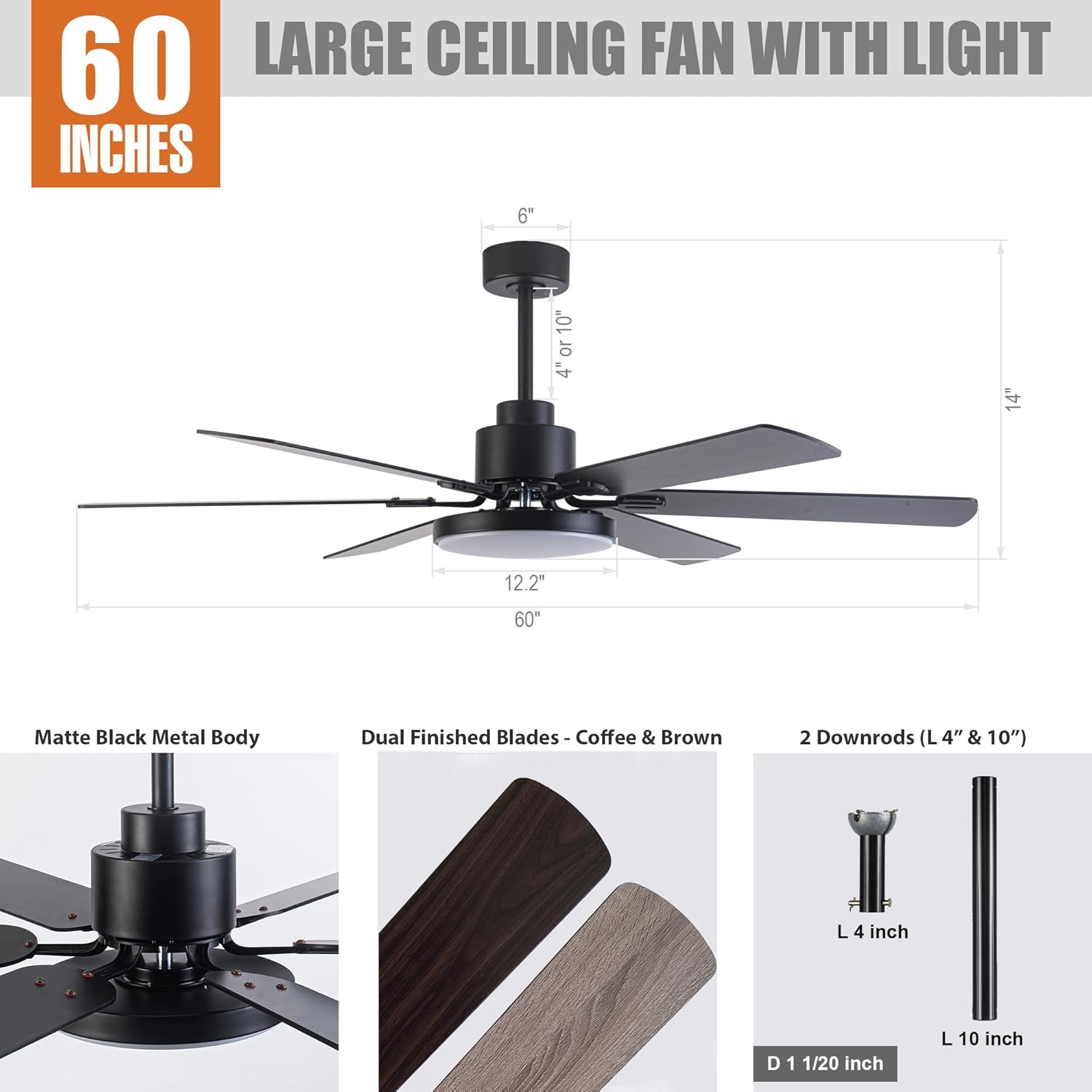
Image: A detailed diagram illustrating the fan's dimensions (60" diameter, 14" height) and key components such as the matte black metal body, dual-finished blades (coffee/brown), and the two included downrods (4" and 10").
Specifications
| Feature | Specification |
|---|---|
| Model Number | F8252 |
| Brand | Parrot Uncle |
| Size | 60 Inches (Diameter) |
| Product Dimensions | 60"L x 60"W x 14"H |
| Color | Black |
| Material | Engineered Wood (Blades), Iron (Housing) |
| Motor Type | DC Motor |
| Light Source Type | Integrated LED |
| LED Wattage | Max 24 Watts |
| Brightness | 1500 Lumen |
| Color Temperature | 3000K (Warm), 4000K (Natural), 5700K (Bright) |
| Control Method | Remote Control |
| Fan Speeds | 6 Levels |
| Special Features | Dimmable Light, Adjustable Color Temperature, Reversible Motor, Timer Function |
| Indoor/Outdoor Usage | Indoor, Outdoor (Covered Patio) |
| Installation Type | Downrod Mount |
| Voltage | 120 Volts |
| Certifications | ETL Listed |
Installation
1. Pre-Installation Checks
- Ensure power is disconnected at the circuit breaker.
- Confirm the ceiling outlet box is rated for fan support (minimum 35 lbs).
- Gather all necessary tools: screwdriver, wire strippers, electrical tape, ladder.
2. Mounting the Bracket
Attach the mounting bracket to the ceiling outlet box using the screws provided with the outlet box. Ensure the bracket is securely fastened.
3. Assembling the Downrod and Fan Motor
Select either the 4-inch or 10-inch downrod based on your ceiling height and preference. Feed the fan wires through the downrod. Secure the downrod to the fan motor housing according to the diagrams in the separate installation guide (not included in this manual).

Image: This diagram shows various downrod mounting configurations, including standard downrod mount, extended downrod mount, and sloped ceiling mount (up to 15 degrees), indicating the fan's adaptability to different ceiling types.
4. Hanging the Fan
Carefully lift the fan assembly and hang it from the mounting bracket. This typically involves placing the downrod ball into the bracket's opening.
5. Wiring Connections
Connect the fan's electrical wires to the household wiring according to the color codes (typically black to black, white to white, and green/bare copper to ground). Ensure all connections are secure with wire nuts and electrical tape. The remote receiver will also need to be wired in line with the fan's power supply.
6. Attaching Fan Blades
Attach each fan blade to the motor housing using the provided screws. Ensure all screws are tightened securely.
7. Installing the LED Light Kit
Connect the LED light kit wires to the fan motor's light wires. Secure the LED light kit to the bottom of the fan housing. Some models use magnetic attachment for ease of installation.

Image: A close-up view of the integrated LED light module, highlighting its sleek design and how it integrates with the fan's body.
Operating Instructions
Your Parrot Uncle ceiling fan is operated using the included remote control. Ensure the remote has two LR03/AAA 1.5 Volt batteries installed (not included).

Image: The remote control for the fan, showing buttons for fan ON/OFF, light ON/OFF, 6-level fan speed, forward/reverse rotation, light dimmer, light color temperature options (3000K/4000K/5700K), and timer settings (30 min/2 hours).
1. Fan Operation
- Fan ON/OFF: Press the fan icon button to turn the fan on or off.
- Fan Speed: Use buttons 1-6 to select desired fan speed, with 6 being the highest.
- Reversible Motor: Press the forward/reverse button to change the direction of blade rotation. This feature allows for downdraft (cooling) in summer and updraft (warm air circulation) in winter.
- Timer Function: Press the '30 min' or '2H' button to set the fan to automatically shut off after 30 minutes or 2 hours.

Image: This graphic demonstrates the reversible motor's function, showing clockwise rotation for warm air circulation in winter and counter-clockwise rotation for cooling in summer.
2. Light Operation
- Light ON/OFF: Press the light bulb icon button to turn the light on or off.
- Light Dimmer: Use the up/down arrow buttons to adjust the light brightness from 1% to 100%.
- Color Temperature Adjustment: Press the '3000K', '4000K', or '5700K' buttons to switch between Warm White, Natural White, and Bright White light color temperatures.

Image: This image displays the fan's integrated LED light capabilities, demonstrating the adjustable color temperature settings from 3000 Kelvin (warm light) to 5700 Kelvin (bright light), and its dimmable range from 1% to 100% brightness.
Maintenance
Regular maintenance ensures optimal performance and extends the lifespan of your ceiling fan.
- Cleaning: To clean the fan, wipe with a soft, damp cloth. Do not use abrasive cleaners or solvents, as these may damage the finish or electrical components.
- Blade Cleaning: Dust the fan blades regularly to prevent dust buildup, which can affect fan balance and air circulation.
- Tightening Screws: Periodically check all screws on the fan and mounting hardware to ensure they are tight. Loose screws can cause noise or wobble.
- No Lubrication Needed: The fan's motor is permanently lubricated and does not require oiling.
Troubleshooting
If you experience issues with your fan, refer to the following common problems and solutions:
| Problem | Possible Cause | Solution |
|---|---|---|
| Fan does not start | No power to the fan; Loose wire connections; Remote control battery low or not paired. | Check circuit breaker; Verify all wire connections are secure; Replace remote battery or re-pair remote. |
| Fan wobbles | Loose blade screws; Loose mounting bracket; Unbalanced blades. | Tighten all blade screws; Ensure mounting bracket is secure; Use a balancing kit (not included) if necessary. |
| Light does not work | Loose wire connection to light kit; Faulty LED module. | Check light kit wiring; Contact customer support for LED module replacement if faulty. |
| Remote control not working | Dead batteries; Remote not paired with receiver; Obstruction between remote and receiver. | Replace batteries; Follow pairing instructions (refer to separate remote manual); Ensure clear line of sight. |
| Fan is noisy | Loose screws; Motor noise; Blades hitting an obstruction. | Tighten all screws; Ensure no obstructions; If motor noise persists, contact customer support. |

Image: This graphic highlights the fan's whisper-quiet operation, rated at 35dB, which is comparable to library learning, ensuring minimal disturbance for sleep or daily activities.
Warranty and Support
Parrot Uncle offers a comprehensive warranty and customer support for your ceiling fan:
- 30-Day Free Return and Exchange: If you are not satisfied with your purchase, you may return or exchange the product within 30 days.
- One-Year Free Replacement Parts Service: Enjoy one year of free replacement parts service for any manufacturing defects.
- Lifetime Professional Customer Service: For any questions or assistance, please do not hesitate to reach out to Parrot Uncle's professional customer service team.
For support, please visit the Parrot Uncle Store on Amazon or contact their customer service directly.


