
Introduction
This manual provides detailed instructions for the installation, operation, maintenance, and troubleshooting of your ChongXiao Intelligent Brushless Square Wave Controller and LCD Display. This system is designed to control the speed and direction of electric bikes and scooters, offering stable and efficient performance. Please read this manual thoroughly before installation and use to ensure proper function and safety.
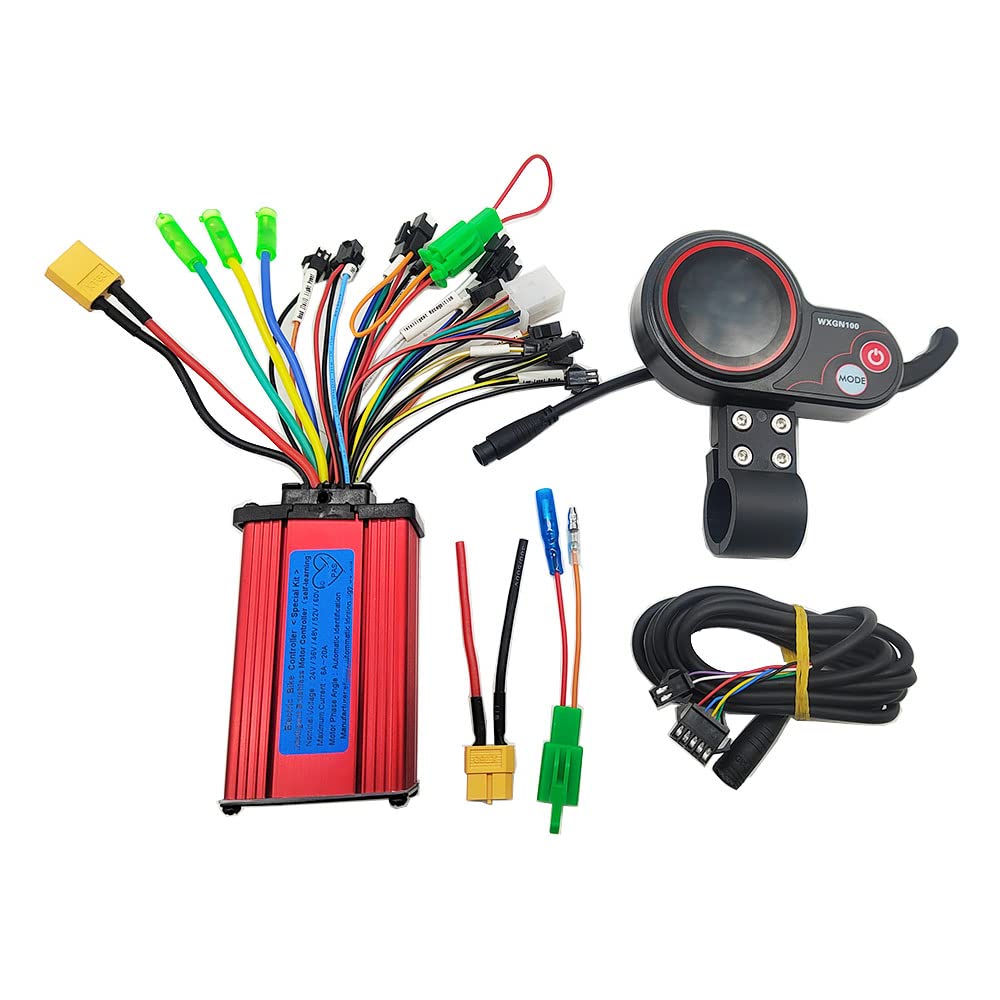
Image: The ChongXiao Intelligent Brushless Square Wave Controller and its accompanying wiring harness, designed for electric bikes and scooters.
Setup and Installation
Follow these steps carefully to connect your intelligent brushless square wave controller and LCD display to your electric bike or scooter. Ensure the power is off before making any connections.
- Connect Phase Lines: Connect the motor's phase lines to the controller's phase lines, matching colors (typically green, blue, yellow).
- Connect Battery Lines: Connect the battery's positive (red wire) and negative (black wire) terminals to the corresponding battery lines on the controller.
- Connect Controller LCD Line and Electric Door Lock: Connect the LCD display's communication cable to the controller. Also, connect the electric door lock wire.
- Connect Hall Line: If your motor has Hall sensors, connect the Hall sensor lines to the controller. If your motor does not have Hall lines, this step can be skipped.
- Intelligent Recognition (Self-Learning) Process:
- Connect the two intelligent recognition (self-learning) lines together. The wheel will begin to rotate, either forward or in reverse.
- If the wheel rotates forward, separate the self-learning lines.
- If the wheel rotates in reverse, separate the two intelligent recognition lines. Then, connect them together again. If the wheel now rotates forward, separate the intelligent recognition lines.
- This function allows the controller to intelligently identify the battery voltage and adjust the motor's rotation direction for optimal performance.
- Connect Other Functions: Connect any other desired functions (e.g., brakes, headlights, tail lights) as needed, referring to the wiring diagram.
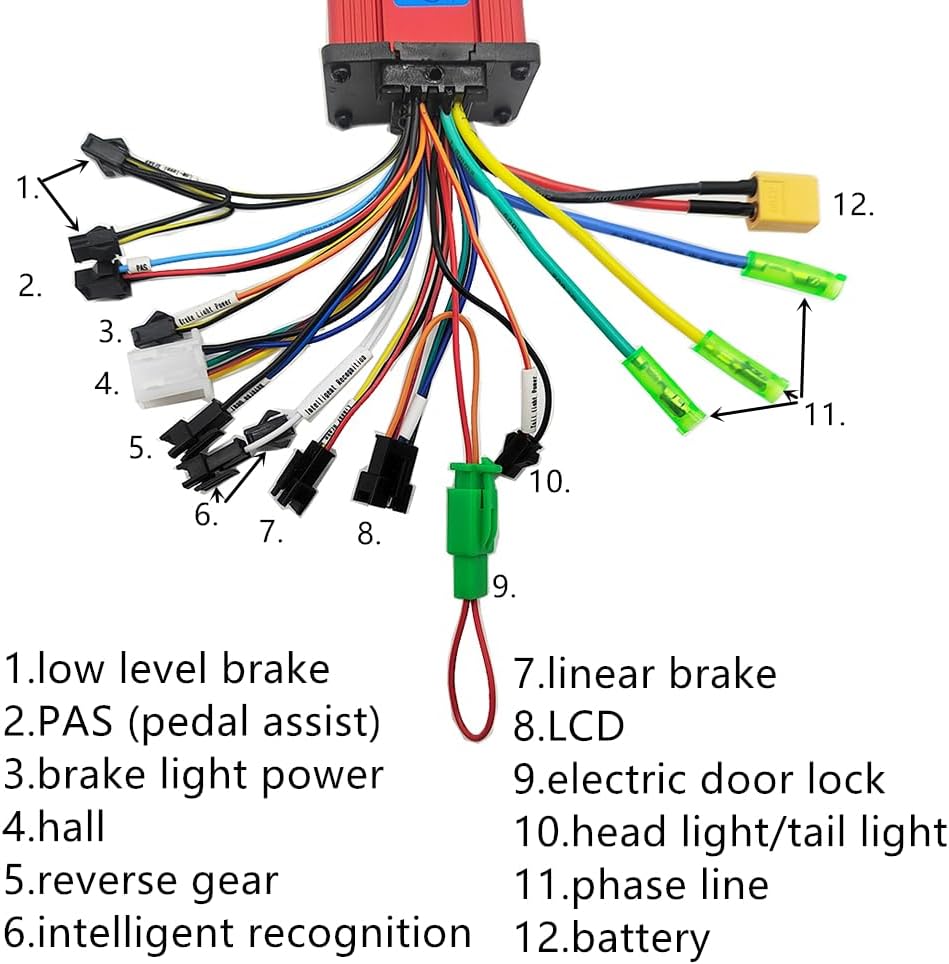
Image: Detailed wiring diagram illustrating the connection points for the ChongXiao controller, including low-level brake, PAS, brake light power, Hall, reverse gear, intelligent recognition, linear brake, LCD, electric door lock, head/tail light, phase line, and battery connections.

Image: Close-up view of the multi-pin connector for the LCD display, showing the various colored wires for communication and power.
Operation
The LCD display provides essential information about your electric bike or scooter's status and allows for control over various functions.
LCD Display Functions:
- Speed Display: Shows current speed (km/h).
- Gear Indicator: Displays the current assist level or gear.
- Battery Level: Indicates the remaining battery charge.
- Odometer (ODO): Tracks total distance traveled.
- Power Button: Turns the system on/off.
- Mode Button: Cycles through display modes or settings.
The brushless design of the controller ensures smoother operation and a more stable ride. The display instrument makes it easy to monitor the running status of your scooter or bike.

Image: The ChongXiao LCD display unit (Model WXGN100) showing speed, gear, battery level, and odometer readings, along with power and mode buttons.
Maintenance
To ensure the longevity and optimal performance of your ChongXiao controller and LCD display, follow these maintenance guidelines:
- Keep Dry: Protect the controller and display from water and excessive moisture. While designed for outdoor use, direct exposure to heavy rain or submersion can cause damage.
- Clean Gently: Use a soft, dry cloth to clean the display and controller. Avoid abrasive cleaners or solvents that could damage the casing or screen.
- Inspect Connections: Periodically check all wire connections to ensure they are secure and free from corrosion or damage. Loose connections can lead to intermittent operation or system failure.
- Avoid Physical Impact: Protect the controller and display from strong impacts or drops, which can damage internal components.
- Temperature Control: Operate and store the device within recommended temperature ranges to prevent overheating or cold-related issues.
Troubleshooting
If you encounter issues with your ChongXiao controller and LCD display, consider the following troubleshooting steps:
Common Issues and Solutions:
- Motor Not Responding or Incorrect Direction:
- Verify all phase lines and Hall sensor connections are correct and secure.
- Perform the intelligent recognition (self-learning) process again as described in the Setup section (Step 5). This helps the controller adapt to your motor.
- No Power to Display:
- Check the battery connection to the controller (red wire for positive, black for negative).
- Ensure the electric door lock wire is properly connected.
- Inspect the LCD display's connection cable for any damage or loose connections.
- Intermittent Operation:
- Check all wiring connections for looseness or corrosion.
- Ensure the battery is adequately charged.
If problems persist after attempting these steps, please contact customer support for further assistance.
Specifications
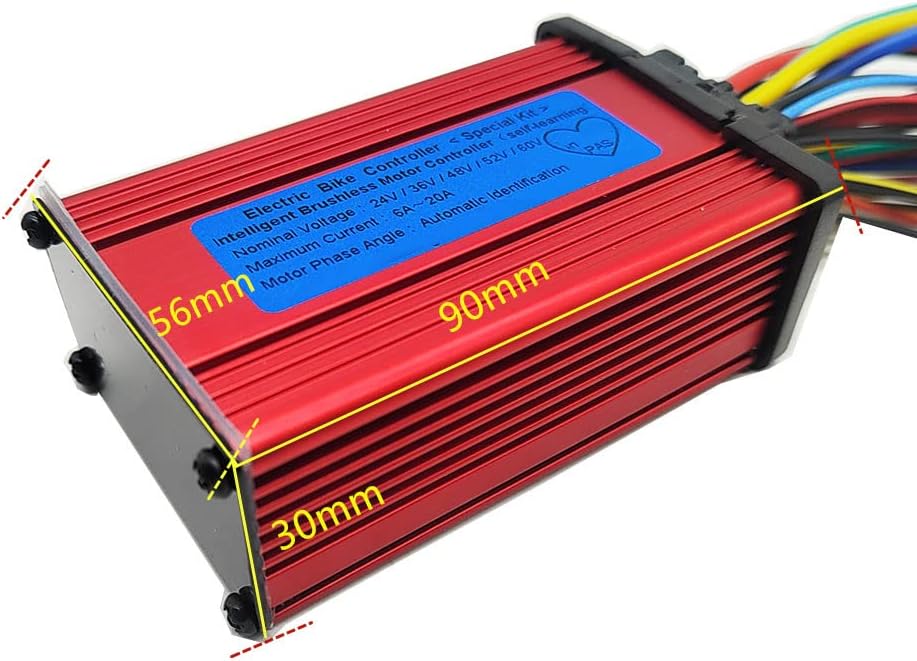
Image: The ChongXiao controller with dimensions indicated: 90mm length, 56mm width, and 30mm height.
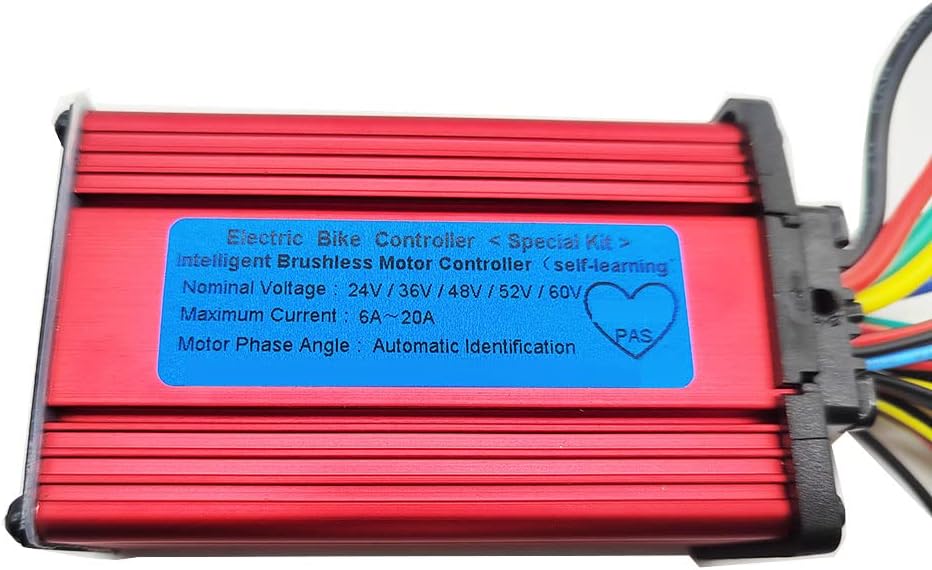
Image: Close-up of the label on the ChongXiao Electric Bike Controller, indicating it is an Intelligent Brushless Motor Controller with self-learning capability, nominal voltage range of 24V/36V/48V/52V/60V, maximum current of 6A~20A, and automatic identification of motor phase angle.
| Feature | Detail |
|---|---|
| Brand | ChongXiao |
| Model Name | 250W 350W brushless controller |
| Nominal Voltage | 24V / 36V / 48V / 52V / 60V (Universal) |
| Maximum Current | 6A ~ 20A |
| Special Feature | Digital Display, Intelligent Brushless, Self-Learning |
| Included Components | Controller and LCD Display |
| Material | Aluminum (Frame) |
| ASIN | B0C2Y5N8GG |
| UPC | 733583847839 |
Key Features:
- Electronic device for controlling electric scooter/bike speed and direction.
- Equipped with a display instrument for easy monitoring of running status.
- Brushless design for smoother operation, enhanced stability, and longer lifespan.
- Compatible with various brands and models of electric scooters and bicycles.
- Advanced technology ensures excellent performance and durability.
Warranty Information
The product comes with a Limited Warranty. However, the manufacturer's warranty description explicitly states "No" warranty is provided. Please refer to your purchase agreement or contact the seller for specific details regarding returns or guarantees.
Customer Support
For technical assistance, troubleshooting beyond the scope of this manual, or inquiries regarding your ChongXiao Intelligent Brushless Square Wave Controller and LCD Display, please contact the seller or manufacturer directly through the platform where the product was purchased.
When contacting support, please have your product model name (250W 350W brushless controller) and ASIN (B0C2Y5N8GG) readily available.