
Introduction
This manual provides essential information for the setup, operation, maintenance, and troubleshooting of your Cherry MX 3.0S Wireless Mechanical Gaming Keyboard. Please read these instructions carefully before using the device to ensure optimal performance and longevity.
Safety Information
- Keep the keyboard away from liquids and excessive moisture.
- Avoid extreme temperatures.
- Do not attempt to disassemble or repair the keyboard yourself. Refer to qualified service personnel.
- Use only the provided USB cable for charging and wired connection.
Setup
Package Contents
- Cherry MX 3.0S Wireless Mechanical Gaming Keyboard
- USB-A to USB-C Cable
- 2.4 GHz USB Dongle
- Instruction Manual
- Additional accessories (e.g., replacement feet, keycap puller - contents may vary)
Connecting the Keyboard
The Cherry MX 3.0S supports three connection modes: wired, 2.4 GHz wireless, and Bluetooth.
- Wired Connection: Connect the provided USB-A to USB-C cable from your computer's USB port to the USB-C port on the back of the keyboard. The keyboard will automatically switch to wired mode and begin charging.
- 2.4 GHz Wireless Connection:
- Locate the 2.4 GHz USB dongle.
- Plug the USB dongle into an available USB-A port on your computer.
- Turn on the keyboard using the power switch located on the back.
- The keyboard should automatically connect to the dongle. An indicator light will confirm the connection.
- Bluetooth Connection:
- Turn on the keyboard using the power switch on the back.
- Activate Bluetooth pairing mode on the keyboard (refer to the specific key combination in the included quick start guide, often Fn + a Bluetooth key).
- On your device (computer, tablet, etc.), go to Bluetooth settings and search for new devices.
- Select "Cherry MX 3.0S" from the list of available devices to pair.

Figure 1: Side view of the keyboard with USB-C port and power switch.

Figure 2: Detachable USB-C cable for wired connection and charging.
Charging the Keyboard
The keyboard features smart charging technology. Connect the USB-A to USB-C cable to the keyboard and a powered USB port on your computer or a USB wall adapter. You can continue to use the keyboard while it charges.
Operating
Key Features
- Aluminum Housing: The keyboard is constructed with a sturdy, extruded aluminum housing for durability and a premium feel.
- CHERRY MX Mechanical Switches: Equipped with genuine CHERRY MX mechanical switches (e.g., MX Brown or Red), offering precise actuation and a tactile typing experience.
- RGB Backlighting: Features RGB backlighting with over 16 million colors and numerous integrated lighting effects.
- CHERRY Advanced Wireless Technology: Provides an incredibly fast gaming mode with less than 1ms latency for responsive performance.
- Full N-Key Rollover & Anti-Ghosting: Ensures every keystroke is registered accurately, even during rapid, simultaneous key presses.
- Win Key Lock: Prevents accidental activation of the Windows key during gaming sessions.
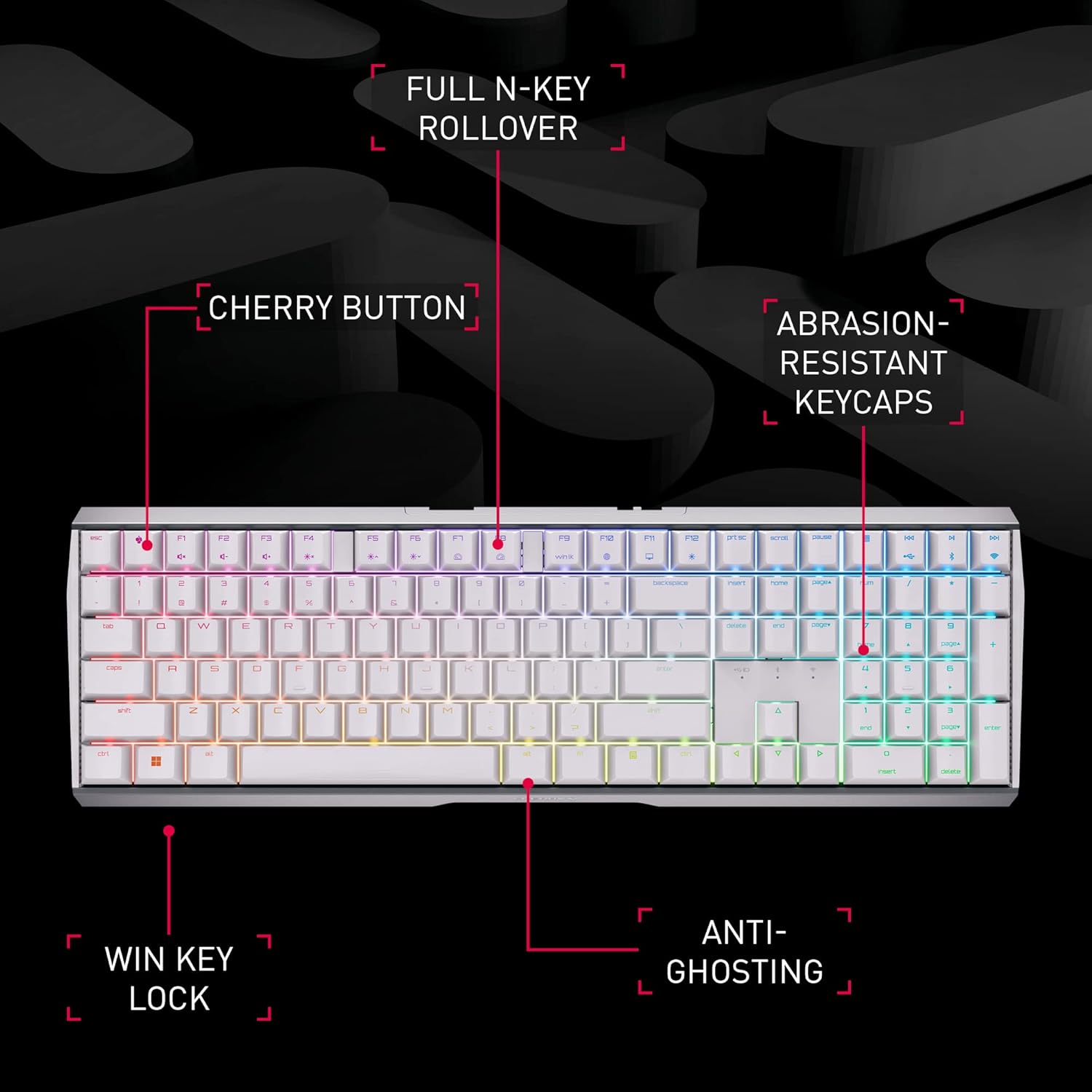
Figure 3: Key features of the Cherry MX 3.0S keyboard.

Figure 4: Cherry MX mechanical keyswitch technology.
RGB Lighting Control
The keyboard's RGB lighting can be customized with 16.8 million colors and various effects. Use the dedicated CHERRY Gaming Software for individual key assignment and fine-tuned lighting control. Refer to the software's interface for detailed customization options.

Figure 5: Cherry MX Gaming Software for lighting and key customization.
Wireless Performance
The advanced wireless technology ensures a stable and fast connection, crucial for gaming. The low latency mode (LLM) provides a response time of less than 1ms when using the 2.4 GHz dongle, minimizing input lag.

Figure 6: Cherry Advanced Wireless Technology.
Video 1: Official product video showcasing the Cherry MX 3.0S Wireless Mechanical Gaming Keyboard's features and wireless capabilities.
Maintenance
Cleaning
- To clean the keyboard, disconnect it from all power sources.
- Use a soft, lint-free cloth slightly dampened with water or a mild cleaning solution.
- Avoid harsh chemicals, abrasive cleaners, or solvents.
- For dust and debris between keys, use compressed air.
Storage
When not in use for extended periods, store the keyboard in a cool, dry place away from direct sunlight. Ensure the battery is partially charged (around 50%) before long-term storage to preserve battery health.
Troubleshooting
- Keyboard not responding: Ensure the keyboard is powered on and properly connected (wired, 2.4 GHz dongle, or Bluetooth paired). Check battery level.
- Wireless connection issues: For 2.4 GHz, ensure the dongle is securely plugged in and within range. For Bluetooth, ensure the keyboard is in pairing mode and your device's Bluetooth is enabled. Try re-pairing.
- Keys are sticky or double-typing: This can sometimes be caused by debris under the keycaps. Carefully remove the affected keycap (using a keycap puller if available) and clean the switch area with compressed air. If the issue persists, contact customer support.
- RGB lighting not working: Check the CHERRY Gaming Software settings to ensure lighting is enabled and configured correctly. Ensure the keyboard battery has sufficient charge.
- Battery not charging: Verify the USB-C cable is fully inserted into both the keyboard and the power source. Try a different USB port or charging adapter.
Specifications
| Feature | Detail |
|---|---|
| Model Number | G80-3872LXAUS-0 |
| Brand | Cherry |
| Connectivity Technology | Bluetooth, 2.4 GHz Wireless, USB-C Wired |
| Keyboard Description | Gaming Mechanical Keyboard |
| Mechanical Switches | CHERRY MX (e.g., Brown, Red) |
| Backlighting | RGB (16.8 million colors) |
| Material | Aluminum Housing |
| Item Weight | 3.89 pounds |
| Package Dimensions | 18.4 x 8.3 x 2.1 inches |
| Compatible Devices | Gaming Console, PC |
Warranty and Support
For detailed warranty information, technical support, and additional resources, please visit the official Cherry website or contact their customer service. The manufacturer is CHERRY.
You can visit the Cherry Store on Amazon for more products and information: Cherry Store


