
Blackview MP20 N150
Blackview MP20 Mini PC User Manual
Model: MP20 N150
Introduction
The Blackview MP20 Mini PC is a compact and powerful desktop computer designed for both home and office use. Featuring an Intel Twin Lake N150 processor, 8GB DDR4 RAM, and a 256GB SSD, it delivers smooth performance for multitasking, 4K streaming, and various applications. Its ultra-portable design, versatile connectivity options including WiFi 6 and Bluetooth 5.2, and support for dual 4K displays make it an ideal solution for a clean, efficient workspace or entertainment hub.

Image: The Blackview MP20 Mini PC, showcasing its compact form factor and modern aesthetic.
What's in the Box
Please check the package contents carefully upon unboxing:
- Blackview MP20 Mini PC (1 unit)
- Power Adapter (1 unit)
- HDMI Cable (1 unit)
- VESA Bracket with Screws (1 set)
- User Guide (1 unit)
Setup Guide
Initial Connection
- Connect to Display: Use the provided HDMI cable to connect the Mini PC to your monitor or TV. The MP20 supports dual 4K displays via HDMI 2.0 and DisplayPort.
- Connect Peripherals: Plug in your keyboard and mouse to the available USB 3.0 or USB 2.0 ports.
- Connect Power: Connect the power adapter to the DC Jack on the Mini PC and then plug it into a power outlet.
- Power On: Press the power button located on the front of the Mini PC.

Image: Detailed view of the Blackview MP20 Mini PC's versatile I/O ports for easy connectivity.
Operating System Setup
The Blackview MP20 comes pre-installed with Windows 11 Pro. Follow the on-screen instructions to complete the initial Windows setup, including language, region, network connection (WiFi 6 or Ethernet), and user account creation.
VESA Mounting (Optional)
To save desk space, you can mount the Mini PC behind a compatible monitor or TV using the included VESA bracket. Attach the bracket to the Mini PC, then secure it to the VESA mounting holes on your display.

Image: The Blackview MP20 Mini PC shown mounted on the rear of a monitor, illustrating its VESA mounting capability for a clutter-free workspace.
Operating Instructions
Power Management
- Power On: Press the power button once.
- Sleep Mode: Briefly press the power button while the PC is on, or select "Sleep" from the Windows Start menu.
- Shut Down: Go to the Windows Start menu, select "Power," and then "Shut down."
- Restart: Go to the Windows Start menu, select "Power," and then "Restart."
Connectivity
The MP20 offers robust connectivity for various needs:
- Wi-Fi 6: For high-speed wireless internet access. Ensure your router supports Wi-Fi 6 for optimal performance.
- Bluetooth 5.2: Connect wireless peripherals such as keyboards, mice, headphones, and speakers.
- Gigabit Ethernet (RJ45): For stable wired network connections.
- USB Ports: Utilize the USB 3.2 and USB 2.0 ports for external drives, flash drives, and other USB devices.
- Full-Featured USB-C: Supports data transfer, video output, and power delivery (check specific device compatibility).

Image: Demonstrating the seamless connectivity of the Blackview MP20 Mini PC with Wi-Fi 6 and Bluetooth 5.2 for various applications.
Storage Expansion
The MP20 Mini PC allows for easy storage expansion. You can add up to a 2TB 2.5-inch SSD/HDD. The base can be removed without tools for convenient access to the expansion slot.

Image: Internal view of the Blackview MP20, illustrating the RAM and SSD, and the potential for 2TB storage expansion.
Maintenance
- Keep Clean: Regularly clean the exterior of the Mini PC with a soft, dry cloth. Ensure ventilation openings are free from dust and obstructions.
- Software Updates: Keep your Windows operating system and drivers updated to ensure optimal performance and security.
- Proper Ventilation: Place the Mini PC in a well-ventilated area to prevent overheating. Avoid blocking the air vents.
- Safe Shutdown: Always shut down the Mini PC properly through the operating system to prevent data corruption.

Image: Exploded view of the Blackview MP20's cooling system, highlighting the copper tube and efficient fan for heat dissipation.
Troubleshooting
If you encounter issues with your Blackview MP20 Mini PC, refer to the following common troubleshooting steps:
- No Power:
- Ensure the power adapter is securely connected to both the Mini PC and a working power outlet.
- Try a different power outlet.
- No Display:
- Verify that the HDMI or DisplayPort cable is firmly connected to both the Mini PC and the monitor.
- Check if the monitor is set to the correct input source (HDMI/DP).
- Try a different display cable or monitor if available.
- No Internet Connection (Wi-Fi):
- Ensure Wi-Fi is enabled in Windows settings.
- Restart your router and the Mini PC.
- Check if the Wi-Fi password is entered correctly.
- Slow Performance:
- Close unnecessary applications running in the background.
- Check for and install any pending Windows updates.
- Ensure there is sufficient free space on the SSD.
- Peripheral Not Detected:
- Try connecting the peripheral to a different USB port.
- Ensure the peripheral's drivers are installed and up to date.
- Restart the Mini PC.
For further assistance, please contact Blackview customer support.
Specifications
| Feature | Detail |
|---|---|
| Model | MP20 N150 |
| Processor | Intel Twin Lake N150 (4 Cores, up to 3.6 GHz Turbo) |
| Graphics | Intel UHD Graphics (Supports dual 4K displays) |
| RAM | 8GB DDR4 2666MHz (Expandable up to 16GB) |
| Storage | 256GB SSD (Expandable up to 2TB 2.5-inch SSD/HDD) |
| Operating System | Windows 11 Pro |
| Wireless Connectivity | Wi-Fi 6 (802.11ax), Bluetooth 5.2 |
| Wired Connectivity | Gigabit Ethernet (RJ45) |
| Ports | 2x USB 3.2, 2x USB 2.0, 1x HDMI 2.0, 1x DisplayPort, 1x Audio In/Out Jack, 1x DC Jack, 1x Security Lock |
| Dimensions | 3.94 x 3.94 x 1.39 inches (10 x 10 x 3.5 cm) |
| Weight | 9.3 ounces (265g) |
| Cooling System | Twofold Heat Dissipation System (Copper Tube, Silent Fan) |
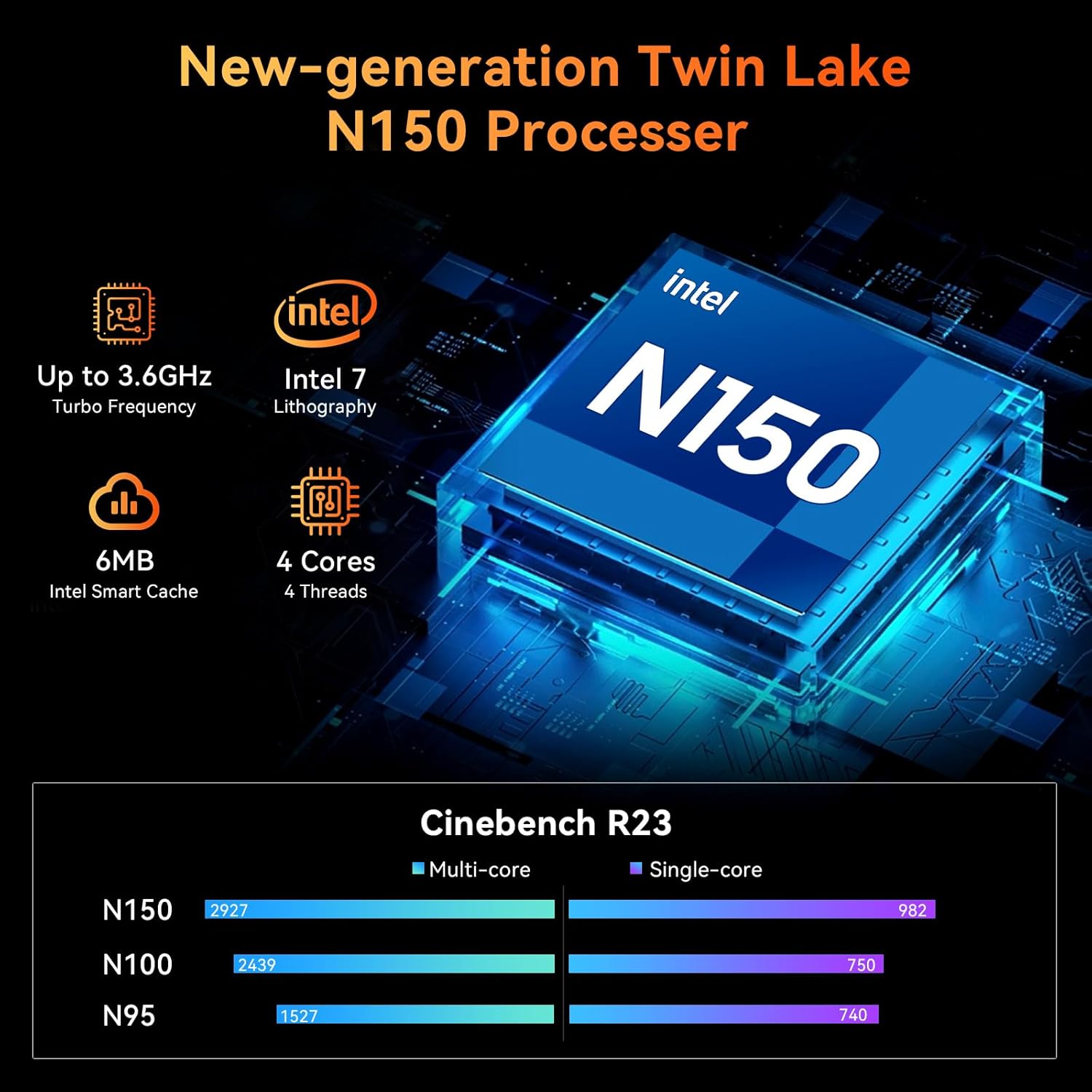
Image: Visual representation of the Intel Twin Lake N150 processor and its performance metrics.
Official Product Video
Video: An official product video showcasing the Blackview MP20 Mini PC, its compact design, powerful Intel Twin Lake N150 processor, versatile ports, dual 4K display support, and efficient cooling system. It highlights the device's suitability for home and office environments.
Warranty and Support
The Blackview MP20 Mini PC comes with a comprehensive two-year warranty covering parts and labor for manufacturing defects. This ensures quick replacement or repair if any issues arise within the warranty period.
Beyond the warranty period, Blackview provides lifelong technical support. Our expert team is available to assist you with software updates, troubleshooting, and optimization suggestions via email, live chat, or phone. We are committed to ensuring your device operates without any malfunctions for many years to come.

Image: Blackview Care information, detailing warranty and support commitments.
Ask a question about this manual
Ask about setup, troubleshooting, compatibility, parts, safety, or missing instructions. Manuals+ will review the question and use this page’s manual context to help answer it.