
Lee Precision 91898
Lee Precision 91898: Deluxe APP Press Kit Instruction Manual
Model: 91898
Introduction
The Lee Deluxe Automatic Processing Press (APP) Kit is designed to provide efficient and precise case processing for reloading. This system offers advanced priming capabilities, automatic case feeding, and versatility for various reloading tasks such as depriming, sizing, and primer pocket swaging. Its design aims for speed, ease of use, and consistent results, making it a valuable tool for reloaders.
Kit Contents
The Lee Deluxe APP Press Kit includes the following components:
- Lee APP Press
- Roller Handle
- Patented Automatic Primer Feed System
- Universal Case Feed Magazine
- APP Deprime Kit
- Bottle Adapter
- Shell Holder Adapter
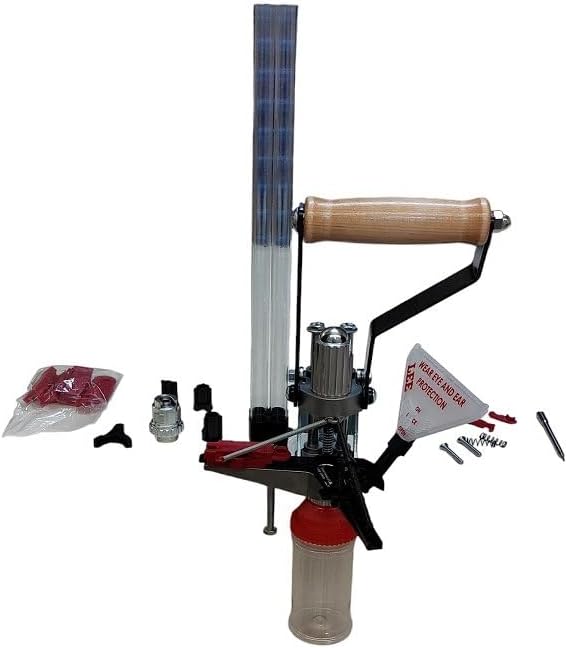
Image: Overview of the Lee Deluxe APP Press Kit, showing the press, roller handle, case feeder, and various accessories.
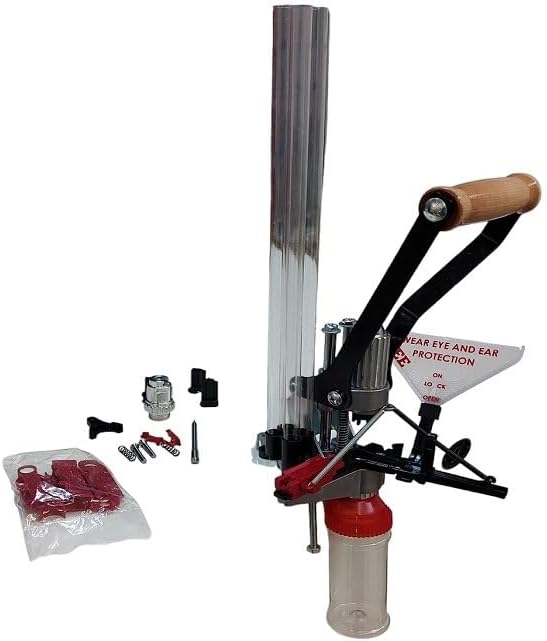
Image: Side view of the Lee Deluxe APP Press Kit, highlighting the press mechanism and case feeder.

Image: Another perspective of the Lee Deluxe APP Press Kit, showing the overall assembly.
Setup and Assembly
Proper setup is crucial for optimal performance and safety. Follow these steps to assemble your Lee Deluxe APP Press:
- Mounting the Press: Securely mount the APP press to a sturdy workbench using the provided mounting holes. Ensure the surface is even to prevent bending the press base.
- Attaching the Roller Handle: Install the roller handle onto the press. This handle provides ergonomic operation.
- Installing the Universal Case Feed Magazine: Attach the universal case feed magazine to the press. Adjust its height above the slide to ensure smooth feeding of cases. This may require some fine-tuning.
- Configuring for Priming or Depriming:
- For Priming: Install the patented automatic primer feed system. Select the correct primer size (small or large) and insert the corresponding pin and primer guide into the priming chamber. The system automatically feeds and seats primers.
- For Depriming/Sizing: If not priming, twist out the priming tool and replace it with the supplied shell holder adapter. Then, install the appropriate die (e.g., APP Deprime Kit die) into the press using a breech lock bushing if necessary.
- Spent Primer Collection: Attach the spent primer bottle beneath the shell holder to collect spent primers.
Note: For specific die installation and adjustment, refer to the instructions provided with your Lee dies.
Operating Instructions
The Lee Deluxe APP Press is versatile and can perform several operations. Always wear appropriate eye and ear protection when operating the press.
Priming Cases
- Ensure the automatic primer feed system is correctly installed and loaded with the appropriate size primers.
- Place cases into the universal case feed magazine. The system will automatically feed cases to the priming station.
- Operate the roller handle. The press will automatically seat primers uniformly without requiring manual adjustments or "feel."
- To change primer size, twist out the current priming chamber and swap the pin and primer guide.
Depriming and Sizing Cases
- Remove the priming tool and install the shell holder adapter.
- Install the APP Deprime Kit die or other appropriate sizing die into the press.
- Load cases into the universal case feed magazine.
- Operate the roller handle to deprime and/or size cases. For sizing, especially rifle cases, it is recommended to lubricate the brass to reduce friction and strain on the press.
- Spent primers will be collected in the attached bottle.
Bulge Busting or Primer Pocket Swaging
The APP press can be used with other Lee APP accessories for operations like bulge busting or primer pocket swaging. Consult the instructions for these specific accessories for proper setup and use.
Maintenance
Regular maintenance ensures the longevity and smooth operation of your Lee Deluxe APP Press.
- Cleaning: Periodically clean the press, especially around the shell holder and die areas, to remove powder residue, spent primer debris, and lubricant buildup. A soft brush and cloth are usually sufficient.
- Lubrication: Apply a light coat of machine oil to moving parts and pivot points as needed to ensure smooth operation of the handle and ram. Avoid over-lubrication, which can attract debris.
- Inspection: Regularly inspect all components for wear, damage, or loose fasteners. Tighten any loose screws or bolts.
- Primer System Care: Keep the primer feed system clean and free of debris to prevent misfeeds or jams.
Troubleshooting
If you encounter issues with your Lee Deluxe APP Press, consider the following common solutions:
- Cases not feeding smoothly:
- Check the adjustment of the universal case feed magazine. It may need fine-tuning for optimal case drop.
- Ensure cases are clean and free of burrs or deformities that could impede feeding.
- Primers not seating correctly:
- Verify that the correct primer size pin and guide are installed for your primers.
- Ensure the primer feed system is clean and free of obstructions.
- Check for any debris in the primer pocket of the case.
- Difficulty with sizing cases:
- Always lubricate brass before sizing, especially for rifle cartridges, to reduce friction and strain on the press.
- Ensure the sizing die is properly adjusted according to Lee instructions.
- Loose components or instability:
- Check all mounting bolts and screws for tightness.
- Ensure the press is mounted to a sufficiently sturdy and level surface.
For persistent issues, refer to the official Lee Precision support resources or contact their customer service.
Specifications
| Feature | Detail |
|---|---|
| Brand Name | Lee Precision |
| Model Name | Lee Precision 91898: Deluxe App Press Kit |
| Part Number | 91898 |
| Item Package Dimensions (L x W x H) | 16.61 x 9.65 x 9.06 inches |
| Package Weight | 2.3 Kilograms |
| Color | Multi |
| Material | Other |
| Number of Items | 1 |
| Suggested Users | unisex-adult |
Warranty and Support
Lee Precision products are known for their quality and are typically backed by a comprehensive warranty. For specific warranty details, claims, or technical support, please visit the official Lee Precision website or contact their customer service department directly. Ensure you have your product model number (91898) and any purchase information available when seeking support.
Official Website: leeprecision.com
Ask a question about this manual
Ask about setup, troubleshooting, compatibility, parts, safety, or missing instructions. Manuals+ will review the question and use this page’s manual context to help answer it.