
Introduction
The Neumann MT 48 is a premium desktop USB-C audio interface designed for professional audio production. It features a high-resolution touchscreen, comprehensive MIDI, AES67, and ADAT/S/PDIF connectivity, offering exceptional audio quality and versatile control for studio and home recording environments. This manual provides essential information for setting up, operating, and maintaining your MT 48 interface.
Package Contents
Please ensure all items are present in your package:
- Neumann MT 48 Desktop USB-C Audio/MIDI Interface
- 1x USB-C Data Cable
- 1x USB-A Data Cable
- 1x Power Supply with USB-C Cable
- 1x Soft Case
- 1x XLR-XLR Cable
- MDR-7506 Headphones (if part of bundle)
- 1x 1/4" Adapter (for headphones)

Image: Neumann MT 48 audio interface securely placed within its custom-fit soft case, ready for transport or storage.
Setup
1. Driver Installation
Before connecting your MT 48, download and install the latest drivers and control software from the official Neumann website. This ensures optimal performance and compatibility with your operating system (Windows, macOS).
2. Power and Connectivity
Connect the MT 48 to your computer using the provided USB-C data cable. For stable operation and to power the unit, connect the included power supply to the dedicated USB-C power input and a wall outlet. The MT 48 features a power switch for easy on/off control.

Image: The rear panel of the Neumann MT 48, highlighting the diverse range of connectivity options including XLR/TRS combo inputs, line outputs, optical I/O, MIDI, and USB-C ports.
3. Connecting Audio Devices
- Microphones/Line Inputs: Use the 2 x Combo XLR-1/4" Mic/Line Preamps on the rear panel for microphones or line-level instruments.
- Instrument/Line Inputs: Utilize the 2 x 1/4" Hi-Z Instrument/Line Inputs on the front panel for guitars, basses, or other high-impedance instruments.
- Headphones: Connect your headphones to the dual 1/4" headphone outputs on the front panel.
- Monitors: Connect your studio monitors to the main line outputs on the rear panel.
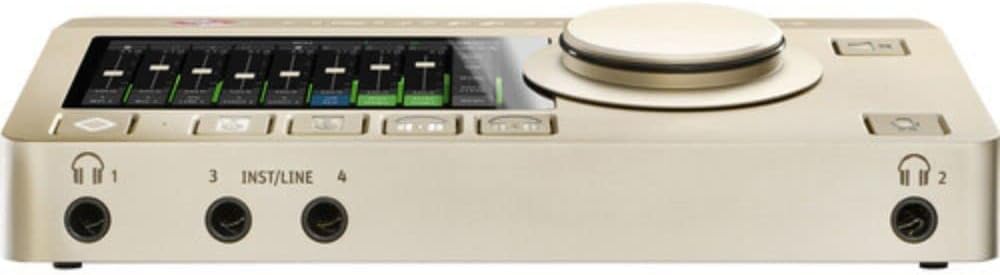
Image: The front of the Neumann MT 48, featuring two headphone jacks and two instrument/line inputs for easy access during recording sessions.
Operating the MT 48
1. Touchscreen Interface
The MT 48 features an intuitive touchscreen display for direct control over all settings. Navigate through menus, adjust levels, and configure DSP effects with ease. The large rotary encoder provides precise control for selected parameters.

Image: The Neumann MT 48's touchscreen displaying a multi-channel mixer interface, allowing for real-time adjustments of audio levels and routing.
2. DSP Processing
The MT 48 includes powerful onboard DSP (Digital Signal Processing) with four internal mixers. This allows for sophisticated EQ, dynamics processing (compression, gates), and reverb directly within the interface, reducing latency and offloading processing from your computer. You can record both raw and processed signals simultaneously to separate tracks in your DAW.
3. Monitor Control and Talkback
Utilize the dedicated monitor control features for precise listening levels. The integrated talkback function allows for clear communication with artists in a separate recording booth, enhancing workflow efficiency.
4. Headphone Outputs
The dual headphone outputs offer extremely low impedance, allowing them to drive virtually any set of headphones to high volumes with exceptional clarity. This is crucial for accurate monitoring during recording and mixing.
Maintenance
To ensure the longevity and optimal performance of your Neumann MT 48, follow these maintenance guidelines:
- Cleaning: Use a soft, dry cloth to clean the exterior of the unit. Avoid abrasive cleaners or solvents.
- Ventilation: Ensure the ventilation openings on the sides of the unit are not obstructed to prevent overheating. The MT 48 features a built-in fan for thermal management.
- Storage: When not in use, store the MT 48 in its soft case to protect it from dust and physical damage.
- Software Updates: Regularly check the Neumann website for firmware and software updates to benefit from new features and performance improvements.

Image: Side profile of the Neumann MT 48, highlighting the ventilation grilles designed to ensure proper airflow and prevent overheating during operation.
Troubleshooting
If you encounter issues with your Neumann MT 48, consider the following steps:
- No Power: Ensure the power supply is securely connected to both the MT 48 and a working power outlet. Check the power switch on the rear panel.
- No Audio: Verify all audio cables are correctly connected. Check input/output routing in the MT 48's touchscreen interface and your DAW. Ensure volume levels are appropriately set.
- Driver Issues: Reinstall the latest drivers from the Neumann website. Try connecting the MT 48 to a different USB port on your computer.
- Software Glitches: Restart your computer and the MT 48. Close and reopen your DAW.
- Distorted Audio: Check input gain levels to prevent clipping. Ensure sample rates and buffer sizes are correctly configured in your DAW and the MT 48 settings.
For further assistance, refer to the comprehensive user manual available on the Neumann website or contact Neumann customer support.
Specifications
- Item Weight: 2.1 pounds
- Package Dimensions: 15 x 7 x 4 inches
- Connectivity Technology: USB-C
- Hardware Interface: USB
- Number of Channels: 48 (internal mixing channels)
- AD/DA Conversion: 24-Bit / 192 kHz
- Mic/Line Preamps: 2 x Combo XLR-1/4"
- Instrument/Line Inputs: 2 x 1/4" Hi-Z
- Additional Connectivity: MIDI I/O, ADAT / S/PDIF, AES67
- DSP Features: 4 Mixers, Talkback, Monitor Control, EQ, Dynamics, Reverb
- Compatible Devices: Personal Computer
- Supported Software: Windows, USB-compatible DAWs and audio-related software
- Operating System: Windows (and macOS with appropriate drivers)
Warranty and Support
The Neumann MT 48 comes with a manufacturer's warranty. Please refer to the warranty card included in your package or visit the official Neumann website for detailed warranty terms and conditions. For technical support, product registration, or service inquiries, please visit the Neumann support page or contact their customer service team directly.
Online Resources: For the most up-to-date information, drivers, and additional resources, please visit the official Neumann website: www.neumann.com


