
Vonets VAP11AC with Fan
VONETS Dual Band AC1200 WiFi Bridge/Router/Repeater
Instruction Manual
Product Overview
The VONETS VAP11AC is a versatile industrial-grade mini dual-band (2.4GHz/5GHz) WiFi device designed to function as a WiFi Bridge, Wireless Repeater, or Router. It facilitates network connectivity for various Ethernet-enabled devices by converting WiFi to wired Ethernet or vice-versa. Its compact design and multiple power supply options make it suitable for diverse applications, including surveillance systems, IoT devices, and extending network coverage.

Image: The VONETS VAP11AC device, highlighting its dual-band 1200Mbps capability as a WiFi Bridge, Repeater, and Router.
Key Features
- Dual Band WiFi Connectivity: Supports 2.4GHz (300Mbps) and 5GHz (900Mbps) for a combined theoretical rate of 1200Mbps, offering strong anti-interference and improved transmission rates.
- Multiple Operating Modes: Functions as a WiFi Router, WiFi Signal Repeater, WiFi AP Hotspot, or WiFi Bridge (Ethernet to WiFi or WiFi to Ethernet conversion).
- Wide Voltage Power Supply: Compatible with DC5V-24V power input, including USB/DC power cable and industrial DC connector options.
- Smart Cooling Fan: Features an intelligent automatic start and stop cooling fan for enhanced heat dissipation and stable operation, activating after 5-10 minutes of normal use.
- Compact Design: Mini industrial design suitable for various environments.
- Built-in Antennas: Equipped with 2T2R dual-band antennas for wireless signal amplification and extended coverage.

Image: Illustration of wireless signal amplification for full house WiFi coverage, demonstrating the device's ability to extend network range.
What's in the Box
Upon unboxing, please verify that all the following components are included:
- VONETS VAP11AC WiFi Bridge/Repeater/Router Unit
- Ethernet RJ45 Cable
- USB/DC Power Cable
- Industrial DC Connector

Image: The VONETS VAP11AC device shown with its accompanying Ethernet cable, USB power cable, and industrial DC connector.
Setup and Installation
This section provides general guidance for setting up your VAP11AC device. For detailed configuration steps, please refer to the official configuration video or the comprehensive user manual provided by VONETS.
- Power Connection: Connect the device to a power source using the provided USB/DC power cable or industrial DC connector. The device supports wide voltage input from DC5V to 24V.
- Initial Connection: For initial configuration, it is recommended to connect the VAP11AC directly to your computer's Ethernet port using the supplied RJ45 cable.
- Accessing Configuration Interface: Once powered on and connected, access the device's web-based configuration interface via a web browser. The default IP address and login credentials can typically be found on the product packaging or in the quick start guide.
- Mode Selection: Select your desired operating mode (Bridge, Repeater, Router, or AP) within the configuration interface.
- Network Configuration: Follow the on-screen prompts to configure network settings specific to your chosen mode, such as WiFi network selection, password entry, or IP settings.

Image: Diagram illustrating the various ports and connections on the VONETS VAP11AC, including LAN, USB, DC input, and the reset button.
Operating Modes
The VAP11AC supports several operating modes to suit different networking needs:
1. WiFi Bridge Mode
In Bridge mode, the device acts as a wireless Ethernet adapter, converting a WiFi signal into a wired Ethernet connection. This is ideal for connecting wired devices (e.g., DVRs, surveillance cameras, desktop PCs, printers) to a wireless network without requiring them to have built-in WiFi capabilities.

Image: Diagram showing the VAP11AC in WiFi Bridge mode, connecting a wired computer to a wireless router.
2. WiFi Repeater Mode
As a Repeater, the VAP11AC extends the range of an existing WiFi network. It receives the wireless signal from your main router and re-transmits it, effectively expanding your WiFi coverage to areas with weak or no signal.

Image: Diagram illustrating the VAP11AC in WiFi Repeater mode, extending the wireless signal within a house.
3. WiFi Router Mode
In Router mode, the VAP11AC can establish a new wireless network. This mode is suitable for scenarios where you need to share an internet connection (e.g., from a modem) wirelessly to multiple devices.

Image: Diagram showing the VAP11AC configured as a WiFi Router, providing internet access to various devices.
4. AP (Access Point) Mode
AP mode allows the VAP11AC to convert a wired network connection into a wireless access point. This is useful for adding wireless capabilities to an existing wired network, enabling wireless devices to connect to the internet without dialing.

Image: Comprehensive diagram illustrating Repeater/Bridge Application, AP Application, and Router Mode, showing how the VAP11AC integrates into different network setups.
Power Supply Options
The VAP11AC offers flexible power input options to accommodate various installation environments:
- DC 5V-24V Input: The device supports a wide voltage range, typically powered by 5V/2A or 12V/1A.
- USB Power: Can be powered via a standard USB port using the provided USB/DC power cable.
- Industrial DC Connector: An industrial DC connector is included for more robust power connections in industrial or specialized settings.
The device features two-stage automatic overvoltage protection, with an upper limit of 27V, ensuring stable and safe operation.
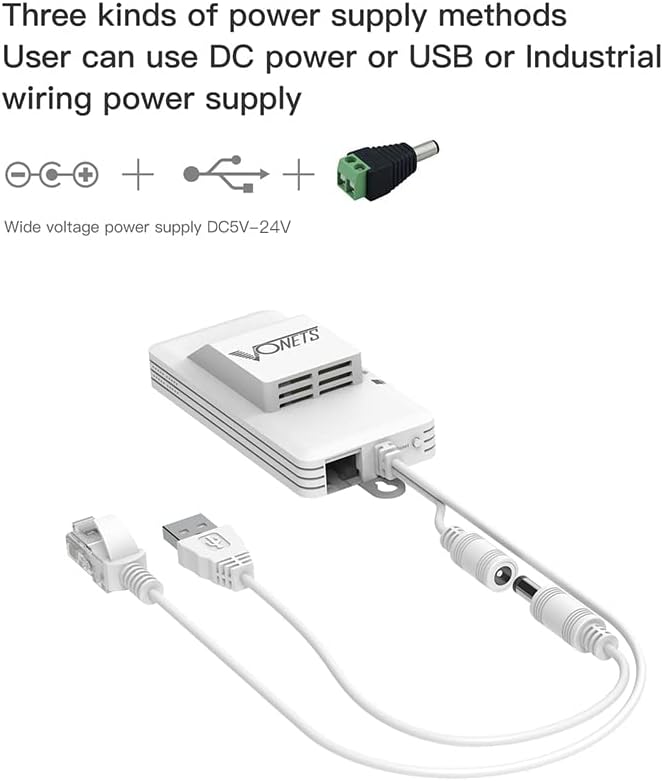
Image: Visual representation of the three power supply methods: DC barrel jack, USB, and industrial wiring terminal.
Smart Cooling Fan Operation
The VAP11AC is equipped with a smart cooling fan designed to manage heat dissipation efficiently. Due to its mini size and high power capabilities, the device generates heat during operation. The integrated fan automatically starts and stops as needed to maintain optimal operating temperature and ensure stable performance.
- The fan typically activates after 5-10 minutes of continuous normal operation.
- This intelligent control helps prevent overheating and prolongs the device's lifespan.
Typical Applications
The versatility of the VAP11AC makes it suitable for a wide range of applications, particularly where wired network access is challenging or wireless extension is required:
- Surveillance Systems: Connect DVRs and IP cameras wirelessly to your network.
- Industrial Automation: Integrate electronic scales, attendance machines, and other IoT devices into a wireless network.
- Office & Home Networking: Provide network access to desktop computers, printers, and other wired devices in locations without Ethernet drops.
- Remote Connectivity: Ideal for scenarios like connecting devices in garages, warehouses, or outdoor areas where running Ethernet cables is impractical.

Image: Diagram illustrating various wireless monitoring application solutions, including point-to-point and multipoint wireless connectivity for surveillance cameras and DVRs.

Image: A collage of various devices that can be connected using the VAP11AC, including IoT gateways, electronic scales, printers, PCs, monitoring cameras, and medical instruments.
Specifications
| Attribute | Detail |
|---|---|
| Product Model | VAP11AC with Fan |
| Product Dimensions | 3.7 x 1.77 x 0.59 inches |
| Item Weight | 2.82 ounces |
| Wireless Communication Standard | 5 GHz Radio Frequency, 802.11a/b/g/n/ac, 2.4 GHz Radio Frequency |
| Data Transfer Rate | 900 Megabits Per Second (5GHz), 300 Megabits Per Second (2.4GHz) |
| Frequency Band Class | Dual-Band |
| Special Features | WiFi to Ethernet, Bridge/Repeater Mode, Access Point Mode, Ethernet to WiFi bridge, Smart Cooling Fan |
| Power Supply | DC5V-24V (typical 5V/2A or 12V/1A) |
| Manufacturer | Shenzhen HouTian Network Communication Technology Co., Ltd. |
| Country of Origin | China |
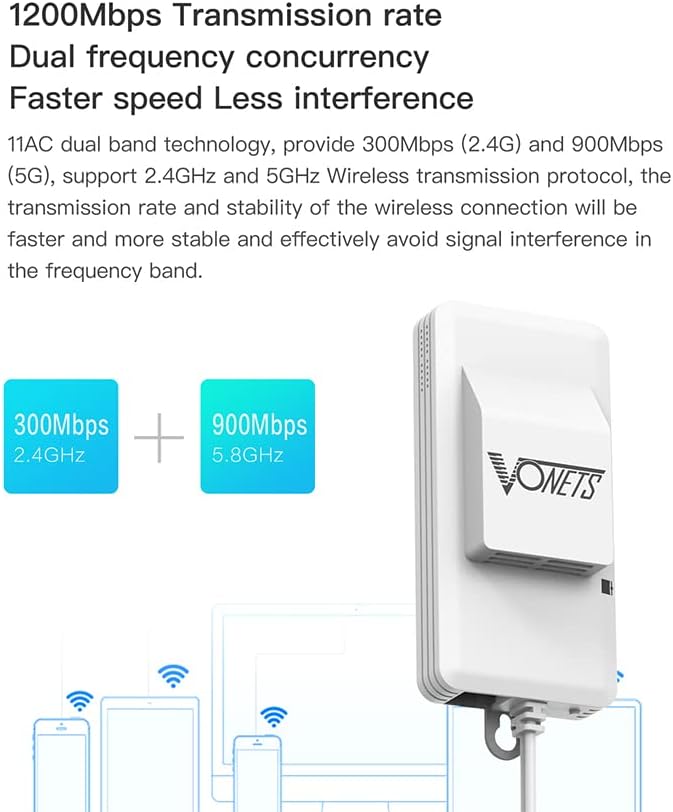
Image: Diagram illustrating the 1200Mbps dual-frequency concurrency, showing 300Mbps for 2.4GHz and 900Mbps for 5.8GHz bands.
Troubleshooting
If you encounter issues with your VONETS VAP11AC, consider the following common troubleshooting steps:
- No Power/Indicator Lights Off: Ensure the power cable is securely connected and the power source (USB port or DC adapter) is functional. Try a different power source if available.
- Cannot Access Configuration Page:
- Verify your computer is directly connected to the VAP11AC via Ethernet.
- Check your computer's IP settings to ensure it's on the same subnet as the device's default IP (e.g., 192.168.254.x if device is 192.168.254.254).
- Try resetting the device to factory defaults (refer to the manual for reset button location and procedure).
- No Internet Connection in Bridge/Repeater Mode:
- Confirm the VAP11AC is successfully connected to your main router's WiFi network. Check the WiFi connection status lights.
- Ensure the WiFi password entered during configuration is correct.
- Check the signal strength between the VAP11AC and your main router. Relocate the device if the signal is weak.
- Slow Speed/Intermittent Connection:
- Minimize physical obstructions (walls, large appliances) between the VAP11AC and your main router/connected devices.
- Consider interference from other 2.4GHz or 5GHz devices.
- Ensure the smart cooling fan is operating correctly to prevent performance degradation due to heat.
For more specific issues or advanced configurations, please consult the detailed user manual or the official configuration video. You can also contact VONETS customer support for assistance.
Warranty and Support
VONETS products are designed for reliability and performance. For information regarding product warranty, please refer to the documentation included with your purchase or visit the official VONETS website.
For technical support, configuration assistance, or any inquiries, please contact VONETS customer support:
- Email: skyfoxcn@vip.163.com
- Official Website: www.vonets.com
When contacting support, please have your product model (VAP11AC with Fan) and any relevant purchase information ready.
Related documentsVAP11AC with Fan


Ask a question about this manual
Ask about setup, troubleshooting, compatibility, parts, safety, or missing instructions. Manuals+ will review the question and use this page’s manual context to help answer it.