
1. Introduction
Thank you for choosing the Baseus EliteJoy Gen2 Series 12-in-1 USB-C Hub. This versatile docking station expands the connectivity of your USB-C enabled device, providing a comprehensive solution for various peripherals and display needs. It is designed to enhance your productivity and streamline your workspace.
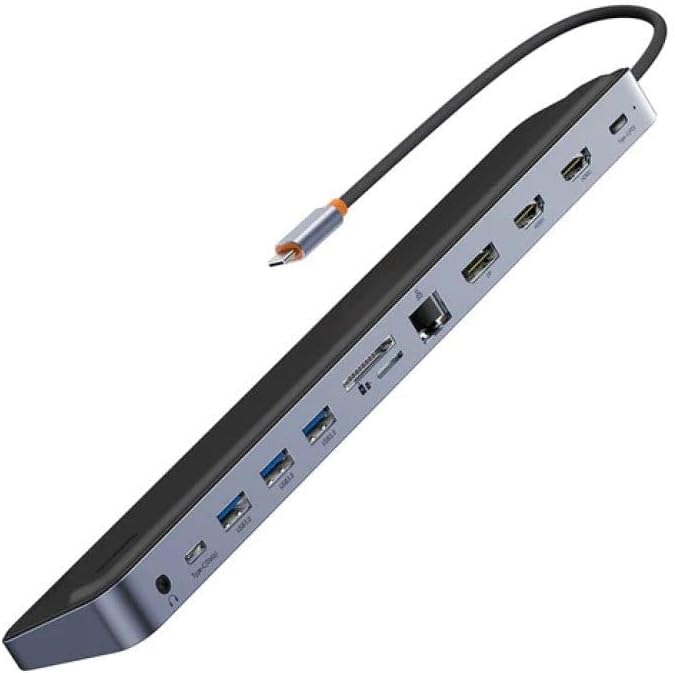
Figure 1: The Baseus EliteJoy Gen2 Series 12-in-1 USB-C Hub, showcasing its sleek design and multiple ports.
This manual provides detailed instructions on how to set up, operate, and maintain your hub, along with troubleshooting tips and product specifications. Please read this manual thoroughly before use to ensure optimal performance and longevity of your device.
2. Package Contents
Please check the package contents upon unboxing. If any items are missing or damaged, please contact your retailer or Baseus customer support.
- 1 x Baseus EliteJoy Gen2 Series 12-in-1 USB-C Hub
- 1 x User Manual (this document)
3. Product Overview and Port Layout
The Baseus EliteJoy Gen2 Hub features a comprehensive array of ports designed to meet diverse connectivity needs. Familiarize yourself with the port layout for easy setup and operation.

Figure 2: Side view of the Baseus Hub, illustrating the various input and output ports.
Port Descriptions:
- USB-C Input Cable: Connects to your host device (laptop, tablet, smartphone) for power and data.
- 2 x HDMI Ports: Connect to external displays for video output. Supports various resolutions up to 4K.
- 3 x USB 3.0 Ports: For connecting USB peripherals such as keyboards, mice, external hard drives, and USB flash drives. Offers high-speed data transfer.
- PD (Power Delivery) Port: USB-C port for power input to charge your host device while using the hub. Supports high wattage charging.
- DP (DisplayPort) Port: Connect to an external display for video output, offering an alternative to HDMI.
- SD Card Slot: For reading and writing data from SD memory cards.
- TF Card Slot (MicroSD): For reading and writing data from TF (MicroSD) memory cards.
- RJ45 Ethernet Port: Provides a stable and fast wired network connection.
- Type-C Data Port: An additional USB-C port for data transfer, connecting USB-C peripherals.
- 3.5mm Audio Jack: For connecting headphones, speakers, or microphones.
4. Setup Guide
Follow these steps to set up your Baseus EliteJoy Gen2 Series USB-C Hub:
- Connect to Host Device: Plug the integrated USB-C cable of the hub into an available USB-C port on your laptop, tablet, or smartphone. Ensure your device's USB-C port supports video output (DisplayPort Alternate Mode) and Power Delivery for full functionality.
- Power Connection (Optional but Recommended): For stable operation, especially when connecting multiple peripherals or external displays, connect a USB-C power adapter (not included) to the PD (Power Delivery) port on the hub. This will also charge your host device.
- Connect Peripherals:
- Displays: Connect your HDMI or DisplayPort cables from your monitors to the corresponding ports on the hub.
- USB Devices: Plug in your USB peripherals (keyboard, mouse, external hard drive, USB flash drive) into the USB 3.0 ports or the Type-C data port.
- Network: Connect an Ethernet cable from your router/modem to the RJ45 port for a wired internet connection.
- Memory Cards: Insert SD or TF cards into their respective slots.
- Audio: Plug in your headphones or speakers into the 3.5mm audio jack.
- Driver Installation: The hub is generally plug-and-play and does not require specific drivers for most operating systems (Windows, macOS, Chrome OS, Linux). If you encounter any issues, ensure your device's operating system is up to date.

Figure 3: The Baseus Hub in use, connected to a laptop and power adapter, demonstrating a typical setup.
5. Operating Instructions
Once connected, the Baseus Hub operates seamlessly with your host device. Here are some key operational notes:
- Display Output: Your operating system should automatically detect connected displays. You can configure display settings (mirror, extend, resolution) through your device's display settings. The hub supports dual HDMI output and a single DisplayPort output, allowing for multi-monitor setups.
- USB Data Transfer: USB 3.0 ports offer data transfer speeds up to 5Gbps. Ensure your connected devices and cables also support USB 3.0 for optimal performance.
- Power Delivery: The PD port allows for pass-through charging of your host device. The actual charging speed depends on your power adapter and host device's capabilities.
- Ethernet Connection: Once connected, your device should automatically recognize the wired network. Check your network settings if an internet connection is not established.
- Card Reader: Insert SD or TF cards correctly into their respective slots. They will appear as removable drives on your computer.
- Audio Output: Select the hub's audio output device in your system's sound settings if audio does not automatically route to your connected headphones/speakers.
6. Maintenance
Proper care and maintenance will ensure the longevity of your Baseus Hub:
- Cleaning: Use a soft, dry, lint-free cloth to clean the hub. Do not use liquid cleaners or aerosol sprays.
- Storage: Store the hub in a cool, dry place away from direct sunlight and extreme temperatures.
- Handling: Avoid dropping the hub or subjecting it to strong impacts. Do not bend or pull the integrated USB-C cable excessively.
- Ventilation: Ensure the hub has adequate ventilation during operation to prevent overheating.
7. Troubleshooting
If you encounter issues with your Baseus Hub, please refer to the following common problems and solutions:
| Problem | Possible Solution |
|---|---|
| No display output from HDMI/DP ports. |
|
| USB devices are not recognized or function intermittently. |
|
| No internet connection via RJ45 Ethernet port. |
|
| Host device is not charging via PD port. |
|
8. Specifications
| Feature | Detail |
|---|---|
| Brand | Baseus |
| Model Number | WKSX030213 |
| Color | Black (Dark Grey) |
| Total USB Ports | 12 (including 3x USB 3.0, 1x Type-C Data) |
| Compatible Devices | Laptops, Desktops, Tablets, Smartphones with USB-C port supporting DisplayPort Alt Mode and Power Delivery. |
| Data Transfer Rate | Up to 5 Gigabits per second (USB 3.0) |
| Video Output | 2x HDMI, 1x DisplayPort (resolutions up to 4K supported) |
| Ethernet | RJ45 Gigabit Ethernet |
| Card Reader | SD and TF (MicroSD) slots |
| Audio | 3.5mm Audio Jack |
| Weight | 268 Grams |
9. Warranty and Support
Baseus products are designed and manufactured to the highest quality standards. This product is covered by a limited warranty from the date of purchase. Please refer to the warranty card included with your product or visit the official Baseus website for detailed warranty terms and conditions.
For technical support, troubleshooting assistance, or general inquiries, please contact Baseus customer service through their official website or the contact information provided on your product packaging. When contacting support, please have your product model number (WKSX030213) and purchase details ready.
You can find more information and support resources at: www.baseus.com


