
1. Introduction
This manual provides comprehensive instructions for the safe and effective operation of your HelloBaby HB40-2 Video Baby Monitor. Please read this manual thoroughly before use and retain it for future reference. The HelloBaby HB40-2 is designed to provide parents with a secure and reliable way to monitor their baby, featuring a 4-inch IPS screen, remote pan-tilt-zoom capabilities, night vision, two-way talk, and temperature monitoring.
2. Package Contents
Verify that all items are present in the package:
- Parent Unit (Monitor)
- Baby Unit (Camera) - 2 units
- Power Adapters (for Parent Unit and Baby Units)
- Instruction Manual
- Mounting Screw

Image: The HelloBaby HB40-2 system, including the parent unit with a 4-inch IPS screen and two baby units (cameras), along with power adapters and mounting hardware.
3. Important Safety Information
- Strangulation Hazard: Keep cords out of reach of children. Never place the camera or cords within 3 feet (1 meter) of the crib or playpen. Secure cords to a wall or floor using cord clips.
- Choking Hazard: This product contains small parts. Keep out of reach of children.
- Water and Moisture: Do not expose the product to rain or moisture. Do not use near water (e.g., bathtub, sink).
- Heat Sources: Keep the product away from heat sources such as radiators, heat registers, stoves, or other appliances that produce heat.
- Ventilation: Do not block any ventilation openings. Ensure proper airflow around the units.
- Power Adapters: Use only the AC power adapters provided with the product. Using other adapters may damage the product.
- Battery Safety: The parent unit contains a rechargeable Lithium-Ion battery. Do not attempt to replace it yourself. Dispose of batteries properly.
- Interference: The monitor operates on a 2.4GHz FHSS frequency. Keep it away from other 2.4GHz devices (e.g., Wi-Fi routers, microwaves) to avoid interference.
4. Setup
4.1 Charging the Parent Unit
Before first use, fully charge the parent unit for approximately 7-8 hours. Connect the small plug of the power adapter to the parent unit and the other end to a power outlet. The battery indicator on the screen will show charging status. A full charge provides up to 29 hours in Audio-only mode or 13 hours in Screen-on mode.

Image: Comparison of battery life for the HelloBaby HB40-2 parent unit, illustrating 29 hours in audio-only mode and 13 hours in screen-on mode.
4.2 Positioning the Baby Unit (Camera)
Place the baby unit in a location that provides the best view of your baby. Ensure it is at least 3 feet (1 meter) away from the baby's crib or playpen to prevent strangulation hazards from the power cord. The camera can be placed on a flat surface or mounted to a wall using the included mounting screw.
- For optimal night vision, avoid placing the camera directly facing a light source.
- Ensure the camera is within the 1000ft (300m) range of the parent unit for stable connection.
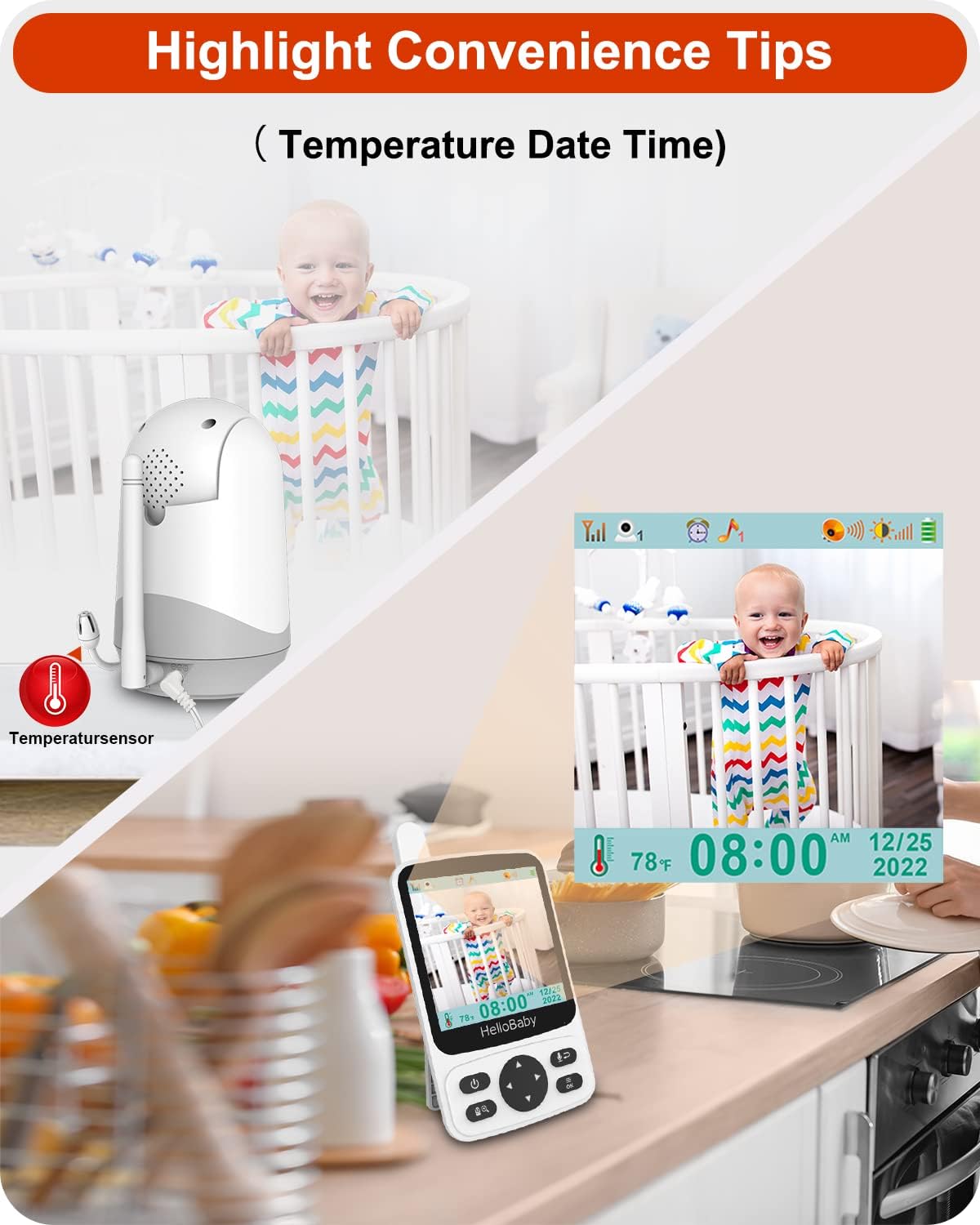
Image: The compact dimensions of the HelloBaby HB40-2 baby unit (camera) and illustrations of tabletop placement and wall mounting options.
4.3 Connecting the Baby Unit
Connect the power adapter to the baby unit and plug it into a power outlet. The baby unit will automatically power on. The monitor uses FHSS technology for a secure 2.4GHz channel transmission, requiring no Wi-Fi or app connection.

Image: Diagram illustrating the 1000ft (300m) range of the HelloBaby HB40-2 monitor, emphasizing its secure FHSS 2.4GHz connection without Wi-Fi or app requirements.
5. Operating Your HelloBaby HB40-2 Monitor
5.1 Parent Unit Controls and Display
The parent unit features a 4-inch IPS screen for clear viewing and intuitive controls.

Image: The parent unit display showcasing the menu with icons for Volume, Brightness, Pairing, Lullaby, Feeding Timer, Sleep Mode, Temperature, Date, and Time.
- Power Button: Press and hold to turn on/off. Press briefly to turn screen on/off.
- Navigation Buttons (Up/Down/Left/Right): Used to navigate menus and control camera pan/tilt.
- OK Button: Confirms selections.
- Talk Button: Press and hold to speak through the baby unit (two-way talk).
- Zoom Button: Activates 2X digital zoom.
- Menu Button: Accesses main menu for settings.
5.2 Key Features
- Remote Pan-Tilt-Zoom (PTZ): Use the navigation buttons on the parent unit to remotely rotate the camera 350° horizontally and 120° vertically. The 2X zoom allows for closer inspection.
- Two-Way Talk: Press and hold the talk button on the parent unit to communicate with your baby through the camera's speaker.
- Infrared Night Vision: The baby unit automatically activates infrared LEDs in low-light conditions, providing a clear black-and-white image of your baby in the dark.
- VOX Audio Mode: In VOX mode, the screen of the parent unit will light up and sound will activate when the baby camera detects your baby's voice or cries. This conserves battery life.
- Temperature Monitoring: The baby unit has a built-in temperature sensor. The room temperature is displayed on the parent unit screen, and alerts can be set for out-of-range temperatures.
- Lullabies: The monitor includes 8 pre-programmed lullabies to soothe your baby. These can be played remotely from the parent unit.
- Feeding Timer: Set reminders for feeding times directly from the parent unit.
- Multi-Camera Support: The system supports up to 4 cameras, allowing you to monitor multiple rooms or angles.

Image: The HelloBaby HB40-2 parent unit display showing the current temperature, date, and time, along with a live view of the baby.
6. Maintenance
- Cleaning: Clean the monitor and camera surfaces with a soft, dry cloth. Do not use cleaning agents or solvents.
- Lens Care: Gently wipe the camera lens with a soft, lint-free cloth. Avoid touching the lens directly with fingers.
- Storage: If storing the unit for an extended period, ensure the parent unit battery is fully charged, then power off both units. Store in a cool, dry place.
7. Troubleshooting
| Problem | Possible Cause | Solution |
|---|---|---|
| No picture/sound on parent unit. | Units are not powered on or out of range. | Ensure both parent and baby units are powered on and within range. Check power adapters are securely connected. |
| Picture freezes or disconnects. | Interference from other 2.4GHz devices or weak signal. | Move the parent unit closer to the baby unit. Relocate the units away from other wireless devices (e.g., Wi-Fi routers, microwaves). |
| Poor image quality/blurry night vision. | Camera lens is dirty or insufficient ambient light for night vision. | Clean the camera lens with a soft, dry cloth. Ensure no direct light sources are interfering with night vision. |
| Parent unit battery drains quickly. | Screen is constantly on or battery is old. | Use VOX mode to conserve battery. Reduce screen brightness. Ensure full charge before use. Battery life naturally degrades over time. |
| Temperature reading is inaccurate. | Baby unit placed near a heat source or draft. | Relocate the baby unit to a central area of the room, away from direct sunlight, vents, or heating/cooling sources. |
8. Specifications
| Feature | Detail |
|---|---|
| Model Number | HB40-2 |
| Screen Size | 4-inch IPS Display |
| Wireless Technology | 2.4GHz FHSS (Frequency Hopping Spread Spectrum) |
| Range | Up to 1000ft (300m) in open space |
| Camera Pan Angle | 350° Horizontal |
| Camera Tilt Angle | 120° Vertical |
| Zoom | 2X Digital Zoom |
| Night Vision | Infrared Automatic Night Vision |
| Battery Life (Parent Unit) | Up to 29 hours (Audio-only mode), 13 hours (Screen-on mode) |
| Power Source | AC Power Adapter (included) |
| Included Components | Parent Unit, 2 Baby Units, Power Adapters, Instruction Manual, Mounting Screw |
| Item Weight | 950 g |
9. Warranty Information
The HelloBaby HB40-2 Video Baby Monitor comes with a 1-year limited warranty from the date of purchase. This warranty covers defects in materials and workmanship under normal use. It does not cover damage caused by misuse, accident, unauthorized modification, or failure to follow the instructions in this manual.
Please retain your proof of purchase for warranty claims.
10. Customer Support
For technical assistance, troubleshooting, or warranty inquiries, please contact HelloBaby customer support. Refer to the contact information provided on the product packaging or the official HelloBaby website.
Website: Visit the HelloBaby Store on Amazon
When contacting support, please have your product model number (HB40-2) and purchase date available.


