
1. Introduction
This manual provides essential information for setting up and operating your Waveshare 1.69inch LCD Display Module. This module features a 240×280 resolution, 262K colors, and an IPS display panel, offering clear and vibrant visuals. It utilizes an SPI interface, minimizing the required I/O pins, and is compatible with various controller boards such as Raspberry Pi, Arduino, and STM32.
2. Package Content
Verify that all items listed below are included in your package:
- 1.69inch LCD Display Module
- Connection Cable

Image: The 1.69inch LCD Display Module shown alongside its multi-colored connection cable.
3. Features and Specifications
Key Features:
- 240×280 resolution, 262K colors, clear and colorful displaying effect.
- SPI interface, minimizes required I/O pins.
- Supports controller boards like Raspberry Pi, Arduino, and STM32.
- Onboard voltage translator for 3.3V/5V power input and logic level compatibility.
Technical Specifications:
| Specification | Value |
|---|---|
| Model Name | 1.69inch LCD Module |
| Display Size | 1.69 inches |
| Resolution | 240 × 280 pixels |
| Display Color | 262K Colors |
| Display Panel Type | IPS |
| Interface | SPI (4-wire) |
| Driver IC | ST7789V2 |
| Operating Voltage | 3.3V / 5V |
| Compatible Devices | Raspberry Pi series, Arduino, STM32 |

Image: Overview of the 1.69inch LCD Display Module's key features and specifications.
4. Hardware Overview
Onboard Voltage Translator
The module includes an onboard voltage translator, ensuring compatibility with both 3.3V and 5V power inputs and logic levels. This simplifies integration with various microcontrollers without the need for external level shifters.
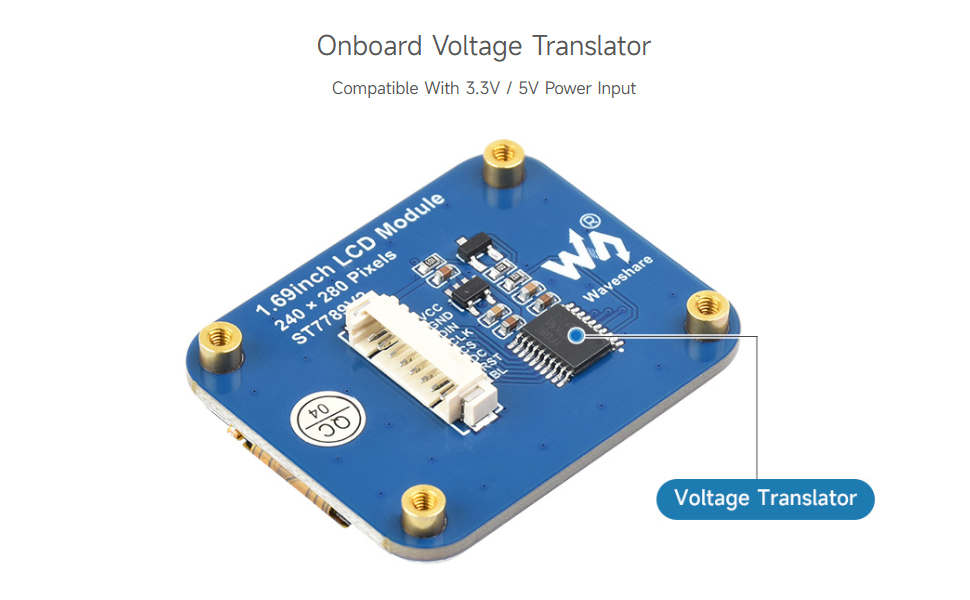
Image: The voltage translator circuit on the module's PCB.
Onboard SPI Control Interface
The module features a standard SPI control interface, which is widely supported by microcontrollers. The pin definitions are clearly marked on the PCB for easy connection.
| Pin | Description |
|---|---|
| VCC | Power (3.3V / 5V input) |
| GND | Ground |
| DIN | SPI Data Input |
| CLK | SPI Clock Input |
| CS | Chip Select (low active) |
| DC | Data/Command Selection (high for data, low for command) |
| RST | Reset (low active) |
| BL | Backlight Control |

Image: The SPI control interface and pin definitions on the module.
5. Setup and Hardware Connection
This section outlines the general connection procedure for common development boards. Always refer to the specific pinout diagrams for your chosen microcontroller and the module.
Connecting with Raspberry Pi:
Connect the module to your Raspberry Pi's GPIO pins according to the provided pinout. Ensure correct connections for VCC, GND, DIN, CLK, CS, DC, RST, and BL.
Connecting with Arduino Board:
For Arduino boards, connect the module's SPI pins to the corresponding SPI pins on your Arduino (e.g., MOSI, SCK, SS). Pay attention to the VCC and GND connections, ensuring they match the Arduino's voltage output.
Connecting with STM32:
When connecting to an STM32 microcontroller, follow the specific SPI pin assignments for your STM32 development board. The onboard voltage translator on the LCD module ensures compatibility with STM32's typical 3.3V logic.
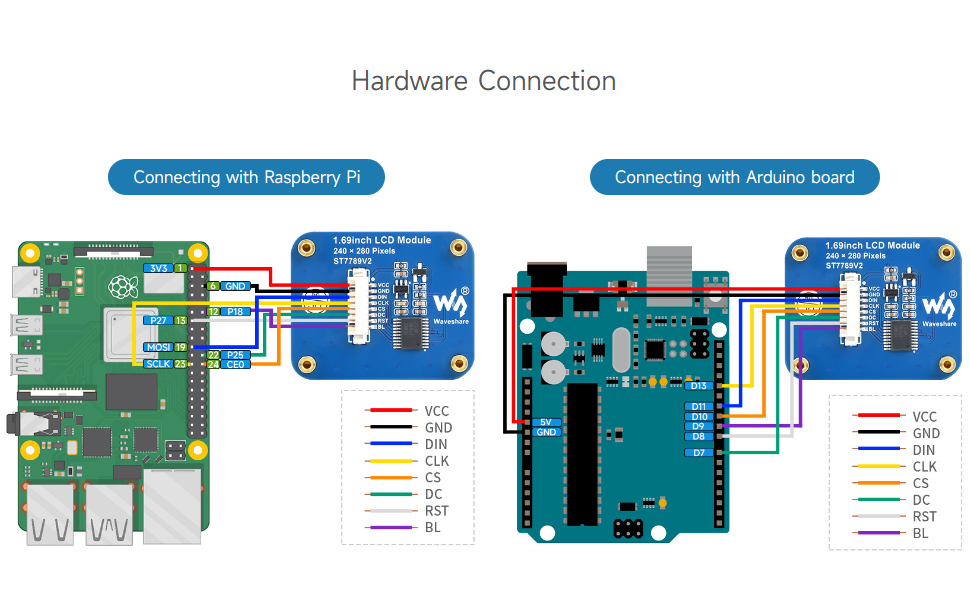
Image: Detailed connection diagrams for Raspberry Pi and Arduino.
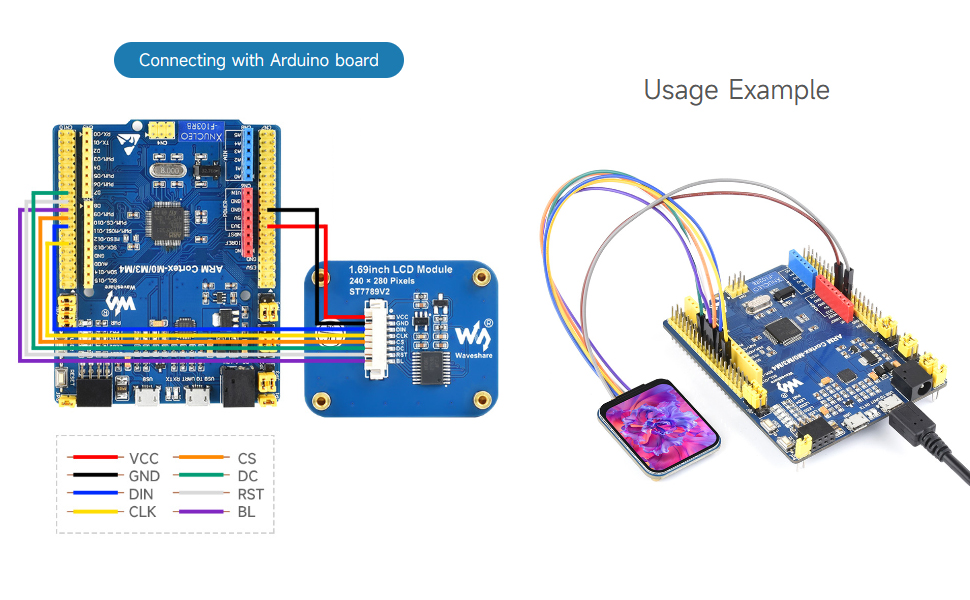
Image: Connection diagram for STM32.
6. Operating Instructions
Once the hardware connections are established, you will need to program your microcontroller to interact with the LCD module. Waveshare provides comprehensive online resources, including example code and tutorials for various platforms (Raspberry Pi, Arduino, STM32).
For detailed programming guides and sample code, please visit the official Waveshare Wiki or product page. These resources will guide you through initializing the display, drawing graphics, and displaying text.
Video: An overview of the 1.69inch LCD Module, demonstrating its features and compatibility with various development boards. This video highlights the display's resolution, color capabilities, and SPI interface.
7. Outline Dimensions
Below are the physical dimensions of the 1.69inch LCD Display Module, provided in millimeters. These measurements are crucial for integration into custom enclosures or projects.

Image: Detailed outline dimensions of the LCD module (Unit: mm).
8. Troubleshooting
If you encounter issues during setup or operation, consider the following common troubleshooting steps:
- Check Connections: Ensure all wires are securely connected to the correct pins on both the LCD module and your microcontroller. Verify VCC and GND are correctly supplied.
- Power Supply: Confirm that your microcontroller and the LCD module are receiving adequate power.
- Software Configuration: Double-check your code for correct SPI initialization, pin assignments, and display driver commands. Ensure you are using the correct library for the ST7789V2 driver.
- Online Resources: Refer to the Waveshare Wiki for specific troubleshooting guides, FAQs, and community forums where similar issues may have been resolved.
9. Support and Warranty
For technical support, additional documentation, and warranty information, please visit the official Waveshare website. The website provides access to the latest drivers, software examples, and contact details for customer service.
Waveshare is committed to providing high-quality products and support. Please retain your proof of purchase for any warranty claims.


