
1. Safety Information
Please read all safety instructions carefully before using the VILTROX Sprite 15B LED Panel Video Light. Retain this manual for future reference.
- Do not expose the device to water or excessive humidity.
- Avoid direct eye exposure to the LED light source, as it can cause discomfort or damage.
- Do not disassemble or modify the product. Repairs should only be performed by authorized service personnel.
- Keep the device away from heat sources and direct sunlight.
- Use only the specified battery (NP-F550) and charging cable (USB-C) provided or recommended by VILTROX.
- Dispose of batteries according to local regulations. Do not incinerate.
2. Product Overview
The VILTROX Sprite 15B is a versatile 18W CCT LED panel video light designed for photography and videography. It offers adjustable color temperature, dimmable brightness, and smart control features.

Image: The VILTROX Sprite 15B LED light, showcasing its compact design, removable battery, and a smartphone displaying its control application.
2.1 Key Features
- CCT Mode: Adjustable color temperature from 2800K (warm) to 6800K (cool) to match various lighting conditions.
- Constant Power Output: Maintains a consistent 18W power output even when adjusting color temperature.
- Bluetooth App Control: Control multiple devices simultaneously via a smartphone app for simplified lighting setup.
- Special Lighting Effects: Includes 10 pre-programmed lighting effects for creative video production.
- Precise Dimming: Brightness adjustable from 1% to 100% with 100-level accuracy for smooth transitions and accurate light levels.
- Rechargeable Battery: Equipped with a 2200 mAh Lithium Battery, providing approximately 80 minutes of operation at maximum brightness.
- USB-C Power: Supports Type-C power input for flexible charging and continuous power options.
- Soft Light Output: Features a professional frosted surface to diffuse glare, producing soft and uniform illumination.
2.2 What's in the Box

Image: Contents of the VILTROX Sprite 15B package. Shown are the LED light panel, a cold shoe adapter, an NP-F550 battery, and a USB-C charging cable.
- VILTROX Sprite 15B LED Light
- Cold Shoe Adapter
- NP-F550 Battery
- USB-C Charging Cable
2.3 Component Identification
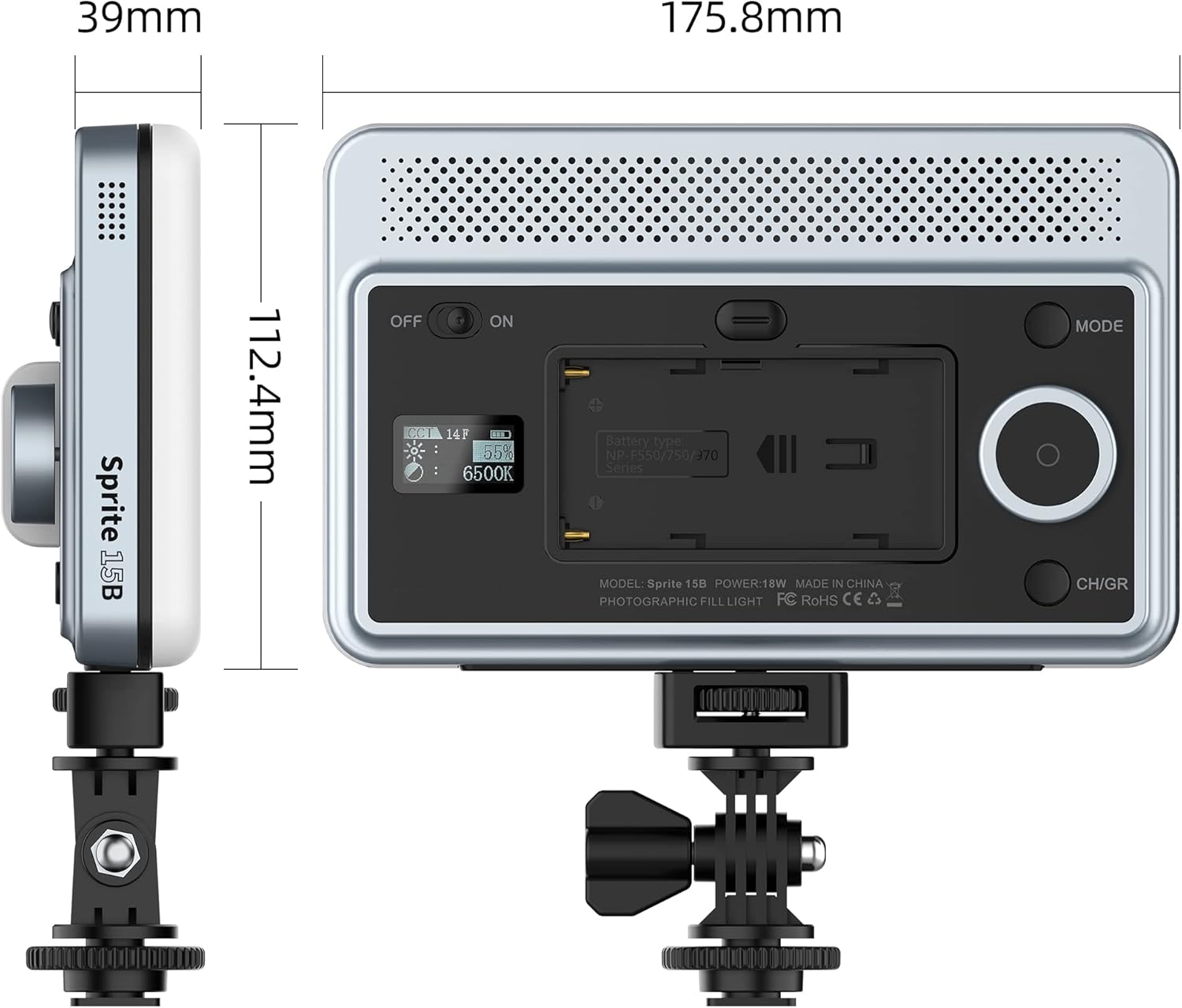
Image: Rear panel of the VILTROX Sprite 15B. Visible components include the ON/OFF switch, battery compartment, mode button, control dial, and CH/GR (Channel/Group) button.
- ON/OFF Switch: Powers the device on or off.
- Battery Compartment: Houses the NP-F550 battery.
- USB-C Port: For charging and external power supply.
- Mode Button: Toggles between CCT mode and special effects mode.
- Control Dial: Adjusts brightness, color temperature, or effect parameters. Press to confirm selections.
- CH/GR Button: Selects channel or group for multi-light control.
- Display Screen: Shows current settings (brightness, color temperature, battery level, channel/group).
3. Setup
3.1 Battery Installation
- Locate the battery compartment on the rear of the light.
- Insert the NP-F550 battery into the compartment, ensuring the contacts align correctly.
- Gently push the battery until it clicks into place.
3.2 Mounting the Light

Image: The VILTROX Sprite 15B LED light attached to a camera via its cold shoe adapter, demonstrating typical usage.
- Attach the cold shoe adapter to the 1/4-inch screw hole at the bottom of the LED light.
- Securely tighten the adapter.
- Slide the cold shoe adapter into your camera's hot shoe mount or a compatible light stand.
- Tighten the locking ring on the cold shoe adapter to secure the light in position.
3.3 Charging the Battery

Image: The VILTROX Sprite 15B LED light connected to a USB-C charging cable, indicating the charging process.
- Connect the provided USB-C charging cable to the USB-C port on the light.
- Connect the other end of the cable to a compatible USB power adapter (5V/2A or 9V/2A recommended).
- The display screen will indicate the charging status.
- The light can be used while charging.
4. Operation
4.1 Power On/Off
Slide the ON/OFF switch located on the rear panel to the "ON" position to power on the light. Slide it to "OFF" to power off.
4.2 Adjusting Color Temperature (CCT Mode)
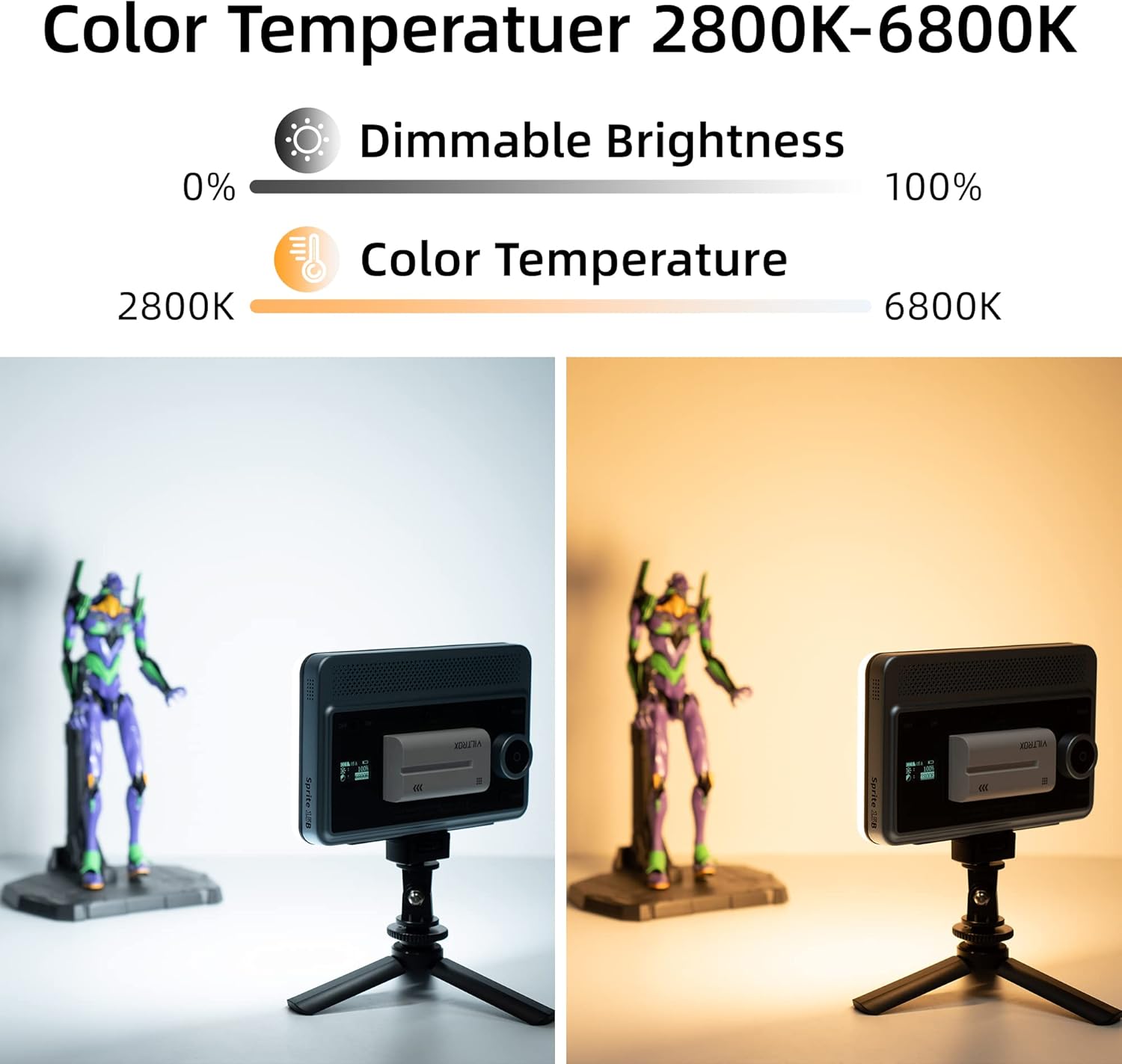
Image: Demonstrates the adjustable color temperature range of the VILTROX Sprite 15B, showing a warm 2800K light on the left and a cool 6800K light on the right.
- Ensure the light is in CCT mode. If not, press the MODE button until "CCT" or a similar indicator appears on the display.
- Rotate the Control Dial to adjust the color temperature between 2800K and 6800K. The display will show the current Kelvin value.
4.3 Adjusting Brightness
- In CCT mode, press the Control Dial once to switch to brightness adjustment. The brightness percentage will blink on the display.
- Rotate the Control Dial to adjust the brightness from 1% to 100%.
- Press the Control Dial again to confirm the setting or to switch back to color temperature adjustment.
4.4 Special Effects Mode
- Press the MODE button to cycle through available modes until you reach the special effects mode.
- Rotate the Control Dial to select from the 10 available lighting effects.
- Press the Control Dial to enter the selected effect's parameters (if applicable) and adjust them.
4.5 Bluetooth App Control

Image: A user controlling two VILTROX Sprite 15B LED lights remotely via a smartphone application, demonstrating the Bluetooth control feature in a content creation setting.
- Download the VILTROX app from your smartphone's app store.
- Ensure Bluetooth is enabled on your smartphone and the LED light is powered on.
- Open the VILTROX app and follow the on-screen instructions to pair your device(s).
- Use the app interface to adjust brightness, color temperature, select special effects, and manage multiple lights by assigning them to channels or groups using the CH/GR button on the light.
5. Maintenance
- Cleaning: Use a soft, dry cloth to clean the light panel and body. Do not use abrasive cleaners or solvents.
- Battery Care: For optimal battery life, avoid fully discharging the battery frequently. Charge the battery regularly, even if not in use for extended periods.
- Storage: Store the light in a cool, dry place away from direct sunlight and extreme temperatures. Remove the battery if storing for a long duration.
6. Troubleshooting
| Problem | Possible Cause | Solution |
|---|---|---|
| Light does not turn on. | Battery is depleted or not installed correctly. | Ensure battery is fully charged and correctly inserted. Check ON/OFF switch position. |
| Battery not charging. | Faulty USB-C cable or power adapter. | Try a different USB-C cable and power adapter. Ensure the power adapter meets specifications (5V/2A or 9V/2A). |
| Bluetooth app cannot connect. | Bluetooth is off on phone or light, or app issue. | Ensure Bluetooth is enabled on both devices. Restart the app and the light. Try re-pairing the device in the app. |
| Light output is inconsistent or flickers. | Low battery or internal issue. | Charge the battery fully. If the problem persists, contact customer support. |
7. Specifications
| Feature | Detail |
|---|---|
| Model Number | Sprite 15B |
| Power | 18W |
| Color Temperature Range | 2800K - 6800K |
| Max Brightness | 1720 Lux @ 0.5m |
| CRI (Color Rendering Index) | ≥95 |
| Dimming Range | 1% - 100% |
| Beam Angle | 120° |
| Battery Type | NP-F550 Lithium Ion (2200 mAh) |
| Battery Life (Max Brightness) | Approx. 80 minutes |
| Power Supply | USB-C (5V/2A, 9V/2A) |
| Item Weight | 1.28 pounds (approx. 580g) |
| Dimensions (L x W x H) | 175.8mm x 112.4mm x 39mm (approx.) |
| Manufacturer | Shenzhen Jueying Technology Co., Ltd. |
Note: Specifications are subject to change without prior notice.
8. Warranty and Support
VILTROX products come with a standard manufacturer's warranty. For detailed warranty information, product support, or service inquiries, please visit the official VILTROX website or contact their customer service.
Official VILTROX Website: www.viltrox.com
VILTROX Amazon Store: VILTROX Official Store
