
Introduction
Welcome to a Cleaner Home
Thank you for choosing the ROIDMI EVA Robot Vacuum Cleaner. This advanced cleaning device is designed to provide a comprehensive and hands-free cleaning experience, combining powerful vacuuming with efficient mopping. Featuring intelligent navigation, automatic dust collection, and self-cleaning mop pads, the ROIDMI EVA simplifies your home maintenance routine. Please read this manual thoroughly before using the product to ensure safe and optimal operation.
Safety Information
To reduce the risk of injury or damage, read these safety instructions carefully and keep them handy for future reference. This appliance can be used by children aged 8 years and above and persons with reduced physical, sensory or mental capabilities or lack of experience and knowledge if they have been given supervision or instruction concerning use of the appliance in a safe way and understand the hazards involved. Children shall not play with the appliance. Cleaning and user maintenance shall not be made by children without supervision.
- Ensure the charging dock is placed on a flat, stable surface against a wall, with adequate clear space around it.
- Do not use the robot vacuum on wet surfaces or in areas with standing water.
- Keep loose cables, curtains, and other objects that could entangle the robot out of its path.
- Do not allow the robot to pick up large or sharp objects, liquids, or burning/smoking materials.
- Only use the original power adapter and charging dock provided with the device.
- Regularly clean the brushes and sensors to maintain optimal performance.
Product Overview
The ROIDMI EVA is an integrated cleaning solution, featuring a robot vacuum and a self-cleaning base station.

Figure 1: ROIDMI EVA Robot Vacuum and Self-Cleaning Station with mobile app interface.
Main Components
- Robot Vacuum: Equipped with powerful suction, rotating mop pads, LiDAR navigation, and various sensors for intelligent cleaning.
- Self-Cleaning Base Station: Automatically empties the robot's dustbin, washes and dries the mop pads, and stores clean/dirty water.
- Dust Bag: Located in the base station, capable of holding up to 60 days of dust and debris.
- Water Tanks: Separate 4-liter tanks for clean and dirty water within the base station.
- Power Adapter: For connecting the base station to a power outlet.
Setup
1. Unpacking and Placement
- Carefully remove all components from the packaging.
- Choose a suitable location for the self-cleaning base station. It should be placed against a wall, on a hard, flat surface, with at least 0.5 meters (1.6 feet) of clear space on both sides and 1.5 meters (4.9 feet) in front. Ensure there are no obstacles blocking the robot's return path.
- Connect the power adapter to the base station and plug it into a wall outlet. Ensure the power indicator on the base station lights up.
2. Preparing the Robot
- Remove any protective films or packing materials from the robot vacuum.
- Ensure the mop pads are securely attached to the robot.
- Place the robot vacuum onto the charging contacts of the base station. It will automatically align and begin charging. For first use, it is recommended to fully charge the robot.
3. Filling Water Tanks and Installing Dust Bag
- Open the lid of the base station.
- Remove the clean water tank (usually marked) and fill it with clean tap water. Do not add cleaning solutions unless specifically designed for robot vacuums and approved by ROIDMI.
- Ensure the dirty water tank is empty before starting a cleaning cycle.
- Verify that a dust bag is correctly installed in the dustbin compartment of the base station. The LED indicator will help confirm its status.
4. App Connection (Recommended)
- Download the ROIDMI App or Mijia App from your smartphone's app store.
- Follow the in-app instructions to add your ROIDMI EVA device. This typically involves connecting to your home Wi-Fi network.
- The app allows for advanced features such as mapping, setting no-go zones, scheduling, and remote control.
Operating Instructions
Cleaning Modes
The ROIDMI EVA offers versatile cleaning options:

Figure 2: The ROIDMI EVA supports three distinct cleaning modes.
- Vacuuming & Mopping Mode: Simultaneous vacuuming and mopping for comprehensive cleaning.
- Vacuuming Mode: Focuses solely on vacuuming, ideal for carpets or when mopping is not desired.
- Mopping Mode: Dedicated mopping with rotating pads and downward pressure for stubborn stains.
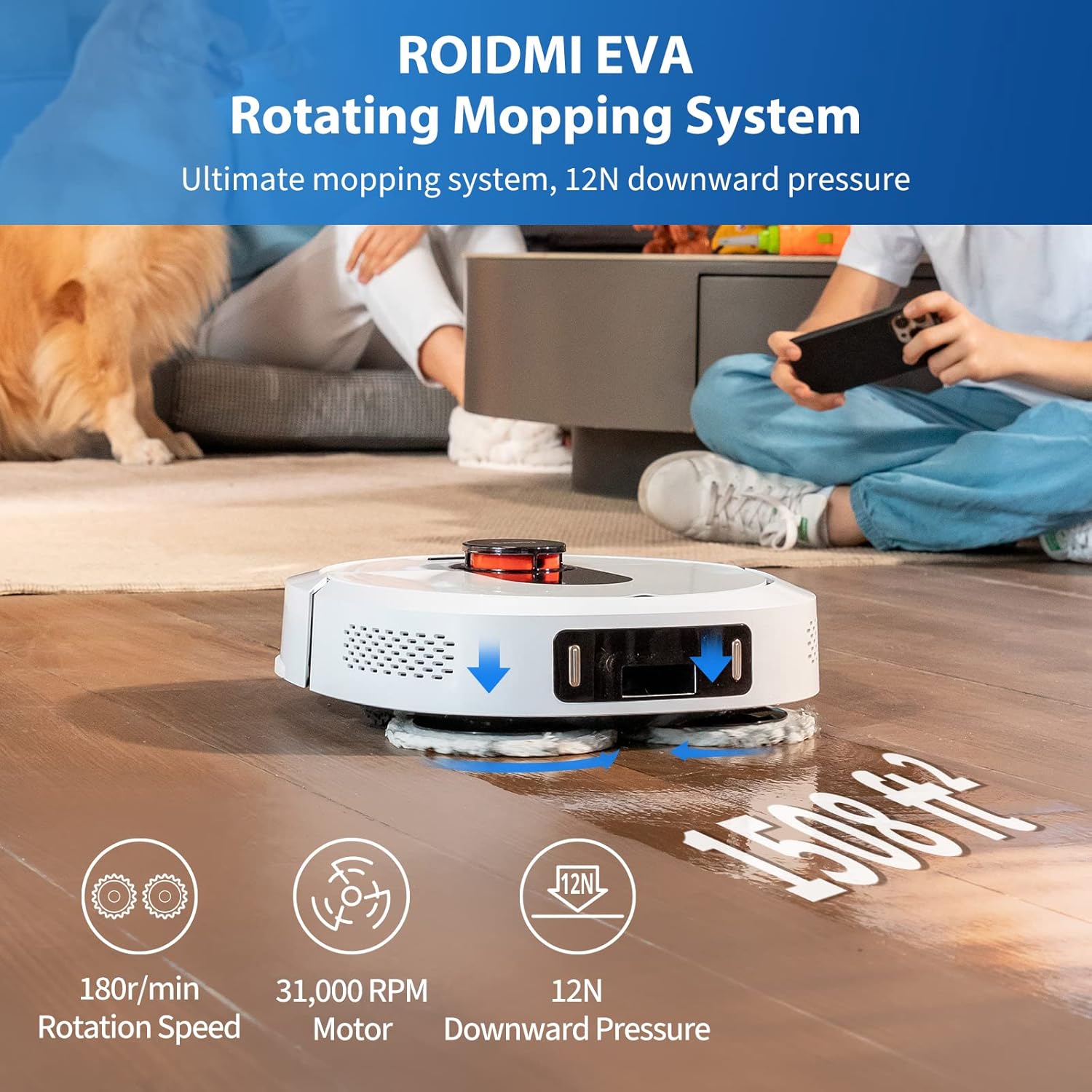
Figure 3: The powerful rotating mopping system applies 12N downward pressure for effective cleaning.
Starting a Cleaning Cycle
- Via Robot Button: Press the power button on the robot once to start a general cleaning cycle. Press again to pause. Hold to send it back to the base.
- Via App: Open the ROIDMI/Mijia App, select your device, and tap "Start Cleaning." You can also choose specific rooms, set no-go zones, or schedule cleanings.
- Via Voice Control: If connected to Amazon Alexa or Google Assistant, use voice commands like "Alexa, start cleaning the kitchen" or "OK Google, tell ROIDMI to clean."

Figure 4: Voice control integration for hands-free operation.
Navigation and Obstacle Avoidance
The ROIDMI EVA utilizes advanced LiDAR navigation (LDS 8.0) and AI obstacle avoidance technology to efficiently map your home and navigate around furniture and other objects. This ensures thorough coverage and prevents collisions.

Figure 5: Advanced LDS 8.0 LiDAR for precise navigation and mapping.
Maintenance
Regular maintenance ensures the longevity and optimal performance of your ROIDMI EVA.
Base Station Maintenance
- Emptying Dirty Water Tank: Regularly empty the dirty water tank to prevent odors and bacterial growth. Clean the tank with clean water after emptying.
- Refilling Clean Water Tank: Ensure the clean water tank is always filled before a mopping cycle.
- Dust Bag Replacement: The 3-liter dust bag can hold debris for up to 60 days. Replace it when the LED indicator on the base station signals it's full or when you notice reduced suction.
- Cleaning the Cleaning Tray: Periodically remove and clean the cleaning tray where the mop pads are washed. This prevents residue buildup.
Robot Vacuum Maintenance
- Mop Pads: The base station automatically washes and dries the mop pads. However, it's recommended to occasionally remove and hand-wash them for a deeper clean, especially if heavily soiled. Replace worn-out mop pads as needed.
- Main Brush: Remove the main brush cover and clean any tangled hair or debris from the brush. Use the cleaning tool provided.
- Side Brush: Check the side brush for tangled hair or debris. If damaged, replace it.
- Sensors: Gently wipe all sensors (cliff sensors, wall sensors, LiDAR sensor) with a clean, dry cloth to ensure accurate navigation.
- Charging Contacts: Clean the charging contacts on both the robot and the base station with a dry cloth to ensure proper charging.
Troubleshooting
| Problem | Possible Cause | Solution |
|---|---|---|
| Robot not charging | Charging contacts are dirty or blocked. Power adapter not connected. | Clean charging contacts on both robot and base station. Ensure power adapter is securely plugged in. |
| Robot gets stuck frequently | Loose cables, small objects, or high thresholds. Sensors are dirty. | Clear the cleaning area of obstacles. Clean all sensors. |
| Poor cleaning performance | Dustbin full, brushes tangled, mop pads dirty, or water tank empty. | Empty dust bag. Clean main and side brushes. Clean or replace mop pads. Refill clean water tank. |
| Base station smells bad | Dirty water tank not emptied, or cleaning tray needs cleaning. | Empty and clean the dirty water tank. Clean the cleaning tray thoroughly. |
| App connection issues | Incorrect Wi-Fi password, router too far, or app needs update. | Ensure correct Wi-Fi credentials. Move router closer or use a Wi-Fi extender. Update the app to the latest version. Restart robot and router. |
Specifications

Figure 6: Dimensions of the ROIDMI EVA Robot Vacuum and Base Station.
| Feature | Detail |
|---|---|
| Model | EVA CE Weiss |
| Brand | ROIDMI |
| Color | White |
| Suction Power | 3200 Pa |
| Battery Capacity | 5200 mAh |
| Runtime | Up to 180 minutes |
| Clean Water Tank Capacity | 4 Liters |
| Dirty Water Tank Capacity | 4 Liters |
| Dust Bag Capacity | 3 Liters (up to 60 days) |
| Navigation System | LDS 8.0 LiDAR |
| Control Method | App (ROIDMI/Mijia), Voice (Amazon Alexa, Google Assistant), Buttons |
| Mop Pad Pressure | 12N |
| Mop Pad Rotation Speed | 180 rotations/minute |
| Product Weight (Package) | 6.5 kg |
Warranty and Support
For warranty information and technical support, please refer to the warranty card included in your product packaging or visit the official ROIDMI website. You can also contact ROIDMI customer service through the app or their official support channels for assistance with any issues or questions.
Website: www.roidmi.com
Customer Service: Refer to the ROIDMI App for in-app support options.


