
TCL 32S331
TCL 32-Inch Series 4 Class 720p LED Smart TV User Manual
Model: 32S331
1. Introduction
This manual provides essential information for the setup, operation, maintenance, and troubleshooting of your TCL 32-Inch Series 4 Class 720p LED Smart TV. Please read this manual thoroughly before using your television to ensure proper and safe operation.
Your TCL Smart TV combines advanced display technology with an integrated entertainment platform, offering a sharp 720p image quality and access to various streaming services. This model is designed for wall mounting and does not include traditional stands.

Front view of the TCL 32-inch Smart TV.
2. What's in the Box
Carefully unpack your new TCL TV and ensure all items listed below are present. If any items are missing or damaged, please contact customer support.
- TCL 32-Inch Series 4 Class 720p LED Smart TV
- Remote Control
- Wall Mount Bracket (Note: TV stands are not included with this model)
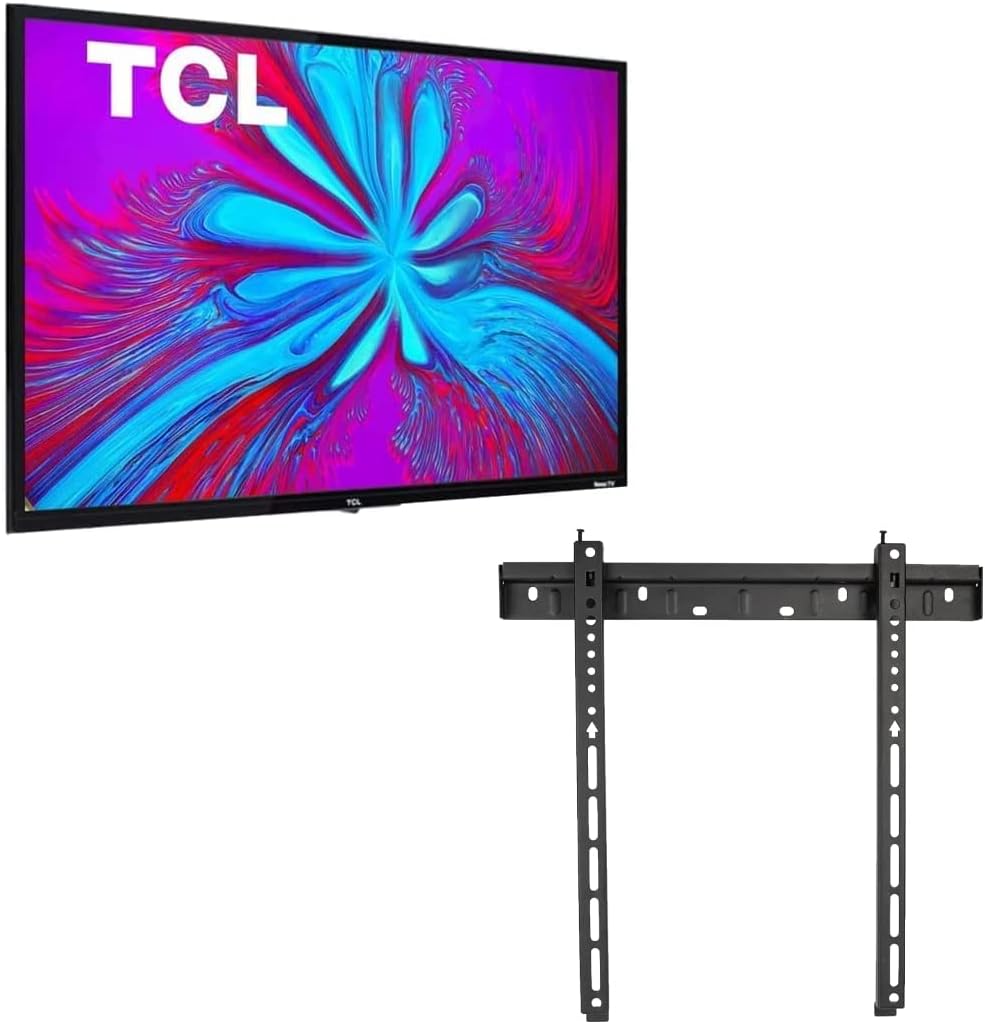
The TCL Smart TV and included wall mount bracket.
3. Setup
3.1 Wall Mount Installation
This television is designed for wall mounting. Ensure you have the appropriate tools and follow the instructions provided with the wall mount bracket for secure installation. It is recommended to have professional assistance for wall mounting to prevent damage or injury.
- Identify a suitable location on a sturdy wall, away from direct sunlight and heat sources.
- Attach the wall mount brackets to the back of the TV using the provided screws, ensuring they are securely fastened to the VESA mounting points.
- Mount the wall plate to the wall according to the wall mount's instructions, ensuring it is level and capable of supporting the TV's weight.
- Carefully lift and attach the TV to the wall plate. Verify that the TV is securely locked into place.

Rear view of the TV, highlighting the VESA mounting area.
3.2 Connecting Peripherals
Connect your external devices such as cable boxes, gaming consoles, or Blu-ray players to the TV's input ports.
- HDMI: For high-definition video and audio, connect devices to the HDMI ports.
- USB: For media playback from USB drives.
- Antenna/Cable: For over-the-air broadcasts or cable TV.
- Ethernet: For a wired internet connection (Wi-Fi is also available).

Side view of the TV, illustrating the available connectivity ports.
3.3 Initial Power On and Network Connection
- Plug the power cord into an electrical outlet.
- Press the power button on the remote control or on the TV.
- Follow the on-screen instructions to complete the initial setup, including language selection, time zone, and network connection.
- For Wi-Fi, select your network from the list and enter the password.
4. Operating Your TV
4.1 Remote Control Overview
The included remote control allows you to navigate menus, change channels, adjust volume, and access smart features. Familiarize yourself with the button layout for optimal use.
4.2 Smart TV Features
Your TCL Smart TV provides instant access to a wide variety of streaming applications and services.
- Streaming Services: Access popular apps like Netflix, Disney+, YouTube, and more directly from your TV's home screen.
- Voice Assistant Compatibility: The TV is compatible with Alexa and Google Assistant. You can use voice commands through a compatible device to control your TV, such as turning it on, changing channels, or adjusting the volume.
- Content Navigation: Use the remote control's directional pad and select button to browse content and menus.
4.3 Picture and Sound Settings
Customize your viewing experience through the TV's settings menu.
- Picture Modes: Select from various preset picture modes (e.g., Standard, Movie, Sport) or customize settings like brightness, contrast, and color.
- Sound Modes: Choose sound modes (e.g., Standard, Music, Movie) or adjust bass, treble, and balance for your preferred audio output.
5. Maintenance
5.1 Cleaning Your TV
To maintain the appearance and performance of your TV, follow these cleaning guidelines:
- Always unplug the TV before cleaning.
- Use a soft, dry, lint-free cloth to gently wipe the screen and cabinet.
- For stubborn marks, lightly dampen the cloth with water or a specialized screen cleaner. Never spray liquid directly onto the TV.
- Avoid using abrasive cleaners, waxes, or solvents as they can damage the TV's finish.
5.2 Software Updates
Your TV may receive software updates to improve performance and add new features. Ensure your TV is connected to the internet to receive these updates automatically or check for them manually through the settings menu.
6. Troubleshooting
If you encounter issues with your TV, refer to the following common problems and solutions before contacting customer support.
| Problem | Possible Solution |
|---|---|
| No power | Ensure the power cord is securely plugged into both the TV and a working electrical outlet. Try a different outlet. |
| No picture, but sound is present | Check the input source. Ensure all video cables are securely connected. Try restarting the TV. |
| No sound, but picture is present | Check the volume level and mute status. Ensure audio cables are correctly connected. Check TV audio output settings. |
| Remote control not working | Replace the batteries. Ensure there are no obstructions between the remote and the TV's IR sensor. |
| Cannot connect to Wi-Fi | Ensure your Wi-Fi router is on and working. Re-enter the Wi-Fi password. Try restarting both the TV and the router. |
| Smart TV apps not loading | Check your internet connection. Try restarting the TV. Ensure apps are updated to the latest version. |
7. Specifications
Below are the technical specifications for the TCL 32-Inch Series 4 Class 720p LED Smart TV (Model: 32S331).
| Feature | Detail |
|---|---|
| Brand | TCL |
| Model Number | 32S331 |
| Screen Size | 32 Inches |
| Display Technology | LED |
| Resolution | 720p |
| Refresh Rate | 60 Hz |
| Aspect Ratio | 16:9 |
| Connectivity Technology | Wi-Fi, HDMI, Wireless |
| Special Feature | Flat |
| Speaker Type | Built-In |
| Color | Black |
| Product Dimensions (D x W x H) | 7 x 73 x 43 inches (approximate) |
| Voltage | 1.1E+2 Volts (AC) |
| Wattage | 7E+1 |

Approximate dimensions of the TCL 32-inch Smart TV.
8. Warranty and Support
For warranty information, technical support, or service inquiries, please refer to the documentation provided with your purchase or visit the official TCL support website. Keep your proof of purchase for warranty claims.
If you require further assistance, please contact TCL customer service directly.
Related documents32S331


Ask a question about this manual
Ask about setup, troubleshooting, compatibility, parts, safety, or missing instructions. Manuals+ will review the question and use this page’s manual context to help answer it.