
ODK ZJZ-SBWJCZ
ODK Reversible L-Shaped Desk User Manual
Model: ZJZ-SBWJCZ
Introduction
Welcome to your new ODK L-shaped desk! This versatile piece of furniture is designed to enhance your workspace, offering a reversible design, generous storage, and integrated power solutions. Whether used as a standalone desk or against a wall, its thoughtful features aim to improve productivity and create a comfortable working environment.

Figure 1: The ODK L-shaped desk configured for a gaming setup, showcasing its spacious surface and integrated features.
Safety Warnings
Please read these safety warnings carefully before assembly and use.
- During assembly, ensure the desk is stable and securely mounted.
- Pay attention to the maximum weight capacity of the desk and avoid exceeding its limit.
- We recommend securing the desk according to the assembly instructions to prevent tipping.
- Stay away from potential power sources while building and using the desk, especially if it is equipped with outlets and USB ports.
Setup and Assembly
Your ODK L-shaped desk features a reversible design, allowing you to configure it to suit your space and preferences. The assembly process is straightforward, but careful attention to the instructions will ensure stability and longevity.
Reversible Configuration
The desk can be assembled with the longer section on either the left or right side, adapting to your room layout. This flexibility allows for optimal use of space, whether you prefer a corner setup or a longer straight desk with an attached return.
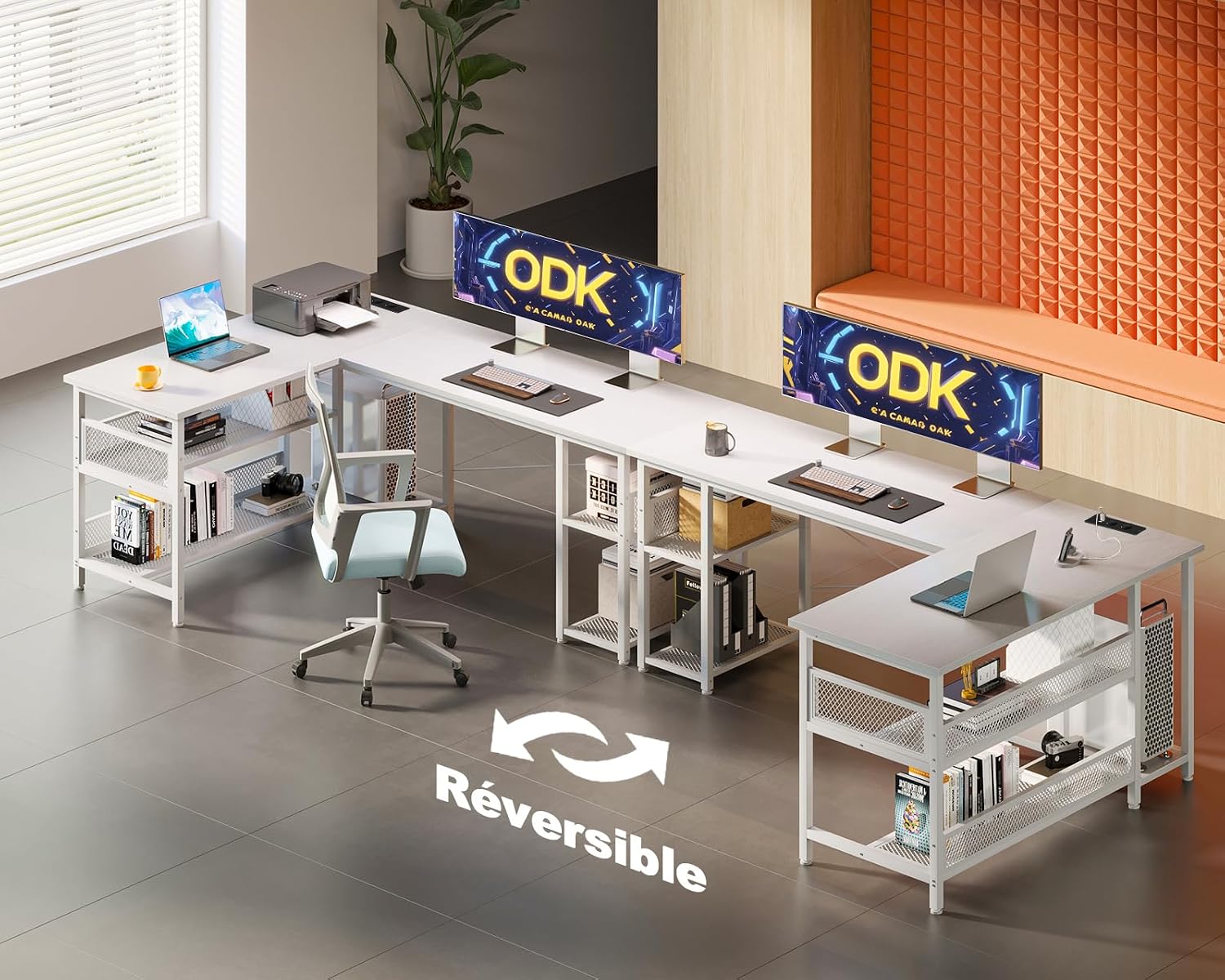
Figure 2: Illustration of the desk's reversible design, demonstrating how the L-shape can be oriented to the left or right.
Dimensions and Components
Familiarize yourself with the desk's dimensions and key components before beginning assembly. All necessary hardware is included.
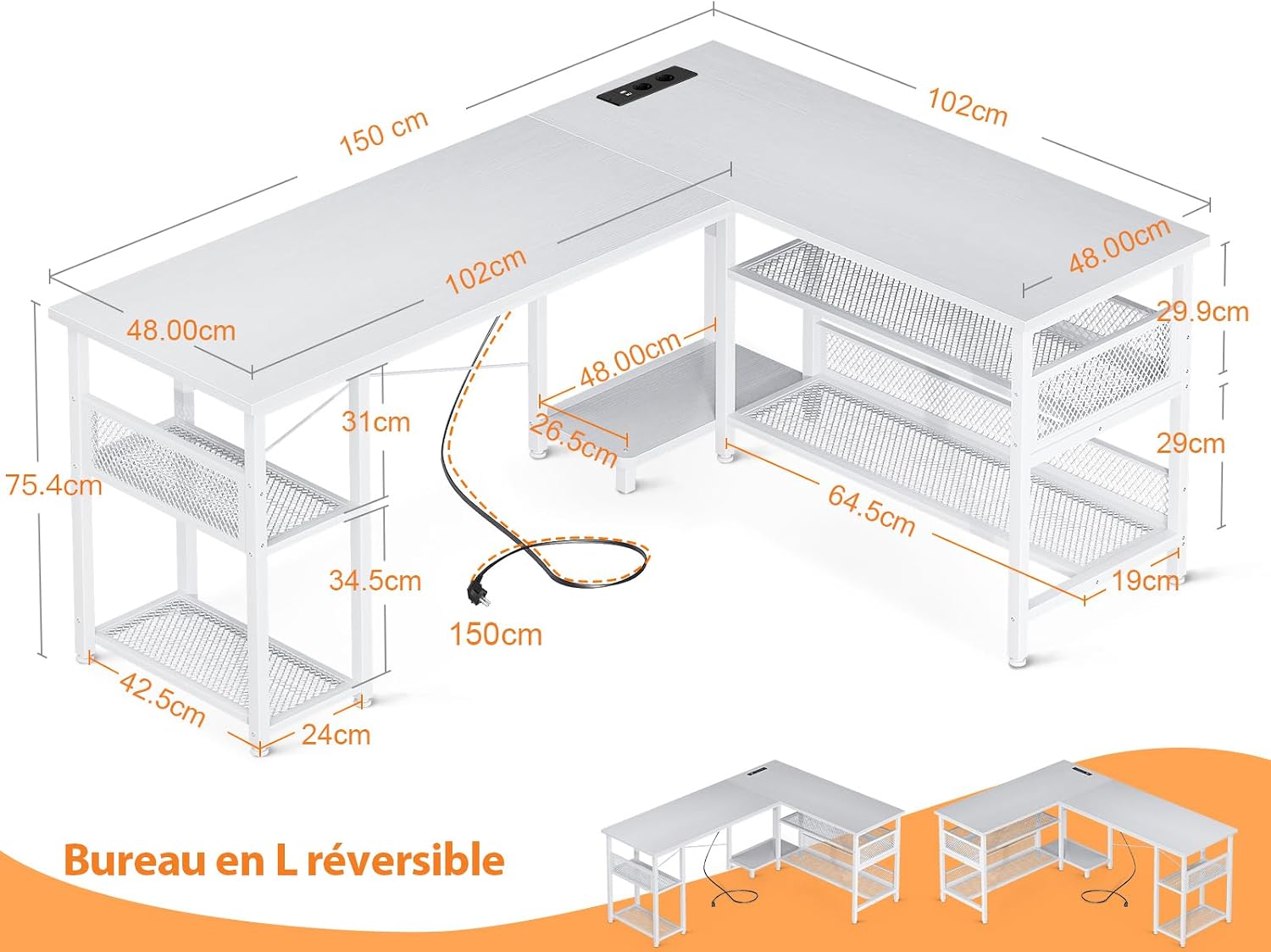
Figure 3: A detailed diagram showing the dimensions of the ODK L-shaped desk, including the main desktop, side shelves, and power cord length.
For detailed step-by-step assembly instructions, please refer to the included physical manual.
Operating Features
Integrated Power Strip
The desk is equipped with a built-in power strip featuring 2 AC outlets and 2 USB charging ports. This allows for convenient charging of your devices directly on the desktop, eliminating the need to search for wall outlets.

Figure 4: The integrated power strip on the desk surface, showing two AC outlets and two USB ports for convenient device charging.
- AC Outlets: 220-250V/15A
- USB Ports: 5V/2.1A
- Power Cord Length: 200 cm
Storage and Organization
The desk provides generous storage space with multiple shelves. The height of these shelves is adjustable, allowing you to customize the storage area to fit binders, books, gaming accessories, and other work supplies.

Figure 5: The desk's integrated shelving units, demonstrating ample space for organizing various items, with adjustable shelf heights.
Maintenance
To ensure the longevity and appearance of your ODK desk, follow these simple maintenance guidelines:
- Cleaning: Wipe the desk surface with a soft, damp cloth. Avoid abrasive cleaners or harsh chemicals that could damage the finish.
- Spills: Clean up spills immediately to prevent staining or damage to the engineered wood material.
- Heat and Moisture: Avoid placing hot items directly on the surface. Use coasters for drinks to protect against moisture rings.
- Stability Check: Periodically check all screws and fasteners to ensure they are tight. Re-tighten if necessary to maintain desk stability.
Troubleshooting
Here are some common issues and their potential solutions:
| Problem | Possible Cause | Solution |
|---|---|---|
| Desk is wobbly or unstable. | Loose fasteners or uneven floor. | Ensure all screws are tightened. Adjust leveling feet if present, or place shims under legs on uneven surfaces. |
| Integrated power outlets/USB ports are not working. | Power cord not fully plugged in, or circuit overload. | Check that the desk's power cord is securely plugged into a working wall outlet. Ensure total power draw does not exceed the strip's capacity. Test with another device. |
| Difficulty assembling a section. | Incorrect orientation of parts or missing hardware. | Refer to the assembly manual for correct part orientation. Verify all hardware is present and correctly used. Do not force parts. |
Specifications
| Attribute | Detail |
|---|---|
| Brand | ODK |
| Model Number | ZJZ-SBWJCZ |
| Color | White |
| Product Dimensions (L x W x H) | 150 x 102 x 75.7 cm |
| Material | Engineered Wood |
| Special Feature | Integrated USB Outlet |
| Item Weight | 19.4 Kilograms |
| Desk Design | Computer Desk (L-shaped) |
| Power Outlets | 2 AC outlets (220-250V/15A) |
| USB Charging Ports | 2 USB ports (5V/2.1A) |
Warranty and Support
ODK is committed to providing reliable support for your product. If you have any questions or require assistance with your L-shaped desk, please do not hesitate to contact our customer service team.
We aim to respond to all inquiries within 24 hours.
For further assistance, please visit our official website or contact the seller directly through your purchase platform.
Related documentsZJZ-SBWJCZ


Ask a question about this manual
Ask about setup, troubleshooting, compatibility, parts, safety, or missing instructions. Manuals+ will review the question and use this page’s manual context to help answer it.