
Product Overview
The BRILONER LED Battery Floor Lamp is a versatile, wireless lighting solution designed for both indoor and outdoor use. It features a 3-way divisible threaded rod for adjustable height, allowing it to function as a floor lamp or a table lamp. The integrated battery provides up to 18 hours of light on a gentle brightness setting, and it is rechargeable via a USB-C cable. The lamp offers three dimming levels controlled by a touch sensor and emits a warm white light at 3000 Kelvin. With an IP44 protection rating, it is resistant to splashes of water, making it suitable for balconies and terraces.

Image: The BRILONER LED Battery Floor Lamp highlighting its wireless operation, integrated battery, warm white light (3000K), height adjustability, and IP44 rating.
Safety Instructions
- Read all instructions before using the lamp.
- Do not expose the lamp to extreme temperatures or direct sunlight for prolonged periods.
- Ensure the USB-C charging cable is properly connected to a compatible power source.
- Do not attempt to disassemble or modify the lamp, as this may void the warranty and pose a safety risk.
- Keep the lamp away from flammable materials.
- While rated IP44 for splash resistance, avoid submerging the lamp in water.
- This lamp is designed for general illumination and is not suitable for emergency lighting.
Setup
1. Assembly
The lamp features a modular design with a 3-way divisible threaded rod, allowing for height adjustment. You can assemble it to your desired height:
- Full Height (130 cm): Use all three rod sections.
- Medium Height (68 cm): Remove one rod section.
- Table Lamp Height (38 cm): Remove two rod sections.
To adjust the height, gently twist and separate the rod sections. Reassemble by screwing the sections together clockwise until secure. Ensure all connections are tight before use.

Image: Visual representation of the lamp's 3-in-1 height adjustment capability, illustrating how rod sections can be removed to change the lamp's overall height.

Image: The BRILONER lamp displayed in three assembled heights (floor lamp, medium height, table lamp) within an outdoor environment, demonstrating its versatility.
2. Initial Charging
Before first use, fully charge the lamp's integrated battery. Locate the USB-C charging port, typically on the lamp head or base.
- Connect the provided USB-C cable to the lamp's charging port.
- Connect the other end of the USB-C cable to a compatible USB power adapter (not included) or a powered USB port.
- The charging indicator (if present) will illuminate or change color to indicate charging status.
- Allow the lamp to charge until the indicator shows a full charge (e.g., light turns green or off). A full charge can provide up to 18 hours of light at gentle brightness.
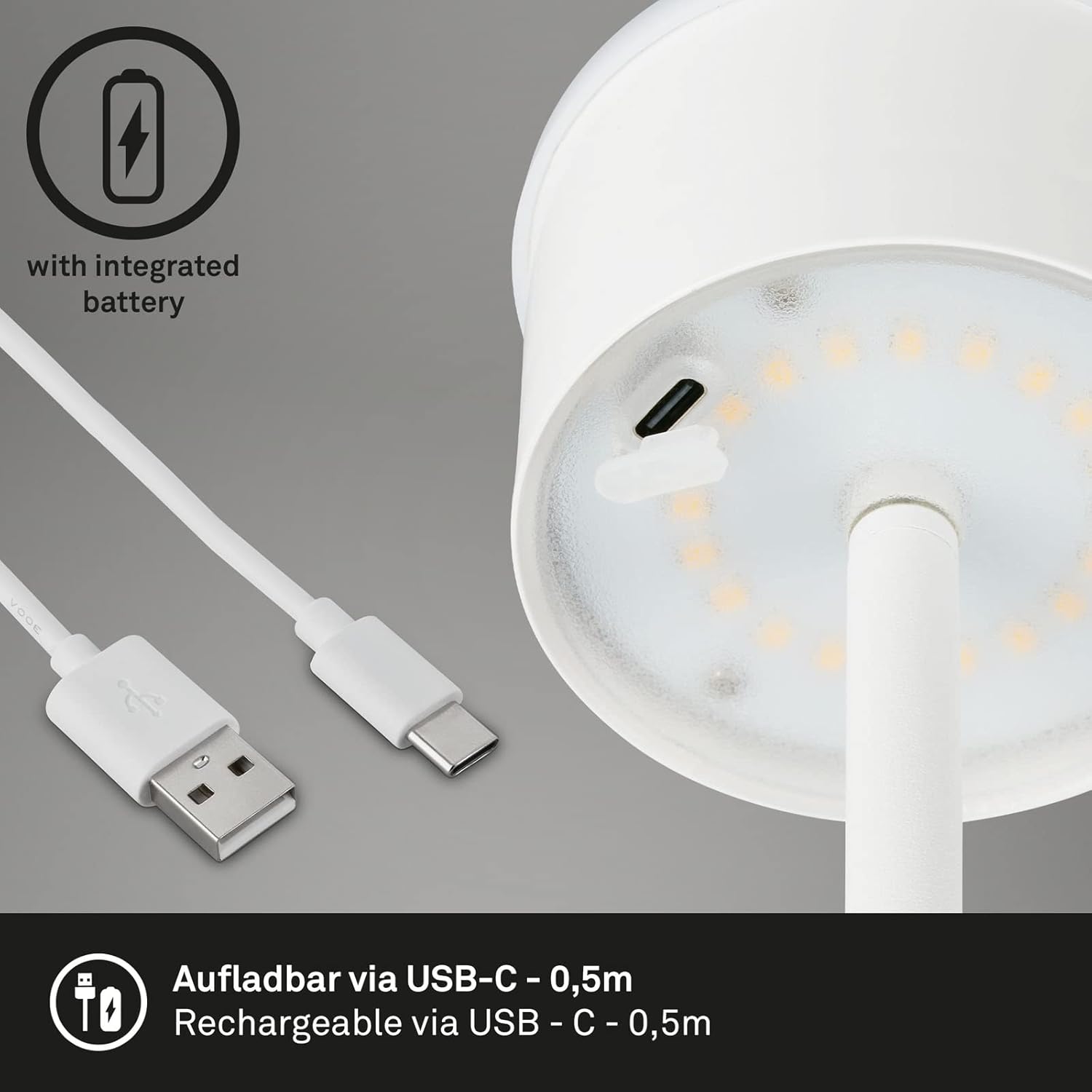
Image: A detailed view of the lamp's USB-C charging port and the accompanying USB-C cable, illustrating how to connect for recharging.
Operating Instructions
1. Power On/Off and Dimming
The lamp is operated using a touch-sensitive control, typically located on the top of the lamp head.
- To Turn On (100% Brightness): Lightly touch the power symbol once. The lamp will illuminate at its brightest setting.
- To Dim (50% Brightness): Touch the power symbol a second time. The light intensity will reduce to 50%.
- To Dim Further (15% Brightness): Touch the power symbol a third time. The light intensity will reduce to 15% (gentle brightness).
- To Turn Off: Touch the power symbol a fourth time. The lamp will turn off.

Image: A close-up view of the lamp's touch-sensitive power button, indicating its location for operation.

Image: A diagram demonstrating the lamp's three-step dimming functionality, showing how successive touches cycle through 100%, 50%, and 15% brightness before turning off.
Maintenance
1. Cleaning
- Ensure the lamp is turned off and disconnected from any charging source before cleaning.
- Wipe the lamp with a soft, dry, or slightly damp cloth.
- Do not use abrasive cleaners, solvents, or harsh chemicals, as these can damage the finish or electronic components.
- Avoid spraying liquids directly onto the lamp.
2. Battery Care
- For optimal battery life, avoid completely draining the battery frequently.
- If storing the lamp for an extended period, charge it to approximately 50% before storage and recharge every 3-6 months to prevent deep discharge.
- Use only the provided USB-C cable or a certified equivalent for charging.
3. Storage
- Store the lamp in a cool, dry place away from direct sunlight and extreme temperatures.
- If disassembling for storage, ensure all components are clean and dry.
Troubleshooting
| Problem | Possible Cause | Solution |
|---|---|---|
| Lamp does not turn on. | Battery is depleted. | Charge the lamp using the USB-C cable. |
| Lamp does not turn on. | Touch sensor malfunction or dirty. | Ensure the touch sensor area is clean and dry. Try touching firmly. |
| Lamp does not dim or changes brightness unexpectedly. | Touch sensor issue. | Clean the touch sensor area. Ensure no moisture or debris is interfering. |
| Short battery life. | Battery not fully charged or battery degradation. | Ensure the lamp is fully charged before use. If the issue persists after multiple full charges, the battery may be degrading. Contact support if within warranty. |
| Lamp flickers. | Low battery or internal connection issue. | Charge the lamp fully. If flickering continues, discontinue use and contact support. |
Specifications
- Model: B0BZSW5XWG
- Brand: BRILONER
- Type: LED Battery Floor Lamp (3-in-1: Floor, Medium, Table)
- Material: Metal (Base, Shade)
- Color: White
- Dimensions (Max Height): 19 cm (W) x 130 cm (H) / 190 mm (D) x 1300 mm (H)
- Adjustable Heights: 130 cm, 68 cm, 38 cm
- Weight: 2.3 Kilograms
- Light Source: Integrated LED
- Color Temperature: 3000 Kelvin (Warm White)
- Dimming: 3-step touch dimmable (100%, 50%, 15%)
- Switch Type: Touch
- Battery Life: Up to 18 hours (at gentle brightness)
- Charging: USB-C (cable included)
- Protection Class: IP44 (Splash-proof)
- Intended Use: Indoor and Outdoor (covered areas)

Image: A technical drawing illustrating the maximum and minimum heights (1300mm and 380mm) and the base diameter (190mm) of the BRILONER LED Battery Floor Lamp.
Warranty Information
Specific warranty details for the BRILONER LED Battery Floor Lamp are typically provided at the point of purchase or within the product packaging. Please retain your proof of purchase for warranty claims.
For information regarding warranty duration, coverage, and terms, please refer to the documentation included with your product or contact the retailer from whom you purchased the lamp.
Support
If you encounter any issues or have questions not covered in this manual, please contact the retailer or the manufacturer directly for assistance.
- Retailer Support: Refer to your purchase receipt or the retailer's website for contact information.
- Manufacturer Support: Visit the official BRILONER website for support resources, FAQs, or contact details.
When contacting support, please have your product model (B0BZSW5XWG) and proof of purchase readily available.


