
1. Introduction
The Wellue Connect BP2A is an advanced automatic upper arm blood pressure monitor designed for convenient home use. It offers precise blood pressure measurements and ECG recording capabilities, with seamless data synchronization via Bluetooth and Wi-Fi to a dedicated mobile application. This manual provides essential instructions for setting up, operating, and maintaining your device to ensure accurate and reliable health monitoring.
Key Features:
- Accurate X3 Measurement: Provides an average value from 3 consecutive measurements for enhanced accuracy.
- Bluetooth & Wi-Fi Sync: Automatically transfers your blood pressure and ECG data to the mobile app.
- Unlimited Data Storage: Save and review your health records within the app, with options to share with healthcare providers.
- Portable Design: Compact and lightweight, ideal for monitoring on the go.
- Long Battery Life: One full charge supports approximately 500 measurements.
- Integrated ECG: Records electrocardiogram data for comprehensive heart health insights.

Figure 1: Wellue Connect BP2A Blood Pressure Monitor.
2. Setup
2.1 Charging the Device
Before first use, fully charge your Wellue Connect BP2A monitor. The device uses a Type-C charging port. Connect the provided USB-C cable to the device and a compatible USB power adapter (not included). The battery indicator on the device screen will show charging status. A full charge typically takes a few hours and provides power for approximately 500 measurements.
2.2 Mobile App Installation & Pairing
- Download the ViHealth app from your smartphone's app store (available for iOS and Android).
- Create an account or log in if you already have one.
- Ensure Bluetooth is enabled on your smartphone.
- Turn on your Wellue Connect BP2A monitor by pressing the START/STOP button.
- Within the ViHealth app, navigate to the device pairing section and select the BP2A monitor. Follow the on-screen prompts to complete the pairing process via Bluetooth.
- For Wi-Fi synchronization, follow the in-app instructions to connect your device to your home Wi-Fi network (supports 2.4GHz networks only). This allows data to sync even when your phone is not nearby.

Figure 2: Seamless data synchronization to the mobile app via Wi-Fi.
2.3 Cuff Placement
Proper cuff placement is crucial for accurate readings. The BP2A comes with a wide-range cuff (22-42cm) suitable for most adult arm sizes.
- Ensure your arm is bare or has thin clothing.
- Wrap the cuff around your upper left arm, approximately 1-2 cm above your elbow.
- The tube from the cuff should be positioned over the brachial artery, aligned with the middle of your inner arm.
- Secure the cuff snugly but not too tightly. You should be able to insert two fingers between the cuff and your arm.
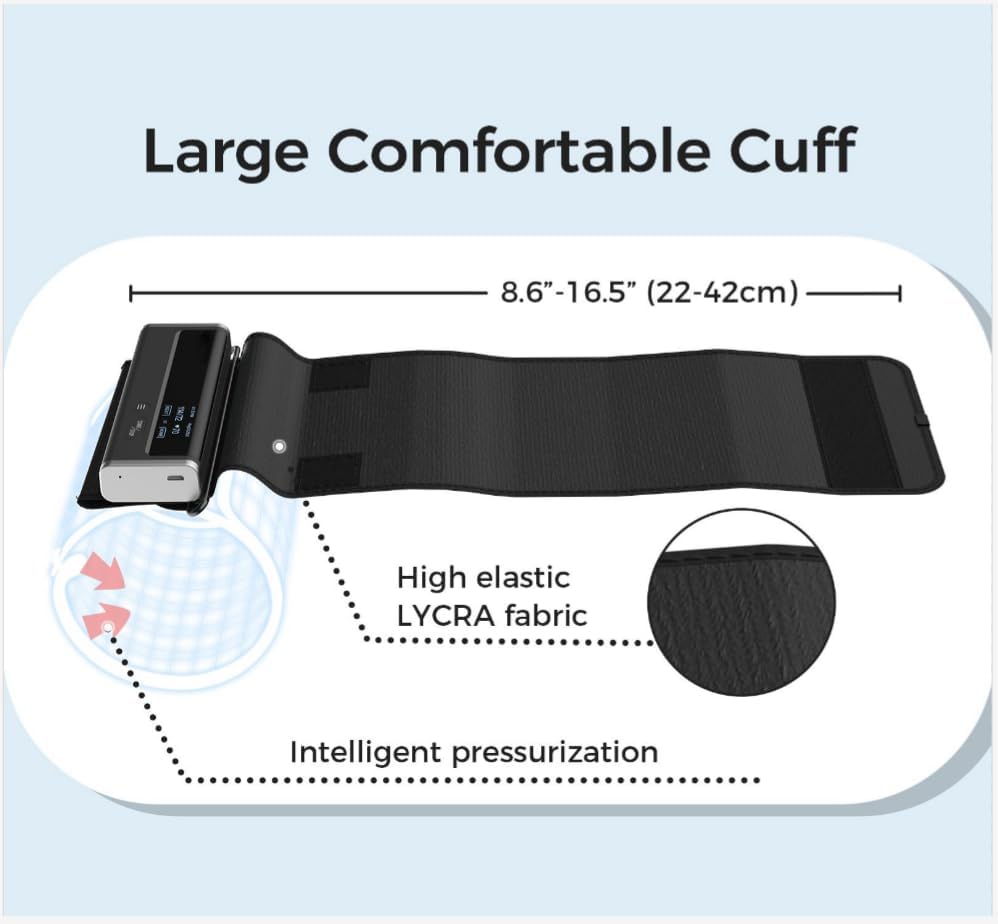
Figure 3: Proper cuff placement for accurate blood pressure measurement.
3. Operating Instructions
3.1 Blood Pressure Measurement
For accurate blood pressure readings, follow these guidelines:
- Sit comfortably in a chair with your back supported and feet flat on the floor.
- Rest your arm on a table so the cuff is at heart level.
- Remain still and silent during the measurement. Avoid talking or moving.
- Press the START/STOP button on the device to begin measurement. The cuff will inflate automatically.
- The device features an X3 measurement function, taking three readings with a short interval to provide an average. This ensures realistic and reliable results.
- Your blood pressure (SYS/DIA) and pulse rate will be displayed on the device screen and automatically synced to the app.

Figure 4: Device screen showing the average of 3 blood pressure measurements.
3.2 ECG Recording
The Wellue Connect BP2A can also record a 30-second electrocardiogram (ECG) using integrated electrodes.
- Ensure your skin is clean and dry where electrodes will make contact.
- On the device, press the menu button (three horizontal lines) to navigate to the ECG option.
- Choose one of the following wearing modes for ECG measurement:
- Hand-to-Hand: Hold the device with both hands, ensuring your thumbs are on the metal electrodes.
- Hand-to-Leg: Hold the device in one hand and place the other electrode against your leg.
- Hand-to-Abdomen: Hold the device in one hand and place the other electrode against your abdomen.
- Chest Lead: Place the device against your chest, ensuring both electrodes make contact with your skin.
- Press the menu button again to start the 30-second ECG recording.
- Remain still and silent during the recording.
- After 30 seconds, your heart rate and ECG waveform will be displayed on the device and synced to the app.
Video 1: Official Wellue video demonstrating blood pressure and EKG measurement.
3.3 Device Display & Navigation
The 1.4-inch OLED display shows current readings and allows navigation through historical data stored on the device.
- START/STOP Button: Powers the device on/off and initiates blood pressure measurement.
- Menu Button (three lines): Navigates through different modes (BP, ECG) and historical records.
- Screen Information: Displays time, date, blood pressure readings (SYS/DIA), pulse rate, and ECG waveforms.

Figure 5: Labeled features of the Wellue Connect BP2A monitor.
4. App Usage
The ViHealth app is your central hub for managing and analyzing your health data.
4.1 Data Synchronization
Once connected via Bluetooth or Wi-Fi, your measurement data will automatically sync to the ViHealth app. The device can store up to 50 sets of blood pressure measurements and 10 sets of ECG measurements internally before syncing is required.

Figure 6: Viewing synced blood pressure data on the mobile app.
4.2 Viewing History & Trends
The app provides a comprehensive history of your measurements, allowing you to track trends over time.
- Access weekly or monthly views of your blood pressure and heart rate trends.
- Review individual measurement details, including SYS/DIA, pulse rate, MAP, and pulse pressure.
- Add notes to specific readings for context (e.g., medication, activity).
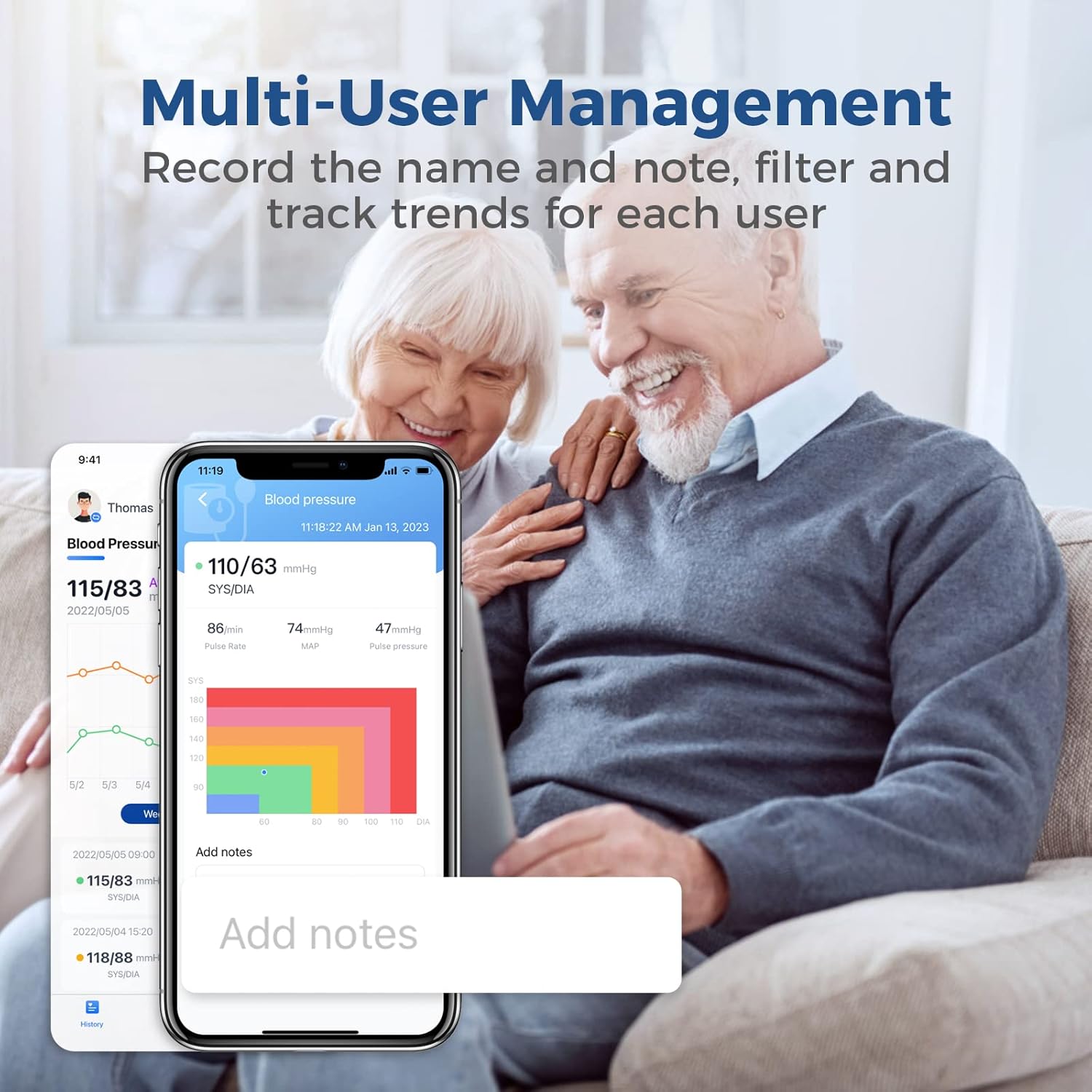
Figure 7: Multi-user management and historical data tracking in the app.
4.3 Sharing Records
Easily share your blood pressure and ECG records with your doctor or family members directly from the app with a single click. This feature is essential for continuous health management and professional consultation.

Figure 8: Sharing health records from the mobile app.
5. Maintenance
5.1 Care & Cleaning
- Wipe the device and cuff with a soft, dry cloth.
- Do not use abrasive cleaners or immerse the device in water.
- Store the device in a cool, dry place away from direct sunlight.
5.2 Battery Management
The device uses a rechargeable Lithium-polymer battery. Charge it regularly to ensure it's ready for use. A fully charged battery provides approximately 500 measurements.

Figure 9: The portable design and charging capability of the BP2A monitor.
6. Troubleshooting
- Inaccurate Readings: Ensure proper cuff placement, arm position, and relaxation during measurement. Avoid talking or moving. Compare readings with a known accurate device if concerns persist.
- Device Not Connecting to App: Check if Bluetooth is enabled on your phone and the device is powered on. For Wi-Fi, ensure the device is connected to a 2.4GHz network and within range. Try restarting both the device and the app.
- Battery Not Charging: Ensure the USB-C cable is securely connected to both the device and a working power source. Try a different cable or adapter.
- Error Messages: Refer to the full user manual for specific error codes and their corresponding solutions.
7. Specifications
| Model Number | BP2A |
| Brand | Wellue |
| Measurement Range | Blood Pressure: 0-300mmHg |
| Pulse Rate Range | 40-200/min |
| ECG Recording Length | 30s |
| Display | 1.4 inch Digital OLED |
| Cuff Size | 22-42cm (8.6"-16.5") |
| Battery Type | Rechargeable Lithium-polymer |
| Battery Life | Approx. 500 measurements per charge |
| Charging Port | Type-C |
| Connectivity | Bluetooth 4.0 BLE, Wi-Fi (2.4GHz) |
| Weight (main unit) | 1.06 Pounds (approx. 480g) |
| Package Dimensions | 6.81 x 4.53 x 2.32 inches |
| Manufacturer | Shenzhen Viatom Technology Co., Ltd |
| UPC | 850048347182 |
8. Warranty & Support
The Wellue Connect BP2A Blood Pressure Monitor comes with a 12-month worry-free warranty. Additionally, Wellue provides lifetime technical support for your device. For any technical assistance or warranty claims, please contact Wellue customer service.
9. Safety Information
Statements regarding dietary supplements have not been evaluated by the FDA and are not intended to diagnose, treat, cure, or prevent any disease or health condition.
Always consult with a healthcare professional before making any medical decisions or changes to your treatment plan based on readings from this device. This device is intended for general wellness and informational purposes only and should not be used as a substitute for professional medical advice, diagnosis, or treatment.


