
ANCEL AD410 PRO, AD310
ANCEL AD410 PRO and AD310 OBD2 Scanner User Manual
Comprehensive instructions for your ANCEL diagnostic tools.
1. Introduction
This manual provides detailed instructions for the operation and maintenance of your ANCEL AD410 PRO OBD2 Scanner with Battery Tester and ANCEL AD310 Classic OBD II Scanner. These devices are designed to assist vehicle owners and automotive technicians in diagnosing vehicle issues, reading and clearing diagnostic trouble codes (DTCs), and monitoring vehicle performance data.

Image: The ANCEL AD410 PRO (right) and ANCEL AD310 (left) diagnostic tools. The AD410 PRO features a larger color screen and battery clamps, while the AD310 is more compact with a monochrome display.
2. Product Features
The ANCEL AD410 PRO and AD310 offer a range of diagnostic capabilities for various vehicles.
2.1 ANCEL AD410 PRO OBD2 Scanner & Battery Tester

Image: Close-up of the ANCEL AD410 PRO's main screen, showing options for OBDII, I/M, BAT (Battery), Lookup, Review, and Setup.
- Comprehensive OBD2 Functions: Reads and clears diagnostic trouble codes (DTCs), views live data stream, displays I/M readiness status, views freeze frame data, O2 sensor test, on-board monitor test, EVAP monitor test, and vehicle information.
- Advanced Battery Tester: Performs battery health tests, cranking tests, and charging system tests for 12V batteries (100-2000 CCA), including regular flooded, AGM flat plate, AGM spiral, and gel batteries. Provides detailed analysis of battery conditions (voltage, CCA, SOH, SOC, internal resistance).
- User-Friendly Interface: Features a large color LCD display for clear presentation of data.
2.2 ANCEL AD310 Classic OBD II Scanner

Image: The ANCEL AD310's monochrome screen displaying the "Diagnostic Menu" with options like Read Codes, Erase Codes, Live Data, and I/M Readiness.
- Essential OBD2 Functions: Reads and clears generic and manufacturer-specific Diagnostic Trouble Codes (DTCs), turns off the Check Engine Light (MIL), retrieves I/M readiness status, and views freeze frame data.
- Live Data Stream: Displays real-time sensor data from the vehicle's engine control unit (ECU).
- EVAP System Test: Supports testing of the Evaporative Emission Control System.
- Vehicle Information: Retrieves VIN, CIN, and CVN.
- Power Source: Powered directly from the vehicle's OBDII Data Link Connector (DLC), requiring no external batteries.
- Display: Large LCD display (128 x 64 pixel) with white backlight and contrast adjustment.
2.3 General Compatibility & Language Support
- Vehicle Coverage: Works on most 1996 US-Based, 2000 EU-Based, and Asian cars, and newer OBD II & CAN domestic or import vehicles.
- Multi-Language Support: Supports English, German, French, Spanish, Finnish, Dutch, Russian, and Portuguese.
3. Setup
Before using your ANCEL diagnostic tool, follow these steps to ensure proper setup.
- Locate the OBDII Port: The 16-pin Data Link Connector (DLC) is usually located under the dashboard on the driver's side of the vehicle. Refer to your vehicle's service manual for the exact location if you cannot find it.
- Connect the Scanner:
- For both AD410 PRO and AD310, firmly plug the scanner's OBDII cable into the vehicle's DLC.
- For AD410 PRO's battery testing function, connect the red clamp to the positive (+) battery terminal and the black clamp to the negative (-) battery terminal.
- Turn On Ignition: Turn the vehicle's ignition to the "ON" position (engine off). The scanner will power on automatically.
- Language Selection (if needed): Navigate to the "Setup" or "System Settings" menu on the scanner to select your preferred language.
4. Operating Instructions
4.1 ANCEL AD410 PRO Operation
The AD410 PRO offers both OBDII diagnostic and battery testing functionalities.

Image: The ANCEL AD410 PRO connected to a car battery, illustrating its capability for cranking, battery, charging, and review data tests.
4.1.1 OBDII Diagnostics
- Read Codes: Select "OBDII" from the main menu, then choose "Read Codes" to display current, pending, and permanent Diagnostic Trouble Codes (DTCs).
- Erase Codes: After addressing the vehicle fault, select "Erase Codes" to clear the DTCs and turn off the Check Engine Light. Ensure the ignition is on and the engine is off before clearing codes.
- Live Data: Select "Live Data" to view real-time parameters from the vehicle's sensors. This can help identify intermittent problems or monitor system performance.
- I/M Readiness: Check the status of emission-related monitors to determine if the vehicle is ready for an emissions test.
- Freeze Frame: View a snapshot of vehicle operating conditions recorded at the time a DTC was set.
- O2 Sensor Test: Retrieve O2 sensor monitoring test results.
- On-Board Monitor Test: Retrieve results for on-board diagnostic monitoring tests of specific components/systems.
- EVAP Monitor Test: Initiate a test of the Evaporative Emission Control System.
- Vehicle Info: Retrieve the Vehicle Identification Number (VIN), Calibration ID (CALID), and Calibration Verification Number (CVN).
4.1.2 Battery Testing
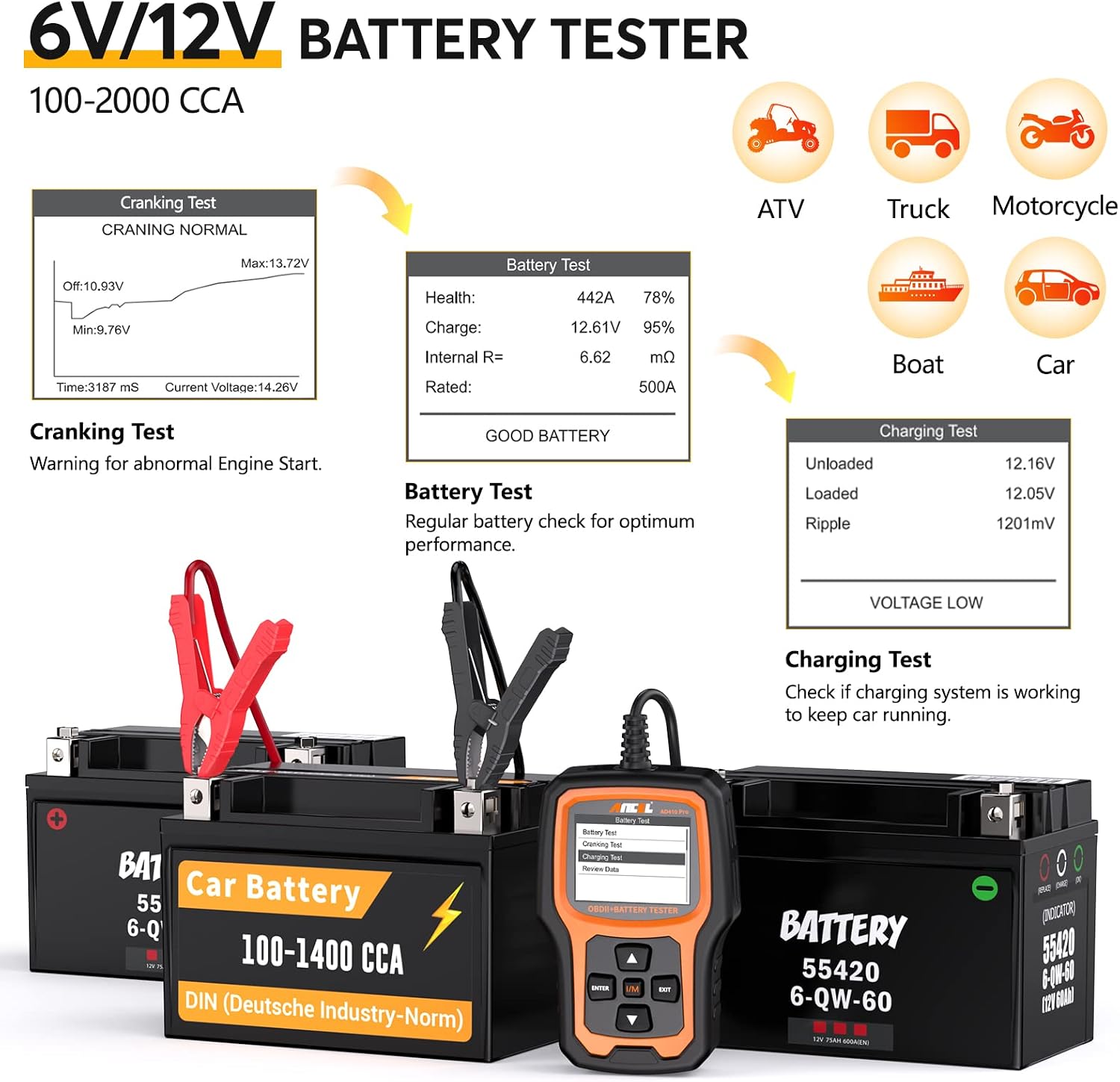
Image: Detailed screen views of the ANCEL AD410 PRO showing battery test results (Health, Charge, Internal Resistance) and a cranking test graph with voltage readings.
- Battery Health Test: Select "BAT" from the main menu, then "Battery Test." Connect the clamps to the battery terminals. The scanner will display battery health (SOH), charge (SOC), voltage, measured CCA, and internal resistance.
- Cranking Test: Select "Cranking Test." Follow the on-screen prompts to start the engine. The scanner will analyze the cranking voltage and time to assess the starting system's performance.
- Charging Test: Select "Charging Test." The scanner will evaluate the vehicle's charging system (alternator, rectifier, diode) by monitoring voltage under different loads.
4.2 ANCEL AD310 Operation
The AD310 is a classic OBDII scanner focused on core diagnostic functions.

Image: The ANCEL AD310's screen showing the "Live Data" menu and examples of live data parameters like O2 sensor voltage and engine RPM.
- Diagnostic Menu: Upon connecting and powering on, the AD310 will display the main diagnostic menu. Use the UP/DOWN buttons to navigate and ENTER to select.
- Read Codes: Select "Read Codes" to retrieve Diagnostic Trouble Codes (DTCs) stored in the vehicle's ECU.
- Erase Codes: Select "Erase Codes" to clear DTCs and reset the Check Engine Light after repairs are completed.
- Live Data: Select "Live Data" to view real-time operational parameters of the vehicle.
- View Freeze Frame: Access the data snapshot recorded when an emission-related fault occurred.
- I/M Readiness: Check the status of various emission monitors.
- Vehicle Info: Retrieve vehicle identification information.
- EVAP Leak Test: Select "EVAP Leak Test" to perform a test on the evaporative emission system.

Image: The ANCEL AD310 screen showing "Evap Leak Test" with an "OK" prompt, indicating the test is ready or complete. Diagrams of the EVAP system are also shown.
5. Maintenance
Proper maintenance ensures the longevity and optimal performance of your ANCEL diagnostic tools.
- Cleaning: Use a soft, damp cloth to clean the exterior of the scanners. Do not use abrasive cleaners or solvents.
- Storage: Store the devices in a clean, dry environment away from extreme temperatures, direct sunlight, and excessive dust.
- Cable Care: Avoid bending or crimping the OBDII cables excessively. Store them neatly to prevent damage.
- Software Updates: Periodically check the ANCEL official website for available software updates for your AD410 PRO and AD310. Updates can improve performance, add new features, or enhance vehicle compatibility. Follow the instructions provided on the website for updating the firmware.
6. Troubleshooting
If you encounter issues while using your ANCEL scanners, refer to the following common troubleshooting tips:
| Problem | Possible Cause / Solution |
|---|---|
| Scanner does not power on. |
|
| "Link Error" or "Communication Error" message. |
|
| Cannot clear codes. |
|
| Inaccurate battery test results (AD410 PRO). |
|
7. Specifications
Key technical specifications for the ANCEL AD410 PRO and AD310 scanners:
| Feature | ANCEL AD410 PRO | ANCEL AD310 |
|---|---|---|
| Display Resolution | Color LCD (specific resolution not provided, but higher than AD310) | 128 x 64 pixel LCD with white backlight |
| Power Source | Vehicle OBDII DLC / 12V Battery (for battery testing) | Vehicle OBDII DLC |
| Battery Test Range | 12V, 100-2000 CCA (for AD410 PRO only) | N/A |
| Supported Protocols | OBDII & CAN | OBDII & CAN |
| Operating Temperature | (Standard automotive diagnostic tool range, typically 0°C to 60°C) | (Standard automotive diagnostic tool range, typically 0°C to 60°C) |
8. Warranty and Support
ANCEL products typically come with a manufacturer's warranty. For specific warranty details, technical support, or service inquiries, please refer to the warranty card included with your product or visit the official ANCEL website.
Official ANCEL Website: www.anceltech.com
When contacting support, please have your product model (AD410 PRO, AD310) and purchase information ready.
Related documentsAD410 PRO, AD310


Ask a question about this manual
Ask about setup, troubleshooting, compatibility, parts, safety, or missing instructions. Manuals+ will review the question and use this page’s manual context to help answer it.