
1. Introduction
Thank you for choosing the Mystflame Galaxy 60 Pro electric fireplace. This manual provides essential information for the safe operation, installation, and maintenance of your new appliance. Please read it thoroughly before installation and use, and retain it for future reference.

Image 1.1: Front view of the Mystflame Galaxy 60 Pro electric fireplace, showcasing its sleek design and realistic flame effects.
2. Safety Information
Always follow basic safety precautions when using electrical appliances to reduce the risk of fire, electric shock, and injury to persons.
- Read all instructions before using this fireplace.
- Do not operate any fireplace with a damaged cord or plug, or if the heater has malfunctioned or been dropped or damaged in any manner.
- Do not use outdoors.
- Keep combustible materials, such as furniture, pillows, bedding, papers, clothes, and curtains at least 3 feet (0.9 m) from the front of the fireplace.
- Extreme caution is necessary when any heater is used by or near children or invalids and whenever the fireplace is left operating and unattended.
- Always unplug the fireplace when not in use.
- Do not insert or allow foreign objects to enter any ventilation or exhaust opening as this may cause an electric shock or fire, or damage the fireplace.
- To prevent a possible fire, do not block air intakes or exhaust in any manner. Do not use on soft surfaces, like a bed, where openings may become blocked.
- This fireplace is hot when in use. To avoid burns, do not let bare skin touch hot surfaces.
3. Package Contents
Upon unpacking, ensure all components are present and undamaged. If any parts are missing or damaged, contact customer support.
- Mystflame Galaxy 60 Pro Electric Fireplace Unit
- Remote Control
- Mounting Hardware (screws, anchors)
- Log Set and Crystal Media
- User Manual
4. Specifications
| Feature | Detail |
|---|---|
| Model Number | EF60R PRO |
| Dimensions (L x D x H) | 152.4 cm x 14 cm x 45 cm (60 inches x 5.5 inches x 17.7 inches) |
| Weight | 26.2 kg |
| Power Output | 750W / 1500W |
| Voltage | Standard Household (e.g., 220-240V for EU, 120V for US) |
| Material | Tempered Glass, Metal |
| Installation Type | Wall-Mounted |
| Flame Colors | 13 Options |
| Fuel Bed Colors | 13 Options |
| Control Methods | Touch Panel, Remote Control, Wi-Fi App, Voice Control (Alexa/Google Home) |

Image 4.1: Detailed dimensions of the Mystflame Galaxy 60 Pro electric fireplace and recommended opening dimensions for wall installation.
5. Setup and Installation
The Mystflame Galaxy 60 Pro is designed for wall-mounted installation. Professional installation is recommended.
5.1 Pre-Installation Checklist
- Ensure the chosen location is a non-combustible wall structure.
- Verify that the electrical outlet is within reach of the power cord and meets the fireplace's power requirements.
- Maintain minimum clearances from combustible materials as specified in Section 2.
5.2 Wall Mounting Instructions
- Prepare the Opening: Create a wall opening according to the dimensions provided in Image 4.1. Ensure the opening is structurally sound.
- Install Mounting Brackets: Secure the provided mounting brackets to the inside of the wall opening using appropriate screws and anchors.
- Insert Fireplace Unit: Carefully slide the electric fireplace unit into the prepared opening. Ensure it is level and flush with the wall surface.
- Secure the Unit: Fasten the fireplace unit to the mounting brackets using the designated screws.
- Install Fuel Bed Media: Place the desired fuel bed media (logs or crystals) into the fuel bed area of the fireplace.
- Connect Power: Plug the power cord into a grounded electrical outlet.

Image 5.1: Rear and side views of the Mystflame Galaxy 60 Pro, showing mounting points and power connection.
6. Operating Instructions
The Mystflame Galaxy 60 Pro offers multiple control options for convenience.
6.1 Control Methods
You can operate your fireplace using the touch panel on the unit, the included remote control, or via the dedicated Wi-Fi application with Alexa and Google Home voice commands.

Image 6.1: Overview of the remote control and the touch panel display with various function indicators.

Image 6.2: The mobile application interface for controlling the fireplace, showing temperature, timer, and color settings.
6.2 Power On/Off
Press the power button on the remote, touch panel, or app to turn the fireplace on or off.
6.3 Flame and Fuel Bed Effects
The fireplace features 13 customizable flame colors and 13 fuel bed lighting options. Use the dedicated buttons on the remote or app to cycle through the available colors and adjust brightness levels (5 levels).
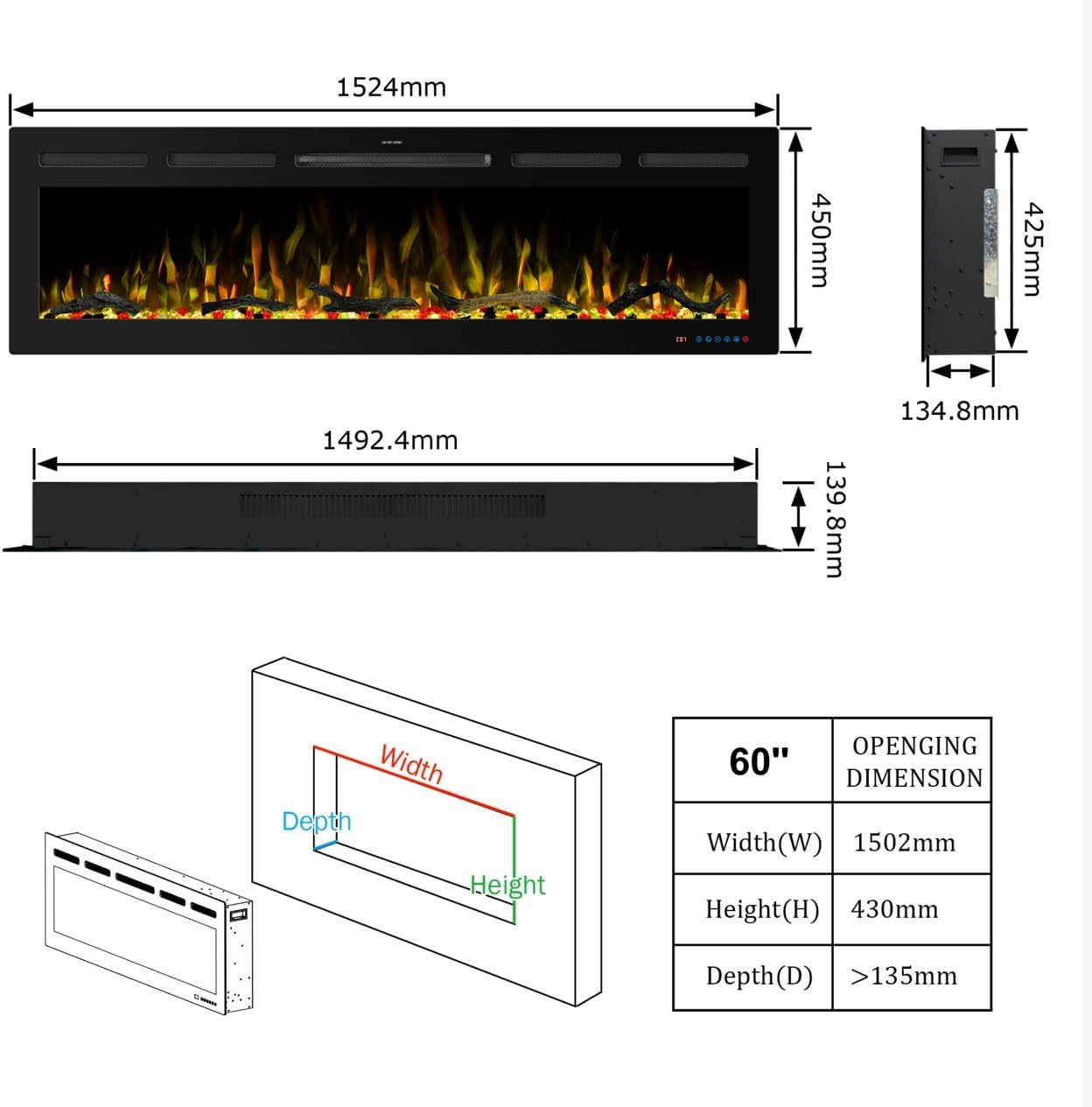
Image 6.3: Visual representation of various flame and fuel bed color combinations available.
6.4 Heating Function
Activate the heater function using the remote, touch panel, or app. The fireplace offers two heat settings: 750W and 1500W. The integrated thermostat allows you to set a desired room temperature between 17°C and 37°C (62°F and 99°F).
6.5 Timer Function
Set the automatic shut-off timer for 1 to 9 hours using the timer button on the remote or app. This feature allows the fireplace to turn off automatically after the set duration.
6.6 Sound Effects
The fireplace includes a realistic crackling wood sound effect. This feature can be turned on or off, and its volume adjusted, via the remote control or app.
6.7 Wi-Fi and Voice Control
Connect your fireplace to your home Wi-Fi network to enable control via the mobile application and integrate with smart home systems like Amazon Alexa and Google Home. Follow the instructions in the app for pairing and voice command setup.
7. Maintenance
Regular maintenance ensures optimal performance and longevity of your electric fireplace.
7.1 Cleaning
- Always unplug the fireplace before cleaning.
- Glass Panel: Wipe with a soft, damp cloth. Do not use abrasive cleaners or spray cleaners directly onto the glass.
- Exterior Surfaces: Wipe with a soft, dry cloth.
- Air Vents: Use a vacuum cleaner with a brush attachment to remove dust from the air intake and exhaust vents.
7.2 Storage
If storing the fireplace for an extended period, unplug it and store it in a dry, dust-free location.
8. Troubleshooting
Refer to the following table for common issues and their solutions.
| Problem | Possible Cause | Solution |
|---|---|---|
| Fireplace does not turn on | No power, power cord loose, main power switch off | Check power outlet, ensure cord is securely plugged in, verify main power switch is on. |
| No heat output | Heater function not activated, thermostat set too low, thermal cut-off activated | Activate heater, increase thermostat setting, unplug for 15 minutes to reset thermal cut-off. |
| Flame effect not working | Flame motor issue, LED lights malfunction | Contact customer support. |
| Remote control not working | Batteries dead, remote out of range, sensor blocked | Replace batteries, ensure remote is within range and pointed at the fireplace, clear any obstructions. |
| Wi-Fi connection issues | Incorrect password, router too far, network interference | Verify Wi-Fi password, move router closer, check for network interference. Refer to app instructions for detailed setup. |
9. Warranty and Support
Mystflame products are manufactured to high-quality standards. For warranty information, please refer to the documentation included with your purchase or contact Mystflame customer support. For technical assistance or replacement parts, please visit the official Mystflame website or contact your retailer.


