
Introduction
The Migipaws Electric Interactive Cat Toy is designed to engage your cat with realistic bird movements and sounds. This plush bird toy provides versatile entertainment, whether used on the floor or suspended for jumping play, encouraging natural hunting instincts and physical activity for your feline companion.
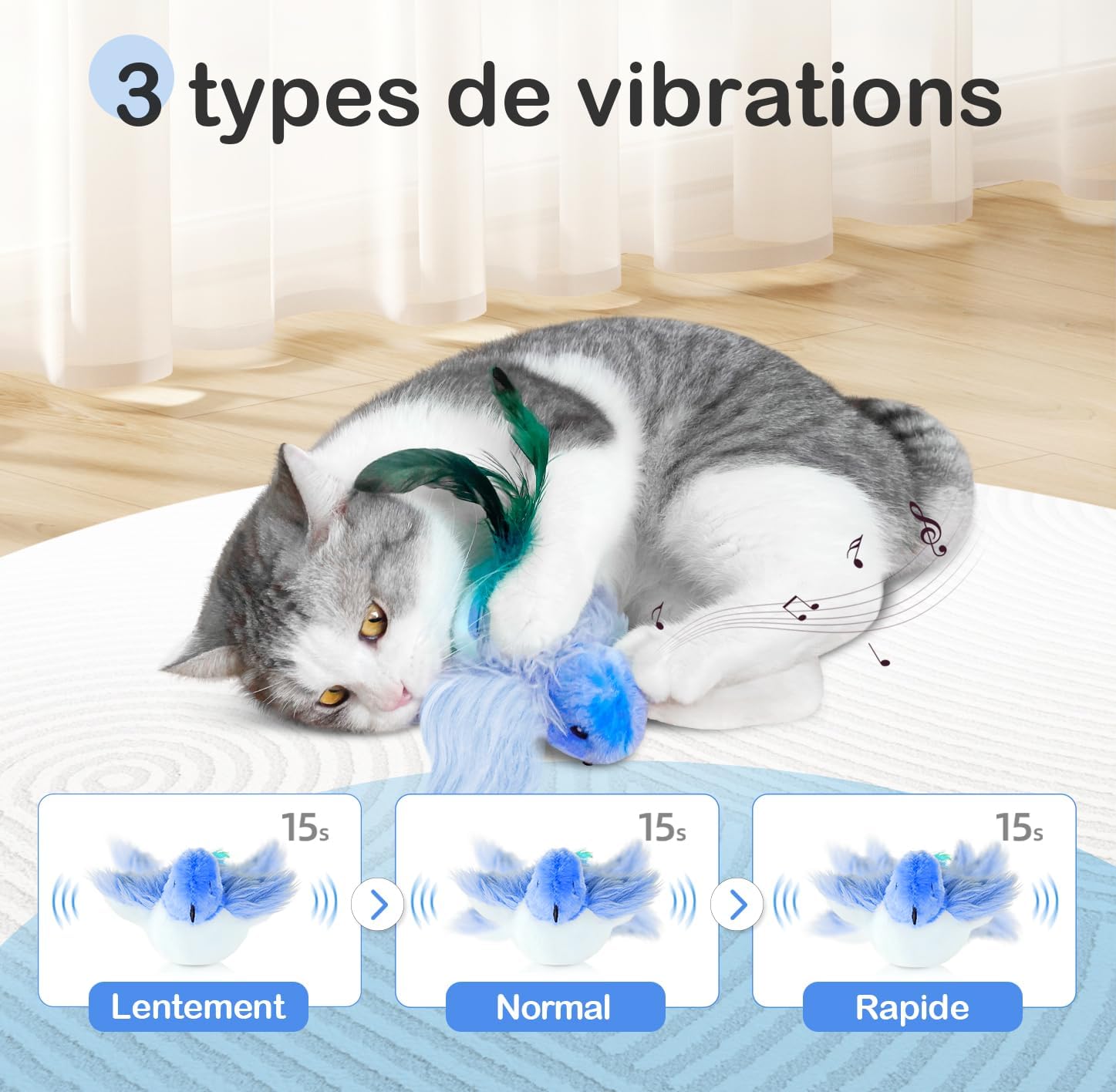
Image: The Migipaws Electric Interactive Blue Bird Cat Toy, designed to stimulate your cat's natural instincts.
Safety Information
- Children should use this toy under adult supervision.
- Ensure the toy is fully assembled and securely attached if using the hanging mechanism.
- Regularly inspect the toy for any damage. Discontinue use if damaged.
- Keep the charging port dry and clean.
Package Contents
- 1 x Plush Bird Toy (Blue Bird Model)
- 1 x Electronic Movement Module
- 1 x C-Clamp
- 1 x Elastic Rod
- 1 x Type-C USB Charging Cable
- 1 x Catnip Pouch
- 1 x User Manual

Image: All components included in the Migipaws Electric Interactive Cat Toy package.
Setup
1. Charging the Toy
- Locate the Velcro opening on the underside of the plush bird.
- Open the Velcro to access the electronic movement module.
- Connect the Type-C USB charging cable to the module's charging port.
- Plug the other end of the USB cable into a suitable USB power source (e.g., computer, wall adapter). The LED indicator will light up during charging.
- Once fully charged, disconnect the cable and close the Velcro.

Image: Detailed view of the USB charging port, LED indicator, and power switch on the electronic module.
2. Inserting Catnip
- Open the Velcro on the plush bird.
- Place the provided catnip pouch inside the toy, next to the electronic module.
- Close the Velcro securely.
3. Assembling the Hanging Mechanism (Optional)
- Thread the string from the plush bird through the loop at the end of the elastic rod.
- Screw the end of the elastic rod into the C-clamp.
- Fix the C-clamp onto a flat surface, such as a table edge or cat tree.
- Ensure the bird hangs freely and is securely attached.

Image: Step-by-step guide for assembling the clamp and elastic rod for suspended play.
Operating Instructions
1. Powering On/Off
- Open the Velcro on the plush bird to access the electronic module.
- Flip the power switch to the "ON" position to activate the toy.
- Flip the power switch to the "OFF" position to turn off the toy when not in use.
2. Activating the Toy
The toy features a motion sensor. Once powered on, gently tap or touch the bird to activate its flapping wings and chirping sounds. It will operate for approximately 15 seconds before entering standby mode. To reactivate, simply tap it again.

Image: Visual guide for turning on the switch and activating the toy by tapping.
3. Vibration Modes
The toy offers three vibration modes: Slow, Normal, and Rapid. Each tap or activation cycles through these modes, providing varied stimulation for your cat.

Image: Illustration of the three vibration modes: Slow, Normal, and Rapid, each lasting 15 seconds.
4. Play Modes
- Floor Play: Place the bird toy on the floor. Its realistic movements and sounds will encourage your cat to chase, pounce, and bat at it.
- Suspended Play: Attach the toy to the elastic rod and clamp it to a suitable surface. This allows your cat to jump and interact with the bird as if it were flying.
- Interactive Play: Hold the elastic rod and manually bounce the bird to engage directly with your cat, fostering a stronger bond.

Image: Cats enjoying interactive play with the Migipaws toy, both suspended and on the floor.
Maintenance
1. Cleaning the Toy
- Before cleaning, ensure the electronic movement module is removed from the plush bird.
- The plush cover is washable. Hand wash with mild soap and water, then air dry completely.
- Do not wash the electronic module. Wipe it with a dry cloth if necessary.
- Once the plush cover is dry, reinsert the electronic module and catnip pouch, then close the Velcro.
2. Battery Care
- Charge the toy fully before first use.
- Recharge the toy when its movements become weak or sounds are faint.
- Avoid overcharging.
- If storing the toy for an extended period, charge it periodically to maintain battery health.
Troubleshooting
| Problem | Possible Cause | Solution |
|---|---|---|
| Toy does not activate. | Power switch is off, or battery is low. | Ensure the power switch is ON. Charge the toy fully. |
| Movements are weak or sounds are faint. | Battery is low. | Recharge the toy. |
| Toy stops responding after 15 seconds. | This is normal operation (standby mode). | Tap the toy again to reactivate it. |
| Cat shows no interest. | Some cats may not be immediately attracted. | Ensure catnip is fresh. Try different play modes (floor, suspended, interactive). Give your cat time to adjust. |
Specifications
| Feature | Detail |
|---|---|
| Brand | Migipaws |
| Model Number | Bird-Blue |
| Recommended Species | All cats |
| Product Dimensions (L x W x H) | 8.2 x 7.2 x 9.7 cm |
| Weight | 149.69 grams |
| Battery Type | 1 Lithium-ion (included) |
| Pet Age Recommendation | Adult cats |
| Color | Blue |
| Material | Acrylonitrile Butadiene Styrene, Polyester |
| Special Features | Interactive, Motion-activated, Realistic sounds, Flapping wings, Catnip pouch, USB rechargeable |
| Specific Uses | Active play, Boredom relief, Exercise |

Image: Product dimensions for the Migipaws Electric Interactive Cat Toy and its hanging clamp.
Product Videos
Video: An interactive play session with the Migipaws cat toy, demonstrating its engaging features.
Video: A demonstration of the Migipaws Smart Interactive Cat Toy in action, highlighting its smart features and cat engagement.