
1. Safety Information
WARNING: Read the ENTIRE instruction manual to become familiar with the features of the product before operating. Failure to operate the product correctly can result in damage to the product, personal property, and cause serious injury. This is a sophisticated hobby product. It must be operated with caution and common sense and requires some basic mechanical ability. Failure to operate this Product in a safe and responsible manner could result in injury or damage to the product or other property. This product is not intended for use by children without direct adult supervision. Do not use with incompatible components or alter this product in any way outside of the instructions provided by Horizon Hobby, LLC. The product manual contains instructions for safety, operation, and maintenance. It is essential to read and follow all the instructions and warnings in the manual, prior to assembly, setup, or use, in order to operate correctly and avoid damage or serious injury.
2. Product Overview
The Axial SCX10 PRO 1/10th 4WD Kit is designed for competitive scale crawling, offering a comprehensive solution for enthusiasts. This kit provides a foundation for building a high-performance RC crawler, incorporating numerous innovations for optimal performance in climbing, side hilling, and break over scenarios.
Key features include:
- Adjustable comp-specific chassis optimized for climbing, side hilling, and break over.
- Multi-piece steel tube axles supporting both servo-on-axle (AMS) or chassis-mounted (CMS) servo configurations.
- Low and forward motor position for superior weight distribution and improved balance.
- Ability to underdrive the rear axle via servo or manually lock it in 1:1 or underdrive.
- New aluminum smooth body, oil-filled shocks for higher clearance.
3. What's in the Box
The Axial SCX10 PRO 1/10th 4WD Kit (AXI03028) includes the following components:
- SCX10 PRO 1/10th 4WD Kit
4. Needed to Complete
To fully assemble and operate your Axial SCX10 PRO kit, the following items are required and sold separately:

This diagram illustrates additional components required to complete the assembly and operation of your Axial SCX10 PRO kit.
- Battery
- Body
- Charger
- Electronic Speed Control (ESC)
- Glue
- Motor
- Paint
- Pinion Gear
- Receiver
- Servo
- Tires & Wheels (x4)
- Tools
- Transmitter
5. Assembly Instructions
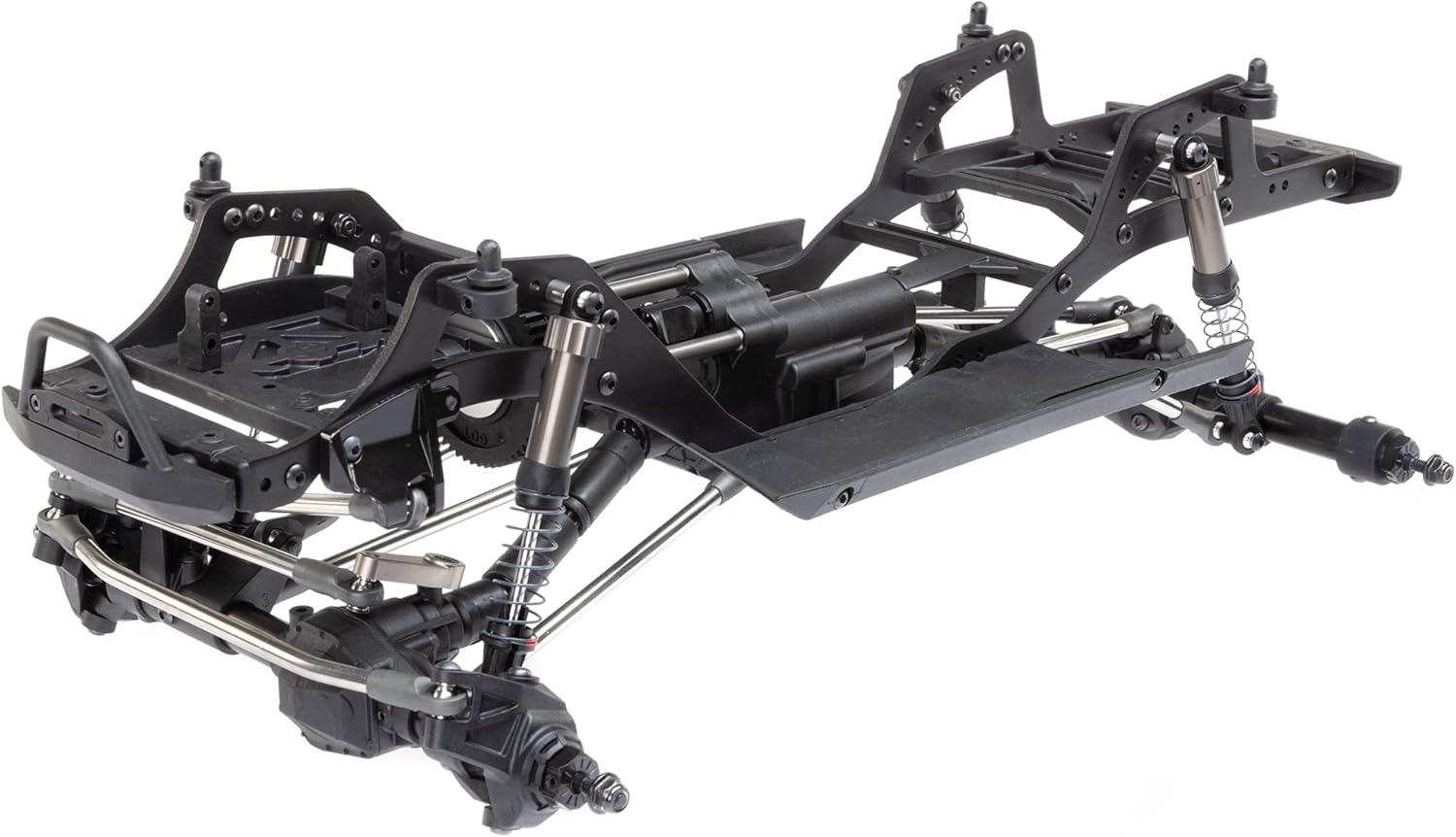
The Axial SCX10 PRO is a kit that requires assembly. Follow the detailed instructions provided in the manufacturer's assembly manual included with your kit. Pay close attention to each step to ensure proper function and durability of your vehicle. The assembly process involves:
- Chassis construction, including the frame rails and crossmembers.
- Axle assembly, ensuring correct installation of the multi-piece steel tube axles.
- Suspension setup, including the installation of the aluminum smooth body, oil-filled shocks.
- Drivetrain assembly, focusing on the transmission and driveshafts.
- Steering mechanism installation, considering servo mounting options (AMS or CMS).
- Mounting of electronic components such as the motor, ESC, receiver, and servo.
Refer to the following images for visual guidance on the assembled chassis structure:


6. Setup
After assembly, proper setup is crucial for optimal performance. Consider the following adjustments:
- Chassis Adjustment: The comp-specific chassis allows for various adjustments to optimize performance for climbing, side hilling, and break over. Consult the detailed manual for specific tuning parameters.
- Servo Mounting: Decide between servo-on-axle (AMS) or chassis-mounted (CMS) configurations based on your preference and terrain.
- Rear Axle Underdrive: The rear axle can be underdriven via a servo or manually locked in a 1:1 or underdrive ratio. Adjust this setting to suit your driving style and the demands of the course.
- Shock Tuning: The aluminum smooth body, oil-filled shocks can be tuned for different terrains and driving conditions. Adjust oil viscosity and spring rates as needed.
- Weight Distribution: The low and forward motor position inherently provides superior weight distribution. Further fine-tune by adjusting component placement and adding ballast if necessary.
7. Operating Instructions
Operating your Axial SCX10 PRO requires practice and adherence to safety guidelines. Always ensure your vehicle is in good working condition before use.
- Pre-Operation Check: Verify all connections are secure, batteries are charged, and the transmitter and receiver are properly bound. Inspect tires, suspension, and steering for any damage or loose parts.
- Starting the Vehicle: Turn on the transmitter first, then the vehicle's power switch.
- Driving: Start with slow, controlled movements to familiarize yourself with the vehicle's handling characteristics. Practice on varied terrain to understand its capabilities.
- Environmental Considerations: Avoid operating in water, mud, or extreme temperatures unless the vehicle is specifically designed and sealed for such conditions.
- Post-Operation: Turn off the vehicle's power switch first, then the transmitter. Disconnect and remove batteries for storage.
Always operate your RC vehicle responsibly and in designated areas, away from people, pets, and property that could be damaged.
8. Maintenance
Regular maintenance extends the lifespan and ensures consistent performance of your Axial SCX10 PRO.
- Cleaning: After each use, especially in dusty or dirty conditions, clean the vehicle. Use a soft brush or compressed air to remove debris. Avoid using harsh chemicals.
- Inspection: Periodically inspect all screws, nuts, and bolts for tightness. Check for any worn or damaged parts, including suspension components, drivetrain gears, and linkages.
- Lubrication: Apply appropriate lubricants to moving parts such as gears, bearings, and universal joints as recommended by the manufacturer.
- Shock Maintenance: Check the oil-filled shocks for leaks and proper damping. Replace shock oil and O-rings as needed.
- Battery Care: Follow the manufacturer's instructions for charging, discharging, and storing your batteries to maximize their life and safety.
9. Troubleshooting
If you encounter issues with your Axial SCX10 PRO, consider the following basic troubleshooting steps:
| Problem | Possible Cause | Solution |
|---|---|---|
| Vehicle does not power on | Dead battery, loose connection, faulty switch | Charge battery, check all power connections, inspect power switch. |
| No response from controls | Transmitter/receiver not bound, dead transmitter battery, faulty electronics | Re-bind transmitter and receiver, replace transmitter batteries, check ESC/receiver connections. |
| Motor runs but wheels do not turn | Stripped gears, loose driveshaft, differential issue | Inspect gears for damage, ensure driveshafts are secure, check differential assembly. |
| Poor steering response | Loose steering linkages, weak servo, incorrect trim settings | Tighten linkages, check servo function, adjust steering trim on transmitter. |
For more complex issues, consult the detailed troubleshooting guide in your kit's manual or contact Axial/Horizon Hobby support.
10. Specifications
The following are the general specifications for the Axial SCX10 PRO 1/10th 4WD Kit (AXI03028):
- Product Dimensions: 14 x 9.6 x 2.8 inches
- Item Weight: 3 pounds
- Item Model Number: AXI03028
- Manufacturer Recommended Age: 14 years and up
- Batteries: 1 Nonstandard Battery required (sold separately)
- Manufacturer: Horizon Hobby
- First Available: February 9, 2023
11. Warranty and Support
For detailed warranty information, technical support, and service inquiries regarding your Axial SCX10 PRO 1/10th 4WD Kit, please refer to the documentation included with your product or visit the official Horizon Hobby website. You can also visit the Axial Store on Amazon for additional product information and resources.


