
1. Introduction
The WEP 982-I Precision Soldering Iron Station is engineered for intricate soldering tasks, particularly on micro components. Its design prioritizes rapid heating and precise temperature control, making it suitable for delicate circuit board work. This manual provides essential information for the safe and effective use of your soldering station.

Figure 1: WEP 982-I Precision Soldering Iron Station with included accessories.
2. Safety Information
Please read and understand all safety instructions before operating the WEP 982-I Soldering Iron Station. Failure to follow these instructions may result in electric shock, fire, or serious injury.
- Electrical Safety: This product is rated for 110-127V USA specifications. Do not connect this iron to a 220V power socket. Ensure the power cord is undamaged and properly grounded.
- Heat Hazard: The soldering iron tip reaches very high temperatures. Avoid direct contact with the tip or heating element. Always place the iron in its holder when not in use.
- Fumes: Soldering produces fumes. Work in a well-ventilated area or use a fume extractor to avoid inhaling harmful vapors.
- Fire Prevention: Keep flammable materials away from the soldering area. Have a fire extinguisher or fire blanket readily available.
- Personal Protective Equipment: Wear safety glasses to protect your eyes from solder splashes.
- Children and Pets: Keep the soldering station out of reach of children and pets.
- Intended Use: This product is designed for micro soldering on delicate circuit boards and is not intended for general soldering tasks that require higher power or larger tips.
3. Package Contents
Verify that all items are present in your package:
- 1 x WEP 982-I Soldering Station Main Unit
- 1 x C210-compatible Soldering Iron Handpiece
- 1 x Soldering Iron Holder
- 1 x Tips Cleaner (brass wool)
- 3 x Soldering Tips (Type-I, SI, and one additional tip)
- 1 x Power Cord
4. Setup
4.1 Station Placement
Place the main unit on a stable, heat-resistant surface. The soldering iron holder can be mounted securely on top of the station using the provided screw, or placed separately on your workbench for convenience.

Figure 2: Soldering iron holder mounting options.
4.2 Soldering Tip Installation
The WEP 982-I uses cartridge-type soldering tips, where the tip and heating element are integrated. Proper installation is crucial for performance and safety.
- Remove Silicone Protection: Before installing a new tip, ensure you remove any silicone protection ring from the tip's base.
- Insert Tip: Carefully insert the soldering tip into the handpiece. Ensure it is fully inserted to the bottom until the marking line on the heating element reaches the rim of the handpiece's receptacle. An improperly inserted tip will result in a sensor error or poor heating performance.

Figure 3: Remove the silicone protection ring before tip installation.

Figure 4: Incorrect tip installation (not fully inserted).
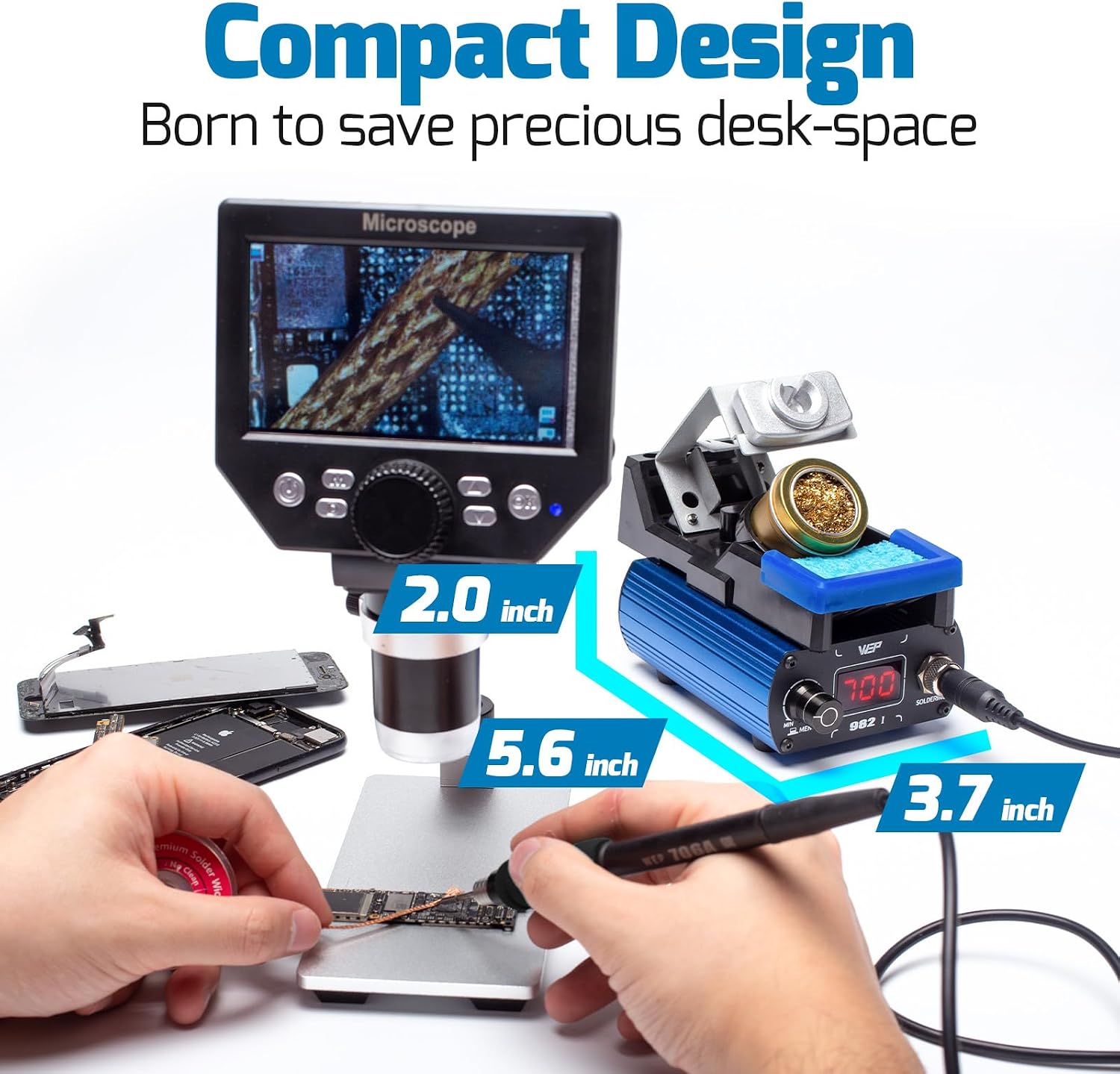
Figure 5: Correct tip installation (fully inserted).
4.3 Power Connection
Connect the soldering iron handpiece to the main unit. Then, connect the power cord to the main unit and plug it into a standard 110-127V AC outlet.
5. Operating Instructions
5.1 Power On/Off
Press the power button to turn the station on. The digital display will show the current temperature. Press and hold the power button to turn off the station.
5.2 Temperature Adjustment
Rotate the digital control knob to adjust the desired soldering temperature. The temperature range is 194°F to 842°F (90°C to 450°C). The station features PID temperature control for rapid and stable heating.
5.3 Preset Channels
The WEP 982-I allows you to store and recall up to three preset temperature settings for quick access.
- To Set a Preset: Adjust the temperature to your desired value. Press and hold the control knob until the channel number (CH1, CH2, or CH3) flashes. Rotate the knob to select a channel, then press again to save.
- To Recall a Preset: Briefly press the control knob to cycle through the preset channels.

Figure 6: Using preset temperature channels.
5.4 °C/°F Conversion
The temperature display can be switched between Celsius and Fahrenheit. Refer to the user interface for the specific button or knob combination to toggle this setting.
5.5 Sleep Mode and Automatic Shutdown
To extend tip lifespan and enhance safety, the station features a sleep mode and automatic shutdown function.
- Sleep Mode: When the soldering iron is placed in its holder, it automatically cools to 392°F (200°C). This reduces unnecessary wear on the heating element and tip plating. The iron rapidly reheats to the set temperature when removed from the holder.
- Automatic Shutdown: If the iron remains in sleep mode for an extended period (configurable), the station will automatically shut down for safety.

Figure 7: Sleep mode and automatic shutdown features.
5.6 Calibration
The station includes a calibration function to ensure accurate temperature readings. Consult the on-screen menu or specific button combinations for calibration procedures, typically requiring a separate temperature meter.
6. Maintenance
6.1 Soldering Tip Care
Proper tip maintenance is essential for optimal soldering performance and tip longevity.
- Clean Regularly: Use the included brass wool tip cleaner to remove excess solder and oxidation from the tip before and after each use. Avoid abrasive materials that can damage the tip plating.
- Prevent Oxidation: To prevent oxidation, gently rub the tip at approximately 572°F (300°C) and keep the tip coated with a thin layer of solder when not actively soldering, especially before placing it in the holder or turning off the station.

Figure 8: Steps to avoid tip oxidation.
6.2 General Cleaning
Ensure the station is powered off and unplugged before cleaning. Wipe the main unit and holder with a soft, damp cloth. Do not use harsh chemicals or solvents.
7. Troubleshooting
| Problem | Possible Cause | Solution |
|---|---|---|
| "S-E" or Sensor Error displayed | Soldering tip not fully inserted or tip is faulty. | Ensure the tip is fully inserted into the handpiece. If the error persists, try a different tip. If the error continues with multiple tips, the handpiece or main unit may require service. |
| Iron not heating up | Power cord disconnected, power switch off, or faulty heating element/tip. | Check power connections. Ensure the station is powered on. Verify tip installation. Replace the tip if necessary. |
| Temperature unstable | Improper tip installation, environmental factors, or calibration needed. | Ensure tip is fully seated. Avoid drafts. Perform calibration if temperature deviation is significant. |
8. Specifications
- Model: WEP 982-I
- Voltage: 110-127V AC
- Wattage: 40 Watts
- Temperature Range: 194°F - 842°F (90°C - 450°C)
- Temperature Stability: PID Controlled
- Display Type: LED
- Product Dimensions: 5.59 x 3.7 x 1.97 inches (Main Unit)
- Item Weight: 2.4 pounds
- Compatible Tips: C210 Type
- Included Components: Soldering Station, Iron Holder, Tips Cleaner, 3 Iron Tips
9. Warranty and Support
The WEP 982-I Soldering Iron Station is covered by a 1-year USA technical support. For assistance, please contact our dedicated support team. We are available to provide 24-hour assistance for any technical inquiries or issues you may encounter.
Please retain your proof of purchase for warranty claims.
