
Important Safety Information
Please read this manual carefully before installation and operation. Keep these instructions for future reference.
- Ensure power is disconnected at the circuit breaker before installation or maintenance.
- Installation must be performed by a qualified electrician in accordance with all local and national electrical codes.
- Mount the fan securely to a ceiling joist or a suitable support structure capable of holding the fan's weight.
- Do not connect the fan to a dimmer switch unless specifically designed for fan control.
- Ensure all electrical connections are tight and correct to prevent fire or electric shock.
Package Contents
Verify that all components are present before beginning installation.

Image: All components included in the package for the ceiling fan installation.
- Ceiling Fan Unit (with integrated LED light)
- Remote Control
- Remote Controller Wall Plate
- 'S' Safety Hook
- 4 x Washers
- 4 x Expansion Screws
- 4 x Expansion Tubes (for expansion screws)
- 4 x Junction Box Screws
- 4 x Self-tapping Screws
- 4 x Wire Connectors
- Additional Expansion Tubes (quantity may vary, typically 4)
Specifications
| Feature | Detail |
|---|---|
| Brand | VOLISUN |
| Model Name | 21164ZM |
| Color | White |
| Material | Acrylic, Acrylonitrile Butadiene Styrene |
| Product Dimensions | 19.7"L x 19.7"W x 5.3"H |
| Item Weight | 7.6 Pounds |
| Installation Type | Flush Mount |
| Control Method | App, Remote Control |
| Light Source Type | LED |
| Light Color Temperature | 3000K-6500K (Dimmable) |
| Brightness | 4320 Lumens |
| Wattage | 36 Watts |
| Voltage | 110 Volts |
| Fan Speeds | 6 |
| Timer Settings | 1H, 2H |
| Recommended Room Size | 15-25 m² |
| Special Features | Dimmable, 6-speed fan, Dual Memory Function (remote/wall switch), Low Profile, Quiet Operation, Reversible Fan |
| Safety Certification | UL |
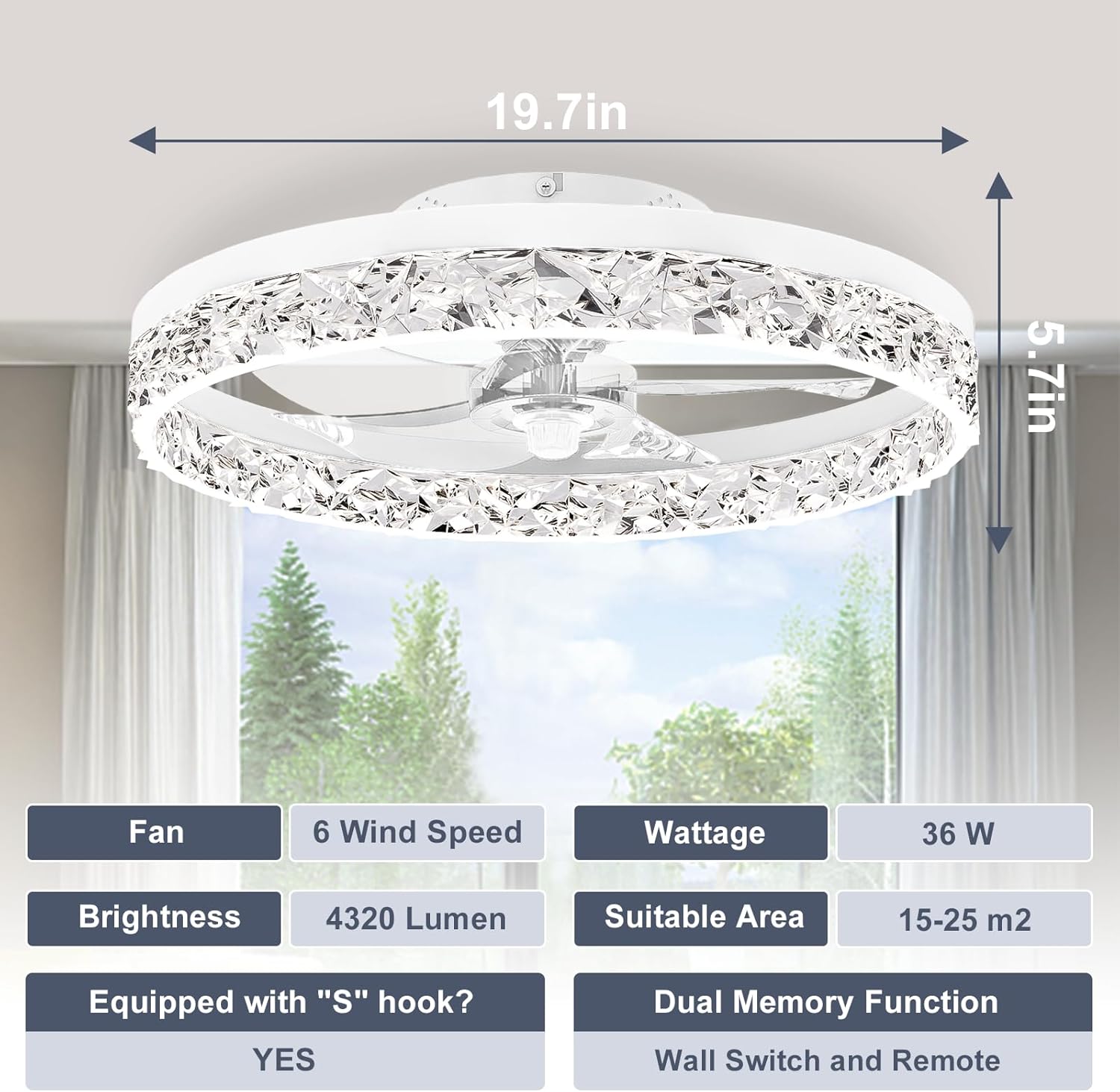
Image: Product dimensions and key specifications.
Setup and Installation
The VOLISUN ceiling fan is designed for simplified installation with most components pre-assembled. A comprehensive user manual is included in the package for detailed instructions.
- Preparation: Ensure the power supply is turned off at the main circuit breaker. Gather all necessary tools (screwdriver, wire strippers, ladder, etc.).
- Mounting Bracket Installation: Secure the mounting bracket to the ceiling junction box using the provided screws. Ensure the bracket is firmly attached to a structural element capable of supporting the fan's weight.
- Wiring: Connect the fan's electrical wires to the household wiring according to the wiring diagram in the included manual. Use the provided wire connectors to ensure secure connections.
- Fan Unit Attachment: Carefully lift the fan unit and attach it to the mounting bracket. Ensure all safety mechanisms, such as the 'S' safety hook, are properly engaged.
- Final Assembly: Secure any covers or decorative elements as per the detailed instructions in the physical manual.
Note: While installation is simplified, it is recommended to have two people for assembly for safety.

Image: Details of solid installation points, high-quality fan blades, and the acrylic diamond face design.
Operating Instructions
Light Control
The integrated LED light offers adjustable brightness and color temperature.
- Dimmable Light: Adjust the brightness from 5% to 100% using the remote control or the companion app.
- Color Temperature: Customize the light color from 3000K (warm white) to 6500K (cool white) to suit your preference or activity.
- Memory Function: The fan light features a dual memory function. It will recall your last brightness and color temperature settings when turned on again, whether using the remote control or a wall switch.

Image: Examples of light color temperatures (3000K-6500K) suitable for various room types.

Image: Illustration of stepless dimming capability from 5% to 100% brightness.
Fan Control
The fan provides multiple speed settings and a reversible function for year-round comfort.
- 6 Wind Speeds: Select from six different fan speeds to achieve your desired airflow intensity.
- Quiet Operation: The fan operates with minimal noise, ensuring a peaceful environment.
- Timer Function: Set the fan to automatically turn off after 1 or 2 hours.
- Reversible Fan:
- Summer Mode (Downward Airflow): Creates a cooling effect by pushing air down.
- Winter Mode (Upward Airflow): Circulates warm air trapped near the ceiling, helping to warm the room.

Image: Demonstrates the quiet operation and timer function of the fan.

Image: Illustration of the fan's reversible function for seasonal use.
Remote Control
The fan comes with a pre-paired remote control for convenient operation. Insert batteries (not included) to use.

Image: The included remote control for the ceiling fan.
App Control
For additional control options, download the companion app. Pairing instructions are available in the video below or the full user manual.

Image: Smartphone app interface for controlling the ceiling fan.
Video: Demonstrates the app control features and pairing process for the VOLISUN ceiling fan.
For more details on app control and pairing, visit the official app support page: http://www.mihuansemi.com/zhikong/
Maintenance
Regular maintenance helps ensure the longevity and optimal performance of your ceiling fan.
- Cleaning: Dust the fan blades and light fixture regularly with a soft, dry cloth. Do not use abrasive cleaners or solvents.
- Tightness Check: Periodically check all screws and connections to ensure they are secure. Loose connections can cause noise or malfunction.
- Light Source: The LED light source is integrated and not user-replaceable. If the light fails, contact customer support.
Troubleshooting
If you encounter issues with your VOLISUN ceiling fan, refer to the following common problems and solutions:
| Problem | Possible Cause | Solution |
|---|---|---|
| Fan does not start | No power, loose wiring, remote control battery dead. | Check circuit breaker. Ensure all wires are securely connected. Replace remote control batteries. |
| Light does not turn on | No power, loose wiring, LED failure. | Check power supply. Verify wiring connections. If LED is faulty, contact customer support. |
| Fan is noisy | Loose mounting screws, unbalanced blades, internal component issue. | Ensure mounting screws are tight. Check for any obstructions. If noise persists, contact customer support. |
| Remote control not working | Dead batteries, remote not paired (unlikely for pre-paired), signal obstruction. | Replace batteries. Ensure no obstructions between remote and fan. Refer to manual for re-pairing if necessary. |
Warranty and Support
VOLISUN provides a 3-year warranty for this ceiling fan. This warranty covers defects in materials and workmanship under normal use.
- If the LED fan lights stop working or any defects occur within the 3-year period, please contact customer service.
- For technical assistance, troubleshooting, or warranty claims, please contact VOLISUN customer support.

Image: VOLISUN's commitment to professional after-sales support and 3-year warranty.
Contact information for VOLISUN support can typically be found on the product packaging, the official VOLISUN website, or through your purchase platform.