
1. Introduction
This manual provides essential information for the safe and effective use of your JINWEI AEC643333 replacement battery. This battery is specifically designed for compatibility with Beats Studio 2, Studio 3, and Solo Pro Wireless Headset Headphones. Please read this manual thoroughly before installation and use to ensure optimal performance and safety.
The JINWEI AEC643333 is a rechargeable Li-ion Polymer battery with a capacity of 560mAh and a nominal voltage of 3.7V.
2. Safety Information
Your safety is paramount. Adhere to the following precautions to prevent damage to the battery, headphones, or personal injury:
- Temperature Exposure: Do not expose the battery to high temperatures. Excessive heat can lead to swelling, leakage, or explosion.
- Charging: Only charge the battery with a specified charger compatible with your Beats headphones. Using an incorrect charger may damage the battery or pose a fire hazard.
- Physical Damage: Do not puncture, disassemble, or modify the battery. Avoid dropping or subjecting the battery to strong impacts.
- Short Circuit: Prevent short circuits by ensuring metal objects do not come into contact with the battery terminals.
- Disposal: Dispose of used batteries according to local regulations. Do not dispose of batteries in general waste or by incineration.
The battery incorporates strict intelligent detection features for enhanced safety:
- Antistatic Impact Protection
- Temperature Anomaly Protection
- Short Circuit Protection
- Chip Monitoring
- Overcurrent Protection
- Voltage Protection
- Overpower Protection
- Power Protection
- Discharge Protection
- Electromagnetic Safety
- Charge Time Protection
- Reserve Protection
These features contribute to the battery's safety and stability, ensuring it automatically shuts off if voltage exceeds safe limits, maintaining stable current and durability.
3. Setup and Installation
Replacing the battery in your Beats headphones requires careful handling and may involve disassembling parts of the headphone. It is recommended that this procedure be performed by individuals with experience in electronics repair or by a qualified technician.
- Preparation: Ensure your headphones are powered off and disconnected from any charging source. Gather necessary tools, which may include small screwdrivers, prying tools, and tweezers.
- Disassembly: Carefully open the headphone ear cup or housing where the battery is located. Refer to specific guides or videos for your Beats model (Studio 2, Studio 3, or Solo Pro) for precise disassembly instructions.
- Old Battery Removal: Gently disconnect the old battery's connector from the headphone's circuit board. Carefully remove the old battery, noting its placement and any adhesive.
- New Battery Installation: Connect the JINWEI AEC643333 battery's connector to the corresponding port on the headphone's circuit board. Ensure the connection is secure and correctly oriented. The battery features a reasonably designed buckle to facilitate convenient installation and disassembly.
- Placement: Position the new battery securely within the headphone housing. Ensure no wires are pinched or obstructing the reassembly.
- Reassembly: Carefully reassemble the headphone components, ensuring all screws and clips are properly secured.
- Initial Charge: After installation, fully charge the new battery before its first use.

Image 1: The JINWEI AEC643333 replacement battery, showing its model number, capacity (560mAh), voltage (3.7V), and safety certifications. The battery is yellow with a small multi-colored wire connector. The part number 8015N01914 is visible on the label.

Image 2: A composite image illustrating the battery's "Safety and Stability" and "Reasonable designed Buckle" features. The top right section describes the battery cells as gold-plated and made with excellent raw materials, featuring automatic shut-off for voltage protection. The bottom left section highlights the buckle design for easy installation and disassembly.

Image 3: A clear view of the JINWEI AEC643333 battery, emphasizing its compact size and the small, multi-pin connector at the end of its wires, crucial for connecting to the headphone's internal circuitry. The part number 9494N16661 is visible on the label.
4. Operating Guidelines
Once installed, the JINWEI AEC643333 battery operates seamlessly with your Beats headphones. Follow these general guidelines for optimal performance:
- First Use: Fully charge the battery before its initial use to calibrate its capacity.
- Charging Cycle: For best battery longevity, avoid frequently draining the battery completely. Partial discharges and charges are generally better for lithium-ion batteries.
- Storage: If storing the headphones for an extended period, ensure the battery is charged to approximately 50-70% to prevent deep discharge, which can reduce battery life.
5. Maintenance
Proper maintenance can extend the life of your JINWEI AEC643333 battery:
- Temperature Control: Avoid exposing your headphones (and thus the battery) to extreme hot or cold temperatures. This includes leaving them in direct sunlight or in a very cold car.
- Cleaning: Keep the headphone's charging port and external surfaces clean to ensure proper connection and prevent debris from entering the battery compartment.
- Regular Use: Regular use and charging help maintain battery health.
6. Troubleshooting
If you encounter issues with your JINWEI AEC643333 battery, consider the following:
- Battery Not Charging:
- Ensure the charging cable and adapter are functional and correctly connected.
- Verify that the battery connector inside the headphone is securely seated.
- Check for any visible damage to the battery or its wires.
- Headphones Not Powering On After Battery Replacement:
- Double-check all internal connections, especially the battery connector.
- Ensure the battery is fully charged.
- Confirm compatibility: This battery is for Beats Studio 2, Studio 3, and Solo Pro Wireless Headset Headphones.
- Connector Fit Issues:
- Some users have reported that the male connector might be too large for certain headphone sockets (e.g., Beats Studio 2 B0501). Before installation, carefully compare the new battery's connector with the original one to ensure a proper fit. If the connector is too large, it will not fit into the socket.
- Reduced Battery Life:
- Ensure the battery has been fully charged and discharged a few times to allow for proper calibration.
- Review operating and maintenance guidelines to ensure optimal usage.
7. Specifications
| Model | AEC643333 |
| Battery Type | Rechargeable Li-ion Polymer Battery |
| Capacity | 560mAh |
| Voltage | 3.7V |
| Energy | 2.072Wh |
| Compatible Models | Beats Studio 2, Studio 3, Solo Pro Wireless Headset Headphones |
| Package Dimensions | 5.08 x 3.19 x 0.94 inches |
| Item Weight | 1.23 ounces |
| Manufacturer | JINWEI |
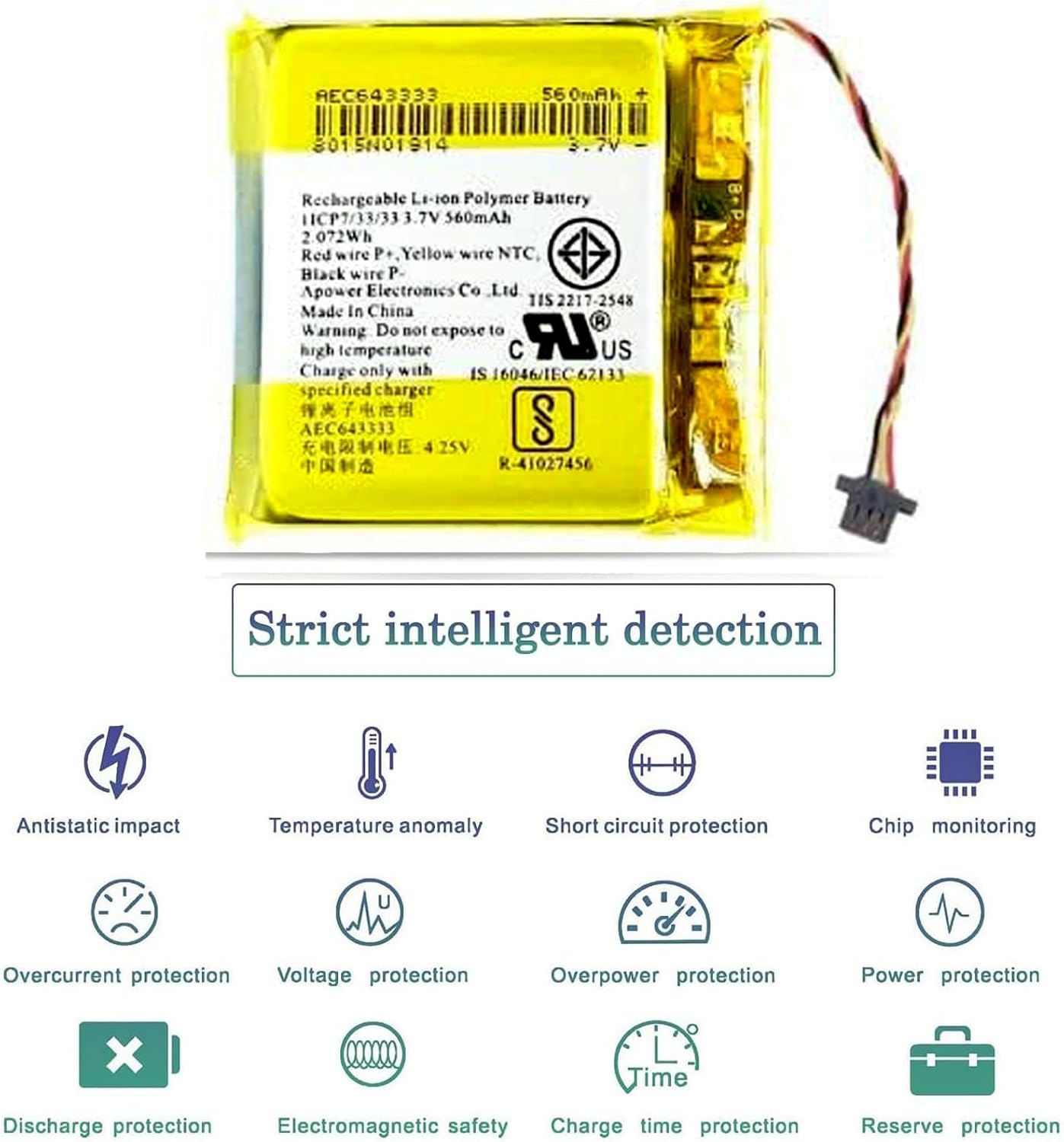
Image 4: A diagram illustrating the various "Strict intelligent detection" features of the battery, including icons for antistatic impact, temperature anomaly, short circuit protection, chip monitoring, overcurrent protection, voltage protection, overpower protection, power protection, discharge protection, electromagnetic safety, charge time protection, and reserve protection.
8. Warranty and Support
Your JINWEI AEC643333 battery comes with a 30-day refund policy and a 6-month warranty. This warranty covers manufacturing defects and ensures your satisfaction with the product.
For any questions, concerns, or support needs regarding your battery, please contact the seller or manufacturer directly. Provide your purchase details and a clear description of the issue for prompt assistance.