
1. Introduction
Thank you for purchasing the UPERFECT 15.6-inch Full HD Portable Monitor. This manual provides essential information for setting up, operating, and maintaining your monitor. Please read it thoroughly before use and retain it for future reference.
2. Product Overview
2.1 Key Features
- Full HD 1080p IPS Display: 1920 x 1080 resolution with HDR support, 178° wide viewing angle, and accurate color reproduction.
- Wide Compatibility: Connects to PCs, laptops, mobile phones, tablets, Chromebooks, PS4/PS5, Raspberry Pi, Xbox One, Wii, and Nintendo Switch via USB-C or HDMI.
- Plug & Play Functionality: Easy connection without complex driver installations.
- Integrated Speakers: Two 2W built-in speakers for clear audio.
- Portable Design: Lightweight and slim, includes a durable synthetic leather protective case that doubles as a stand.
- VESA Compatible: Features 75x75mm VESA mounting holes for flexible installation.
- Patented Hole Design: Allows a pen to be used as a temporary stand for portrait or landscape orientation.
- Eye Care Technology: Low blue light and flicker-free features to reduce eye strain.
2.2 Package Contents
- UPERFECT 15.6-inch Portable Monitor
- Protective Case / Stand
- USB-C to USB-C Cable
- HDMI to HDMI Cable
- USB-A to USB-C Power Cable
- Power Adapter (may vary by region)
- User Manual


3. Safety Information
Please observe the following safety precautions to prevent damage to the monitor and ensure your safety:
- Do not expose the monitor to rain, moisture, or extreme temperatures.
- Avoid placing the monitor near heat sources or in direct sunlight.
- Use only the provided power adapter and cables.
- Do not attempt to disassemble or repair the monitor yourself. Refer all servicing to qualified personnel.
- Keep the monitor away from strong magnetic fields.
- Clean the screen with a soft, lint-free cloth. Avoid using abrasive cleaners.
4. Setup Guide
4.1 Physical Setup
The monitor comes with a protective case that can be folded to serve as a stand. To set up the monitor:
- Place the monitor on a stable, flat surface.
- Fold the protective case into a triangular stand shape to support the monitor at your desired viewing angle.
- Alternatively, use the patented hole design by inserting a pen into the designated hole for quick propping in portrait or landscape mode.

4.2 VESA Mounting
The monitor is VESA compatible (75x75mm) for mounting on a monitor arm or wall mount (mount not included).
- Remove the protective case from the monitor.
- Align the four VESA holes on the back of the monitor with your VESA-compatible mount.
- Secure the monitor to the mount using M4x6mm screws.

5. Operating Instructions
5.1 Connecting Devices
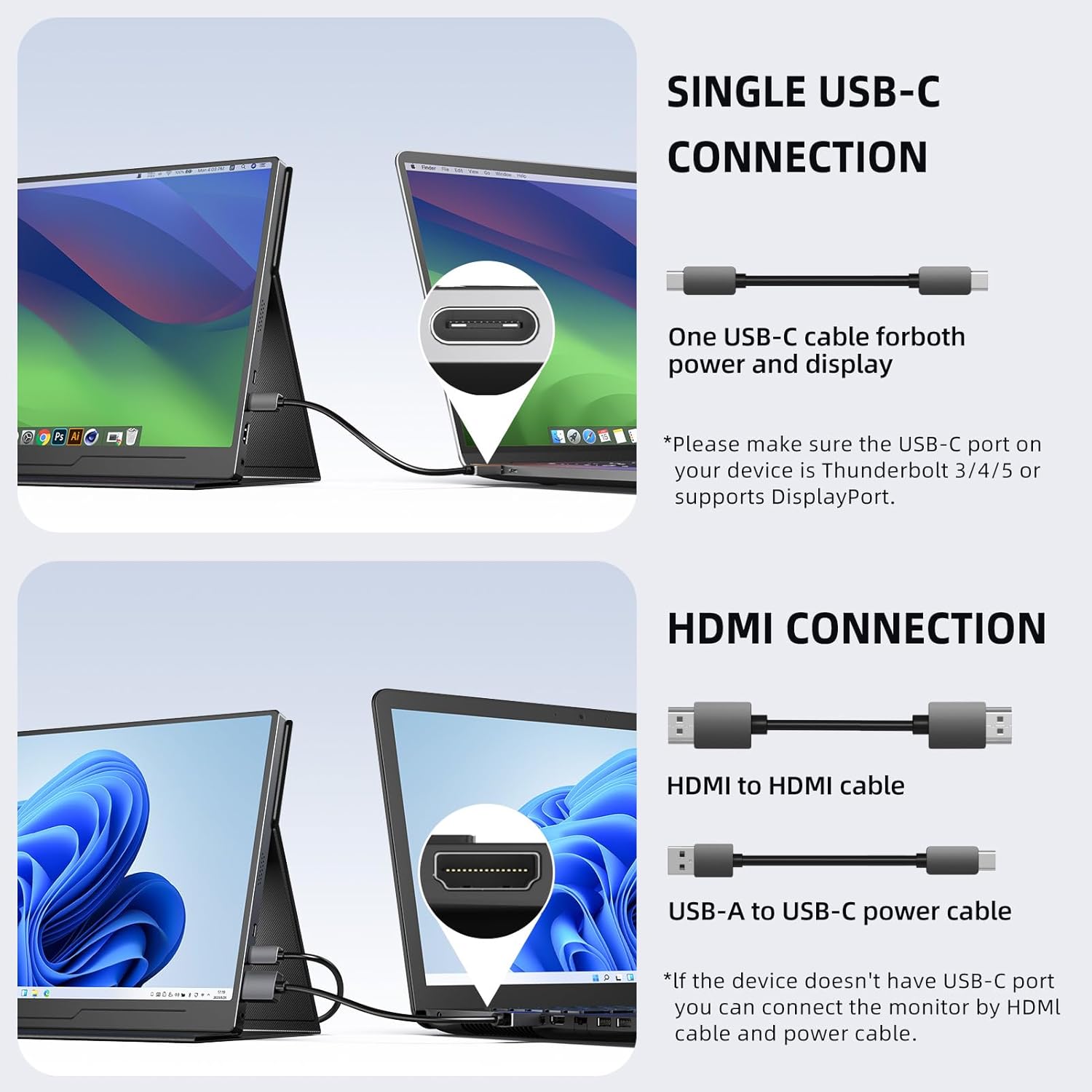
The monitor supports various connection methods:
- USB-C Connection: For devices with a full-featured USB-C port (supporting DisplayPort Alternate Mode and power delivery), a single USB-C to USB-C cable can provide both video signal and power.
- HDMI Connection: For devices with an HDMI output, use an HDMI to HDMI cable for video. The monitor will also require external power via the USB-C power port using the USB-A to USB-C power cable and adapter.
- Micro USB OTG: Connect a keyboard or mouse directly to the monitor for enhanced control when connected to a compatible device.

5.2 Display Modes
When connected to a laptop or PC, you can configure the display mode:
- Duplicate Mode: Shows the same content on both your primary device and the portable monitor.
- Extend Mode: Extends your desktop across both screens, providing more workspace.
- Second Screen Mode: Uses only the portable monitor as the display.

5.3 On-Screen Display (OSD) Menu
The OSD menu allows you to adjust various display settings. Use the buttons on the side of the monitor to navigate:
- Menu Button: Press to open the OSD menu.
- +/- Buttons: Navigate through menu options or adjust values.
- Exit Button: Exit the OSD menu.
- Power Button: Turn the monitor on/off.
Common OSD settings include Brightness, Contrast, Color Temperature, Input Source, and HDR mode.
5.4 Audio
The monitor features two built-in 2W stereo speakers. You can also connect headphones via the 3.5mm audio jack for private listening.
6. Troubleshooting
| Problem | Possible Solution |
|---|---|
| No signal / Black screen |
|
| No power |
|
| Image is distorted or flickering |
|
| No sound |
|
| Colors appear washed out (especially with HDR) |
|
7. Specifications
| Feature | Detail |
|---|---|
| Brand | UPERFECT |
| Model Number | M156A08 |
| Screen Size | 15.6 Inches |
| Resolution | 1920 x 1080 (Full HD 1080p) |
| Panel Type | IPS |
| Aspect Ratio | 16:9, 4:3 |
| Screen Surface | Matte |
| Contrast Ratio | 800:1 |
| Response Time | 1 Millisecond |
| Refresh Rate | 60 Hz |
| Power Consumption | 2 Watt |
| Connections | USB-C (x2), HDMI (Standard), Micro USB (OTG), 3.5mm Audio Jack |
| Compatible Devices | PC, Laptop, Mobile Phone, Tablet, Chromebook, PS4/5, Raspberry Pi 4/3/2/1/3B+, Xbox One, Wii, Switch |
| VESA Compatibility | 75x75mm |
| Color | Black |
For detailed energy efficiency information, please refer to the EPREL database.

8. Warranty and Support
8.1 Manufacturer's Warranty
This UPERFECT monitor comes with a 1-year manufacturer's warranty from the date of purchase. The warranty covers defects in materials and workmanship under normal use. It does not cover damage caused by misuse, accidents, unauthorized modifications, or external causes.
Please retain your proof of purchase for warranty claims.
8.2 Customer Support
If you encounter any issues or have questions regarding your UPERFECT portable monitor, please contact our customer support team:
- Email: support@uperfectmonitor.com (example)
- Website: www.uperfectmonitor.com (example)
When contacting support, please provide your monitor's model number (M156A08) and a detailed description of the issue.


