
Inkbird IBS-TH3-PLUS
INKBIRD IBS-TH3-PLUS WiFi Thermometer Hygrometer User Manual
Model: IBS-TH3-PLUS
Product Overview
The INKBIRD IBS-TH3-PLUS is a WiFi-enabled thermometer and hygrometer designed for indoor environmental monitoring. It provides real-time temperature and humidity readings, accessible via a large LCD display and a smartphone application. The device features a precise Swiss sensor for accurate measurements and supports alert functions for out-of-range conditions and low battery.
This manual provides detailed instructions for setting up, operating, and maintaining your INKBIRD IBS-TH3-PLUS device.

Figure 1: The INKBIRD IBS-TH3-PLUS device shown alongside a smartphone displaying its companion application. The device's screen shows current temperature and humidity, while the app provides detailed historical data and settings.
Package Contents
Upon opening the package, ensure all the following items are present:
- INKBIRD IBS-TH3-PLUS WiFi Thermometer Hygrometer
- User Manual (Card)
- USB Charging Cable

Figure 2: The complete package contents for the IBS-TH3-PLUS, including the main unit, instruction manual, and USB charging cable.
Product Features
- WiFi Connectivity: Connects directly to 2.4GHz WiFi for remote monitoring via smartphone.
- Precise Swiss Sensor: Ensures high accuracy for temperature (±0.3℃/±0.5℉) and humidity (±3%RH).
- Large LCD Display: Shows current temperature, humidity, and comfort level emoticons.
- Smart Alert Function: Customizable high/low temperature/humidity alerts and low battery notifications via the INKBIRD App.
- USB Rechargeable Battery: Built-in 500mAh battery provides up to six months of continuous operation on a full charge (at 25℃/77℉, 60-minute logging interval).
- 1-Year Data Storage & Export: View historical data through graphs and export for analysis.
- Multiple Placement Methods: Features a hanging hole, magnetic back, and foldable stand for versatile placement.

Figure 3: The versatile placement options for the IBS-TH3-PLUS, including a hanging hole, magnetic back, and a foldable stand, allowing it to fit in various locations.

Figure 4: An annotated diagram highlighting the key features and components of the IBS-TH3-PLUS, such as the LCD display elements (temperature, humidity, comfort emoticons, WiFi, battery), and physical controls (power switch, WiFi button, USB charging port, hanging hole, foldable stand, magnetic back).
Setup Guide
1. Charging the Device
Before initial use, fully charge the device using the provided USB charging cable. Connect the USB-C end to the device's charging port and the USB-A end to a standard USB power adapter (not included).
Note: A full charge can take several hours. The battery icon on the display will indicate charging status.
2. Downloading the INKBIRD App
The INKBIRD IBS-TH3-PLUS requires the INKBIRD App for full functionality and remote monitoring. Scan the QR code provided in the quick start guide or search for "INKBIRD" in your smartphone's app store (App Store for iOS, Google Play Store for Android).
- Download and install the INKBIRD App.
- Register for a new account or log in if you already have one.
3. Connecting to WiFi
The device connects to a 2.4GHz WiFi network. Ensure your smartphone's Bluetooth and location services are enabled during the pairing process.
- Turn on the device using the power switch located on the back.
- Open the INKBIRD App and tap "Add Device" or the "+" icon.
- Select "IBS-TH3-PLUS" from the list of available devices.
- Press and hold the WiFi button on the device for 5-10 seconds until the WiFi icon on the display blinks rapidly, indicating pairing mode.
- Follow the on-screen instructions in the app to select your 2.4GHz WiFi network and enter the password.
- Wait for the device to connect. Once connected, the WiFi icon on the display will become solid, and the app will confirm successful pairing.

Figure 5: A step-by-step visual guide illustrating the process of adding and connecting the IBS-TH3-PLUS to the INKBIRD App, from selecting the device to successful network distribution.
Troubleshooting Connection Issues:
- Ensure the device is within range of your 2.4GHz WiFi router.
- Minimize physical barriers (walls, large objects) between the device and the router.
- Verify your WiFi password is correct.
- Check the device's battery level.
- Confirm Bluetooth and location services are enabled on your smartphone.

Figure 6: Important considerations for optimal WiFi connectivity, such as placing the device close to the router, minimizing obstructions, checking battery status, and enabling necessary phone permissions.
Operating Instructions
1. Understanding the Display
The large LCD screen provides immediate environmental data:
- Current Temperature: Displays in Celsius or Fahrenheit.
- Current Humidity: Displays as a percentage (RH).
- Comfort Level Emoticons: Indicates whether the environment is Hot, Comfortable, Cold, Dry, or Wet based on customizable ranges.
- WiFi Icon: Indicates connection status.
- Battery Level: Shows remaining battery life.

Figure 7: The IBS-TH3-PLUS display, illustrating how comfort level emoticons visually represent temperature and humidity conditions (Hot, Comfortable, Cold, Dry, Wet) based on predefined or customized ranges.
2. Using the INKBIRD App
The INKBIRD App provides advanced features and remote access:
- Real-time Monitoring: View live temperature and humidity data from anywhere.
- Historical Data: Access 1-year of historical data, presented in graphs. Data can be exported for further analysis.
- Alert Settings: Set custom high and low temperature/humidity thresholds. Receive instant notifications on your smartphone when these thresholds are exceeded.
- Comfort Range Customization: Adjust the temperature and humidity ranges that define the comfort level emoticons on the device display.
- Logging Interval: Configure how frequently the device records data (e.g., every 10 seconds, 60 minutes). Note that shorter intervals consume more battery power.
- Alexa Integration: Connect the sensor with Alexa to inquire about temperature and humidity by voice.

Figure 8: The INKBIRD App interface, demonstrating real-time temperature and humidity display, historical data graphs, and customizable settings for comfort levels and alert thresholds.
Video 1: An official product video from LERWAY Tech. (Seller) demonstrating the features and functionality of the INKBIRD WiFi Thermometer Hygrometer Monitor IBS-TH3 Plus. This video provides a comprehensive overview of the device's capabilities and user experience.
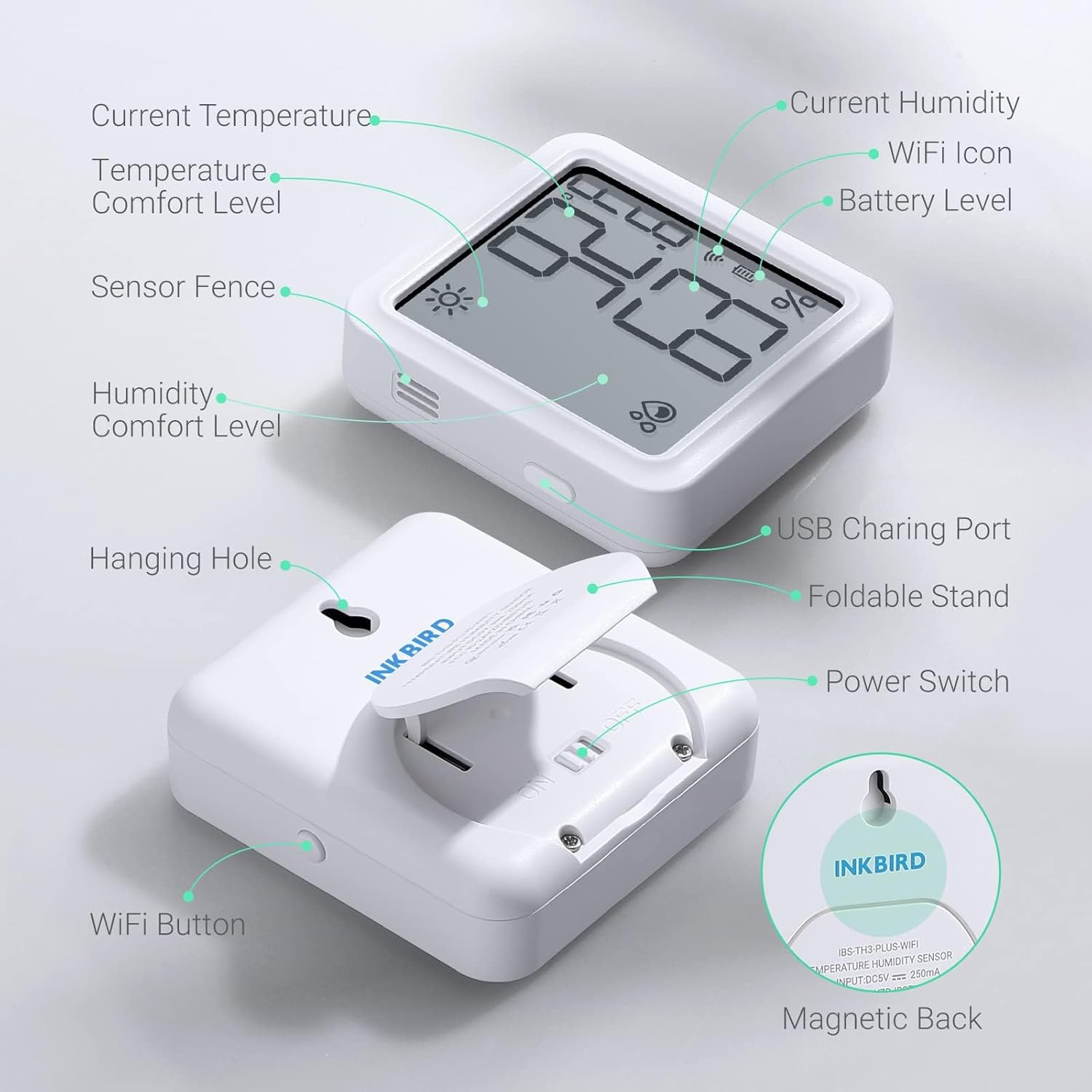
Figure 9: The INKBIRD App's data storage and export feature, allowing users to view historical temperature and humidity trends over a year and export the data for detailed analysis.
Maintenance
1. Cleaning the Device
To ensure accurate readings and prolong the device's lifespan:
- Wipe the device regularly with a soft, dry cloth.
- Do not use abrasive cleaners, solvents, or immerse the device in water.
- Keep the sensor opening clear of dust and debris.
2. Battery Management
The device is equipped with a rechargeable lithium battery. Recharge when the low battery alert is received or the battery icon on the display indicates low power.
- Use the provided USB charging cable.
- Battery life is affected by ambient temperature and logging interval. Lower temperatures and shorter logging intervals will drain the battery faster.
| Recording Time Interval | Battery Life |
|---|---|
| 120 minutes | About 1 year |
| 60 minutes | About 6 months |
| 30 minutes | About 3 months |
| 10 minutes | About 1 month |
To maximize battery life, select a larger recording interval.

Figure 10: A chart detailing the estimated battery life of the IBS-TH3-PLUS under various recording time intervals, emphasizing that longer intervals conserve battery power.
Troubleshooting
| Problem | Possible Cause | Solution |
|---|---|---|
| Device not connecting to WiFi | Incorrect WiFi password; Device too far from router; 5GHz WiFi network selected; Low battery; Bluetooth/Location disabled on phone. | Verify password; Move device closer to router; Ensure 2.4GHz network is selected; Charge device; Enable Bluetooth/Location services. |
| Inaccurate readings | Sensor obstructed or dirty; Device placed in extreme conditions; Need for calibration. | Clean sensor opening; Relocate device to a stable environment; Use the app's calibration feature if available. |
| App not receiving data | Device offline; App not running in background; Network issues. | Check device WiFi connection; Ensure app has background refresh enabled; Check home network stability. |
| Short battery life | Frequent data logging interval; Low ambient temperature. | Increase data logging interval in the app; Note that battery performance decreases in cold environments. |
Specifications
- Model: IBS-TH3-PLUS
- Brand: Inkbird
- Connectivity: 2.4GHz WiFi
- Temperature Measurement Range: 0℃~50℃ / 32℉~122℉
- Temperature Accuracy: ±0.3℃ / ±0.5℉
- Humidity Measurement Range: 0%RH~99%RH
- Humidity Accuracy: ±3%RH
- Battery: Built-in 500mAh USB Rechargeable Lithium Polymer Battery
- Data Storage: 1 Year
- Dimensions: Approximately 4.84 x 3.66 x 2.24 inches
- Weight: Approximately 7.37 ounces
- Mounting Type: Wall Mount, Magnetic, Foldable Stand
Warranty and Support
Inkbird provides a standard warranty for its products. Please refer to the official Inkbird website or the warranty card included in your package for detailed warranty terms and conditions.
For technical support, troubleshooting assistance, or any inquiries regarding your INKBIRD IBS-TH3-PLUS, please contact Inkbird Customer Service:
- Official Website: www.inkbird.com
- Email Support: Refer to your product packaging or official website for the most current contact information.
You can also find additional resources and FAQs on the Inkbird Amazon Store.
Related documentsIBS-TH3-PLUS


Ask a question about this manual
Ask about setup, troubleshooting, compatibility, parts, safety, or missing instructions. Manuals+ will review the question and use this page’s manual context to help answer it.