
Introduction
This SpeaKa Professional HDMI to RCA Audio Extractor is designed to convert an HDMI input signal into a 5.1 channel analog audio output. It supports Dolby AC-3 and DTS decoding, including 5.1 RAW digital audio streaming. This device is suitable for various applications, such as home entertainment systems, schools, concert halls, and cinemas, allowing users to experience DTS or Dolby audio effects.
Product Features
- Converts HDMI input to high-quality analog audio output, suitable for older AV receivers or active 5.1 audio systems.
- Supports 5.1 surround sound or stereo output via a switch, with integrated volume control.
- Supports HDMI resolutions up to 4K Ultra HD 2160p @ 30 Hz.
- Inputs: 1x HDMI. Outputs: 1x HDMI, 6x RCA (for 5.1 analog audio), 1x 3.5 mm headphone jack.
Package Contents
- SpeaKa Professional HDMI to RCA Audio Extractor (SP-10468584)
- Power Adapter (DC 5V)
- Installation Material (if applicable)
Product Overview
Front Panel
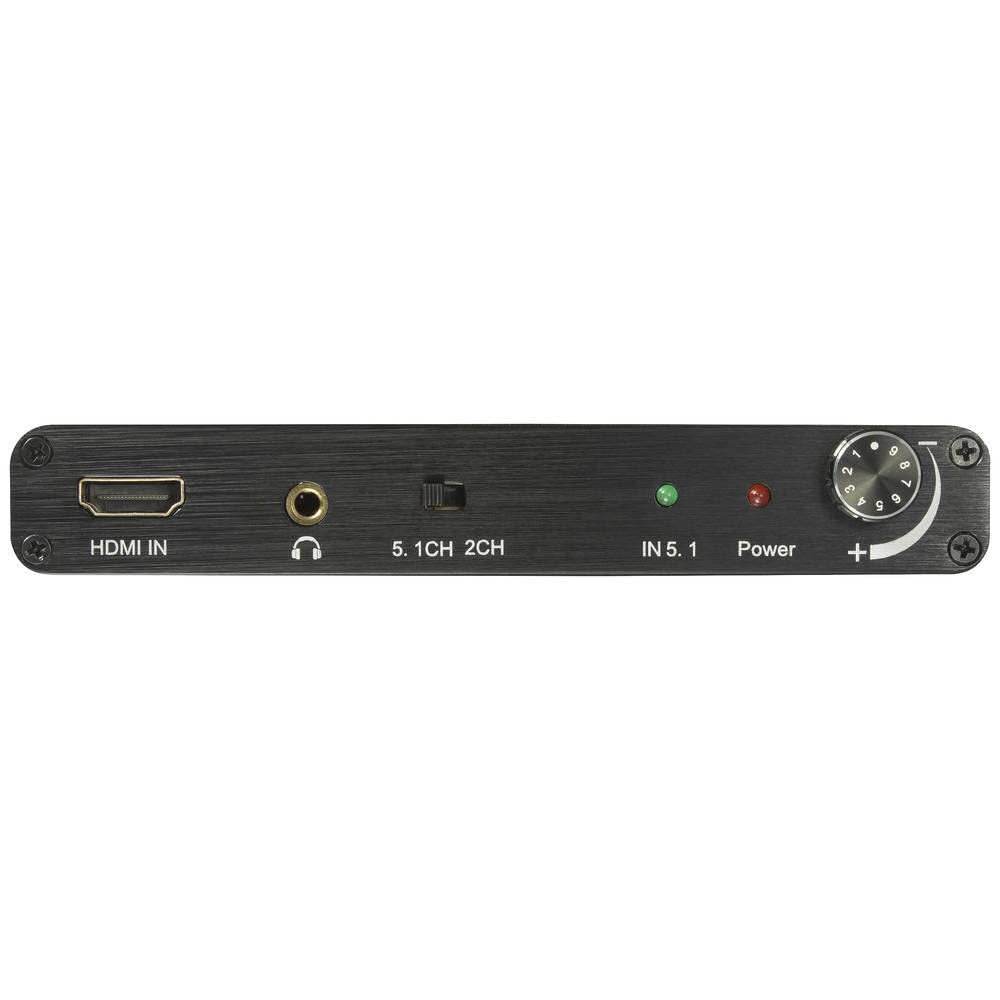
Image: Front panel of the audio extractor. Features include the HDMI input port, a 3.5mm headphone output, a switch to select between 5.1 channel and 2 channel audio output, LED indicators for 5.1 input and power status, and a rotary knob for volume control.
- HDMI IN: Connect your HDMI source device (e.g., Blu-ray player, game console).
- Headphone Jack: 3.5mm output for headphones.
- 5.1CH / 2CH Switch: Selects between 5.1 channel surround sound and 2 channel stereo output.
- IN 5.1 Indicator: Lights up when a 5.1 channel audio signal is detected.
- Power Indicator: Lights up when the device is powered on.
- Volume Control: Adjusts the output volume.
Rear Panel

Image: Rear panel of the audio extractor. It features six RCA output jacks labeled SW (Subwoofer), CEN (Center), SR (Surround Right), SL (Surround Left), FR (Front Right), and FL (Front Left). Also visible are the HDMI OUT port and the DC 5V power input port.
- RCA Outputs (SW, CEN, SR, SL, FR, FL): Connect these to your 5.1 channel analog audio system.
- HDMI OUT: Connect this to your display device (e.g., TV, monitor).
- DC 5V: Connect the provided power adapter here.
Setup Instructions
- Connect HDMI Source: Connect an HDMI cable from your source device (e.g., Blu-ray player, media streamer) to the HDMI IN port on the audio extractor.
- Connect HDMI Display: Connect an HDMI cable from the HDMI OUT port on the audio extractor to your display device (e.g., TV, projector).
- Connect Audio System:
- For 5.1 channel audio: Connect six RCA cables from the corresponding SW, CEN, SR, SL, FR, FL RCA outputs on the extractor to your 5.1 channel analog audio system (e.g., AV receiver, active speakers).
- For 2 channel stereo audio: Connect two RCA cables from the FR and FL outputs to your stereo audio system. Alternatively, connect headphones to the 3.5mm headphone jack.
- Connect Power: Plug the provided DC 5V power adapter into the DC 5V port on the extractor, then plug the adapter into a power outlet. The Power indicator LED will light up.
- Select Audio Mode: Use the 5.1CH / 2CH switch on the front panel to select your desired audio output mode.
Operating Instructions
- Ensure all connections are secure and the device is powered on.
- Turn on your HDMI source device and your display device.
- Play content from your HDMI source. The audio extractor will automatically detect the audio signal.
- If the input audio is 5.1 channel, the IN 5.1 indicator will light up.
- Adjust the volume using the rotary knob on the front panel of the extractor or your connected audio system.
- To switch between 5.1 channel and 2 channel stereo output, use the 5.1CH / 2CH switch.
Maintenance
- Keep the device in a cool, dry place, away from direct sunlight, high temperatures, and humidity.
- Do not expose the device to water or moisture.
- Clean the device with a soft, dry cloth. Do not use liquid or aerosol cleaners.
- Ensure proper ventilation around the device to prevent overheating.
- Avoid dropping or subjecting the device to strong impacts.
Troubleshooting
| Problem | Possible Cause | Solution |
|---|---|---|
| No audio output. |
|
|
| No video output. |
|
|
| 5.1 audio not working, only stereo. |
|
|
Specifications
| Manufacturer | SpeaKa Professional |
| Model Number | SP-10468584 |
| Dimensions (L x W x H) | 11 x 10 x 33 cm |
| Weight | 182 grams |
| HDMI Input Resolution | Up to 3840 x 2160 @ 30 Hz (4K Ultra HD) |
| Input Interface | 1x HDMI |
| Output Interfaces | 1x HDMI, 6x RCA (5.1 analog audio), 1x 3.5mm Headphone Jack |
| Audio Channels | 5.1 (with 2-channel stereo option) |
| Power Supply | DC 5V (via included adapter) |
| Included Components | Main unit, Power adapter, Installation material |
Safety Information
- Read all instructions before operating the device.
- Use only the provided power adapter.
- Do not disassemble or modify the device.
- Keep out of reach of children.
- Disconnect power during lightning storms or when unused for long periods.
Warranty and Support
This product comes with a 1-year availability of spare parts. For technical support or warranty inquiries, please contact your retailer or SpeaKa Professional customer service. Please refer to your purchase documentation for specific warranty terms and contact information.


