
1. Introduction
Thank you for choosing the REMAX TWS-18 True Wireless Stereo Earbuds. This manual provides detailed instructions on how to set up, operate, and maintain your earbuds to ensure optimal performance and longevity. Please read this manual carefully before use and retain it for future reference.
2. Product Overview
Key Features:
- Wireless Version: V5.0 for stable connectivity.
- Noise Cancellation and Smart Noise Reduction for clear audio.
- One Button Control and Smart Touch Control for easy operation.
- Ergonomically Designed for comfortable wear.
- Dual Main Earbuds for flexible usage.
- Type-C Charging Port for convenient charging.
- HD Calls and High-Quality Sound experience.
- Ultra-Low Power Consumption for extended use.
Components:
The REMAX TWS-18 package includes:
- True Wireless Stereo Earbuds (Left and Right)
- Charging Case
- Type-C Charging Cable (typically included)
- User Manual (this document)

Image: The REMAX TWS-18 True Wireless Stereo Earbuds resting inside their open charging case. The earbuds are black with a sleek, in-ear design, and the charging case is also black, indicating its open state.

Image: The closed charging case for the REMAX TWS-18 earbuds, featuring the "REMAX" logo and the slogan "Enjoy Anywhere & Anytime" in gold lettering on its black surface.
3. Setup
3.1 Charging the Earbuds and Charging Case
- Initial Charge: Before first use, fully charge the earbuds and the charging case.
- Charging the Case: Connect the Type-C charging cable to the charging port on the case and to a compatible USB power source (DC5V=300mA). The charging indicator will show the charging status.
- Charging the Earbuds: Place the earbuds into the charging case. They will automatically begin charging. Ensure the case has sufficient power. The earbuds can be charged approximately 3 times by a fully charged case.
Note: A full charge for the earbuds and case typically takes about 1 hour. The earbuds provide approximately 3 hours of playtime on a single charge and 48 hours of standby time.
3.2 Pairing with a Device
- Power On: Open the charging case, and the earbuds will automatically power on and enter pairing mode. You may hear an audible prompt.
- Activate Bluetooth: On your mobile device (smartphone, tablet, etc.), go to the Bluetooth settings and ensure Bluetooth is enabled.
- Select Device: In the list of available Bluetooth devices, locate and select "REMAX TWS-18" (or similar name).
- Confirm Pairing: Once selected, your device should confirm successful pairing. You are now ready to use your earbuds.
Note: The earbuds support dual main earbuds, meaning either earbud can be used independently after initial pairing.
4. Operating Instructions
4.1 Basic Controls (Smart Touch Control)
The REMAX TWS-18 earbuds feature smart touch controls. Specific functions may vary slightly depending on your device and operating system.
- Play/Pause: Single tap on either earbud.
- Next Track: Double tap on the right earbud.
- Previous Track: Double tap on the left earbud.
- Answer/End Call: Single tap on either earbud during an incoming call or active call.
- Reject Call: Press and hold either earbud for 2 seconds during an incoming call.
- Activate Voice Assistant: Triple tap on either earbud (e.g., Siri, Google Assistant).
4.2 Noise Cancellation
The earbuds are equipped with Noise Cancellation and Smart Noise Reduction technology to minimize ambient sounds. This feature is typically active by default or can be toggled via specific touch gestures (refer to the manufacturer's latest firmware updates or app if available for advanced controls).
5. Maintenance
- Cleaning: Regularly clean the earbuds and charging case with a soft, dry, lint-free cloth. Do not use harsh chemicals or abrasive materials.
- Storage: When not in use, store the earbuds in their charging case to protect them and keep them charged. Store in a cool, dry place away from direct sunlight and extreme temperatures.
- Avoid Water: The earbuds are not waterproof. Avoid exposure to water, moisture, or excessive sweat.
- Battery Care: To prolong battery life, avoid fully discharging the battery frequently. Charge the device regularly, even if not in use for extended periods.
6. Troubleshooting
Common Issues and Solutions:
- Earbuds not pairing:
- Ensure both earbuds are charged.
- Turn off and on Bluetooth on your device.
- Forget "REMAX TWS-18" from your device's Bluetooth list and attempt to re-pair.
- Place earbuds back in the case, close it, wait a few seconds, then open again to reset.
- Only one earbud working:
- Ensure both earbuds are charged.
- Try placing both earbuds back into the charging case, closing the lid, and then reopening it.
- Check your device's audio settings to ensure mono audio is not enabled.
- Low volume or poor sound quality:
- Adjust the volume on both your device and the earbuds.
- Ensure the earbuds are clean and free of debris.
- Check for interference from other wireless devices.
- Charging case not charging:
- Verify the charging cable is securely connected to both the case and the power source.
- Try a different Type-C charging cable and/or power adapter.
7. Specifications
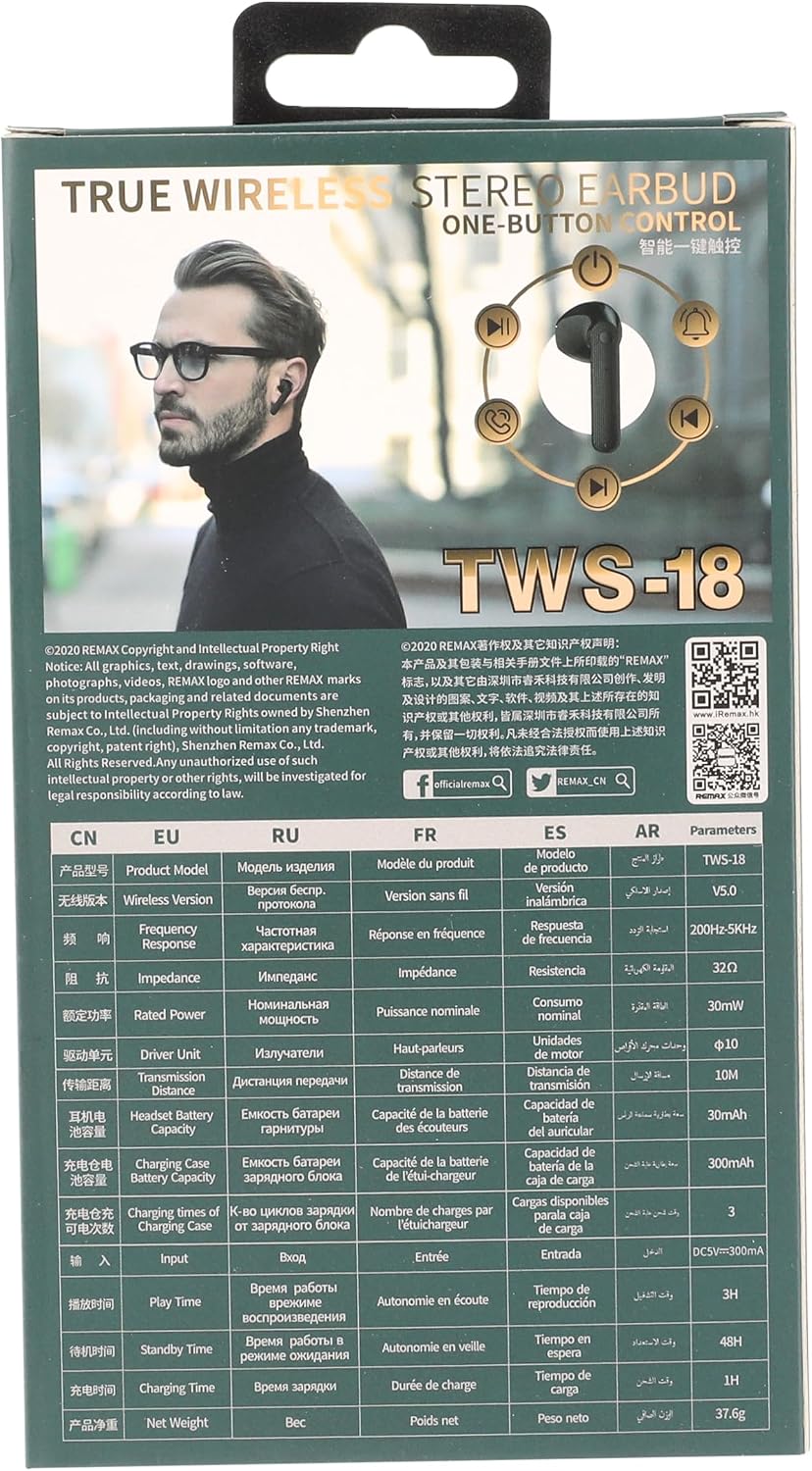
Image: The back of the REMAX TWS-18 product packaging, displaying detailed technical specifications in multiple languages, including English, under the "Parameters" section.
| Feature | Specification |
|---|---|
| Product Model | TWS-18 |
| Wireless Version | V5.0 |
| Transmission Distance | 10m |
| Driver Unit | 10mm |
| Frequency Response | 200Hz-5KHz |
| Impedance | 32Ω |
| Rated Power | 30mW |
| Headset Battery Capacity | 30mAh |
| Charging Case Battery Capacity | 300mAh |
| Charging times of Charging Case | 3 times |
| Input | DC5V=300mA |
| Playtime | 3H |
| Standby Time | 48H |
| Charging Time | 1H |
| Connectivity Technology | Bluetooth |
| Noise Control | Active Noise Cancellation |
| Package Dimensions | 18.4 x 10.1 x 3.2 cm |
| Item Weight | 300 g |
Note: Specifications are subject to change without prior notice. Performance may vary based on usage conditions and environment.
8. Warranty and Support
REMAX products are designed and manufactured to the highest quality standards. For warranty information and customer support, please refer to the warranty card included with your product or visit the official REMAX website.
Manufacturer: Remax
Official Website: www.iRemax.hk
For further assistance or inquiries, please contact REMAX customer service through their official channels.


