Introduction
This manual provides comprehensive instructions for the Casio G-Shock Move GBD-H2000 multisport watch. It covers essential functions, setup procedures, operational guidelines, maintenance tips, and technical specifications. Please read this manual thoroughly to ensure proper use and to maximize the performance of your watch.

Image: Front view of the Casio G-Shock Move GBD-H2000 watch, displaying the digital screen with time and step count, and the vibrant volt yellow resin strap.
Setup
1. Initial Charging
The GBD-H2000 features solar-assisted charging and can also be charged via USB. For initial setup or if the battery is low, connect the watch to a USB power source.
- Connect the supplied charging cable to the watch's charging terminals.
- Connect the other end of the cable to a USB power adapter or a computer's USB port.
- Ensure the watch is placed in an area with sufficient light for solar charging during daily use.

Image: Rear view of the GBD-H2000 watch, highlighting the optical heart rate sensor and the two metallic charging contacts for the USB cable.
2. Pairing with Mobile Device
To utilize all smart features and synchronize data, pair your GBD-H2000 with the Casio G-SHOCK MOVE app on your smartphone.
- Download the Casio G-SHOCK MOVE app from your device's app store.
- Enable Bluetooth on your smartphone.
- On the watch, navigate to the Bluetooth pairing mode (refer to the watch's on-screen instructions or quick start guide for specific button presses).
- Open the G-SHOCK MOVE app and follow the on-screen instructions to add your watch.
- Confirm the pairing on both your watch and smartphone.
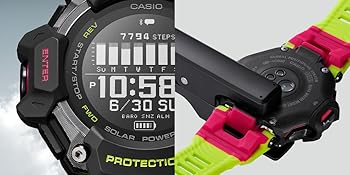
Image: A Casio G-Shock Move GBD-H2000 watch displayed next to a smartphone showing the G-SHOCK MOVE app interface, indicating a successful connection.
Operating the Watch
1. Button Functions
The GBD-H2000 features multiple buttons for navigation and function access:
- ENTER (Left-Front): Confirms selections, starts/stops activities.
- START/STOP (Left-Middle): Initiates or pauses measurements.
- FWD (Left-Rear): Scrolls forward through menus or increases values.
- REV (Right-Front): Scrolls backward through menus or decreases values.
- LIGHT (Right-Middle): Activates the LED backlight.
- SENSOR (Right-Rear): Accesses sensor data (compass, altimeter, barometer, thermometer).
- BACK (Right-Rear, lower): Returns to the previous screen or cancels an operation.

Image: Angled view of the GBD-H2000 watch, showcasing the various labeled buttons on its left and right sides.

Image: Side profile view of the GBD-H2000 watch, highlighting its robust construction and button placement.
2. Basic Navigation
Use the FWD and REV buttons to scroll through different modes and settings. Press ENTER to select an option or BACK to return.
3. Activity Tracking
The watch supports various multisport activities. To start an activity:
- Navigate to the "Activity" mode.
- Select your desired activity (e.g., Running, Biking, Swimming, Gym Workout).
- Press ENTER to begin tracking. The watch will automatically detect GPS and heart rate.
- Press START/STOP to pause or resume. Press and hold START/STOP to end the activity.
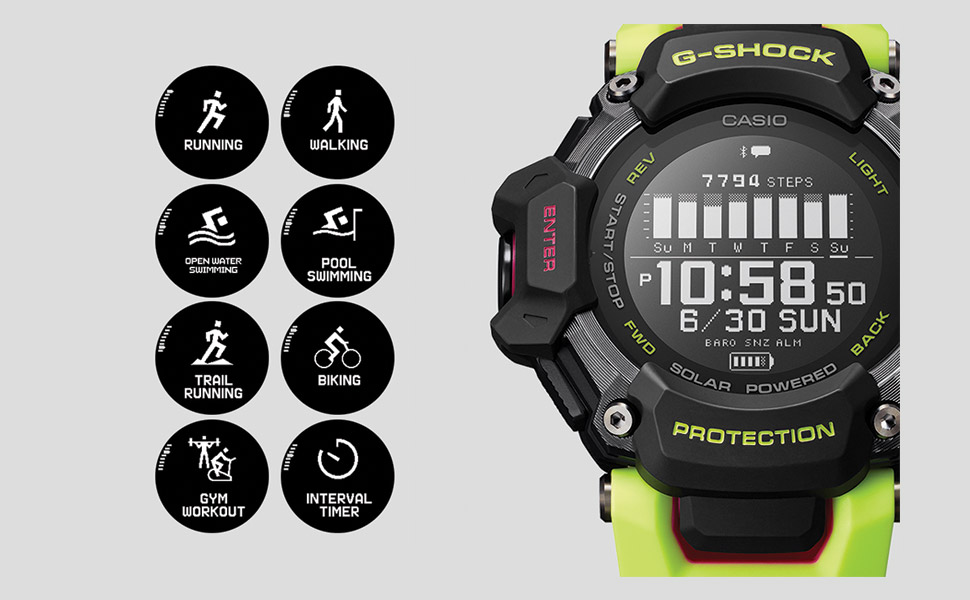
Image: A graphic illustrating the various multisport modes available on the GBD-H2000, including running, walking, swimming, trail running, biking, gym workout, and interval timer.
Supported Activities: Running, Walking, Biking, Swimming (Open Water & Pool), Trail Running, Gym Workout, Interval Timer.

Image: A man running along a coastal path, wearing the Casio G-Shock Move GBD-H2000 watch on his left wrist, demonstrating its use during outdoor activities.

Image: A person with chalked hands checking their Casio G-Shock Move GBD-H2000 watch during a gym workout, with a barbell visible in the background.
4. Heart Rate Measurement
The optical sensor on the back of the watch measures your heart rate. Ensure the watch is worn snugly on your wrist for accurate readings.
- Heart rate is measured continuously during activities.
- View your current heart rate, target heart rate zones, and heart rate graph on the watch display or in the app.
- Measurement range: 30-220 bpm.

Image: A graphic showing icons for the various sensors integrated into the GBD-H2000, including GPS, heart rate, compass, altimeter, step counter, and thermometer.
5. GPS Functionality
The integrated GPS tracks your location, distance, speed, and pace during outdoor activities. For optimal GPS reception, ensure you are in an open area.
- GPS data is automatically recorded during outdoor activities.
- Review detailed route maps and performance metrics in the G-SHOCK MOVE app.
6. Step Count and Activity Time
The 3-axis acceleration sensor measures your daily step count and active time.
- Step count display range: 0 to 99,999 steps.
- Step count resets automatically at midnight.
- Active time is measured using movement analysis (walking, running, biking).
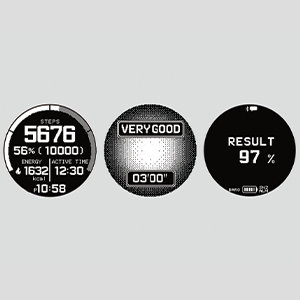
Image: A close-up of the GBD-H2000 watch display, showing the current step count (7794 steps) and a bar graph representing daily activity levels over a week.
7. Sleep Measurement and Breathing Exercise
The watch monitors your sleep patterns and offers guided breathing exercises.
- Sleep Measurement: Tracks sleep recovery status (6 levels), sleep recovery level, sleep status (5 levels), sleep score (1-100), autonomic nerve status (5 levels), and ANS score (-10 to +10).
- Blood Oxygen Level Measurement: Provides an estimate of blood oxygen levels.
- Breathing Exercise: Customizable exercise duration (2 to 20 minutes) with biofeedback.

Image: A graphic showing three circular displays from the GBD-H2000, illustrating training analysis metrics such as steps, energy, active time, cardio load status ("VERY GOOD"), and recovery result percentage.
Maintenance
1. Cleaning
- Wipe the watch and band with a soft, dry cloth regularly.
- For stubborn dirt, use a soft cloth dampened with water and mild soap, then wipe dry.
- Clean the heart rate sensor and charging terminals gently to ensure accurate readings and proper charging.
- Avoid using harsh chemicals or abrasive cleaners.
2. Battery Care
- The watch utilizes solar-assisted charging. Expose the watch to light regularly to maintain battery levels.
- If the battery level is low, charge via USB as described in the "Initial Charging" section.
- Avoid prolonged exposure to extreme temperatures, which can affect battery life.
Troubleshooting
1. Watch Not Turning On / Display Blank
- Solution: Place the watch in a brightly lit area for solar charging or connect it to a USB charger. The battery may be completely depleted.
2. Inaccurate Heart Rate Readings
- Solution: Ensure the watch is worn snugly on your wrist, positioned above the wrist bone. Clean the optical sensor on the back of the watch. Avoid excessive movement during measurement if not in an activity mode.
3. GPS Not Connecting or Inaccurate
- Solution: Ensure you are in an open outdoor area with a clear view of the sky. Avoid tall buildings or dense foliage. Wait a few moments for the watch to acquire a signal.
4. Bluetooth Pairing Issues
- Solution: Ensure Bluetooth is enabled on your smartphone and the watch is in pairing mode. Restart both the watch and your smartphone. Try unpairing and re-pairing the devices through the G-SHOCK MOVE app.
5. App Data Not Syncing
- Solution: Ensure the watch is connected to the G-SHOCK MOVE app via Bluetooth. Check your phone's internet connection. Close and reopen the app.
Specifications
| Feature | Detail |
|---|---|
| Model Number | GBD-H2000-1A9CR |
| Dimensions | 1.97 x 1.97 x 1.97 inches |
| Weight | 2.22 ounces |
| Water Resistance | 200M (20 BAR) |
| Shock Resistance | Yes |
| Power Source | Solar Assisted Recharging, USB Charging |
| Battery Life (Training Function) | Approx. 14 hours (HIGH), 16 hours (NORMAL), 19 hours (LONG) |
| Battery Life (No Training Function) | Approx. 2 months (without power-saving), 23 months (with power-saving) |
| Connectivity | Bluetooth (Mobile Link) |
| Sensors | Optical Heart Rate, GPS, Accelerometer, Gyroscope, Orientation, Altitude/Atmospheric Pressure, Temperature |
| Heart Rate Measurement | 30-220 bpm |
| Step Count Range | 0 to 99,999 steps |
| Activity Log Data | Up to 100 runs (200 laps each), time, distance, pace, calories, heart rate, cardio load, pitch, stride, altitude, strokes, SWOLF |
| Sleep Measurement | Recovery status, level, sleep status, score, ANS status, ANS score |
| Blood Oxygen Level | Yes |
| Band Material | Corn-based plastics (renewable organic materials) |
Warranty and Support
For warranty information and customer support, please refer to the official Casio website or the warranty card included with your product. Keep your proof of purchase for warranty claims.
Online Resources: For additional support, FAQs, and software updates, visit the official Casio G-Shock support page.
Contact Information: Refer to your regional Casio support contact details for service inquiries.


