
Introduction
This manual provides detailed instructions for the assembly, operation, and maintenance of your MAIDeSITe Electric Height Adjustable Desk. Designed for ergonomic comfort, this desk allows seamless transitions between sitting and standing positions, promoting a healthier work environment. Please read this manual thoroughly before assembly and use to ensure proper function and safety.
Safety Information
- Ensure all components are present and undamaged before assembly.
- Keep children and pets away from the desk during operation.
- Do not overload the desk. Refer to the specifications for maximum weight capacity.
- Avoid placing liquids directly on the control panel or near electrical components.
- Ensure sufficient clearance around the desk when adjusting height to prevent obstructions.
- If any unusual noise or movement occurs, stop operation immediately and consult the troubleshooting section.
Package Contents
Before beginning assembly, verify that all parts are included in your package. Refer to the assembly diagram for a complete list of components.
- Desk Frame (Legs, Crossbar)
- Tabletop (120 x 60 cm)
- Control Panel with LED Display
- Power Adapter and Cable
- Accessories: Drawer, Storage Bag, Cable Management Tray, Hooks, Casters (Wheels)
- Assembly Hardware (Screws, Allen Key, etc.)
Setup and Assembly
The MAIDeSITe desk is designed for easy assembly with user-friendly instructions, included tools, and pre-drilled screw holes. It is recommended to have two people for assembly, though it can be done by one person.
Assembly Steps Overview:
- Unpack Components: Carefully remove all parts from the packaging and lay them out on a clean, soft surface to prevent scratches.
- Assemble Desk Frame: Attach the lifting columns to the feet, then connect the crossbar. Ensure all screws are tightened securely.
- Attach Tabletop: Place the tabletop onto the assembled frame, aligning the pre-drilled holes. Secure the tabletop with the provided screws.
- Install Control Panel: Mount the control panel to the underside of the tabletop in the designated area. Connect the motor and power cables to the control box and then to the control panel.
- Install Accessories: Attach the drawer, storage bag, cable management tray, and hooks as desired. If using casters, replace the standard feet with the casters.
- Connect Power: Plug the power adapter into the control box and then into a wall outlet.

Image: Exploded view of the MAIDeSITe desk showing all components and their assembly points. This image illustrates the desk frame, tabletop sections, control panel, and various accessories like the storage bag, drawer, and cable management tray, along with the casters.

Image: A diagram highlighting the ease of assembly, indicating user-friendly setup with included tools and pre-drilled screw holes for quick installation.
Operating Instructions
Control Panel Overview:
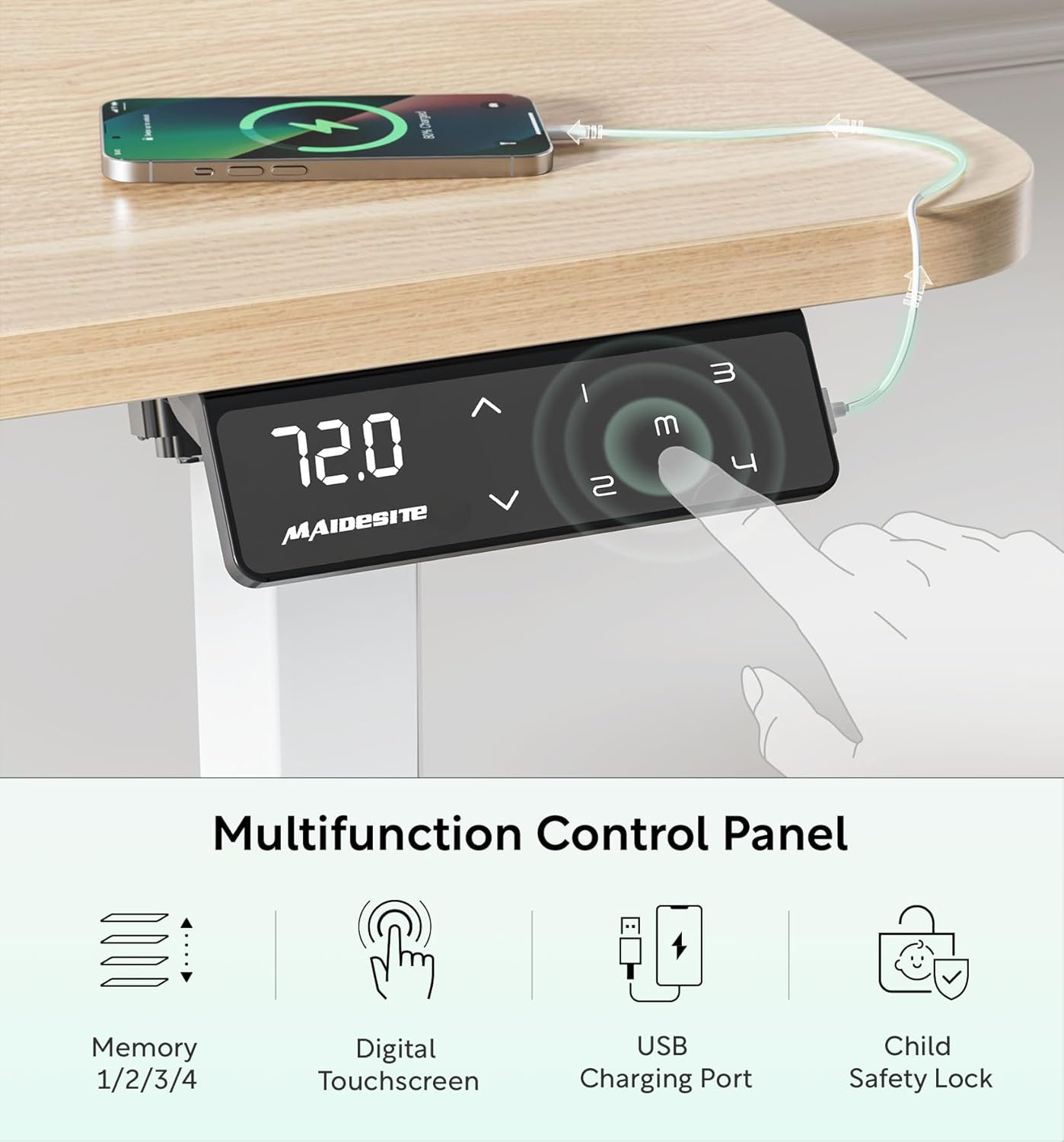
Image: Close-up of the MAIDeSITe desk's multifunctional LED control panel. It features a digital touchscreen display showing the current height, up/down arrows for adjustment, four memory preset buttons (1, 2, 3, 4), a USB charging port, and a child safety lock button.
Height Adjustment:
- Use the Up (^) and Down (v) arrow buttons on the control panel to manually adjust the desk height. The current height will be displayed on the LED screen.
- The desk offers continuous height adjustment from 72 cm to 120 cm.

Image: An illustration demonstrating the desk's height adjustment range, showing different user heights and corresponding desk heights from 72cm (sitting) to 120cm (standing).
Memory Presets:
- The control panel features 4 programmable memory buttons (1, 2, 3, 4) to save your preferred sitting and standing heights.
- To Set a Memory Position: Adjust the desk to your desired height. Press and hold one of the memory buttons (1, 2, 3, or 4) until you hear a beep or the display flashes, indicating the height has been saved.
- To Use a Memory Position: Press the corresponding memory button (1, 2, 3, or 4) once. The desk will automatically move to the saved height.
Child Safety Lock:
- Activate the child safety lock to prevent accidental height adjustments.
- To Activate: Press the lock button on the control panel. The display may show "LOC" or a lock icon.
- To Deactivate: Press the lock button again.
Image: A visual representation of the child lock feature on the control panel, showing the "LOC" indicator when activated.
USB Charging Port:
- A built-in USB port is available on the control panel for convenient charging of your electronic devices.
Anti-Collision System:
- The desk is equipped with an anti-collision system that automatically stops movement if an obstruction is detected during height adjustment. This prevents damage to the desk or other objects.
- If the anti-collision system is triggered, the desk will reverse slightly. Remove the obstruction and resume adjustment.
Maintenance
- Cleaning: Wipe the desk surface and frame with a soft, damp cloth. Avoid abrasive cleaners or harsh chemicals that could damage the finish. The tabletop is water-resistant and easy to clean.
- Cable Management: Regularly check and organize cables using the provided cable management tray to prevent tangles and damage.
- Motor Care: The electric motor is designed for long-term use and requires minimal maintenance. Avoid exposing it to excessive moisture or extreme temperatures.
- Caster Maintenance: If using casters, periodically check them for debris and ensure they roll smoothly. Lock them when the desk is in a stationary position.
Troubleshooting
If you encounter any issues with your MAIDeSITe desk, please refer to the following common troubleshooting steps:
| Problem | Possible Cause | Solution |
|---|---|---|
| Desk does not move. | Power cable disconnected, child lock active, motor error. | Check power connections. Deactivate child lock. Unplug the desk for 10 seconds and plug back in to reset. |
| Desk moves unevenly or makes unusual noise. | Uneven load, loose connections, obstruction. | Ensure weight is evenly distributed. Check all screws and connections. Remove any obstructions. |
| Anti-collision system frequently triggers. | Obstruction in the path of movement. | Ensure there are no objects under or above the desk that could interfere with its movement. |
| Memory presets not working. | Incorrect saving procedure. | Refer to the "Memory Presets" section and ensure you are pressing and holding the button until confirmation. |
If the problem persists after attempting these solutions, please contact customer support.
Specifications
| Feature | Detail |
|---|---|
| Brand | MAIDeSITe |
| Model Number | MJ-D2D-2-EU |
| Dimensions (L x W x H) | 120 x 60 x (72-120) cm |
| Weight | 27 Kilograms |
| Color | Oak |
| Material (Frame) | 100% High-Quality Carbon Steel |
| Material (Tabletop) | Engineered Wood with rounded corners, water-resistant |
| Height Adjustment Range | 72 cm to 120 cm |
| Max Weight Capacity | 80 Kilograms |
| Motor Type | Electric, Ultra-quiet (<45dB) |
| Speed | 25mm/s |
| Control Panel | LED Digital Touchscreen with 4 Memory Presets, USB Charging Port, Child Safety Lock |
| Safety Features | Anti-collision system, Child Safety Lock, Rounded Tabletop Corners |
| Included Accessories | Drawer, Storage Bag, Cable Management Tray, Hooks, Casters |
| Assembly Required | Yes |

Image: A visual representation highlighting the superior specifications of the MAIDeSITe desk, including its powerful and ultra-quiet motor, 25mm/s smooth rise speed, 80kg high capacity, and anti-collision feature.
Warranty and Support
Your MAIDeSITe Electric Height Adjustable Desk comes with a 5-year warranty, ensuring peace of mind regarding its quality and durability. We are committed to providing excellent customer service.
For any questions, technical assistance, or warranty claims, please contact MAIDeSITe customer support through the retailer's platform or visit our official website. Please have your model number (MJ-D2D-2-EU) and purchase date available when contacting support.
Online Resources: For additional information, FAQs, or video tutorials, please visit the official MAIDeSITe website or the product page on the retailer's site.


