1. Introduction
This manual provides detailed instructions for the assembly, operation, maintenance, and troubleshooting of your ONKRON Motorized TV Stand, model TS1881E-B. Please read this manual thoroughly before installation and use to ensure safe and correct operation of the product. Keep this manual for future reference.

Image 1.1: The ONKRON Motorized TV Stand TS1881E-B, showcasing its design with a television and remote control.
2. Safety Information
Adhere to the following safety guidelines to prevent injury or damage to the product:
- Weight Capacity: Do not exceed the maximum TV weight of 200 lbs (90.7 kg).
- TV Size: Compatible with TV screens from 50 to 86 inches.
- VESA Compatibility: Ensure your TV's VESA mounting pattern is between 200x200mm (min) and 800x500mm (max).
- Assembly: Follow all assembly instructions carefully. Improper assembly can lead to instability and potential hazards.
- Movement: Always lock the caster wheels when the stand is stationary. Unlock wheels only when moving the stand. Move the stand slowly and carefully, especially on uneven surfaces.
- Power: Use only the provided power adapter. Disconnect power before cleaning or maintenance.
- Children and Pets: Keep children and pets away from the stand during operation and ensure the TV is securely mounted to prevent tipping.

Image 2.1: Rear view of the TV stand highlighting VESA mounting compatibility and the maximum supported TV weight of 200 lbs.
3. Package Contents
Verify that all components are present and undamaged before beginning assembly. If any parts are missing or damaged, contact ONKRON customer support.

Image 3.1: All components of the TS1881E-B stand, including the base, columns, TV mounting brackets, shelves, remote control, and various fasteners.
Parts List:
- Base Frame
- Vertical Columns (2)
- Motorized Lift Mechanism
- TV Mounting Brackets (2)
- AV Shelves (2)
- Caster Wheels (4)
- Remote Control
- Hardware Kit (various screws, washers, spacers, Allen wrenches, screwdriver)
- Power Adapter
4. Assembly Instructions
Assembly typically requires two people. Lay out all parts on a soft, clean surface to prevent scratches.
- Attach Caster Wheels to Base: Secure the four caster wheels to the base frame using the provided bolts and wrench. Ensure wheels are locked during initial assembly.
- Assemble Vertical Columns: Connect the vertical columns to the base. Follow the diagram in the package for correct orientation.
- Install Motorized Lift: Carefully integrate the motorized lift mechanism into the vertical columns. Connect all necessary cables as indicated in the diagram.
- Attach TV Mounting Brackets: Secure the TV mounting brackets to the motorized lift. These brackets will later attach to your television.
- Install AV Shelves: Position the two AV shelves at your desired height on the vertical columns and secure them. The upper shelf can accommodate a webcam or small device.
- Mount TV: Attach the TV mounting arms to the back of your television, ensuring VESA compatibility. With assistance, carefully lift and hang the TV onto the stand's mounting brackets. Secure the TV with the safety screws.
- Cable Management: Utilize the built-in cable management system to route and conceal all power and AV cables for a tidy setup.

Image 4.1: Detail of the removable VESA panel, simplifying TV attachment and detachment.
5. Operating Instructions
5.1 Motorized Height Adjustment
The ONKRON TS1881E-B features a motorized lift system for convenient height adjustment.
- Remote Control: Use the provided remote control to raise or lower the TV. Press the 'Up' button to elevate the screen and the 'Down' button to lower it.
- Height Range: The TV stand is adjustable from 53.1 inches up to 65 inches (135 cm to 165 cm).
- Speed: The lift mechanism operates at approximately 0.5 inches per second.

Image 5.1: The remote control used to adjust the motorized height of the TV stand, ideal for various viewing environments.
5.2 Moving the Stand
To move the TV stand:
- Unlock Wheels: Ensure all four caster wheels are unlocked.
- Lower TV (Optional): For easier passage through doorways or under low obstacles, you may lower the TV to its minimum height using the remote control.
- Maneuver: Gently push the stand to its desired location. Avoid sudden movements or pushing over uneven surfaces.
- Lock Wheels: Once in position, lock all four caster wheels to secure the stand.

Image 5.2: Demonstrates lowering the TV stand to navigate through doorways or tight spaces.
5.3 Using the Shelves
The two height-adjustable shelves can hold various AV equipment, laptops, or other accessories, each supporting up to 11 lbs (5 kg).
- Adjustment: Shelves can be repositioned along the vertical columns to suit your needs.
- Placement: Devices can be placed on the shelves. The upper shelf is suitable for webcams or small cameras.
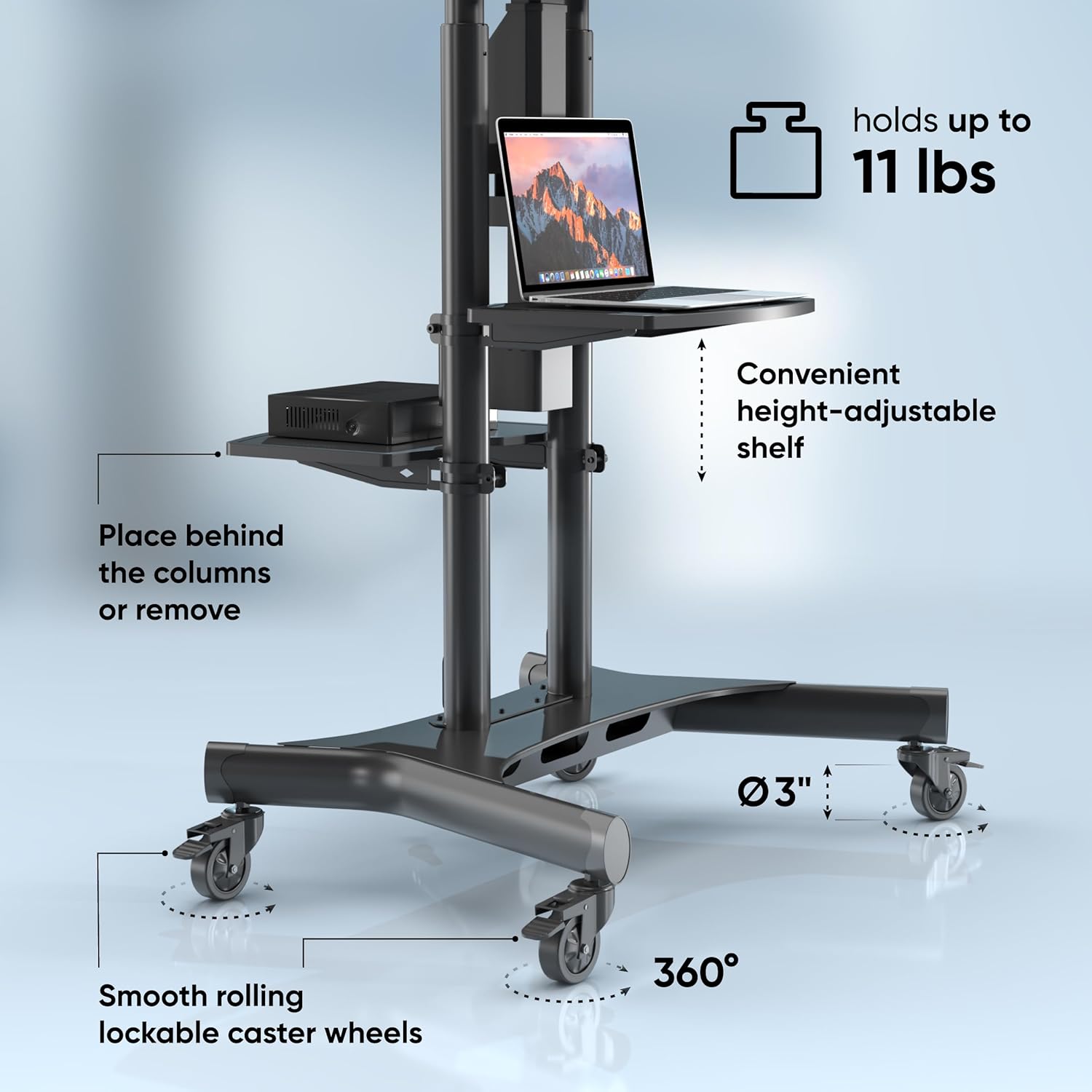
Image 5.3: The adjustable shelves provide space for a laptop and other media devices, while the lockable wheels ensure stability.
6. Maintenance
Regular maintenance ensures the longevity and optimal performance of your TV stand.
- Cleaning: Wipe the stand with a soft, dry cloth. For stubborn marks, use a slightly damp cloth and mild detergent, then dry thoroughly. Avoid abrasive cleaners.
- Check Connections: Periodically inspect all bolts and screws to ensure they are tight. Retighten if necessary.
- Caster Wheels: Keep the caster wheels free of debris to ensure smooth rolling.
- Motorized Lift: Do not attempt to lubricate or disassemble the motorized lift mechanism. If issues arise, refer to the troubleshooting section or contact support.
7. Troubleshooting
If you encounter issues with your ONKRON Motorized TV Stand, consult the following table:
| Problem | Possible Cause | Solution |
|---|---|---|
| TV stand does not move up or down. | Power cable disconnected. Remote control batteries dead. Motor overload. | Check power connection. Replace remote batteries. Disconnect power for 10 minutes, then retry. Ensure TV weight is within limits. |
| Stand moves unevenly or makes unusual noises. | Loose connections. Obstruction in lift mechanism. | Check all assembly bolts and tighten if loose. Inspect for any obstructions. Do not force movement. |
| Caster wheels do not roll smoothly. | Debris in wheels. Wheels locked. | Clean any debris from the wheels. Ensure all wheels are unlocked before moving. |
| TV appears unstable on the stand. | TV not securely mounted. Stand not level. | Ensure TV mounting arms are properly secured to the stand and safety screws are engaged. Verify the stand is on a flat, level surface. |
If the problem persists after attempting these solutions, please contact ONKRON customer support for further assistance.
8. Specifications
| Feature | Specification |
|---|---|
| Model Number | TS1881E-B |
| Brand | ONKRON |
| Compatible TV Sizes | 50 - 86 inches |
| Maximum TV Weight | 200 lbs (90.7 kg) |
| VESA Compatibility | 200x200mm (min) to 800x500mm (max) |
| Height Adjustment Range | 53.1" - 65" (135 cm - 165 cm) |
| Shelf Weight Capacity (each) | 11 lbs (5 kg) |
| Material | Alloy Steel, Metal |
| Item Weight | 71.5 pounds (32.4 kg) |
| Package Dimensions | 38.19 x 29.13 x 7.09 inches |
| Batteries (Remote) | 1 CR2 battery required |

Image 8.1: Key dimensions of the assembled TV stand, including height, width, and depth.
9. Warranty and Support
ONKRON products undergo multi-stage quality control and are designed for durability. For any questions, concerns, or warranty claims regarding your TS1881E-B Motorized TV Stand, please contact ONKRON customer service.
You can find more information and contact details on the official ONKRON store page: Visit the ONKRON Store


