
JALL CH-07
JALL Colorful Digital Alarm Clock Radio User Manual
Model: CH-07
Introduction
Thank you for purchasing the JALL Colorful Digital Alarm Clock Radio. This device combines a modern alarm clock with a mirror surface, vibrant RGB color display, FM radio, and convenient USB charging. Please read this manual carefully to ensure proper use and to fully enjoy all its features.
Safety Information
- Do not expose the device to water or excessive humidity.
- Avoid extreme temperatures.
- Do not disassemble or attempt to repair the device yourself. Refer to qualified service personnel.
- Use only the provided power adapter.
- Keep out of reach of children.
Package Contents
- JALL Colorful Digital Alarm Clock Radio (Model: CH-07)
- Owner's Manual
- Power Adapter
Product Overview
Familiarize yourself with the various parts and controls of your alarm clock radio.

Figure 1: Front view of the JALL Colorful Digital Alarm Clock Radio, highlighting its mirror surface and large digital time display. A smartphone is shown charging via its USB port.

Figure 2: Function introduction diagram, illustrating the main features such as RGB changing number display, FM radio, dual alarm, HD mirror surface, USB charging port, sleep timer, adjustable brightness and volume, and 9-minute snooze.
Control Buttons and Ports:
- Time Set / Dimmer Knob: Used to set time and adjust display brightness.
- Alarm 1 Button: Set and activate Alarm 1.
- Alarm 2 Button: Set and activate Alarm 2.
- Colors Button: Cycle through display color modes.
- FM Radio Button: Activate FM radio and scan stations.
- Volume / Tune Knob: Adjust radio volume and tune FM stations.
- Snooze / Sleep Timer Button: Activate snooze or set sleep timer.
- USB Charging Port: For charging external devices.
- Power Input: Connect the power adapter.
Setup
1. Power Connection
- Connect the provided power adapter to the "DC IN" port on the back of the alarm clock.
- Plug the adapter into a standard wall outlet.
- The display will light up, indicating the device is powered on.
2. Battery Backup (Not for operation)
The clock includes a battery backup feature. This function is designed to preserve your time and alarm settings during a power outage, not to operate the clock without AC power. When power is restored, the clock will display the correct time and settings.
Operating Instructions
Setting Time and Date
- Press and hold the Time Set button (often combined with Dimmer). The hour digits will start flashing.
- Rotate the Time Set / Dimmer Knob to adjust the hour. Press the Time Set button again to confirm and move to minutes.
- Repeat the process to set minutes, then year, month, and day.
- Press the Time Set button one last time to save all settings.
Alarm Settings (Dual Alarms)
The clock supports two independent alarms (Alarm 1 and Alarm 2) with customizable settings.

Figure 3: Dual Alarm functionality, showing options for 8 wake-up sounds, 16 volume levels, 9-minute snooze, and flexible alarm modes (weekend/weekday/7-day).
- Press the Alarm 1 or Alarm 2 button. The alarm time will flash.
- Rotate the Time Set / Dimmer Knob to set the desired alarm hour, then press the alarm button again to confirm.
- Repeat to set alarm minutes.
- Next, select the alarm mode: Weekend, Weekday, or 7-day mode by rotating the knob and confirming with the alarm button.
- Choose from 8 wake-up sounds (beep, ring bell, cheerful music, piano, wind chime, bird song, insect chirping, soft music) and 16 volume levels. The volume will gradually increase.
- Press the alarm button one last time to save and activate the alarm. An alarm icon will appear on the display.
Snooze Function:
When the alarm sounds, press the Snooze / Sleep Timer button to activate snooze for an additional 9 minutes of sleep.
Turning Off Alarm:
To turn off the alarm for the day, press any other button (e.g., Alarm 1 or Alarm 2 button) except the Snooze button. To deactivate an alarm permanently, press the corresponding alarm button until the alarm icon disappears from the display.
Display Modes and Brightness
The clock offers 8 display modes and 5 levels of screen brightness.
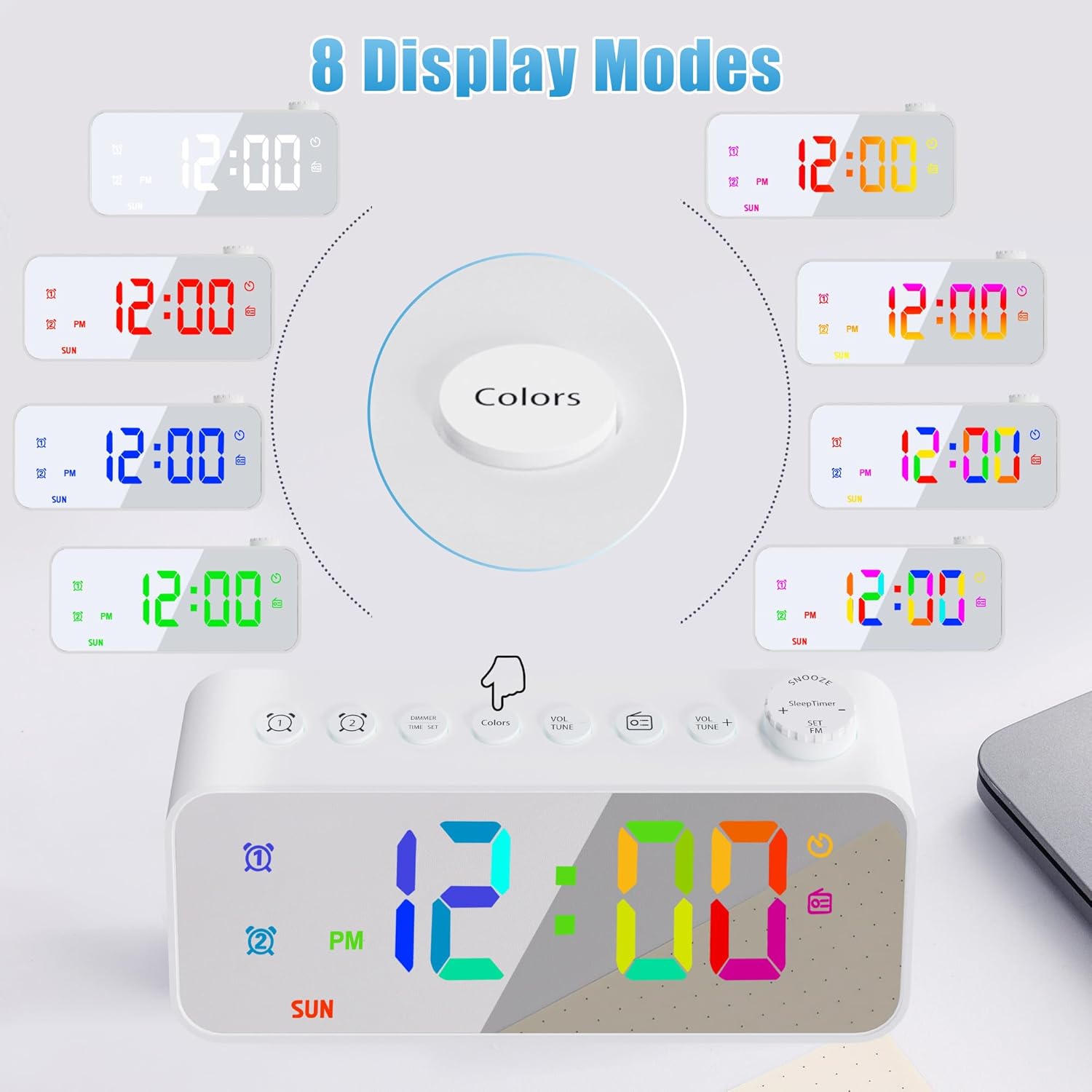
Figure 4: Eight distinct display color modes available on the JALL alarm clock, offering various aesthetic options from solid colors to dynamic gradients.

Figure 5: Brightness adjustment feature, detailing 5 levels of screen brightness from 0% (off) to 100% for optimal visibility in any lighting condition.
- Changing Colors: Press the Colors button to cycle through the 8 display modes: white, red, green, blue, gradient, magic color, left and right gradient, up and down gradient.
- Adjusting Brightness: Rotate the Time Set / Dimmer Knob to adjust the screen brightness through 5 levels. The lowest setting can completely turn off the display.
FM Radio and Sleep Timer
Enjoy your favorite radio stations with the built-in FM radio and fall asleep to music with the sleep timer.

Figure 6: FM Radio and Sleep Timer features, detailing the frequency range, volume control, auto-search function, enhanced antenna, and various sleep timer durations.
- Activating FM Radio: Press the FM Radio button. The radio will turn on.
- Tuning Stations: Rotate the Volume / Tune Knob to manually tune to a specific frequency. Press and hold the FM Radio button to auto-scan and save available stations.
- Adjusting Volume: Rotate the Volume / Tune Knob to adjust the radio volume (0-16 levels).
- Sleep Timer: While the radio is playing, press the Snooze / Sleep Timer button repeatedly to select a sleep timer duration (10, 120, 180, 240 minutes). The radio will automatically turn off after the selected time.
USB Charging Port
The alarm clock is equipped with a USB charging port for your convenience.

Figure 7: USB Charging Port, indicating its location and function for charging various electronic devices with a 5V output.
- Locate the USB charging port on the back of the unit.
- Connect your smartphone or other USB-powered device using its charging cable.
- The clock will provide 5V output for charging.
Maintenance
- To clean the mirror surface and body, use a soft, dry cloth. For stubborn marks, a slightly damp cloth can be used, followed by a dry cloth.
- Do not use abrasive cleaners or solvents, as they may damage the surface.
- Ensure the device is unplugged before cleaning.
Troubleshooting
| Problem | Possible Cause | Solution |
|---|---|---|
| Clock display is off. | No power; brightness set to 0%. | Check power connection. Rotate Dimmer knob to increase brightness. |
| Alarm does not sound. | Alarm not activated; volume too low; incorrect alarm time. | Ensure alarm icon is displayed. Increase alarm volume. Verify alarm time and mode (weekday/weekend). |
| Poor FM radio reception. | Antenna not extended; weak signal. | Fully extend the wire antenna. Try repositioning the clock for better signal. |
| USB charging not working. | Cable issue; device not compatible; clock not powered. | Ensure clock is powered. Try a different USB cable. Check device compatibility (5V output). |
Specifications
| Feature | Detail |
|---|---|
| Brand | JALL |
| Model Number | CH-07 |
| Display Type | Digital |
| Power Source | Corded Electric |
| Special Feature | Adjustable Brightness, Dual Alarm, FM Radio, Sleep Timer, USB Charging Port, Mirror Surface, RGB Color Changing Numbers |
| Material | Acrylonitrile Butadiene Styrene (ABS) |
| Item Weight | 4.8 ounces (0.3 Pounds) |
| Dimensions | 6.18 x 3.74 x 1.89 inches (Package) |
| FM Radio Frequency | 76.0 to 108.0 MHz |
| USB Output | 5V |
Warranty and Support
JALL is committed to providing high-quality products. This product comes with a 365-Day warranty from the date of purchase. If you encounter any issues or have questions, please contact JALL customer support through the retailer's platform or visit the official JALL store for assistance.
For more information, visit the JALL Store on Amazon.
Ask a question about this manual
Ask about setup, troubleshooting, compatibility, parts, safety, or missing instructions. Manuals+ will review the question and use this page’s manual context to help answer it.