
1. Introduction
Thank you for choosing the MARK ADLER Expert 6.2 Ergonomic Office Chair. This manual provides essential information for the safe assembly, operation, maintenance, and troubleshooting of your new office chair. Please read this manual thoroughly before assembly and retain it for future reference.

Image: The MARK ADLER Expert 6.2 ergonomic office chair.
2. Safety Information
- Ensure all parts are present and undamaged before assembly. Do not use if any parts are missing or broken.
- Follow the assembly instructions carefully. Incorrect assembly can lead to instability and injury.
- Do not stand on the chair.
- Do not use the chair as a step stool.
- Keep children and pets away during assembly. Small parts can be a choking hazard.
- Do not exceed the maximum weight capacity of 150 kg (330 lbs).
- Regularly check all bolts and screws to ensure they are tightened. Retighten if necessary.
- Avoid exposing the chair to direct sunlight or extreme temperatures to prevent material degradation.
3. Package Contents
Please verify that all components are included in your package:
- Backrest Assembly
- Seat Cushion Assembly
- Gas Lift Cylinder
- Star Base
- Casters (Wheels)
- Armrests (Left and Right)
- Headrest
- Mounting Hardware (Screws, Washers, Allen Key)
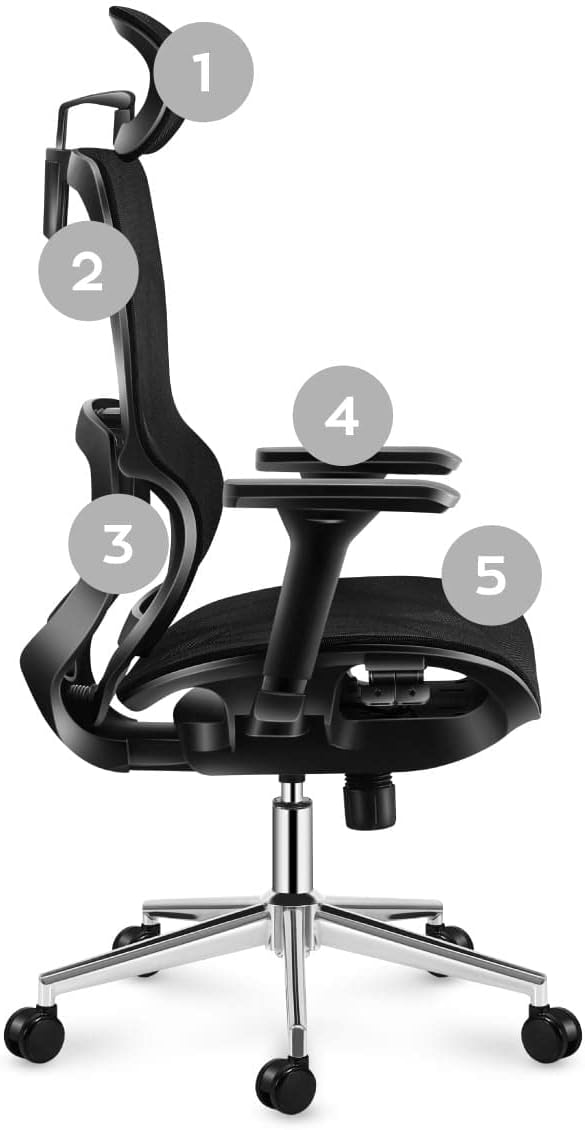
Image: Exploded view of chair components for assembly.
4. Assembly Instructions
Follow these steps to assemble your MARK ADLER Expert 6.2 office chair:
- Attach Casters to Base: Insert the casters into the holes at the end of each leg of the star base. Push firmly until they click into place.
- Insert Gas Lift: Place the gas lift cylinder into the center hole of the star base.
- Attach Armrests to Seat: Secure the armrests to the underside of the seat cushion using the provided screws. Ensure they are oriented correctly (left and right).
- Attach Backrest to Seat: Align the backrest with the seat mechanism and secure it with screws.
- Attach Headrest: Slide the headrest into the designated slots at the top of the backrest.
- Connect Seat Assembly to Gas Lift: Carefully place the assembled seat and backrest onto the gas lift cylinder. Press down firmly to secure.
- Final Check: Ensure all screws are tightened and the chair is stable before use.
5. Operating Instructions
Your MARK ADLER Expert 6.2 chair offers several adjustment features for optimal comfort and ergonomics:
- Chair Height Adjustment: Locate the lever on the right side, under the seat. Pull the lever up to raise the chair (when no weight is on it) or lower it (when seated). Release the lever to lock the height.
- Backrest Recline and Lock (SeatRest Mulitlock-Funktion): The mechanism allows the backrest to tilt to any desired position. Pull the recline lever (typically on the left side, under the seat) to unlock the recline. Lean back to your desired angle, then push the lever down to lock the backrest in place.
- Adjustable Headrest: The headrest can be adjusted vertically to provide proper support for your neck and head. Simply slide it up or down to your preferred height.
- Lumbar Support: The flexible, ergonomic lumbar support is designed to provide adequate support to your spine. This feature automatically adjusts with your posture to maintain spinal alignment.
- Armrest Adjustment: The armrests are adjustable. Look for a button or lever on the side of the armrest to adjust their height.

Image: Detail of the chair's recline and headrest adjustment.
6. Maintenance and Care
To ensure the longevity and optimal performance of your MARK ADLER Expert 6.2 office chair, follow these maintenance guidelines:
- Cleaning: For the mesh and fabric parts, use a soft cloth dampened with mild soap and water. Avoid harsh chemicals or abrasive cleaners. For the metal parts, wipe with a dry or slightly damp cloth.
- Regular Inspection: Periodically check all screws, bolts, and connections to ensure they are tight. Retighten any loose fasteners to maintain stability and safety.
- Caster Care: Clean the casters regularly to remove hair, dust, and debris that can impede smooth movement.
- Avoid Overloading: Do not exceed the chair's maximum weight capacity.
- Environmental Conditions: Keep the chair away from direct sunlight, excessive heat, or humidity, which can damage the materials.
7. Troubleshooting
If you encounter any issues with your chair, refer to the following common problems and solutions:
| Problem | Possible Cause | Solution |
|---|---|---|
| Chair does not adjust height | Gas lift cylinder malfunction or lever issue. | Ensure the lever is fully engaged. If the problem persists, the gas lift may need replacement. |
| Chair is wobbly or unstable | Loose screws or improper assembly. | Check and tighten all assembly screws, especially those connecting the seat, backrest, and armrests. |
| Casters do not roll smoothly | Debris caught in casters or damaged casters. | Remove any hair or debris from the caster wheels. If damaged, replace the casters. |
| Squeaking noises | Loose connections or friction between parts. | Tighten all screws. Apply a small amount of silicone lubricant to moving parts if necessary, avoiding contact with mesh or fabric. |
8. Specifications
| Feature | Detail |
|---|---|
| Brand | MARK ADLER |
| Model Name | Expert 6.2 |
| Product Dimensions (L x W x H) | 49 x 70 x 131 cm (approx. 19.3 x 27.6 x 51.6 inches) |
| Item Weight | 17 Kilograms (approx. 37.5 lbs) |
| Color | Black |
| Material | Air Mesh HD Material |
| Maximum Weight Capacity | 150 kg (approx. 330 lbs) |
| Special Features | Adjustable Headrest, Lumbar Support, Reclining Backrest with Lock, Breathable Mesh |

Image: MARK ADLER Expert 6.2 chair with key dimensions.
9. Warranty and Support
For warranty information or technical support, please refer to the documentation provided with your purchase or visit the official MARK ADLER website. You may also contact the seller directly for assistance.


