
1. Introduction
Thank you for choosing the TrueLife NannyTone VM3 Digital Audio Baby Monitor. This device is designed to provide reliable audio monitoring of your baby, ensuring peace of mind. It features a long operating range, two-way communication, temperature monitoring, and an energy-saving VOX mode. Please read this manual carefully before use to ensure proper operation and maintenance.
2. Package Contents
Ensure all items are present in the package:
- 1x Baby Unit
- 1x Parent Unit
- 1x USB-C Cable (1.5m)
- 1x USB-A Adapter
- 2x Lithium Ion Batteries (pre-installed)

Figure 1: The TrueLife NannyTone VM3 baby monitor units and included accessories. The appearance of accessories may vary slightly.
3. Product Overview
3.1. Unit Components and Controls
Familiarize yourself with the various parts and controls of your baby monitor:
Figure 2: Front and rear view of the Baby and Parent Units with labeled components.
- Sound Indicator: LEDs that light up to indicate the intensity of detected sound.
- Speaker: For audio output from the other unit.
- Microphone: For picking up sound.
- Status LED: Indicates power and connection status.
- Attachment Clip: For securing the unit.
- Night Light: Provides a soft glow in the baby's room.
- Sound Sensitivity Adjustment: Controls the microphone's sensitivity.
- USB-C Port: For power supply and charging.

Figure 3: Side view of the units with labeled control buttons.
- Two-Way Communication Button: Press and hold to speak to the baby unit.
- Lullaby Button: Activates and cycles through lullabies.
- Night Light Button: Turns the night light on/off.
- Volume Adjustment Buttons (+/-): Increases or decreases speaker volume.
- Power On/Off / VOX Mode Button: Powers the unit on/off, activates/deactivates VOX mode.
- Vibration Activation Button: Toggles vibration alerts.
- Parent Unit Locator / Night Light On/Off (Baby Unit): On the baby unit, this button controls the night light. On the parent unit, it activates a locator sound on the baby unit.
4. Setup
4.1. Charging the Units
Both the Baby Unit and Parent Unit are equipped with rechargeable batteries. Before first use, fully charge both units.
- Connect the provided USB-C cable to the USB-C port on each unit.
- Plug the USB-A end of the cable into the USB-A adapter and then into a power outlet.
- The charging indicator will show the charging status.
- A full charge provides up to 7 hours of operation for the Parent Unit and up to 10 hours for the Baby Unit.
- Units can also be powered via a power bank.

Figure 4: Both units feature rechargeable batteries for extended use.
4.2. Powering On/Off
- To power on: Press and hold the Power On/Off button on both units until the display or status LED illuminates.
- To power off: Press and hold the Power On/Off button until the display turns off.
4.3. Initial Pairing
The Baby Unit and Parent Unit are typically pre-paired at the factory. If pairing is lost or you wish to pair an additional Parent Unit (up to two Parent Units can be paired simultaneously), follow these steps:
- Ensure both units are powered on and within close proximity.
- Refer to the specific pairing instructions in the full manual (if provided) or contact customer support if automatic pairing does not occur.
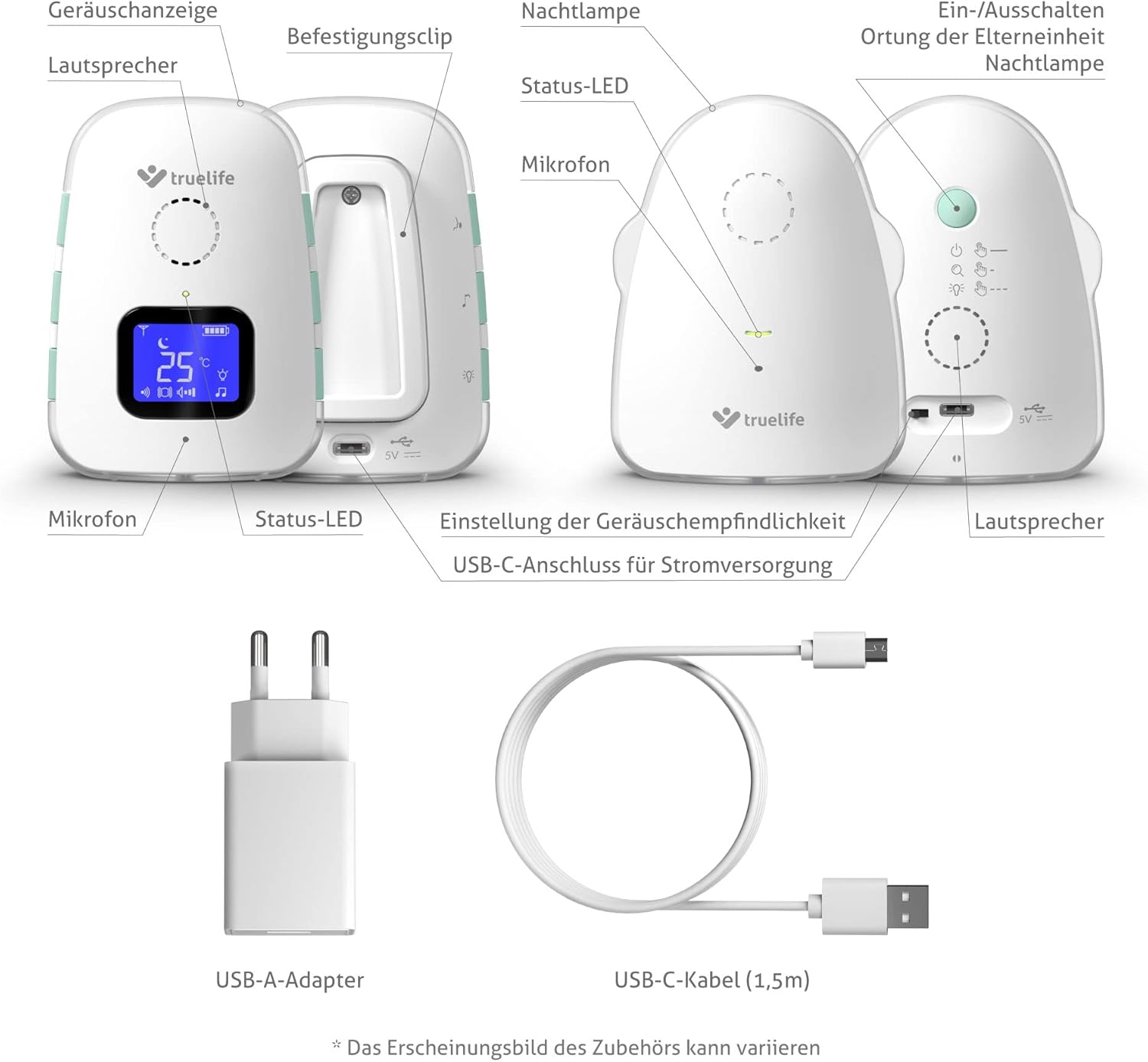
Figure 5: The Baby Unit can be paired with up to two Parent Units simultaneously for enhanced monitoring.
5. Operating Instructions
5.1. VOX Mode (Voice Operated Transmission)
VOX mode conserves battery by activating the monitor only when sound is detected. You can adjust the sensitivity of the VOX mode.
- To activate/deactivate VOX mode: Press the Power On/Off / VOX Mode button briefly.
- To adjust sensitivity: Use the Sound Sensitivity Adjustment control (refer to Figure 2). Higher sensitivity detects quieter sounds.

Figure 6: The energy-saving VOX function activates the baby monitor only when it detects sound.
5.2. Two-Way Communication
To comfort your baby remotely, use the two-way communication feature:
- Press and hold the Two-Way Communication button on the Parent Unit.
- Speak clearly into the microphone on the Parent Unit. Your voice will be transmitted to the Baby Unit.
- Release the button to return to monitoring mode.
5.3. Lullabies
The monitor includes 8 built-in lullabies to soothe your baby:
- Press the Lullaby button on the Parent Unit to start playing lullabies.
- Press the button again to cycle through the available lullabies.
- To stop playing lullabies, press and hold the Lullaby button.
5.4. Temperature Monitoring
The Baby Unit continuously monitors the room temperature and displays it on the Parent Unit's screen. The system will alert you if the temperature falls below or rises above a set threshold.

Figure 7: The baby monitor provides a sense of security by warning with an audible tone and clear LCD display of low or high room temperature, and signal loss.
5.5. Vibration Mode
For silent alerts, activate the vibration mode on the Parent Unit:
- Press the Vibration Activation button to toggle vibration on or off.
- When activated, the Parent Unit will vibrate to indicate detected sounds or alerts.
5.6. Operating Range
The TrueLife NannyTone VM3 offers an extensive operating range:
- Up to 800 meters in open, unbuilt areas.
- Up to 300 meters in buildings, depending on obstacles and wall materials.

Figure 8: With a long signal range of up to 800m in open areas and up to 300m in buildings, you do not need to worry about the distance to the baby monitor.
5.7. Night Light
The Baby Unit features a night light:
- Press the Night Light button on the Baby Unit to turn it on or off.
5.8. Parent Unit Locator
If you misplace the Parent Unit, you can use the locator function:
- Press the Parent Unit Locator button on the Baby Unit. The Parent Unit will emit an audible sound to help you locate it.
6. Maintenance
6.1. Cleaning
- Wipe the units with a soft, dry cloth.
- Do not use abrasive cleaners or solvents.
- Ensure units are powered off and unplugged before cleaning.
6.2. Battery Care
- To prolong battery life, avoid fully discharging the batteries frequently.
- Store the units in a cool, dry place if not used for extended periods.
7. Troubleshooting
If you encounter issues with your TrueLife NannyTone VM3, refer to the following common problems and solutions:
| Problem | Possible Cause | Solution |
|---|---|---|
| No sound or poor audio quality | Units are out of range; volume is too low; interference. | Move units closer; increase volume; move away from other electronic devices. |
| Units not connecting | Units are too far apart; low battery; pairing lost. | Move units closer; charge batteries; re-pair units (refer to section 4.3). |
| Battery not charging | Cable or adapter faulty; improper connection. | Check connections; try a different USB-C cable or adapter. |
| Temperature alert constantly active | Room temperature is genuinely outside the set range. | Adjust room temperature; check monitor placement (away from direct heat/cold sources). |
| VOX mode not activating | Sensitivity set too low; VOX mode is off. | Increase VOX sensitivity; ensure VOX mode is enabled. |
If the problem persists after trying these solutions, please contact customer support.
8. Specifications
- Model: TLNTVM3
- Brand: TrueLife
- Tuner Technology: VHF
- Number of Channels: 8
- Maximum Talking Range: 800 meters (unbuilt area), 300 meters (built area)
- Parent Unit Battery Life: Up to 7 hours
- Baby Unit Battery Life: Up to 10 hours
- Batteries: 2x Lithium Ion (included, rechargeable)
- Special Features: Silent Operation, Voice Operated Transmission (VOX), Two-Way Communication, Lullabies, Temperature Monitoring
- Mounting Hardware: USB-C cable + USB-A adapter
- Water Resistance Level: Not Water Resistant
- Compatible Devices: Other TrueLife baby monitors using VHF and compatible accessories supporting VHF and specific channels
- Parcel Dimensions: 18.3 x 15.6 x 6.9 cm
- Weight: 500 g
9. Warranty and Support
The TrueLife NannyTone VM3 comes with a standard manufacturer's warranty. For detailed warranty information, please refer to the warranty card included with your product or visit the official TrueLife website. For technical support, troubleshooting assistance, or spare parts, please contact TrueLife customer service through their official channels.


