
Introduction
Thank you for choosing the Baseus Adaman Digital Display Power Bank (Model: PPAD070001). This portable power bank is designed to provide reliable and efficient charging for your electronic devices. Please read this manual carefully before use to ensure proper operation and to maximize the lifespan of your device.
Safety Information
- Do not expose the power bank to extreme temperatures, direct sunlight, or fire.
- Avoid dropping, disassembling, or modifying the device.
- Keep away from water and other liquids.
- Use only certified charging cables and adapters.
- Keep out of reach of children.
- If the power bank swells, leaks, or emits an unusual odor, discontinue use immediately.
Package Contents
- Baseus Adaman Digital Display Power Bank (PPAD070001)
- USB Charging Cable
- User Manual
Product Overview
The Baseus Adaman Power Bank (Model PPAD070001) is a portable charging solution featuring a digital display for battery status and multiple ports for wide compatibility. Its slim design makes it convenient for travel.

Image: Top view of the Baseus Adaman Power Bank showing its various input and output ports. From left to right: Type-C (Input/Output), IP/IN (Input), Micro/IN (Input), USB2 (Output), USB1 (Output).

Image: Side profile of the Baseus Adaman Power Bank, highlighting its slim and portable design.
- Type-C Port: Supports both input and output (PD 3.0).
- USB1/USB2 Ports: Output ports for charging devices (QC 3.0).
- Micro-USB Port: Input port for charging the power bank.
- IP/IN Port: Input port for charging the power bank (e.g., for Apple Lightning cables).
- Digital Display: Shows real-time battery percentage.
Setup
Before first use, fully charge the power bank. This ensures optimal battery performance.
Charging the Power Bank
- Connect the provided USB charging cable to one of the input ports on the power bank (Type-C, Micro-USB, or IP/IN).
- Connect the other end of the cable to a USB wall charger (not included).
- The digital display will show the charging status and battery percentage.
- Once the display shows 100%, the power bank is fully charged. Disconnect it from the charger.
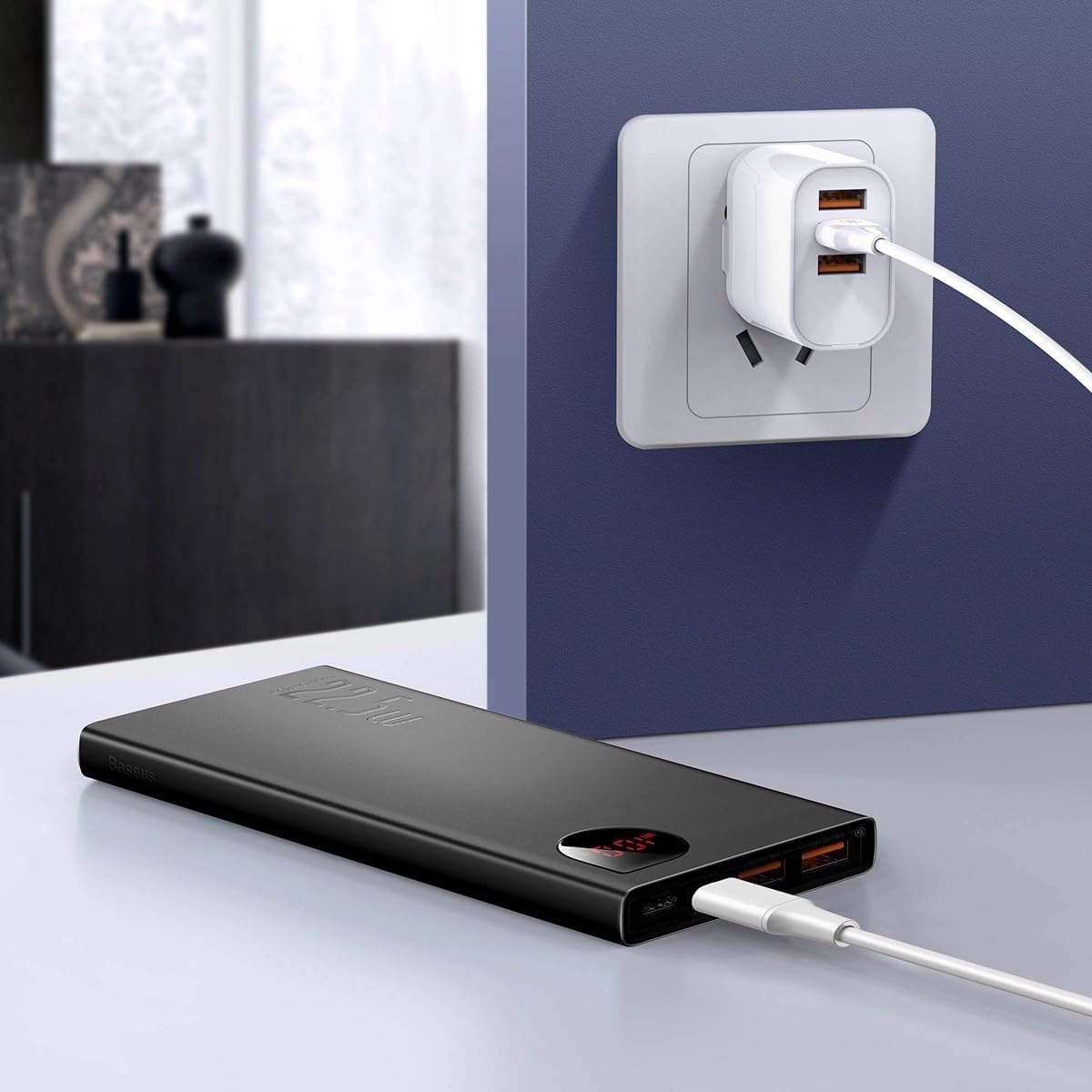
Image: The Baseus Adaman Power Bank connected to a wall charger via a USB cable, illustrating the process of recharging the power bank itself.
Operating Instructions
Charging Your Devices
- Connect your device's charging cable to one of the output ports on the power bank (Type-C, USB1, or USB2).
- Connect the other end of the cable to your device.
- The power bank will automatically begin charging your device. The digital display will show the remaining battery percentage.
- To stop charging, simply disconnect your device from the power bank.

Image: A smartphone being charged by the Baseus Adaman Power Bank, demonstrating the device's charging capability for mobile phones.
Checking Battery Level
The digital display on the power bank will show the current battery percentage when it is in use or when a device is connected. If the power bank is idle, you may need to briefly press the power button (if available, not explicitly mentioned but common) to activate the display.
Maintenance
- Clean the power bank with a soft, dry cloth. Do not use harsh chemicals or abrasive materials.
- Store the power bank in a cool, dry place when not in use.
- For optimal battery health, fully charge and discharge the power bank at least once every three months if it's not used regularly.
Troubleshooting
| Problem | Possible Cause | Solution |
|---|---|---|
| Power bank not charging devices. | Low battery, faulty cable, incompatible device. | Charge the power bank. Try a different cable. Ensure your device is compatible. |
| Power bank not recharging. | Faulty charging cable/adapter, damaged port. | Try a different charging cable and wall adapter. Check ports for damage. |
| Digital display not working. | Power bank is off, low battery, malfunction. | Ensure power bank is on or connected to a device. Charge the power bank. If issue persists, contact support. |
Specifications
| Feature | Detail |
|---|---|
| Model Number | PPAD070001 |
| Brand | Baseus |
| Battery Capacity | 10000 mAh |
| Special Features | Digital Display |
| Connector Types | Input: USB Type-C, Micro-USB, IP/IN; Output: USB Type-C, USB-A (x2) |
| Voltage | 5 Volts |
| Current | 5 Amps |
| Power Output | Up to 22.5W (PD 3.0, QC 3.0) |
| Battery Cell Composition | Lithium Polymer |
| Number of Output Ports | 3 (1x Type-C, 2x USB-A) |
| Number of Input Ports | 3 (1x Type-C, 1x Micro-USB, 1x IP/IN) |
| Compatible Devices | All Smartphones and other USB-powered devices |
| Portable | Yes |
Warranty and Support
This product comes with No Warranty as per the provided specifications. For any technical support or inquiries, please refer to the official Baseus website or contact your retailer.
For more information, visit: www.baseus.com