
Introduction
Thank you for choosing the boAt Rockerz Trinity Wireless In-Ear Earphones. This manual provides essential information for setting up, operating, and maintaining your device. Please read it carefully to ensure optimal performance and longevity of your earphones.
Package Contents
- boAt Rockerz Trinity Wireless Neckband Earphones
- USB Type-C Charging Cable
- Additional Eartips (various sizes)
- User Manual
Product Overview
The boAt Rockerz Trinity features an ergonomic neckband design with in-ear earbuds, providing a secure and comfortable fit. The inline controls allow for easy management of music playback, calls, and voice assistant activation.
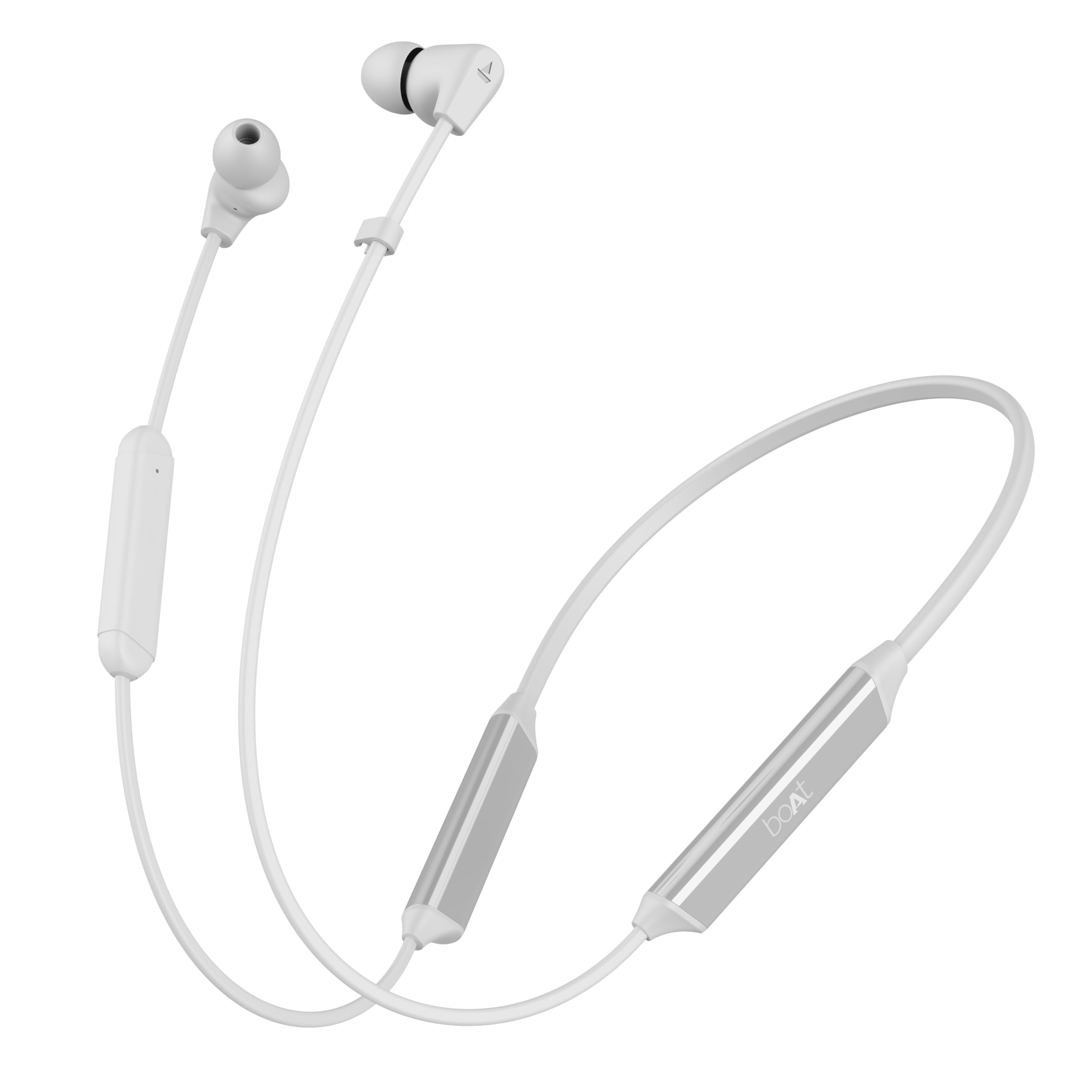
Image: boAt Rockerz Trinity Wireless In-Ear Earphones (White variant).
Charging Your Earphones
Before first use, fully charge your earphones. The Rockerz Trinity supports ASAP Charge technology, providing significant playtime with minimal charging time.
- Connect the USB Type-C charging cable to the charging port on the neckband.
- Connect the other end of the cable to a compatible USB power adapter (not included) or a computer's USB port.
- The LED indicator will show the charging status. It typically takes approximately 45 minutes for a full charge.
- With ASAP Charge, 10 minutes of charging provides up to 24 hours of playback. A full charge offers up to 150 hours of total playtime.

Image: ASAP Charge and 150 hours playtime feature.
Powering On/Off
- Power On: Press and hold the Multi-function Button (MFB) for a few seconds until the LED indicator flashes blue and a voice prompt confirms 'Power On'.
- Power Off: Press and hold the MFB for a few seconds until the LED indicator flashes red and a voice prompt confirms 'Power Off'.
Bluetooth Pairing
To connect your Rockerz Trinity earphones to a device:
- Ensure the earphones are powered off.
- Press and hold the MFB until the LED indicator flashes red and blue alternately, indicating pairing mode.
- Enable Bluetooth on your device (smartphone, tablet, etc.) and search for 'Rockerz Trinity'.
- Select 'Rockerz Trinity' from the list of available devices to connect. A voice prompt will confirm successful pairing.
Dual Pairing
The Rockerz Trinity supports dual pairing, allowing connection to two devices simultaneously.
- Pair the earphones with the first device as described above.
- Disable Bluetooth on the first device. The earphones will re-enter pairing mode.
- Pair the earphones with the second device.
- Re-enable Bluetooth on the first device. The earphones will automatically connect to both devices.

Image: Dual Pairing with Bluetooth v5.2.
Operating Your Earphones
Music Controls
- Play/Pause: Single press the MFB.
- Next Track: Long press the '+' button.
- Previous Track: Long press the '-' button.
- Volume Up: Short press the '+' button.
- Volume Down: Short press the '-' button.
Call Management
- Answer/End Call: Single press the MFB.
- Reject Call: Long press the MFB.
Voice Assistant
Activate your device's voice assistant (Siri, Google Assistant) by double-pressing the MFB.

Image: Voice Assistant compatibility.
Crystal Bionic Sound
Experience enhanced audio clarity with Crystal Bionic Sound, powered by HiFi DSP. This technology optimizes sound output for a rich and immersive listening experience.

Image: Crystal Bionic Sound technology with HiFi DSP.
ENx™ Technology (Environmental Noise Cancellation)
ENx™ Technology ensures clear voice calls by effectively canceling out environmental noise, allowing your voice to be heard distinctly even in noisy surroundings.

Image: AI-ENx™ Technology for clear voice calls.
BEAST™ Mode (Low Latency)
Activate BEAST™ Mode for a low-latency audio experience, ideal for gaming and video streaming, ensuring synchronized audio and visuals.

Image: BEAST™ Mode for 65ms low latency.
Water Resistance (IPX5)
The Rockerz Trinity earphones are rated IPX5, making them resistant to sweat and light splashes of water. This makes them suitable for workouts and outdoor activities. Avoid submerging the earphones in water.

Image: IPX5 Water Resistance.
Maintenance
- Cleaning: Use a soft, dry cloth to clean the earphones. Do not use harsh chemicals or abrasive materials.
- Storage: Store the earphones in a cool, dry place away from direct sunlight and extreme temperatures.
- Battery Care: To prolong battery life, avoid fully discharging the earphones frequently. Charge them regularly, even if not in use for extended periods.
Troubleshooting
| Issue | Solution |
|---|---|
| Earphones not powering on | Ensure the earphones are charged. Press and hold the MFB for a few seconds. |
| Cannot pair with device | Ensure earphones are in pairing mode (flashing red/blue). Turn off and on Bluetooth on your device. Forget previous connections on your device. |
| No sound/Low volume | Check volume levels on both earphones and connected device. Ensure earphones are properly paired. |
| Call quality issues | Ensure microphone is not obstructed. Move to an area with less environmental noise. |
Specifications
- Model Name: Rockerz Trinity
- Connectivity Technology: Wireless (Bluetooth v5.2)
- Audio Driver Type: Dynamic Driver (10mm)
- Battery Life: Up to 150 Hours
- ASAP Charge: 10 Mins = 24 Hours Playtime
- Charging Time: Approximately 45 Minutes
- Water Resistance: IPX5
- Special Features: Crystal Bionic Sound (HiFi DSP), ENx™ Technology, BEAST™ Mode, Dual Pairing
- Item Weight: 35 Grams
Official Product Videos
Video: boAt Rockerz Trinity - Main Product Overview. This video provides a comprehensive look at the features and design of the earphones.
Video: boAt Rockerz Trinity - Quick Feature Highlights. This short video quickly showcases key features like 150 hours playtime, Crystal Bionic Sound, and ENx noise cancellation.
Warranty and Support
The boAt Rockerz Trinity Wireless In-Ear Earphones come with a 1-year warranty from the date of purchase. For warranty claims, technical support, or any product-related inquiries, please refer to the official boAt support channels or contact your retailer.
Manufacturer: Imagine Marketing Ltd, info@imaginemarketingindia.com
