
Introduction
Thank you for choosing the Marea Smartwatch B59008/1. This manual provides essential information for setting up, operating, and maintaining your new smartwatch. Please read this manual thoroughly before using the device to ensure proper function and to maximize your user experience.
Important Safety Information
- Consult your doctor before starting any new exercise program.
- The device is not a medical device. Data provided is for reference only and should not be used for medical diagnosis or treatment.
- Keep the device away from extreme temperatures and direct sunlight.
- Do not attempt to disassemble or repair the device yourself. This will void the warranty.
- Ensure the charging contacts are clean and dry before charging.
Package Contents
Please check the package for the following items:
- Marea Smartwatch B59008/1
- Charging Cable
- User Manual (this document)
Product Overview
The Marea Smartwatch B59008/1 features a 1.69-inch display and a sleek design. It includes a side button for navigation and activation.

Figure 1: Front view of the Marea Smartwatch B59008/1, displaying the time, date, and sleep tracking information on its 1.69-inch screen. The watch has a black strap and a rectangular black casing.
Setup Guide
1. Charging the Device
Before first use, fully charge your smartwatch. Connect the charging cable to the charging contacts on the back of the watch and to a USB power source. The watch will display a charging indicator.
2. App Installation and Pairing
- Download the App: Search for the official Marea Smartwatch app in your smartphone's app store (Google Play Store for Android or Apple App Store for iOS).
- Create Account: Open the app and follow the on-screen instructions to create an account or log in.
- Pair Device:
- Ensure Bluetooth is enabled on your smartphone.
- Make sure the watch is within range of your phone.
- In the app, navigate to the device pairing section (usually labeled "Add Device" or "Pair Device").
- Select "B59008/1" from the list of available devices.
- Confirm the pairing request on both your smartphone and the smartwatch if prompted.
- Initial Settings: Follow the app's instructions to set up personal information, notification preferences, and other initial settings.
Operating Instructions
Basic Navigation
- Wake Screen: Raise your wrist or press the side button to wake the screen.
- Swipe Up/Down: Access notifications or quick settings.
- Swipe Left/Right: Navigate through different widgets or feature screens.
- Press Side Button: Return to the home screen or access the main menu.
Key Features
The Marea Smartwatch B59008/1 offers a range of features to support your daily activities and health monitoring:

Figure 2: A grid of icons representing various features of the smartwatch, including calorie consumption, distance traveled, steps, step goal setting, sleep monitoring, heart rate, automatic heart rate test, blood pressure, blood oxygen, breathing guide, menstrual cycle, sport mode, sedentary reminder, call notifications, social media notifications, message notifications, read received messages, alarms, chronograph, countdown timer, weather, remote music control, remote camera control, choose home screen, customize home screen, do not disturb, anti-loss, find watch, find phone, and turn on screen by wrist rotation.
- Activity Tracking: Monitors steps, calories burned, and distance traveled. Set daily step goals through the app.
- Heart Rate Monitoring: Continuously tracks your heart rate.
- Blood Pressure & Blood Oxygen: Provides estimates of blood pressure and blood oxygen levels. (Note: Not for medical use.)
- Sleep Monitoring: Tracks your sleep patterns and quality.
- Sport Modes: Multiple sport modes to track specific activities.
- Notifications: Receive notifications for calls, messages, and social media apps directly on your wrist.
- Music Control: Control music playback on your smartphone.
- Camera Remote: Use your watch as a remote shutter for your smartphone camera.
- Alarms & Timer: Set alarms and use the stopwatch/timer functions.
- Weather: View current weather information.
- Find Watch/Phone: Locate your watch or paired phone.
- Sedentary Reminder: Reminds you to move after periods of inactivity.
- Customizable Watch Faces: Choose from various watch faces or customize your own.
Maintenance
Cleaning
Regularly clean your smartwatch and strap to prevent skin irritation and maintain device functionality. Use a soft, damp cloth. Do not use harsh chemicals or abrasive materials.
Water Resistance (IP67)
The Marea Smartwatch B59008/1 has an IP67 water resistance rating. This means it is protected against dust ingress and can withstand immersion in water up to 1 meter for up to 30 minutes. It is suitable for daily use, such as washing hands or light rain. However, it is not recommended for swimming, showering with hot water, or diving, as steam and high water pressure can damage the device.
Battery Care
To prolong battery life, avoid fully discharging the battery frequently. Charge the device when the battery level is low.
Troubleshooting
| Problem | Possible Solution |
|---|---|
| Watch not turning on | Ensure the watch is fully charged. Connect it to the charger for at least 30 minutes. |
| Cannot pair with smartphone |
|
| Inaccurate health data | Ensure the watch is worn snugly on your wrist, about one finger's width above the wrist bone. Clean the sensor on the back of the watch. |
| Notifications not appearing |
|
| Short battery life |
|
Specifications
| Feature | Detail |
|---|---|
| Model | B59008/1 |
| Display Size | 1.69 inches |
| Battery Capacity | 220 mAh |
| Battery Life | 3-7 days (depending on usage) |
| Dimensions | 44.6 x 35 x 10.4 mm |
| Water Resistance | IP67 |
| Color | Black |
| Compatibility | Android, iOS (via dedicated app) |
Warranty and Support
For warranty information, please refer to the warranty card included with your purchase or visit the official Marea website. For technical support or further assistance, please contact Marea customer service through their official channels.
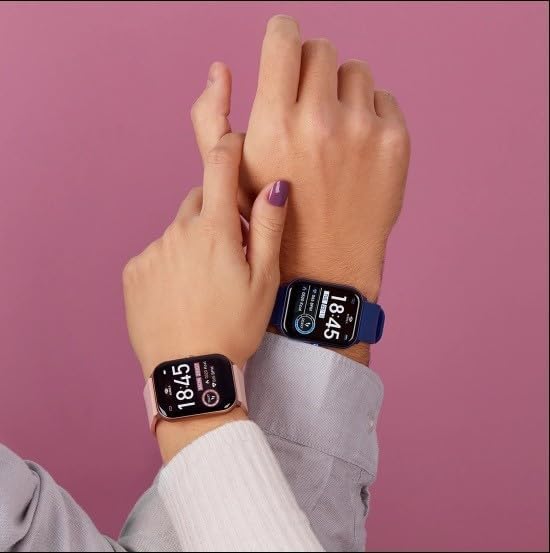
Figure 3: Two individuals wearing Marea smartwatches on their wrists, demonstrating the device's comfortable fit and stylish appearance. One watch has a black strap, and the other has a blue strap, both displaying the time 18:45.


