
1. Introduction
Thank you for choosing the Yaheetech Full Size Upholstered Bed Frame. This manual provides essential information for the safe assembly, operation, and maintenance of your new bed frame. Please read these instructions carefully before beginning assembly and retain them for future reference.
Important Safety Information
- Do not exceed the maximum weight capacity of 705 lb.
- Exercise caution with sharp edges during assembly to prevent injury.
- Ensure the adjustable headboard is securely fastened before use.
- The bed frame is shipped in two packages. The arrival time of the packages may vary.
2. Package Contents
Before assembly, verify that all components listed below are present and undamaged. If any parts are missing or damaged, please contact customer support.
- Headboard (Upholstered)
- Bed Frame Rails (Metal)
- Wooden Slats
- 4 Storage Drawers (Wire Netting with Faux Leather exterior)
- Installation Manual
- Hardware Pack (Screws, bolts, plastic parts, power adapter, power cord)

Figure 2.1: Overview of bed frame dimensions and components.
This diagram illustrates the overall structure and key measurements of the bed frame, including the headboard, frame, and a single storage drawer. Please refer to this for component identification.
3. Setup and Assembly
Assembly typically requires two adults. Please follow these steps carefully. Tools required are generally included in the hardware pack.
- Unpack Components: Carefully remove all parts from the packaging. Lay them out on a clean, soft surface to prevent scratches.
- Assemble Headboard: Attach the headboard supports to the upholstered headboard section using the provided hardware. Ensure all connections are tight.
- Connect Side Rails: Attach the side rails to the headboard and footboard using the designated bolts. Do not fully tighten until all frame components are aligned.
- Install Center Support: Secure the center support beam(s) to the frame.
- Install Slats:

Figure 3.1: Slat Installation Steps.
This image illustrates the process of installing the wooden slats. First, attach the plastic end caps to the outer slats. Next, fix the slats onto both sides of the bed frame. Finally, fit and secure the two middle slats with their respective plastic parts. Ensure all slats are evenly spaced and securely seated.
- Final Tightening: Once all frame components and slats are in place, fully tighten all bolts and screws.
- Insert Storage Drawers: Place the four wire netting storage drawers into their designated positions under the bed frame.
- Connect USB Power: Plug the provided power adapter into the bed frame's power input and then into a wall outlet.
4. Operating Instructions
4.1 USB Charging Stations

Figure 4.1: USB Charging Ports on Headboard.
The headboard features two built-in USB charging ports: one Type-A and one Type-C. These ports are designed to keep your electronic devices charged conveniently. Simply plug your device's charging cable into the appropriate port. Ensure the bed frame's power adapter is connected to a live electrical outlet for the USB ports to function.
4.2 Storage Drawers

Figure 4.2: Under-bed Storage Drawers.
The bed frame includes four wire netting storage drawers, each measuring approximately 31.5"L x 19.7"W x 6"H. These drawers provide ample space for storing bedding items, clothing, or other personal belongings. The drawers are designed to slide smoothly under the bed for easy access and discreet storage.
4.3 Adjustable Headboard

Figure 4.3: Adjustable Headboard Height.
The upholstered headboard's height can be adjusted to suit your preference or mattress thickness, ranging from 39.5" to 44". To adjust, loosen the bolts connecting the headboard to the frame, slide the headboard to the desired height, and then securely tighten the bolts. Ensure the headboard is stable after adjustment.
5. Maintenance
Proper care and maintenance will extend the life of your Yaheetech bed frame.
- Cleaning: Clean the faux leather upholstery with a dry or slightly damp cloth. Avoid harsh chemicals or abrasive cleaners, as these may damage the material.
- Hardware Check: Periodically check all bolts and screws to ensure they remain tight. Loose connections can affect the stability and longevity of the bed frame.
- Slat Inspection: Inspect the wooden slats regularly for any signs of wear or damage. Replace any broken slats promptly to maintain mattress support.
- Drawer Care: Keep the storage drawers free of excessive weight to ensure smooth operation and prevent damage to the wire netting.
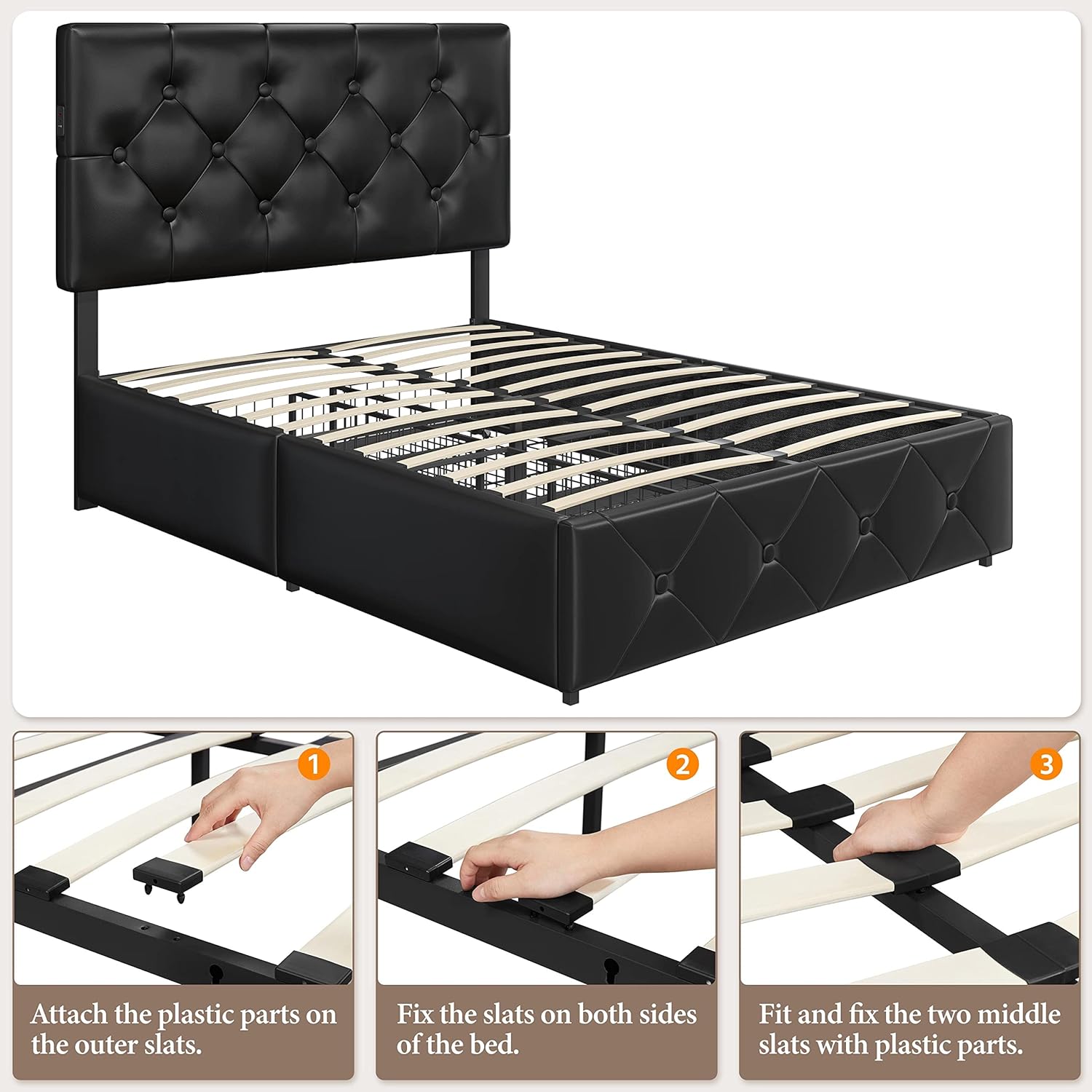
Figure 5.1: Faux Leather and Foam Detail.
The faux leather upholstery is designed for durability and easy cleaning. Regular dusting and occasional wiping with a damp cloth are sufficient to maintain its appearance.
6. Troubleshooting
If you encounter any issues with your bed frame, refer to the following common problems and solutions:
- Bed Frame is Wobbling:
Ensure all bolts and screws are securely tightened. Check that the center support legs are firmly on the floor and properly aligned. - USB Ports Not Functioning:
Verify that the bed frame's power adapter is correctly plugged into both the bed frame and a working wall outlet. Check the power cord for any visible damage. If the issue persists, the power cable or USB module may require replacement. - Storage Drawers Do Not Slide Smoothly:
Check for any obstructions under the bed or within the drawer tracks. Ensure the drawer wheels are clean and free of debris. Verify that the drawers are not overloaded. - Slats Breaking or Sagging:
Ensure the mattress weight does not exceed the bed frame's capacity (705 lb). Verify that the slats are correctly installed and evenly distributed. If individual slats are damaged, they may need to be replaced.
7. Specifications
| Size | Full |
| Product Dimensions | 79"L x 59"W x 44"H |
| Adjustable Headboard Height | 39.5" to 44" |
| Storage Drawer Dimensions | 31.5"L x 19.7"W x 6"H (each) |
| Color | Black |
| Material | MDF, Metal, PU leather, Foam |
| Weight Capacity | 705 pounds |
| Item Weight | 97.5 pounds |
| USB Ports | 1x Type-A, 1x Type-C |
| Assembly Required | Yes |
8. Warranty and Support
For specific warranty information or to obtain support for your Yaheetech Full Size Upholstered Bed Frame, please refer to the warranty card included with your product or visit the official Yaheetech website. If you require assistance with assembly, missing parts, or troubleshooting beyond this manual, please contact Yaheetech customer service directly.
You can find more information and contact details on the Yaheetech Store on Amazon.


