
Yard Force LX PS1200-EU
YARD FORCE Portable Power Station LX PS1200 User Manual
Model: LX PS1200-EU | Brand: Yard Force
1. Introduction
The YARD FORCE LX PS1200 is a versatile and portable power station designed to provide reliable power for a wide range of applications, from outdoor activities like camping and RV trips to emergency backup power at home. With a battery capacity of 974 Wh and a peak output of 2400W, it can power various electronic devices and small appliances. This manual provides essential information for the safe and efficient operation of your power station.

Figure 1.1: YARD FORCE LX PS1200 Portable Power Station. This image displays the main unit with its various output ports and a sturdy carrying handle, highlighting its compact and portable design.
Video 1.1: Yard Force Solar Panel and Power Generator Overview. This video demonstrates the portability and versatility of the Yard Force power station and its compatibility with solar panels for charging in outdoor environments, showcasing various use cases like powering laptops, drones, and small appliances during camping trips.
2. Safety Instructions
To ensure safe operation and prolong the lifespan of your YARD FORCE power station, please adhere to the following safety guidelines:
- Do not expose the unit to rain or moisture. Keep it away from water and high humidity.
- Avoid operating the power station in extreme temperatures. Refer to the specifications for optimal operating temperature ranges.
- Ensure adequate ventilation around the unit during operation to prevent overheating. Do not block ventilation openings.
- Do not disassemble, repair, or modify the unit yourself. Contact qualified service personnel for any repairs.
- Keep out of reach of children and pets.
- Use only original or certified accessories and charging cables.
- The integrated Battery Management System (BMS) provides protection against overheating, short circuits, overcurrent, and overcharging. However, always monitor the unit during charging and discharge.
3. Product Features
The YARD FORCE LX PS1200 is equipped with advanced features for reliable and convenient power delivery:
- High Capacity: 974 Wh Lithium-Ion battery for extended power supply.
- Multiple Outputs: Features 2 x 230V AC outlets, 3 x USB-A ports, 2 x Type-C ports, and a 12V car port to power a variety of devices.
- Fast Charging: Supports rapid charging via separately available solar modules (LX SPP10/20) within 10-19 hours, utilizing integrated MPPT technology for maximum charging efficiency.
- Eco-Friendly: Operates without gasoline or other fuels, making it a cleaner alternative to traditional generators.
- Safety Protections: Built-in BMS ensures protection against over-heating, short-circuit, over-current, and over-charge.
- Portability: Compact dimensions (25.2 x 19.1 x 24.4 cm) and a weight of 9.8 kg with a foldable handle for easy transport.
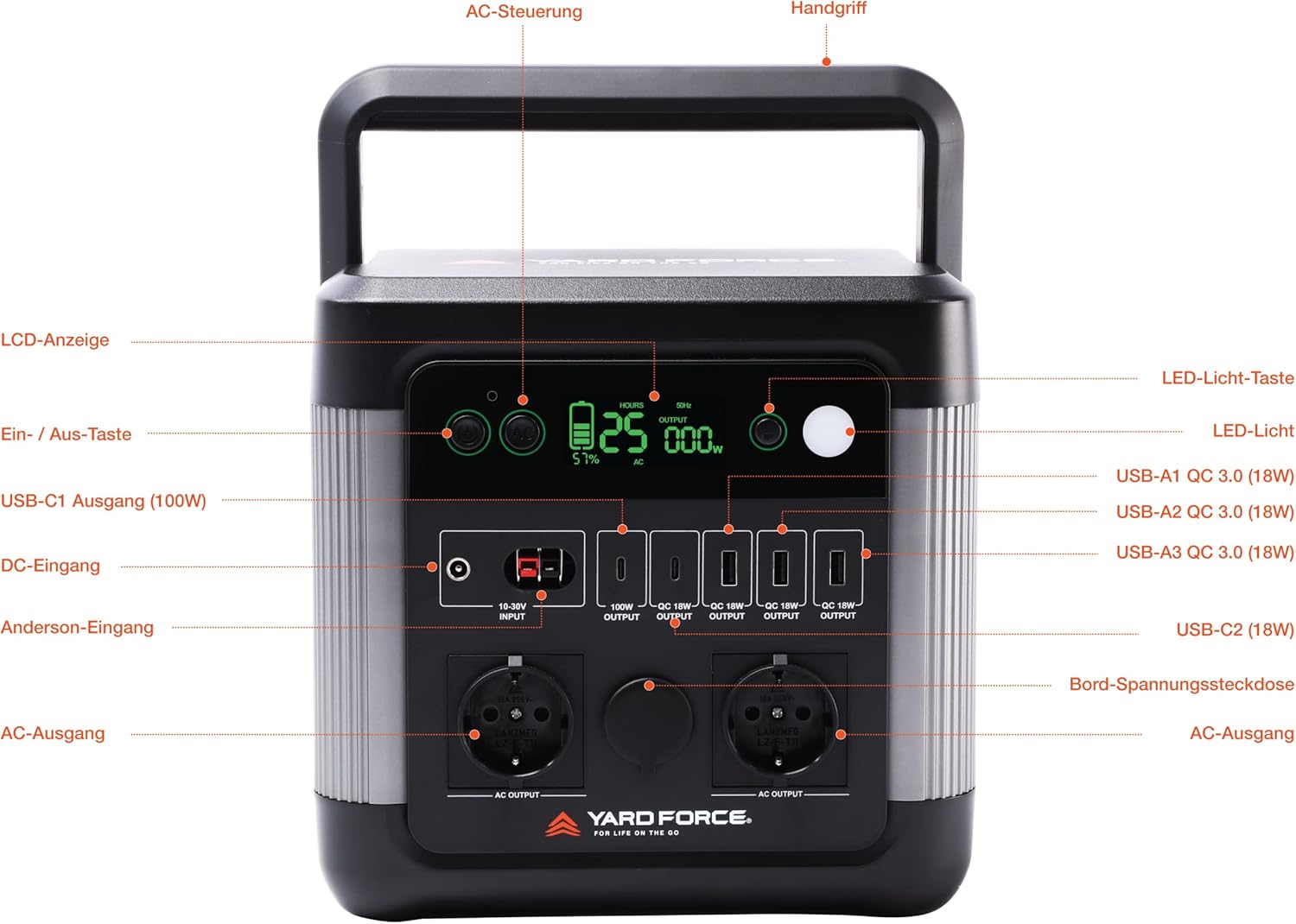
Figure 3.1: Detailed view of the YARD FORCE LX PS1200's control panel and ports. This diagram labels the LCD display, power buttons, DC input, Anderson input, USB-C outputs, USB-A outputs, 12V car socket, and AC outputs, providing a clear guide to all functionalities.

Figure 3.2: Output capabilities of the YARD FORCE LX PS1200. This image illustrates how long or how many times common devices like TVs, smartphones, laptops, mini-fridges, coffee machines, and rice cookers can be powered by the unit, demonstrating its practical applications.

Figure 3.3: Three-way multi-function charging methods. This image visually explains the different ways to recharge the power station: via solar panels for outdoor charging, a standard wall outlet for home charging, and a car charger for on-the-go convenience.
4. Setup
Before first use, it is recommended to fully charge the power station.
4.1 Initial Charging
- Connect the provided AC charging cable to the AC input port on the power station.
- Plug the other end of the AC charging cable into a standard wall outlet (230V).
- The LCD display will show the charging progress. The unit is fully charged when the display indicates 100%.
4.2 Connecting Solar Panels (Optional)
For solar charging, ensure you have a compatible YARD FORCE solar panel (e.g., LX SPP10/20).
- Unfold the solar panel and place it in direct sunlight.
- Connect the solar panel's output cable to the DC input port (10-30V) or Anderson input port on the power station.
- The power station will automatically detect the solar input and begin charging. The LCD display will show the charging status.
5. Operating Instructions
5.1 Powering On/Off
- To turn on the power station, press and hold the main power button until the LCD display illuminates.
- To turn off the power station, press and hold the main power button until the LCD display turns off.
5.2 Using AC Outputs
- Press the AC output button to activate the 230V AC outlets. The AC indicator on the display will light up.
- Plug your AC devices into the outlets. Ensure the total power consumption does not exceed 1200W (2400W peak).
- Press the AC output button again to turn off the AC outlets when not in use.
5.3 Using DC and USB Outputs
- The USB-A, Type-C, and 12V car outputs are typically active when the unit is powered on.
- Connect your USB-powered devices to the respective USB ports.
- Connect 12V devices to the car output port.
5.4 LCD Display Information
The LCD display provides real-time information:
- Battery Level: Shows the remaining battery percentage.
- Input Power: Displays the current charging wattage.
- Output Power: Shows the current discharge wattage for AC, DC, and USB outputs.
- Status Indicators: Icons for AC output, DC output, fan status, and warning indicators.
6. Maintenance
Proper maintenance ensures the longevity and performance of your power station:
- Cleaning: Use a dry, soft cloth to clean the exterior of the unit. Do not use abrasive cleaners or solvents.
- Storage: Store the power station in a cool, dry place, away from direct sunlight and extreme temperatures. If storing for extended periods, charge the battery to 50-80% every 3-6 months to maintain battery health.
- Battery Care: Avoid fully discharging the battery frequently. It is best to recharge the unit before it drops below 20% capacity.
- Ventilation: Regularly check that the ventilation openings are clear of dust and debris.
7. Troubleshooting
If you encounter issues with your YARD FORCE power station, refer to the following common problems and solutions:
| Problem | Possible Cause | Solution |
|---|---|---|
| Unit does not turn on | Battery is completely discharged; Power button not pressed long enough. | Charge the unit using the AC adapter; Press and hold the power button for 3-5 seconds. |
| AC output not working | AC output not activated; Overload; Battery too low. | Press the AC output button; Reduce connected load; Recharge the power station. |
| Solar charging is slow or not working | Insufficient sunlight; Panel not positioned correctly; Dirty panel; Incompatible panel. | Ensure direct sunlight; Adjust panel angle; Clean panel surface; Verify panel compatibility and voltage. |
| Unit overheats | Blocked ventilation; Excessive load. | Ensure clear ventilation; Reduce connected load; Allow unit to cool down. |
If the problem persists after trying these solutions, please contact customer support.
8. Specifications
Key technical specifications for the YARD FORCE LX PS1200 Power Station:
| Feature | Detail |
|---|---|
| Model Number | LX PS1200-EU |
| Battery Type | Lithium-Ion |
| Battery Capacity | 974 Wh |
| AC Output (Rated) | 1200W |
| AC Output (Peak) | 2400W |
| AC Output Voltage | 230V |
| USB-A Output | 3 x QC 3.0 (18W) |
| USB-C Output | 1 x 100W, 1 x 18W |
| DC Input (Solar/Car) | 10-30V |
| Product Dimensions | 25.2 x 19.1 x 24.4 cm |
| Item Weight | 9.8 Kilograms |
| Operating Temperature | 0°C to 40°C (32°F to 104°F) |
9. Warranty and Support
Your YARD FORCE LX PS1200 Portable Power Station comes with a warranty. Please refer to the included Warranty Card for detailed terms and conditions, including the warranty period and coverage.
For technical support, troubleshooting assistance, or warranty claims, please contact YARD FORCE customer service. Contact information can typically be found on the Warranty Card or the official YARD FORCE website.
When contacting support, please have your model number (LX PS1200-EU) and purchase information readily available.
Related documentsLX PS1200-EU


Ask a question about this manual
Ask about setup, troubleshooting, compatibility, parts, safety, or missing instructions. Manuals+ will review the question and use this page’s manual context to help answer it.