
Introduction
This manual provides instructions for the Panasonic KX-TGFA97B additional cordless handset. This handset is designed to expand your existing Panasonic KX-TGF94x or KX-TGF97x series landline phone system. It is not a standalone product and requires a compatible base unit to function.
What's in the Box
- Cordless Handset (KX-TGFA97B)
- Charger
- Rechargeable AAA Batteries (2)
- Handset Cover
- Belt Clip
Compatibility
The KX-TGFA97B additional cordless handset is compatible with Panasonic KX-TGF94x and KX-TGF97x series landline phone systems. Ensure your existing system is one of these series for proper functionality.
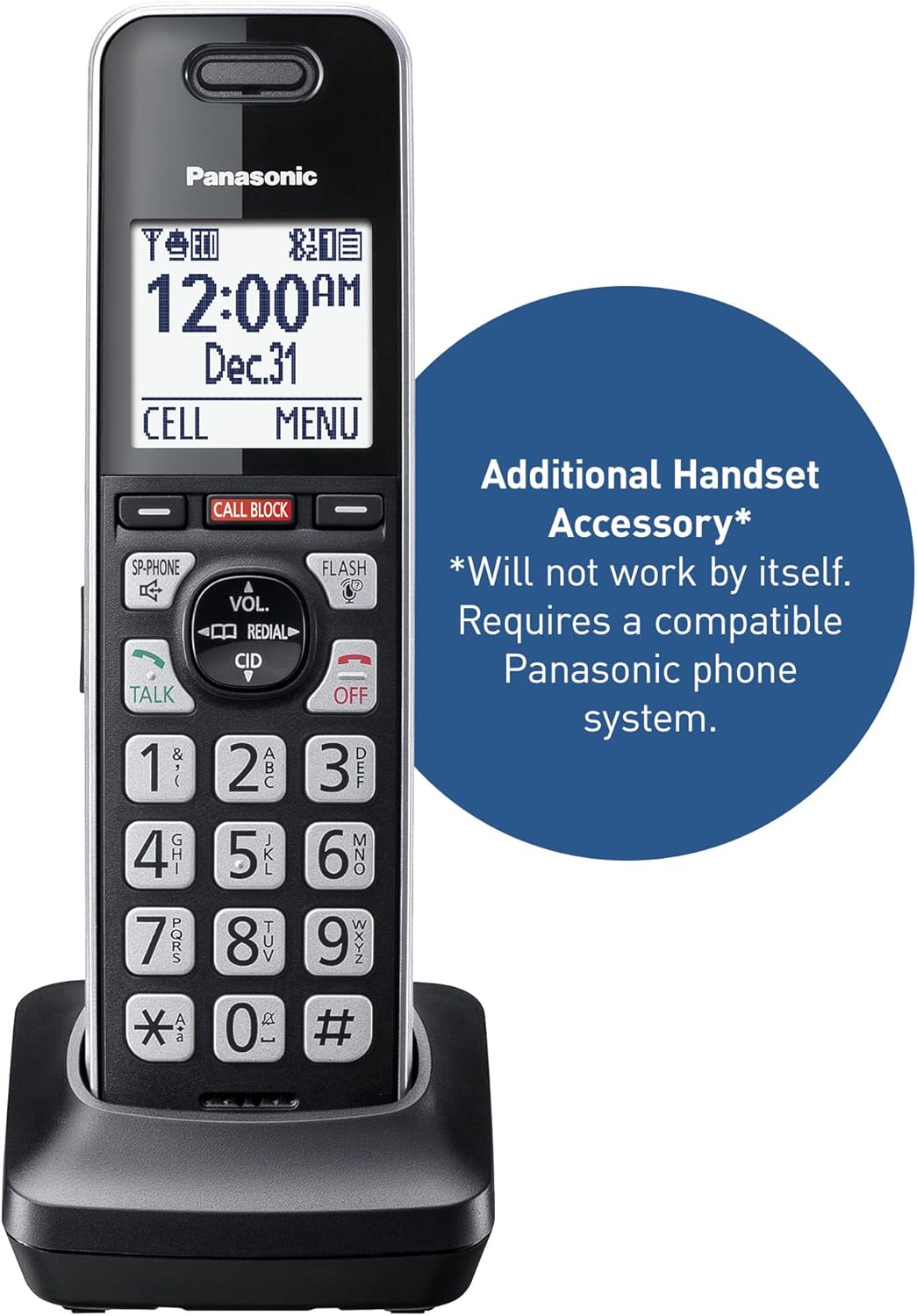
A close-up view of the Panasonic KX-TGFA97B additional cordless handset in its charging base. Text overlay indicates it is an 'Additional Handset Accessory' and 'Will not work by itself. Requires a compatible Panasonic phone system.'
Setup
- Install Batteries: Open the battery compartment on the back of the handset. Insert the two supplied AAA rechargeable batteries, observing the correct polarity (+ and -). Close the compartment cover.
- Charge Handset: Place the handset on the charger. The handset will begin charging. Allow at least 7 hours for a full charge before initial use. The display will indicate charging status.
- Register Handset: This additional handset must be registered to your compatible Panasonic base unit. Refer to your main system's instruction manual for specific handset registration steps. Generally, this involves putting the base unit into registration mode and then initiating registration from the new handset's menu.
- Initial Settings: Once registered, the handset will synchronize with the base unit's settings (date, time, etc.). You may need to adjust personal preferences such as ring volume or display language through the handset's menu.

This image shows the Panasonic KX-TGFA97B additional cordless handset resting in its charging cradle. The handset features a black body with silver trim, a backlit LCD screen displaying time and date, and a standard numeric keypad with function buttons like TALK, OFF, CALL BLOCK, VOL, CID, and FLASH.
Operating Instructions
Basic Call Functions
- Making a Call: Dial the phone number and press the TALK button.
- Answering a Call: When the phone rings, press the TALK button.
- Ending a Call: Press the OFF button or place the handset back on the charger.
- Redial: Press the REDIAL button to view and call previously dialed numbers.
- Flash: During a call, press the FLASH button to use call waiting or transfer calls (if supported by your phone service).
Volume Control
During a call, use the VOL up/down buttons to adjust the earpiece or speakerphone volume.
Intercom
To make an intercom call to another registered handset, press the INTERCOM button and select the desired handset. Refer to your main system manual for detailed intercom usage.
Menu Navigation
Use the navigation buttons (up/down arrows) to scroll through menu options on the display. Press MENU/SELECT to enter a menu or confirm a selection. Press OFF to exit a menu.
Advanced Features
Advanced Call Blocking
The system incorporates advanced features to minimize unwanted calls:
- Pre-installed Call Block: The system comes with 14,000 pre-installed numbers from a robocall database to block nuisance calls automatically.
- One-Touch Call Block: During or after a call, press the dedicated CALL BLOCK button on the handset to add the caller's number to your block list. You can block up to an additional 2,000 numbers.
- Automated Call Block: This feature pre-blocks known robocalls.
- Telemarketing Call Block: Allows you to block announced callers, giving you control over who reaches you.
- One-Ring Scam Alert: Protects against one-ring scams by displaying a confirmation screen if you attempt to return a one-ring call, prompting you to verify before dialing.
This video demonstrates the pre-installed call block feature of the Panasonic cordless phone system. It shows an incoming call being automatically blocked, preventing unwanted interruptions.
2-Way Recording
The 2-Way Recording feature allows you to record telephone conversations. This can be useful for retaining important details. When activated, an announcement of "Start Recording" is played to both parties, which can also deter suspicious callers. Refer to your main system manual for detailed instructions on activating and managing 2-way recording.
Troubleshooting
If you encounter issues with your KX-TGFA97B handset, review the following common problems and solutions. For comprehensive troubleshooting, consult the full user manual available on the Panasonic support website.
- "Check tel line" Message: If the handset displays "Check tel line," ensure the main base unit is properly connected to the telephone line and power source. This message indicates a communication issue with the base unit or the telephone service.
- Short Battery Life: The included 400mAh batteries typically provide 4-5 hours of talk time. If you require longer usage between charges, consider replacing them with higher capacity 1100mAh rechargeable AAA batteries.
- Inconsistent Ringing: If the handset rings out of sequence with other phones in your home, this can sometimes be a system-level issue. Check the main base unit's settings for any 'First Ring Delay' or similar features. If the problem persists, it may be related to your telephone service provider or an inherent characteristic of the system.
- Speaker Quality: The speakerphone on the base unit may have a 'tin-like' sound. There is no tone adjustment for the speaker. This is a characteristic of the device.
- LED Indicators Always On: If the answering machine's 'answer on/off' or message indicator LEDs remain constantly lit even when the machine is off or no messages are present, this may indicate a manufacturing defect. If this occurs, contact Panasonic customer support.
- Spam Calls Still Getting Through: While the system has a large pre-installed block list, new spam numbers emerge constantly. Actively use the one-touch call block button to add new unwanted numbers to your personal block list.
Specifications
| Brand | Panasonic |
| Model Number | KX-TGFA97B |
| Color | Black with Silver Trim |
| Telephone Type | Cordless |
| Number of Batteries | 2 AAA batteries required (included) |
| Power Source | Corded Electric, Battery-Powered |
| Dialer Type | Single Keypad |
| Item Dimensions (L x W x H) | 2.87 x 2.83 x 6.73 inches |
| Answering System Type | Digital (via compatible base unit) |
| Item Weight | 8.48 ounces |
| Compatible Devices | KX-TGF94x and KX-TGF97x Series |
| Conference Call Capability | 3 way (via compatible base unit) |
| Multiline Operation | Single-Line Operation |
| Phone Standby Time | 5 days |
| Phone Talk Time | 10 hours |
| Recording Capacity | 22 minutes (via compatible base unit) |

This image illustrates the dimensions of the Panasonic KX-TGFA97B cordless handset and its charging base. The handset measures 6.7 inches in height, 1.9 inches in width, and 1.2 inches in depth. The base measures 2.8 inches in width and 2.9 inches in depth, with a height of 1.8 inches.
Warranty and Support
Warranty Information
The Panasonic KX-TGFA97B additional cordless handset comes with a 1-year labor warranty and a 1-year manufacturer's warranty. Please retain your proof of purchase for warranty claims.
Customer Support
For technical assistance, troubleshooting beyond this manual, or warranty service, please visit the official Panasonic support website or contact their customer service. The full, detailed instruction manual for your complete phone system (KX-TGF94x or KX-TGF97x series) can also be found on the Panasonic support website.


