
Beninca BULL15MA
Beninca BULL15MA Slide Gate Electric Motor Opener/Operator
User Instruction Manual
1. Introduction
This manual provides essential information for the safe and efficient installation, operation, and maintenance of the Beninca BULL15MA Slide Gate Electric Motor Opener/Operator. The BULL15MA is a robust 115 VAC single-phase operator designed for sliding gates up to 3,000 lbs, featuring a built-in control panel and integrated LCD display for easy programming. Please read this manual thoroughly before beginning any procedures.
2. Important Safety Information
WARNING: Improper installation or use can cause serious injury or death. Always follow all instructions and safety warnings.
- Ensure all electrical connections are made by a qualified electrician and comply with local electrical codes.
- Disconnect power before performing any service or maintenance.
- Keep hands and clothing clear of the gate and operator during operation.
- Do not allow children to operate or play near the gate opener.
- Install safety devices such as photocells or safety edges to prevent entrapment.
- The gate must be properly installed and in good working order before installing the operator.
3. Package Contents
Verify that all components are present and undamaged upon unpacking:
- 1 x Beninca BULL15MA Slide Gate Operator
- 2 x Beninca Long-Range 2-Button ARC 128 Remote Controls
- Installation Hardware (as supplied by manufacturer)
- Instruction Manual (this document)

Figure 3.1: Beninca BULL15MA Gate Operator and included remote controls.
4. Setup and Installation
Installation of the Beninca BULL15MA should be performed by qualified personnel. Refer to the detailed wiring diagrams and mounting instructions provided in the full installation guide (not included in this summary manual) for precise steps. Key steps include:
- Mounting the Operator: Securely mount the operator on a stable concrete pad or foundation adjacent to the gate, ensuring proper alignment with the gate's rack.
- Installing the Rack: Attach the gate rack securely to the gate, ensuring it meshes correctly with the operator's pinion gear.
- Electrical Connections: Connect the 115 VAC power supply to the operator's control board. Ensure all wiring is done according to local electrical codes and the provided wiring diagram. The internal control panel is designed for fast and easy wiring.
- Accessory Connections: Connect any desired accessories such as photocells, keypads, or safety edges to the control board.
- Initial Programming: Utilize the integrated LCD display on the control panel for initial programming, including setting torque, stroke limits, anti-crushing reverse sensor, soft-start, soft-stop, working time, and number of cycles.
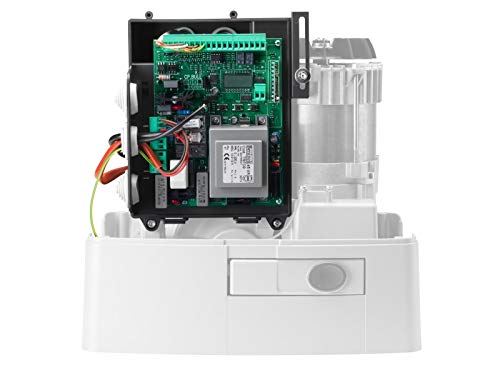
Figure 4.1: Internal view of the BULL15MA operator, highlighting the control board for wiring and programming.
5. Operating Instructions
The Beninca BULL15MA is designed for smooth and silent operation. Once installed and programmed, the gate can be operated using the provided remote controls or other connected access devices.
5.1. Remote Control Operation
To open or close the gate, press the designated button on your Beninca ARC 128 remote control. The operator will initiate the gate movement. Pressing the button again during operation will typically stop the gate.

Figure 5.1: Beninca ARC 128 Remote Control for gate operation.
5.2. Manual Release
In case of power failure or malfunction, the operator can be manually disengaged to allow the gate to be opened or closed by hand. Locate the manual release mechanism on the operator (refer to the full installation manual for exact location and procedure), typically involving a key or lever. Engage the release to disengage the motor from the gate.
6. Maintenance
Regular maintenance ensures the longevity and reliable operation of your Beninca BULL15MA gate opener. Perform the following checks periodically:
- Cleanliness: Keep the operator housing and surrounding area free from dirt, debris, and insects.
- Gate Condition: Inspect the gate for proper alignment, smooth movement, and any signs of wear or damage to hinges, wheels, or tracks.
- Rack and Pinion: Ensure the gate rack is securely fastened and the pinion gear is free of obstructions.
- Safety Devices: Test all safety devices (e.g., photocells, safety edges) regularly to ensure they are functioning correctly.
- Lubrication: Check the lubrication of moving parts as recommended by the manufacturer (refer to full manual). The BULL15MA uses grease lubrication.
7. Troubleshooting
Before contacting technical support, review the following common issues and their potential solutions:
| Problem | Possible Cause | Solution |
|---|---|---|
| Gate does not move. | No power; remote control battery low; safety device activated; manual release engaged. | Check power supply; replace remote battery; check safety sensors for obstructions; disengage manual release. |
| Gate stops unexpectedly. | Obstruction detected; safety device activated; motor overheating. | Remove obstruction; check safety sensors; allow motor to cool down. |
| Remote control not working. | Battery dead; remote out of range; remote not programmed. | Replace battery; move closer to operator; re-program remote control (refer to programming section in full manual). |
8. Specifications
Technical specifications for the Beninca BULL15MA operator:
| Feature | Specification (BULL15MA) |
|---|---|
| Power Supply | 115 Vac 60 Hz |
| Motor Supply | 115 Vac |
| Power Consumption | 300 W |
| Max. Absorbed Current | 4 A |
| Torque | 50 Nm |
| Opening Speed | 35 ft/min |
| Operating Cycle | 40% |
| Operating Temp. | 0 / 150 °F |
| Max gate weight | 3000 Lb |
| Lubrication | Grease |
| Weight | 46 Lb |
| Item Model Number | BULL15MA |
| Country of Origin | Italy |
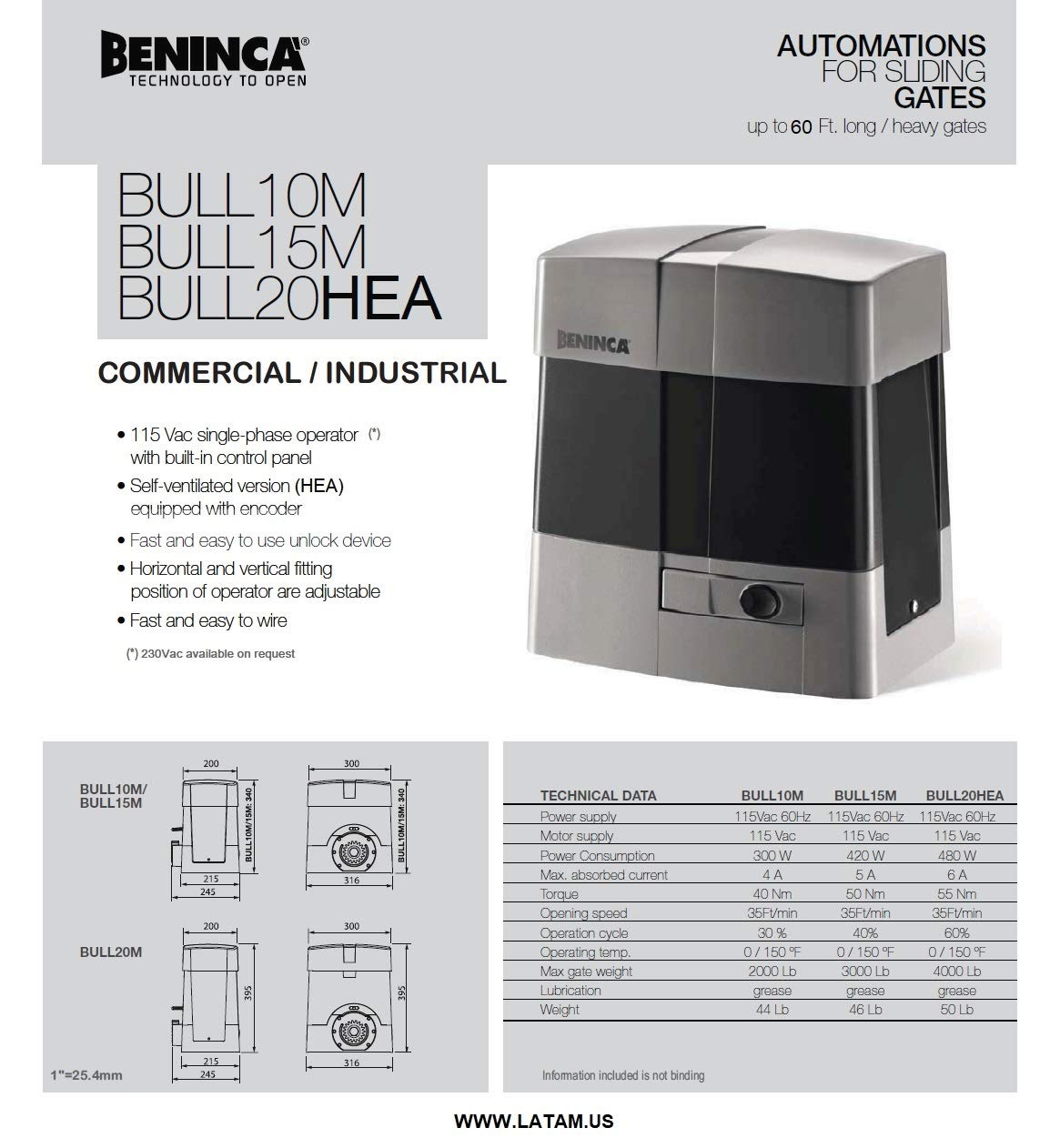
Figure 8.1: Excerpt from technical data sheet for Beninca BULL series operators.
9. Warranty and Support
Beninca products are manufactured to high standards and come with a standard manufacturer's warranty. For specific warranty terms and conditions, please refer to the documentation provided with your purchase or contact your authorized Beninca dealer.
For technical assistance, troubleshooting beyond this manual, or spare parts, please contact Beninca customer support or your local distributor. Ensure you have your product model number (BULL15MA) and purchase details available when contacting support.
Manufacturer: Beninca
Model: BULL15MA
Related documentsBULL15MA


Ask a question about this manual
Ask about setup, troubleshooting, compatibility, parts, safety, or missing instructions. Manuals+ will review the question and use this page’s manual context to help answer it.