
Introduction
The Collective Minds PSVR2 Showcase is designed to provide a convenient and safe solution for storing and charging your PlayStation VR2 (PSVR2) headset and two PSVR2 Sense controllers. This unit allows for simultaneous charging of both controllers in under 1.5 hours and includes a 5V AC adapter, eliminating the need to use your console's USB ports for charging. It also features a multi-protect safety system to prevent over-charge, over-current, over-heating, over-voltage, or short-circuiting.
Please read this manual thoroughly before using the product to ensure proper setup and operation.
Package Contents
- PSVR2 Showcase Charging Stand
- 5V AC Power Adapter
- 2x USB-C Magnetic Adapters
- Instruction Manual (this document)
Setup Instructions
- Unpack the Showcase: Carefully remove all components from the packaging. Ensure all listed package contents are present.

Image: The Collective Minds PSVR2 Showcase charging stand, shown without any devices attached, ready for setup.
- Connect Power: Plug the provided 5V AC power adapter into the power input port on the back of the PSVR2 Showcase. Then, plug the adapter into a standard wall outlet. A blue LED indicator on the front of the stand will illuminate, indicating that the unit is powered on.
- Attach Magnetic Adapters to Controllers: Locate the two small USB-C magnetic adapters. Insert one magnetic adapter into the USB-C port of each PSVR2 Sense controller. These adapters are designed to remain in the controllers for easy drop-and-charge functionality.
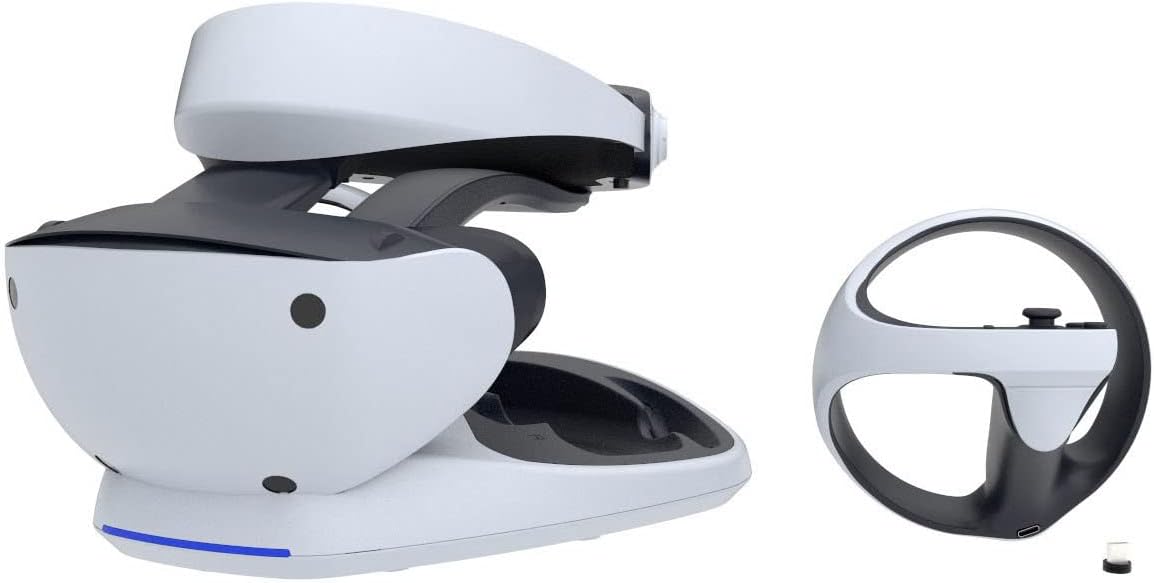
Image: A PSVR2 Sense controller with the small USB-C magnetic charging adapter inserted into its port, ready for placement on the stand.
- Place PSVR2 Headset: Gently place your PSVR2 headset onto the designated stand area. Ensure it rests securely and is balanced. The stand is designed to cradle the headset, providing a stable storage location.

Image: The PSVR2 headset securely placed on the Showcase stand, demonstrating proper storage.
- Place PSVR2 Sense Controllers: Carefully align each PSVR2 Sense controller with its respective charging dock on the stand. The magnetic adapters will snap into place, initiating the charging process. The LED indicators for each controller charging slot will change color (e.g., red for charging, blue for fully charged) to show the charging status.

Image: The Collective Minds PSVR2 Showcase fully assembled with the PSVR2 headset and two Sense controllers, demonstrating the complete setup.
Operating Instructions
- Charging PSVR2 Sense Controllers:
Once the magnetic adapters are installed in your controllers, simply place the controllers onto their designated charging slots on the Showcase. The magnetic connection will ensure proper alignment. Charging will begin automatically. The LED indicators on the stand will show the charging status (e.g., red for charging, blue for fully charged). Both controllers will fully charge in under 1.5 hours.
- Storing PSVR2 Headset:
Place the PSVR2 headset onto the central stand. The design provides a stable and secure location to store your headset when not in use, protecting it from damage and keeping your gaming area tidy.
Maintenance
- Cleaning: Disconnect the power adapter before cleaning. Use a soft, dry cloth to wipe down the surface of the Showcase. Do not use abrasive cleaners, solvents, or harsh chemicals, as these may damage the finish.
- Storage: When not in use for extended periods, store the Showcase in a cool, dry place away from direct sunlight and extreme temperatures.
Troubleshooting
| Problem | Possible Cause | Solution |
|---|---|---|
| Controllers not charging. |
|
|
| PSVR2 headset does not fit securely. |
|
|
| Blue LED indicator on stand is off. |
|
|
Specifications
- Model Number: CM00146
- Product Dimensions: 29.97 x 28.78 x 11 cm
- Weight: 1.13 kg
- Input Power: 5V AC Adapter (included)
- Charging Time: Under 1.5 hours for two PSVR2 Sense controllers
- Safety Features: Over-Charge, Over-Current, Over-Heating, Over-Voltage, Short-Circuit protection
Warranty Information
Specific warranty details are not provided in the product information. Please refer to the manufacturer's official website or contact their customer support for warranty terms and conditions.
Customer Support
For further assistance or inquiries, please visit the Collective Minds official website or contact their customer support channels. Contact information may be found on the product packaging or their website.
