
1. Introduction
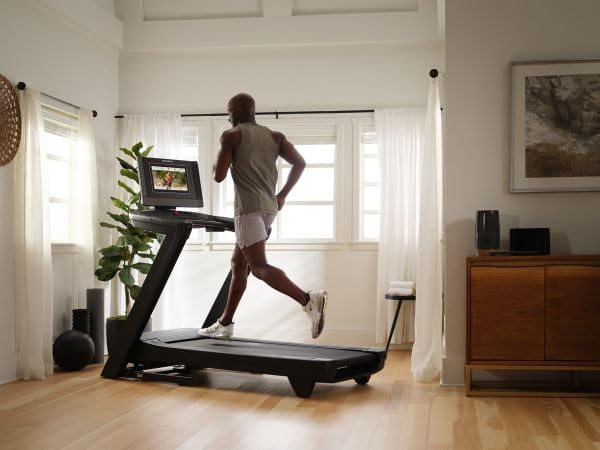
Welcome to the NordicTrack Commercial Series 1750 Treadmill. This iFIT-enabled treadmill is designed for both running and walking, offering a comprehensive fitness experience from the comfort of your home. Featuring a 14-inch pivoting touchscreen, it provides access to a vast library of interactive workouts and global trails.
Key features include:
- iFIT-Enabled: Access thousands of on-demand workouts with expert trainers.
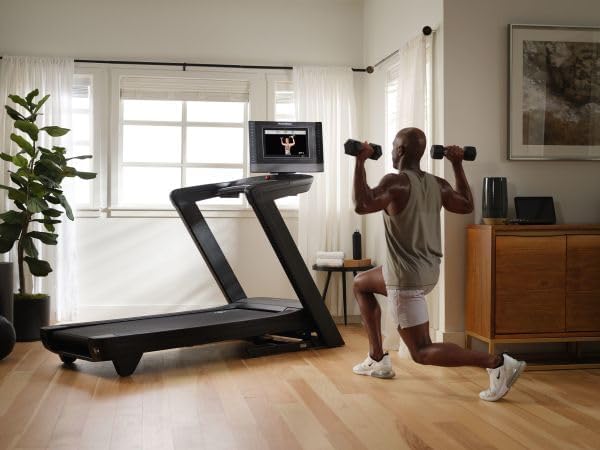
- 14" Tilt & Pivot Touchscreen: Enjoy immersive training sessions and off-equipment workouts.
- Runner's Flex Cushioning: Provides a comfortable and joint-friendly running surface.
- OneTouch Controls: Easily adjust speed and incline with a single touch.
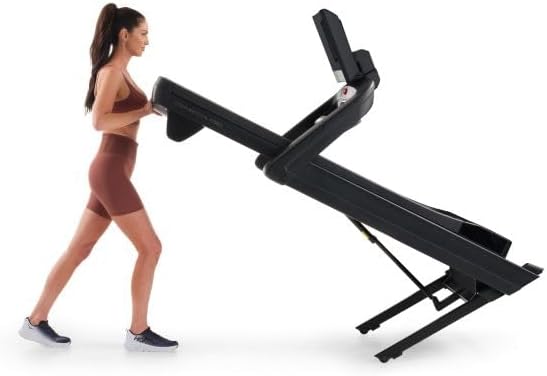
- SpaceSaver Design with EasyLift Assist: Conveniently fold and store the treadmill when not in use.
- SmartAdjust & ActivePulse: Personalized workout adjustments based on performance and heart rate (with iFIT subscription and compatible HR monitor).
- AutoBreeze Fans: Automatically adjust fan speed to match your workout intensity.

2. Important Safety Information
Before operating this treadmill, please read all instructions carefully. Keep this manual for future reference. Adhere to all warnings and instructions on the product and in this manual.
- Maximum User Weight: Do not exceed the maximum recommended user weight of 300 pounds (136 kg).
- Safety Key: Always attach the safety key clip to your clothing before beginning a workout. In case of an emergency, pulling the safety key will immediately stop the treadmill.
- Clearance: Maintain a minimum clearance of 6 feet (1.8 meters) behind the treadmill and 2 feet (0.6 meters) on each side.
- Foot Placement: Always stand on the foot rails when starting or stopping the treadmill.
- Children and Pets: Keep children and pets away from the treadmill at all times.
- Medical Conditions: Consult your physician before starting any exercise program, especially if you have pre-existing medical conditions.
- Heart Rate Monitoring: WARNING: Heart rate monitoring systems may be inaccurate. Overexercising may result in serious injury or death. If you feel faint, stop exercising immediately.
- Power Cord: Ensure the power cord is not pinched or damaged. Plug the treadmill into a properly grounded outlet.
3. Setup and Assembly
Assembly is required for the NordicTrack Commercial Series 1750 Treadmill. Please follow the detailed assembly instructions provided in the separate assembly guide that came with your product. Ensure all parts are present and securely fastened before use.
3.1 Placement
Place the treadmill on a level surface with adequate clearance around it. The SpaceSaver Design and transport wheels allow for easy relocation. To move the treadmill, lift the rear end and roll it on its front wheels.


3.2 Power Connection
Connect the treadmill to a dedicated AC power outlet. Ensure the power switch, typically located near the base of the treadmill, is in the "ON" position. The console will illuminate, indicating power is supplied.
3.3 Initial Setup (iFIT)
Upon first power-on, the treadmill's 14-inch pivoting touchscreen will guide you through the iFIT setup process. This includes connecting to your Wi-Fi network and logging into or creating your iFIT account. An iFIT subscription is sold separately and is required to access the full range of interactive workouts and features.
4. Operating Instructions
4.1 Basic Operation
Once the treadmill is powered on and the safety key is attached, you can begin your workout:
- Start: Press the START button to begin the treadmill belt movement.
- Stop: Press the STOP button to halt the treadmill belt.
- Speed Adjustment: Use the SPEED +/- buttons or the OneTouch speed buttons (0-12 MPH) on the console to adjust your pace.
- Incline Adjustment: Use the INCLINE +/- buttons or the OneTouch incline buttons (-3% to 12%) to simulate uphill or downhill terrain.
4.2 iFIT Workouts
The 14-inch pivoting touchscreen provides access to the iFIT platform. With an active iFIT subscription, you can:
- Browse Workouts: Explore a vast library of studio classes, global workouts, and cross-training options led by world-class trainers.
- SmartAdjust: Your treadmill can automatically adjust its speed and incline to match the terrain or trainer's instructions, personalized to your fitness level.
- ActivePulse: Connect a Bluetooth-enabled heart rate monitor (sold separately) to enable ActivePulse, which automatically adjusts your workout intensity to keep you within your target heart rate zone.
- Off-Equipment Workouts: Pivot the screen to participate in yoga, strength training, and other off-treadmill workouts.

4.3 Audio and Cooling
- Speakers: The treadmill features two 2-inch speakers for audio playback from iFIT workouts or connected devices.
- Bluetooth Connectivity: Connect your Bluetooth headphones or other audio devices for a personalized listening experience.
- AutoBreeze Fans: Activate the built-in fans to stay cool during your workout. The fans can automatically adjust their intensity based on your workout.
5. Maintenance
Regular maintenance ensures the longevity and optimal performance of your treadmill.
5.1 Cleaning
- General Cleaning: Wipe down the console and other surfaces with a damp cloth after each use to remove sweat and dust. Avoid abrasive cleaners.
- Deck and Belt: Periodically clean the area under the motor cover and around the running deck to prevent dust and debris buildup.
5.2 Belt Lubrication
The running belt may require lubrication over time. Refer to your separate assembly guide or contact customer support for specific instructions and recommended lubricants. Proper lubrication helps maintain smooth belt operation and extends its lifespan.
5.3 Storage
The SpaceSaver Design with EasyLift Assist allows for convenient vertical storage. To fold the treadmill, gently press on the EasyLift bar with your foot and lift the running deck until it locks into the upright position. To lower, gently press the bar again and allow the deck to slowly descend.
6. Troubleshooting
If you encounter issues with your treadmill, refer to the following common solutions:
| Problem | Possible Cause | Solution |
|---|---|---|
| Treadmill does not power on. | Power cord unplugged; circuit breaker tripped; power switch off. | Ensure power cord is securely plugged in. Check household circuit breaker. Verify power switch is ON. |
| Belt does not move. | Safety key not in place; emergency stop engaged. | Ensure the safety key is fully inserted into the console. Check if the emergency stop button is pressed. |
| Screen is lagging or unresponsive. | Software issue; temporary glitch. | Perform a quick reset by turning the treadmill off and then on again. Ensure Wi-Fi connection is stable for iFIT. |
| Unusual noise from the belt. | Belt misalignment; lack of lubrication; debris under belt. | Inspect the belt for alignment and adjust if necessary (refer to assembly guide). Lubricate the belt if dry. Clean under the belt. |
For issues not listed here, please contact NordicTrack Customer Support.
7. Specifications
| Feature | Detail |
|---|---|
| Brand | NordicTrack |
| Model Name | Commercial Series 1750 |
| Model Number | NTL17124 |
| Product Dimensions (LxWxH) | 78.5"D x 36"W x 65"H (199.4 cm x 91.4 cm x 165.1 cm) |
| Folded Size (HxWxD) | 70.4"H x 35.6"W x 44"D (178.8 cm x 90.4 cm x 111.8 cm) |
| Maximum User Weight | 300 Pounds (136 kg) |
| Maximum Speed | 12 Miles per Hour (19.3 km/h) |
| Incline Range | -3% Decline to 12% Incline |
| Maximum Horsepower | 3.6 Horsepower |
| Deck Length | 60 Inches (152.4 cm) |
| Deck Width | 20 Inches (50.8 cm) |
| Display Type | 14" Tilt & Pivot Touchscreen |
| Connectivity | Bluetooth, Wi-Fi |
| Included Components | Safety Key |

8. Warranty and Support
8.1 Warranty Information
The NordicTrack Commercial Series 1750 Treadmill comes with the following warranty:
- Frame: Ten (10) years from the initial date of purchase.
- Parts: Two (2) years from the initial date of purchase.
- Labor: One (1) year from the initial date of purchase.
Please retain your proof of purchase for warranty claims.
8.2 Customer Support
For any questions, technical assistance, or warranty claims, please contact NordicTrack Customer Support. Refer to the contact information provided with your product or visit the official NordicTrack website for support details.
You can also visit the NordicTrack Store on Amazon for additional product information and support resources.


