
KLIM KLIM Nomad
KLIM Discover Portable CD Player User Manual
Model: KLIM Nomad
Brand: KLIM
Introduction
Welcome to the user manual for your KLIM Discover Portable CD Player. This manual provides comprehensive instructions for setting up, operating, maintaining, and troubleshooting your device. The KLIM Discover is a versatile portable audio player designed to offer multiple playback options, including CD, Bluetooth, FM radio, and SD card support, along with an FM transmitter for car connectivity.
The device is equipped with an anti-shock protection chip to ensure uninterrupted playback and a long-lasting rechargeable battery for extended use.
What's in the Box
Upon unboxing your KLIM Discover, please ensure all the following components are present:
- KLIM Discover CD Player
- KLIM Fusion wired earphones
- Earphone Accessories (e.g., extra ear tips)
- USB-C Charging Cable
- Carry Pouch
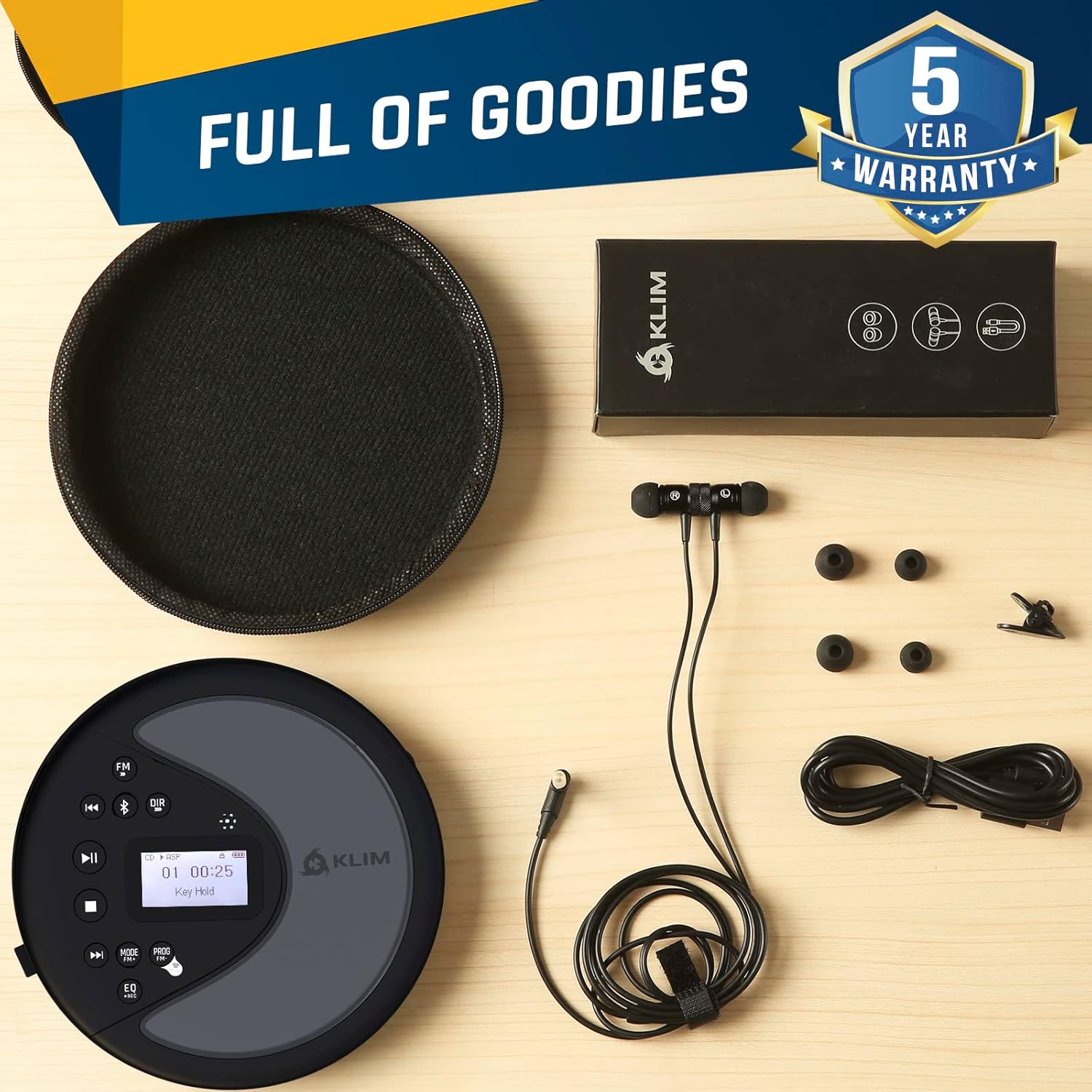
Image: All components included in the KLIM Discover package, neatly laid out.
Setup
Charging the Device
Before first use, fully charge your KLIM Discover. Connect the provided USB-C charging cable to the device's charging port and plug the other end into a compatible USB power adapter (not included) or a computer's USB port. The charging indicator will show the charging status.

Image: The KLIM Discover highlighting its internal rechargeable battery, offering over 14 hours of playtime.
Inserting a CD
- Gently slide the CD compartment cover to open it.
- Place the CD onto the spindle with the label side facing up.
- Press down gently on the center of the CD until it clicks into place.
- Close the CD compartment cover firmly.

Image: The KLIM Discover CD player with a CD visible through its transparent cover, alongside the included earphones.
Operating Instructions
Controls Overview

Image: A detailed diagram illustrating the various buttons and their functions on the KLIM Discover.
- Backlit Display: Shows track information, mode, and settings.
- Stop Button: Stops playback.
- Play/Pause Button: Starts or pauses playback.
- Next Track/Fast Forward: Skips to the next track or fast forwards during playback.
- Previous Track/Fast Backward: Skips to the previous track or fast backwards during playback.
- DIR/Speed +: Changes directory (for MP3 CDs) or increases playback speed.
- FM Radio/Speed -: Switches to FM radio mode or decreases playback speed.
- FM Transmitter: Activates FM transmission mode.
- MODE/FM (+): Changes playback mode (Repeat, Random, Intro) or increases FM frequency.
- PROG/FM (-): Programs tracks (for CD) or decreases FM frequency.
- EQ/Recording: Adjusts equalizer settings or initiates recording (if supported).
- Bluetooth Button: Activates Bluetooth pairing mode.
- Volume Control: Adjusts the audio output volume.
- Hold Switch: Locks all buttons to prevent accidental presses.
CD Playback
After inserting a CD, press the Play/Pause button to begin playback. Use the Next Track and Previous Track buttons to navigate between songs. Press and hold these buttons for fast forward or fast backward. The Stop button will halt playback.
The KLIM Discover supports CD, CD-R, CD-RW, HDCD, and MP3 CDs. For MP3 CDs, use the DIR button to navigate between folders.

Image: The KLIM Discover CD player, designed to bring back the classic CD listening experience.
Bluetooth Connectivity
To connect to Bluetooth headphones or speakers, press the Bluetooth button. The device will enter pairing mode. On your Bluetooth device, search for "KLIM Discover" and select it to pair. Once connected, audio will stream wirelessly.
FM Radio
Press the FM button to switch to FM radio mode. Use the MODE/FM (+) and PROG/FM (-) buttons to tune to desired frequencies. Ensure the included earphones are plugged in, as they act as the FM antenna.
SD/TF Card Playback
Insert an SD or TF card into the designated slot. The player will automatically detect and begin playing compatible audio files (MP3, WMA, WAV). Use the navigation buttons to control playback.
Equalizer (EQ) and Recording
Press the EQ button to cycle through various equalizer presets (e.g., Pop, Rock, Jazz, Classic, Bass). Some models may also support recording functionality via this button; refer to the on-screen prompts for details.
Playback Speed Control
Adjust playback speed using the DIR/Speed + and FM Radio/Speed - buttons. This feature is useful for audiobooks or language learning.
Connecting to Your Car
The KLIM Discover offers three primary methods for connecting to your car's audio system:
- AUX Cable: Use the included AUX cable to connect the player's audio output to your car's AUX input port. This provides a direct wired connection for clear audio.
- Bluetooth: If your car's infotainment system supports Bluetooth audio input, you can pair the KLIM Discover wirelessly. Activate Bluetooth on the player and your car, then select "KLIM Discover" from your car's Bluetooth device list.
- FM Transmission: This feature allows you to broadcast the player's audio to your car's FM radio. Press the FM Transmitter button on the player, then tune your car's FM radio to the frequency displayed on the KLIM Discover. This is ideal for cars without AUX or Bluetooth.

Image: Visual representation of the three car connectivity options: Bluetooth, FM Transmitter, and AUX cable.
Official Product Video: KLIM Discover + Portable CD Player Walkman
Video: This video demonstrates the features and connectivity options of the KLIM Discover Portable CD Player, including its use as a walkman and car audio integration.
Maintenance
Cleaning
To clean the device, use a soft, dry cloth. Do not use abrasive cleaners or solvents. For the laser lens, use a specialized CD lens cleaner. Keep the CD compartment free of dust and debris.
Storage
When not in use, store the KLIM Discover in its provided carry pouch to protect it from scratches and dust. Avoid exposing the device to extreme temperatures, humidity, or direct sunlight.
Troubleshooting
| Problem | Possible Cause | Solution |
|---|---|---|
| Device does not power on. | Battery is depleted. | Charge the device fully using the USB-C cable. |
| CD skips or does not play. | CD is dirty, scratched, or inserted incorrectly. Anti-shock protection exceeded. | Clean the CD. Ensure it is properly seated. Avoid excessive movement during playback. |
| No sound from headphones. | Headphones not fully plugged in. Volume too low. | Ensure headphones are securely connected. Increase volume. Test with different headphones. |
| Bluetooth pairing fails. | Device is too far from the player. Bluetooth not activated. | Ensure devices are within range. Activate Bluetooth on both devices. Restart pairing process. |
| FM transmission static. | Interference or incorrect frequency. | Try a different FM frequency. Ensure earphones are plugged in (acting as antenna). |
Specifications
| Feature | Detail |
|---|---|
| Model Name | KLIM Nomad |
| Product Dimensions | 5.51 x 5.51 x 1.1 inches |
| Item Weight | 8.8 ounces |
| Connectivity Technology | Bluetooth, AUX, FM Transmitter |
| Media Type Supported | CD, CD-R, CD-RW, HDCD, MP3, WMA, WAV |
| Battery Type | 1 Lithium Polymer battery (included) |
| Display Technology | LCD |
| Anti-Shock Protection | 100 seconds (for CD playback) |
Warranty and Support
Warranty Information
The KLIM Discover Portable CD Player comes with a 5-year assurance. This warranty covers manufacturing defects and ensures the product's quality and durability. For detailed terms and conditions, please refer to the warranty card included in your package or visit the official KLIM website.
Customer Support
Should you encounter any issues or have questions regarding your KLIM Discover, please contact KLIM customer support. You can find contact information on the official KLIM website or through the retailer where you purchased the product. Please have your model number (KLIM Nomad) and purchase date ready when contacting support.

Image: KLIM's commitment to quality and customer satisfaction, highlighting the 5-year protection.
Related documentsKLIM Nomad


Ask a question about this manual
Ask about setup, troubleshooting, compatibility, parts, safety, or missing instructions. Manuals+ will review the question and use this page’s manual context to help answer it.