
1. Product Overview
The Kuulaa Portable Charger is an ultra-compact power bank designed for convenient on-the-go charging of your iPhone and AirPods. Its built-in Lightning connector eliminates the need for extra cables, making it an ideal companion for short travels and daily use. With a 4500mAh capacity, it provides reliable emergency battery backup.
Key features include:
- Ultra-Compact Design: Size of a lipstick, easy to carry in pocket or purse.
- Built-in Lightning Connector: Direct plug-in for iPhone and AirPods, no cable needed.
- 4500mAh Capacity: Provides approximately 1 to 1.2 full charges for most iPhones.
- Durable Construction: Made from high-quality polycarbonate and ABS plastic.
- Smart Chips & Safety Features: Anti-oxidation process, temperature, over-current, short-circuit, and over-voltage protection.
- LED Indicator Lights: Clearly displays remaining battery charge.

Figure 1: The Kuulaa Portable Charger, a compact power bank with a built-in Lightning connector.
2. Product Features in Detail

Figure 2: The compact design allows for easy portability, even when attached to a phone on a gimbal.

Figure 3: Experience more convenient charging without the need for external cables.

Figure 4: Compatible with iPhone 14, 13, 12, 11, X, 8/7 series, and AirPods.

Figure 5: Weighing only 90 grams, it's slightly heavier than an egg, ensuring ultra-portability.
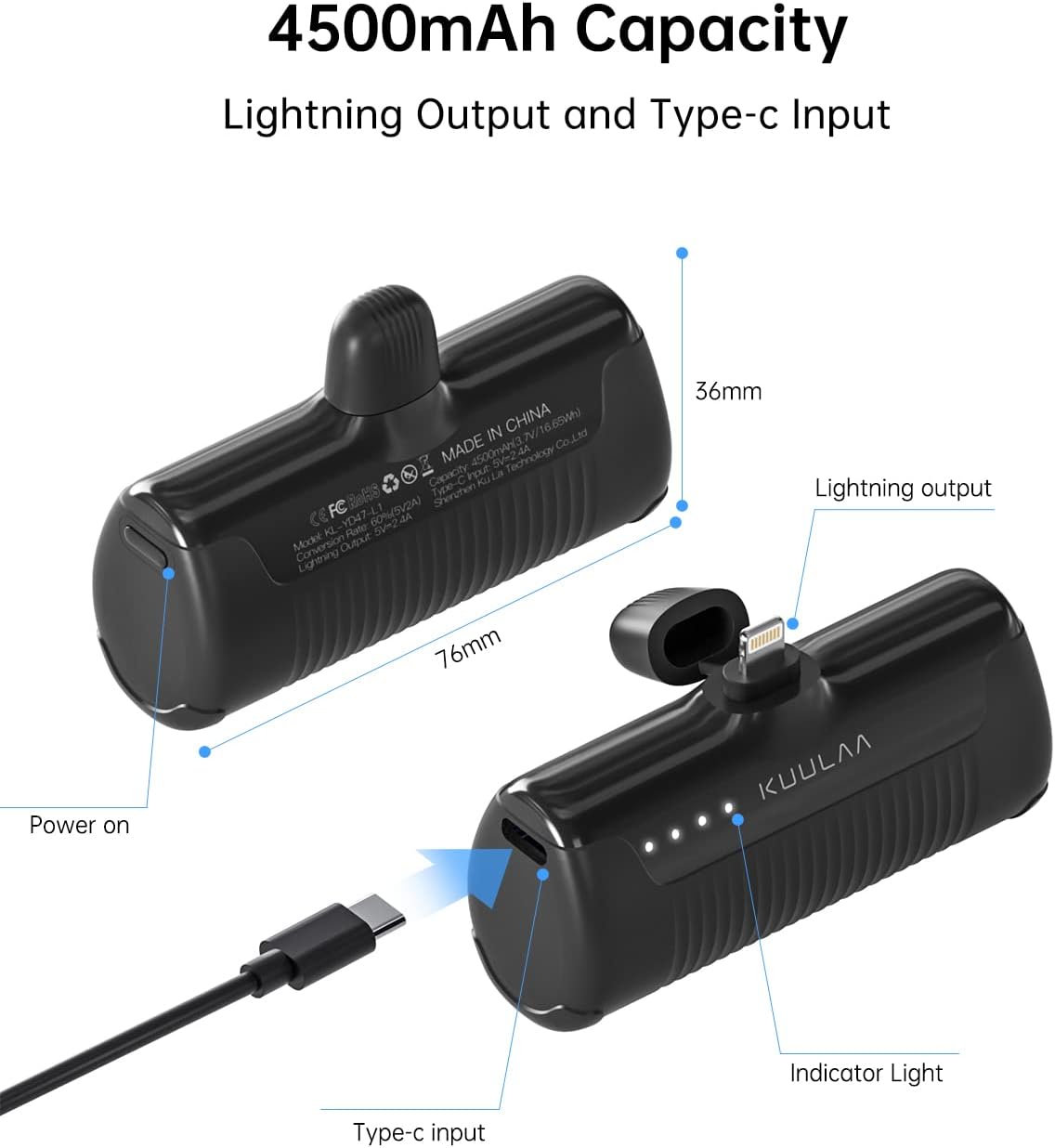
Figure 6: Detailed view of the 4500mAh capacity charger, highlighting its Lightning output and Type-C input. Dimensions are 76mm length and 36mm height.

Figure 7: The charger incorporates a comprehensive multi-protection safety system, including temperature, over-current, short-circuit, and over-voltage protection.
3. Setup and Initial Use
3.1 Charging the Power Bank
Before first use, fully charge your Kuulaa Portable Charger. Use the provided USB-C cable to connect the power bank's Type-C input port to a USB power adapter (not included) or a computer's USB port.
- Connect the small end of the USB-C cable to the Type-C input port on the side of the power bank.
- Connect the standard USB end of the cable to a power source.
- The LED indicator lights will illuminate to show charging progress.

Figure 8: The power bank is charged using the included USB-C cable connected to a power adapter.
3.2 Connecting to Your Device
The Kuulaa Portable Charger features a built-in Lightning connector for direct charging of compatible Apple devices.
- Remove the protective cap from the Lightning connector.
- Carefully insert the Lightning connector into your iPhone or AirPods charging port. Ensure a secure connection.
- The power bank will automatically begin charging your device.
Figure 9: The power bank directly plugs into your iPhone's Lightning port for immediate charging.
Video 1: An instructional video demonstrating the unboxing, features, and usage of the Kuulaa Portable Phone Charger. This video shows how to connect the charger to a phone and highlights its compact design.
4. Operating Instructions
4.1 Charging Your Device
Once connected, the power bank will automatically detect your device and begin charging. There is no power button to press for initiating charging when a device is plugged in.
- Ensure the power bank is sufficiently charged (check LED indicators).
- Plug the built-in Lightning connector firmly into your iPhone or AirPods.
- The device's charging icon will appear, indicating that charging has started.
- To stop charging, simply disconnect the power bank from your device.
4.2 Understanding LED Indicator Lights
The power bank features four LED lights on its front surface that indicate the remaining battery capacity and charging status.
| Number of Lights On | Battery Level |
|---|---|
| 1 Light | 0% - 25% |
| 2 Lights | 25% - 50% |
| 3 Lights | 50% - 75% |
| 4 Lights | 75% - 100% (Fully Charged) |

Figure 10: Visual representation of the LED indicator lights and their corresponding battery charge levels.
5. Maintenance and Care
To ensure the longevity and optimal performance of your Kuulaa Portable Charger, please follow these maintenance guidelines:
- Storage: Store the power bank in a cool, dry place away from direct sunlight and extreme temperatures.
- Cleaning: Use a soft, dry cloth to clean the surface of the power bank. Do not use harsh chemicals or abrasive materials.
- Avoid Drops: While durable, avoid dropping the power bank or subjecting it to strong impacts.
- Water Exposure: Keep the power bank away from water and high humidity. It is not waterproof.
- Battery Health: For best battery life, fully charge the power bank at least once every three months if not in regular use.
6. Troubleshooting
If you encounter issues with your Kuulaa Portable Charger, please refer to the following common problems and solutions:
| Problem | Possible Cause | Solution |
|---|---|---|
| Power bank not charging | Cable not properly connected; faulty cable/adapter; power bank fully charged. | Ensure USB-C cable is securely connected to both the power bank and the power source. Try a different USB-C cable or power adapter. Check LED indicators; if all four are solid, the power bank is fully charged. |
| Device not charging from power bank | Power bank battery low; Lightning connector not fully inserted; device not compatible; device case interference. | Recharge the power bank. Ensure the Lightning connector is fully and securely inserted into your device's port. Verify your device is compatible (Apple devices with Lightning port). Remove bulky phone cases that might prevent a proper connection. |
| Slow charging | Using device while charging; low power adapter. | Avoid using your device extensively while it is charging. Ensure you are using a suitable power adapter for charging the power bank itself. |
| LED indicators not working | Power bank completely drained; internal malfunction. | Try charging the power bank for an extended period (several hours). If the issue persists, contact customer support. |
7. Specifications
| Feature | Detail |
|---|---|
| Model Number | KL-YD47-L1 |
| Battery Capacity | 4500 mAh (3.7V Battery) |
| Connector Type | Built-in Lightning Output, Type-C Input |
| Product Dimensions | 1.57 x 1.42 x 2.91 inches (approx. 40 x 36 x 74 mm) |
| Item Weight | 3.17 ounces (approx. 90 grams) |
| Material | Polycarbonate (PC) and Acrylonitrile Butadiene Styrene (ABS) Plastic |
| Special Features | Auto Shut-Off, LED Indicator Lights |
| Color | Black |
8. Warranty and Support
Your Kuulaa Portable Charger comes with a 3-year warranty and lifetime technical support.
If you have any questions, require technical assistance, or need to claim warranty service, please do not hesitate to contact our customer support team. Refer to the contact information provided with your product packaging or visit the official Kuulaa website for support details.
We are committed to providing you with the most satisfying products and services.


