
Introduction
This manual provides detailed instructions for the installation, operation, and maintenance of your VANMASS Ultimate Car Phone Mount. Designed for secure and convenient phone placement, this mount offers multiple installation options to suit various vehicle interiors and user preferences. Please read this manual thoroughly before use to ensure optimal performance and safety.
What's in the Box
- 1x Phone Cradle (fits large phones/thick cases)
- 1x Telescopic Suction Cup
- 1x Vent Clip (fits vertical/horizontal air vents)
- 1x Wipe (for cleaning dash/windshield surface)
- 120 Months Refund or Replacement Support Information
Features
- Certified Durability: Tested and certified for military-grade shockproof performance (Cert No. GZMR230200285101, CP65, REACH, RoHS).
- Strong Suction: Features a 2.7-inch diameter suction cup with PU adhesive, tested to be 60X stronger than older models. Melt-resistant and leaves no residue.
- Adjustable Vent Clip: Designed to fit 0.07-0.1 inch thick vent blades of 99% vehicles (horizontal/vertical). Includes a thickened steel plate and soft silicone pads for protection.
- Premium Materials: Constructed from durable and healthy materials, withstanding temperatures from -40°F to 194°F.
- Ergonomic Design: Original lower-back release button for comfortable phone removal. Thickened fixed cradle legs provide stable support for various phone weights. Widened cradle legs (0.96 inches) offer enhanced compatibility.
Setup & Installation
Your VANMASS car phone mount offers versatile installation options for your dashboard, windshield, or air vent. Choose the method that best suits your vehicle and preference.
1. Suction Cup Installation (Dashboard/Windshield)
- Clean the Surface: Use the provided wipe to thoroughly clean the flat surface on your dashboard or windshield where you intend to mount the suction cup. Ensure the surface is dry and free of dust.
- Attach the Suction Cup: Remove the protective film from the suction cup. Press the suction cup firmly onto the cleaned flat surface.
- Lock the Suction Cup: Push the lever down to create a strong vacuum seal, locking the suction cup in place.
- Attach Phone Cradle: Connect the phone cradle to the ball joint of the telescopic arm. Secure it by tightening the nut.
- Adjust Position: Adjust the telescopic arm and cradle to your desired viewing angle and distance. Tighten all adjustment knobs to secure the position.

Image: Overview of mounting options including dashboard, air vent, and windshield.

Image: Step 1 - Cleaning the dashboard surface.
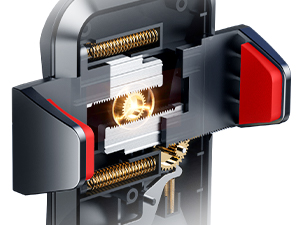
Image: Step 2 - Pressing the suction cup onto the surface.
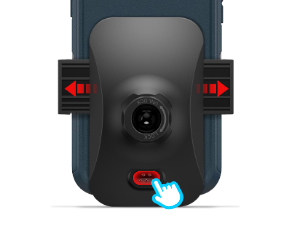
Image: Step 3 - Locking the suction cup.
Video: Detailed installation guide for the VANMASS phone mount in a vehicle, demonstrating suction cup and vent clip setup.
2. Vent Clip Installation
- Attach Vent Clip to Cradle: Connect the vent clip to the ball joint on the back of the phone cradle. Secure it by tightening the nut.
- Insert into Vent: Gently push the vent clip into a suitable horizontal or vertical air vent blade.
- Secure the Clip: Use the lever on the vent clip to firmly secure it to the vent blade. Ensure it is stable and does not wobble.
Video: Demonstration of installing the VANMASS car phone mount using the vent clip option.
Operating Instructions
1. Inserting Your Phone
- Open Cradle Arms: Press the release button located on the lower back of the phone cradle. The side arms will automatically extend.
- Place Phone: Carefully place your phone into the cradle. The thickened fixed cradle legs will support the phone from below.
- Secure Phone: Gently squeeze the side arms inwards until they firmly grip your phone. The arms will ratchet to secure the phone in place.

Image: Close-up of the phone cradle highlighting the thickened fixed cradle legs for secure phone support.
2. Removing Your Phone
Press the release button on the lower back of the phone cradle. The side arms will automatically open, allowing you to safely remove your phone.
3. Adjusting Viewing Angle and Distance
- Telescopic Arm: Loosen the knob on the telescopic arm to extend or retract it, adjusting the distance of your phone. Tighten the knob to secure.
- Ball Joint: Loosen the nut behind the phone cradle to rotate the phone 360 degrees or tilt it to your preferred viewing angle. Tighten the nut to secure.
Video: Demonstrates how the car mount securely holds a phone and allows for easy adjustments.
Maintenance
- Suction Cup Cleaning: If the suction cup loses its stickiness, rinse it with warm water and let it air dry. This will restore its adhesive properties.
- General Cleaning: Wipe the mount with a soft, damp cloth to remove dust and grime. Avoid harsh chemicals that may damage the materials.
- Temperature Considerations: The mount is designed to withstand extreme temperatures (-40°F to 194°F). However, prolonged exposure to direct sunlight in extremely hot conditions may affect adhesive performance over time.
Troubleshooting
- Suction Cup Not Sticking:
- Ensure the mounting surface is clean, dry, and flat. Avoid curved, textile, or leather surfaces.
- Rinse the suction cup with water and let it air dry to restore stickiness.
- Apply firm pressure when attaching and ensure the lock lever is fully engaged.
- Vent Clip Not Secure:
- Ensure the vent clip is compatible with your car's vent type (horizontal/vertical blades). It is not compatible with round, cross, or diagonal vents.
- Verify the lever on the clip is fully tightened to secure it to the vent blade.
- Phone Wobbles in Cradle:
- Ensure the side arms are firmly gripping the phone. Squeeze them until they ratchet securely.
- Check that the bottom cradle legs are extended appropriately to fully support your phone's size.
Specifications
| Item Weight | 10.5 ounces |
| Item Model Number | BABff3CA4A |
| Special Features | Adjustable |
| Color | Red |
| Compatible Devices | Smartphones |
| Compatible Phone Models | Samsung, iPhone |
| Mounting Type | Dashboard, Windshield, Vent |
Warranty and Support
Your VANMASS Ultimate Car Phone Mount comes with 120 Months Refund or Replacement Support. For any inquiries or assistance, please refer to the contact information provided with your product packaging or visit the official VANMASS website.


