
Introduction
Thank you for purchasing the GoolRC WLtoys XK A280 RC Airplane. This high-simulation P-51 Mustang fighter aircraft is designed for both beginners and experienced pilots, offering versatile flight modes and robust construction. This manual provides essential information for assembly, operation, maintenance, and safety to ensure a successful and enjoyable flying experience.

Figure 1: GoolRC WLtoys XK A280 RC Airplane with its remote control.
Product Features
The XK A280 RC Airplane is engineered with advanced features for optimal performance and user-friendliness:
- Durable Construction: Made from impact-resistant EPP (Expanded Polypropylene) and engineering materials, ensuring high simulation and resilience. The rack features a quick installation and replacement structure for easy transport.
- Advanced Stabilization: Equipped with a 6-axis gyroscope for attitude locking and seamless 3D/6G mode conversion. This makes it suitable for various flight scenarios and ideal for beginners transitioning to advanced flying.
- Modular Design: Blades, motors, and wings are detachable for convenient replacement and maintenance.
- Receiver Compatibility: Flight control system includes two receiver conversion sockets (5V for FUTABA (S-BUS) and 3V for DSM receivers).
- Powerful Motor: Features an 1806 strong magnetic brushless motor for super powerful performance.
- Precise Control: Utilizes 2g high-precision digital steering gear for quick response and locking.
- Night Flight Capability: Integrated LED searchlight allows for flying even at night, with remote control one-button light control.
- High-Capacity Battery: Powered by a 7.4V 600mAh 25C lithium polymer battery, providing approximately 7 minutes of glide flight time.

Figure 2: Product features, emphasizing the EPP high-strength composite materials.
Components Overview
The GoolRC WLtoys XK A280 RC Airplane package includes the following components:
- 1 x XK A280 RC Airplane (main body, wings, tail)
- 1 x 2.4GHz Remote Control Transmitter
- 1 x 7.4V 600mAh 25C Lithium Polymer Battery
- 1 x Charger (USB type)
- Spare Propellers
- Landing Gear Set
- Tools and Screws
- Instruction Manual

Figure 3: All included components of the XK A280 RC Airplane package.
Setup Guide
1. Assembly
- Carefully unpack all components from the box.
- Attach the main wings to the fuselage. Ensure they click securely into place.
- Install the horizontal and vertical tail fins.
- Attach the landing gear if you plan for ground take-offs and landings.
- Ensure the propeller is securely fastened to the motor shaft.
2. Battery Installation and Charging
- Charge the 7.4V 600mAh LiPo battery using the provided USB charger. The charging time is approximately 120 minutes.
- Once charged, open the battery compartment on the aircraft (usually on the underside or top near the cockpit).
- Connect the battery to the aircraft's power connector.
- Securely close the battery compartment.

Figure 4: Diagram illustrating the battery compartment and connection.
3. Remote Control Setup
- Install 4 AA batteries (not included) into the remote control.
- Turn on the remote control.
- Turn on the aircraft. The aircraft and remote control should automatically bind. If not, refer to the manual's binding instructions.
- Perform a control surface check: Move the joysticks on the remote control and observe if the corresponding control surfaces (ailerons, elevator, rudder) on the aircraft move correctly. Adjust trims if necessary to ensure surfaces are neutral.
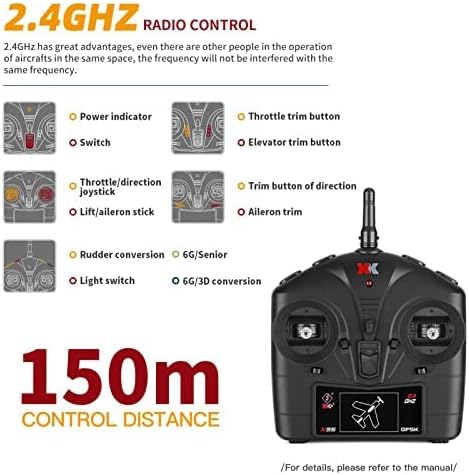
Figure 5: The 2.4GHz remote control with labeled functions.
Operating Instructions
1. Flight Modes (3D/6G)
The XK A280 offers two primary flight modes:
- 6G (Beginner) Mode: This mode provides enhanced stability with the 6-axis gyroscope, automatically leveling the aircraft. It's ideal for new pilots or when flying in windy conditions.
- 3D (Aerobatic) Mode: For experienced pilots, this mode allows for full acrobatic maneuvers like somersaults, rolls, and inverted flight. The gyroscope provides less assistance, giving the pilot more direct control.
Switch between modes using the dedicated button on the remote control. It is recommended to gain sufficient altitude before switching to 3D mode.

Figure 6: The aircraft performing maneuvers in 3D Gyroscope mode.

Figure 7: The aircraft maintaining stable flight in 6G Axis Gyroscope mode.
2. Take-off
The aircraft supports both ground take-off and hand launch:
- Ground Take-off: Place the aircraft on a flat surface, facing into the wind. Gradually increase throttle to maximum. Once the aircraft gains sufficient speed, it will lift off. Use the direction joystick to steer.
- Hand Launch: Hold the aircraft firmly and push the throttle to maximum. Gently throw the aircraft forward and slightly upwards into the wind.

Figure 8: Flight parameters and ground take-off instructions.

Figure 9: Diagram illustrating the correct method for hand launching the aircraft.
3. Flight Controls
Use the remote control joysticks to maneuver the aircraft:
- Throttle/Direction Joystick: Controls engine speed (altitude) and rudder (yaw).
- Lift/Aileron Stick: Controls elevator (pitch) and ailerons (roll).
- Trim Buttons: Fine-tune the aircraft's flight path if it drifts without input.
4. LED Searchlight
The aircraft is equipped with LED lights for night flying. Use the 'Light switch' button on the remote control to turn them on/off.

Figure 10: The aircraft with its LED searchlight illuminated for night flight.
5. Landing
Approach the landing area slowly, reducing throttle. Gently use the elevator to control descent. Aim for a smooth, level touchdown. If using landing gear, ensure a flat surface. If hand-launching, prepare to catch the aircraft or land it gently on soft ground.
Maintenance
- Battery Care: Always disconnect the battery after use. Store LiPo batteries in a cool, dry place at storage voltage (around 3.8V per cell) if not used for extended periods. Do not overcharge or over-discharge.
- Propeller Replacement: If the propeller is damaged, replace it with a new one from the spare parts. Ensure it is installed in the correct orientation.
- Cleaning: Wipe the aircraft clean with a soft, dry cloth after each flight to remove dirt or debris.
- Inspection: Regularly check all parts for damage, loose connections, or wear. Pay attention to control surfaces, linkages, and motor mounts.
Troubleshooting
| Problem | Possible Cause | Solution |
|---|---|---|
| Aircraft does not respond to remote control. | Not bound, low battery (aircraft/remote), interference. | Re-bind aircraft and remote. Charge/replace batteries. Fly in an open area. |
| Motor not spinning. | Battery not connected, damaged motor/propeller, throttle not at lowest position during binding. | Check battery connection. Replace damaged parts. Ensure throttle is low when binding. |
| Aircraft drifts during flight. | Trims not adjusted, strong wind. | Adjust trim buttons on remote. Fly in calmer conditions. |
| LED lights not working. | Lights switched off, loose connection. | Press light switch button. Check wiring connections. |
Specifications
| Feature | Specification |
|---|---|
| Model Number | XK A280 |
| Flight Time | Approx. 7 minutes |
| Charging Time | Approx. 120 minutes |
| Remote Control Frequency | 2.4GHz |
| Control Distance | Approx. 150 meters |
| Motor | 1806 Brushless Motor |
| Battery | 7.4V 600mAh 25C LiPo |
| Material | EPP + Engineering Materials |
| Recommended Age | 14 years and up |
| Item Weight | 2.44 pounds |
| Package Dimensions | 23.2 x 8.2 x 7.5 inches |

Figure 11: Detailed product information including dimensions and specifications.
Safety Guidelines
To ensure safe operation and prevent damage or injury, please adhere to the following safety guidelines:
- Flying Environment: Always fly in open areas away from people, buildings, trees, power lines, and water bodies. Avoid flying in strong winds or adverse weather conditions.
- Pre-Flight Check: Before each flight, ensure the aircraft and remote control batteries are fully charged. Check all control surfaces for proper movement and ensure no parts are loose or damaged.
- Battery Safety: Use only the recommended battery and charger. Do not puncture, short-circuit, or expose batteries to extreme temperatures. Never leave charging batteries unattended.
- Propeller Safety: Keep hands, face, and loose clothing away from the spinning propeller. The propeller can cause serious injury.
- Adult Supervision: For users under the recommended age, adult supervision is highly advised.
- Respect Local Regulations: Be aware of and comply with all local laws and regulations regarding RC aircraft operation.
Warranty and Support
GoolRC products are manufactured to high-quality standards. For any issues or support inquiries, please contact the retailer or manufacturer directly. Keep your purchase receipt as proof of purchase for warranty claims. Specific warranty details may vary by region and retailer.