
PETLIBRO PLAF008
PETLIBRO Automatic Cat Feeder Instruction Manual
Brand: PETLIBRO | Model: PLAF008
1. Introduction
The PETLIBRO Automatic Cat Feeder (Model PLAF008) is designed to provide scheduled and controlled feeding for your pets, ensuring they receive appropriate portions at designated times. This feeder features a 2-liter (8-cup) capacity, battery or wall power options, and user-friendly controls to simplify pet care.

Figure 1: PETLIBRO Automatic Cat Feeder (Model PLAF008)
2. Package Contents
Please verify that all components are present in the package:
- Automatic Pet Feeder (1)
- Stainless Steel Bowl (1)
- Charger (1)
- User Manual (1)
- Quick Guide (1)
3. Setup
3.1 Power Supply
The feeder can be powered by either the included charger or 3 D Cell Alkaline Batteries (not included). For optimal flexibility and as a power backup, it is recommended to use both.
- AC Power: Connect the charger to the feeder's power input port and plug it into a standard wall outlet.
- Battery Power: Open the battery compartment on the bottom of the feeder and insert 3 D Cell Alkaline Batteries, ensuring correct polarity.
The feeder is designed for up to 180 days of battery life, offering flexible placement without the need for constant wall tethering.

Figure 2: Flexible placement with battery power
3.2 Filling the Food Tank
The food tank has a 2-liter (8-cup) capacity. Ensure the feeder is clean and dry before filling.
- Open the top lid of the feeder.
- Pour dry kibble into the food tank. The feeder is compatible with dry kibble sizes ranging from 2-15mm (0.08-0.6 inches). Do not use wet pet food or kibble with a diameter over 15mm.
- Close the top lid and press down firmly to engage the press-to-lock mechanism, preventing accidental opening and spillage.

Figure 3: Securely locking the food tank lid
3.3 Attaching the Food Bowl
Place the stainless steel bowl in front of the feeder's dispensing outlet. Ensure it is properly aligned to catch dispensed food.
4. Operating Instructions
4.1 Control Panel Overview
The control panel is located on the front of the feeder, protected by a cover to prevent accidental presses by pets. Gently open the cover to access the buttons and display.

Figure 4: Control panel cover prevents pet interaction
4.2 Setting Current Time
Refer to the quick guide or user manual for specific button functions to set the current time on the feeder's display.
4.3 Programming Feeding Schedule
The feeder allows you to program up to 6 meals per day, with 0-16 portions per meal. One portion is approximately 10.4 ml (1/24 cup or 2/3 tbsp).
- Access the programming mode via the control panel.
- Set the desired time for each meal.
- Set the number of portions to be dispensed for each meal.
- Save the settings.
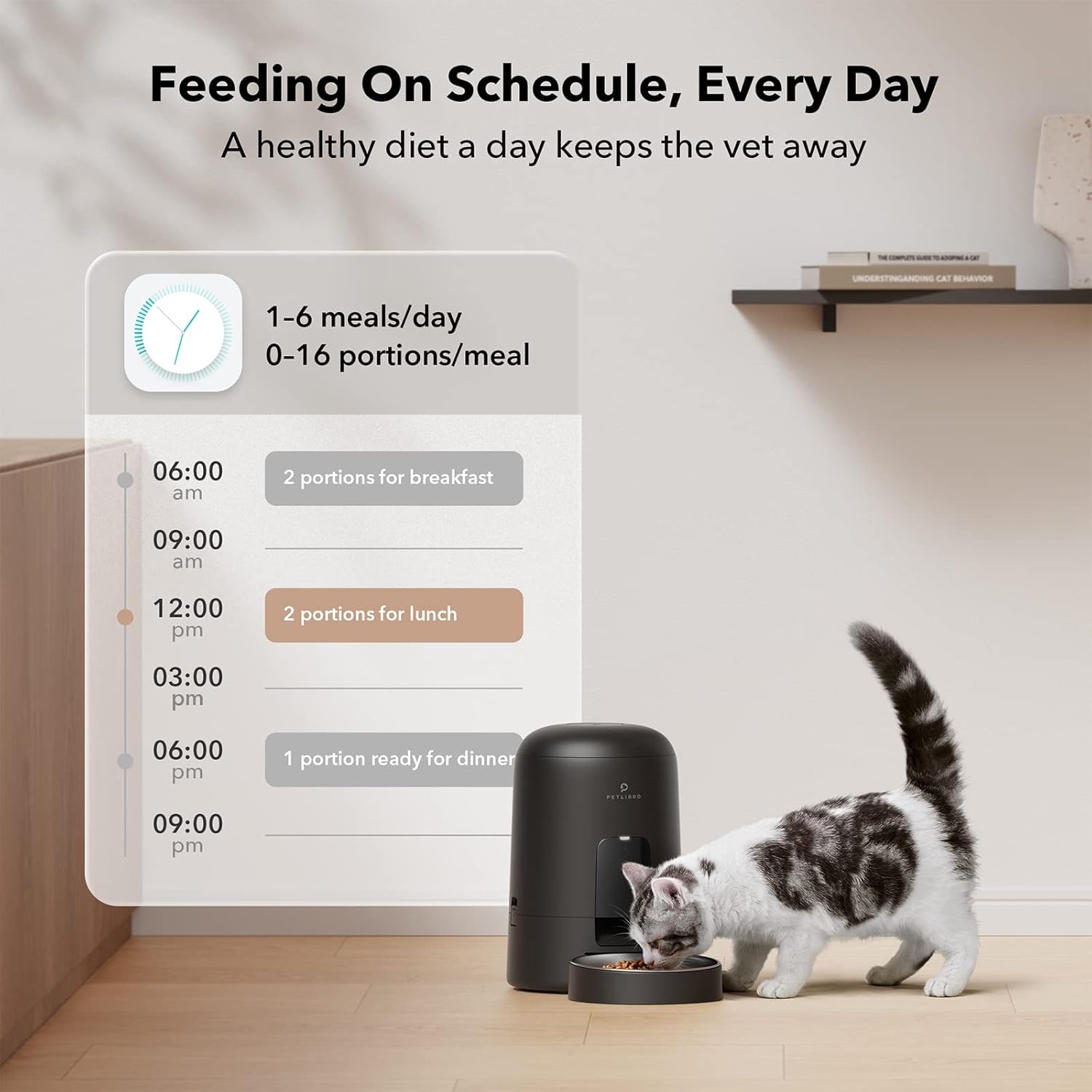
Figure 5: Example of a daily feeding schedule
4.4 Manual Feeding
To dispense food manually, press the designated manual feed button on the control panel. This will dispense one portion of food immediately.
4.5 Recommended Daily Feeding Portions
The following table provides general recommendations for daily intake and corresponding portions. Adjust based on your pet's specific needs and dietary requirements.

Figure 6: Recommended Daily Feeding Portions
4.6 Official Product Video
Watch the official PETLIBRO video for a comprehensive overview of the automatic cat feeder's features and benefits.
Video 1: PETLIBRO Automatic Cat Feeders - An official overview of the product's design and functionality.
5. Maintenance
5.1 Cleaning
Regular cleaning ensures hygiene and proper operation of the feeder. The food tank and stainless steel bowl are detachable for easy cleaning.
- Detach the food tank and stainless steel bowl from the main unit.
- Wash the detachable parts with water and mild detergent.
- Important: Wipe all parts dry before reassembly and use. Do not wash the main machine base with water.
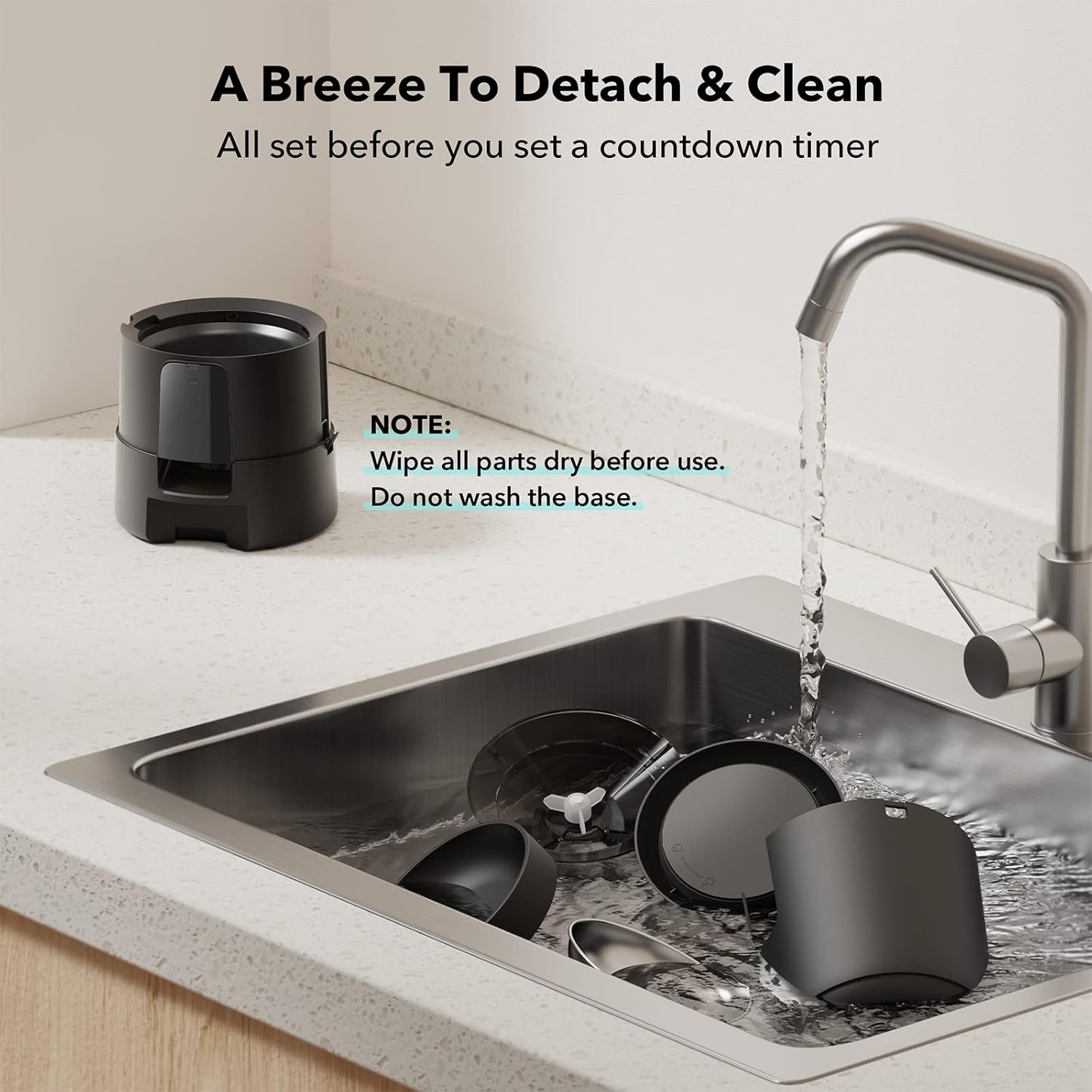
Figure 7: Detaching and cleaning feeder components
5.2 Refilling
Refill the food tank as needed. The frequency will depend on your pet's consumption and the set portion sizes. For a typical 1-2 cat household, refilling once per week may be adequate.
6. Troubleshooting
The PETLIBRO Automatic Cat Feeder features a smart status indicator to alert you to common issues:
- Low Food: A red flashing light and "LOW FOOD" on the screen indicate that the food level in the tank is low and requires refilling.
- Food Jamming: The indicator will alert you if food is stuck in the dispensing mechanism. Check for blockages and clear them.
- Low Battery: The indicator will signal when the battery level is low, prompting you to replace batteries or connect to AC power.

Figure 8: Smart Status Indicator alerts
If you encounter persistent issues not covered here, please refer to the full user manual or contact customer support.
7. Specifications
| Feature | Detail |
|---|---|
| Model Name | automatic cat feeder |
| Model Number | PLAF008 |
| Brand | PETLIBRO |
| Capacity | 2 Liters (8 cups) |
| Dimensions (LxWxH) | 7.68 x 7.68 x 11.42 inches |
| Item Weight | 2.91 Pounds |
| Material | Stainless Steel, Acrylonitrile Butadiene Styrene |
| Power Source | AC Adapter or 3 D Cell Alkaline Batteries (not included) |
| Battery Life | Up to 180 days (battery-operated) |
| Kibble Size Compatibility | 2-15mm (0.08-0.6 inches) |
| Number of Meals | Up to 6 meals/day |
| Portions per Meal | 0-16 portions/meal |
| Care Instructions | Do not use any food with diameter over 15mm, Indoor use only, Do not wash the machine base with water |
8. Warranty and Support
The PETLIBRO Automatic Cat Feeder comes with a 24-month warranty, demonstrating our commitment to quality. For any product issues, technical assistance, or warranty claims, please contact the PETLIBRO Support Team. Contact information can be found in the included User Manual or on the official PETLIBRO website.
Related documentsPLAF008


Ask a question about this manual
Ask about setup, troubleshooting, compatibility, parts, safety, or missing instructions. Manuals+ will review the question and use this page’s manual context to help answer it.