1. Introduction
The FeinTech VMS14201 is an advanced HDMI 2.1 matrix switch designed to enhance your audio-visual experience. It allows you to connect up to four HDMI sources, such as PCs, PS5, or Xbox Series X game consoles, to two HDMI displays, like a TV and a projector. This versatile device supports cutting-edge video formats including 4K at 120Hz and 8K at 60Hz, with a bandwidth of up to 40 Gbps. It also features an integrated audio extractor for separate sound output via optical digital (Toslink) or analog RCA, and supports Audio Return Channel (ARC) from your TV.
Key features include:
- Connects 4 HDMI sources to 2 HDMI displays simultaneously.
- Supports Ultra HD resolutions up to 8K 60Hz and 4K 120Hz.
- Integrated audio extractor with SPDIF Toslink and RCA outputs.
- Supports ARC for TV audio output via Toslink.
- Automatic downscaler for mixed 4K and Full HD display setups.
- Compatible with HDR10, HDR10+, Dolby Vision, HDR, VRR, and ALLM for gaming.
- HDCP 2.3 compliant (backward compatible).
- Supports various audio formats including LPCM 2.0-7.1, AC3, Dolby Digital Plus, Dolby TrueHD, Dolby Atmos, DTS, DTS-HD, DSD.
2. Package Contents
- FeinTech VMS14201 HDMI 2.1 Matrix Switch
- Power Adapter
- Remote Control
- Battery (CR2032)
- User Manual
3. Setup and Connections
Before connecting, ensure all devices are powered off. Use high-quality HDMI 2.1 certified cables for optimal performance, especially for 4K 120Hz or 8K content.
3.1 Device Overview
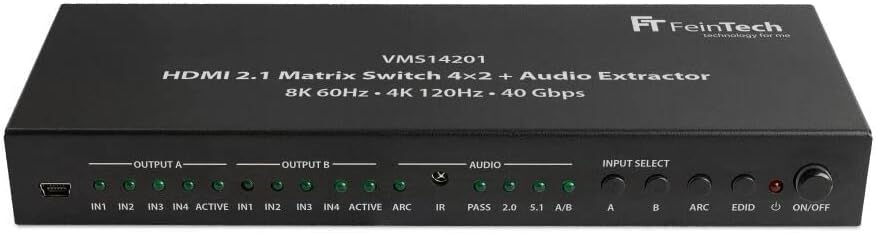
Figure 3.1: Front panel of the FeinTech VMS14201, showing input select buttons, output indicators, and power button.

Figure 3.2: Rear panel of the FeinTech VMS14201, displaying HDMI inputs, HDMI outputs, DC 12V power input, and audio outputs (RCA and Optical Digital).
3.2 Connecting Your Devices
- Connect HDMI Sources: Plug your HDMI source devices (e.g., PC, PS5, Xbox, Blu-ray player) into the HDMI IN 1-4 ports on the rear of the VMS14201.
- Connect HDMI Displays: Connect your primary display (e.g., TV) to HDMI OUT A and your secondary display (e.g., projector) to HDMI OUT B.
- Connect Audio System (Optional): If you wish to extract audio, connect your sound system to the 'AUDIO OUT' ports. Use the 'DIGITAL' (Toslink) port for optical digital audio (stereo, Dolby Digital 5.1, DTS 5.1) or the 'ANALOG R/L' (RCA) ports for stereo analog audio.
- Power Connection: Connect the included 12V power adapter to the 'DC 12V' port on the switch and then to a power outlet.

Figure 3.3: Typical connection diagram illustrating HDMI sources connected to inputs, and displays/audio systems connected to outputs.
3.3 Cable Length Recommendations
- For 8K / 4K 120Hz: HDMI cable length should be less than 3 meters for both input and output.
- For 4K 60Hz: HDMI cable length should be less than 5 meters for both input and output.
- For longer distances, a hybrid fiber optic HDMI cable is recommended.
4. Operation
The FeinTech VMS14201 allows flexible routing of your HDMI sources to your displays.
4.1 Switching Inputs and Outputs
You can switch between the 4 HDMI inputs and route them to either or both of the 2 HDMI outputs using the buttons on the front panel or the included remote control. The switch does not support automatic input switching.

Figure 4.1: The VMS14201 unit shown with its remote control for convenient operation.
4.2 Downscaler Functionality
The VMS14201 features an automatic downscaler, enabling mixed display setups (e.g., one 4K TV and one Full HD projector). If a 4K source is connected and one display is Full HD, the switch will automatically downscale the 4K content to 1080p at 60Hz for the Full HD display, while maintaining 4K resolution on the 4K display. Note that the downscaler is inactive for 4K 120Hz gaming content.

Figure 4.2: The downscaler automatically adjusts 4K 60Hz content for Full HD displays while maintaining 4K on compatible screens.
4.3 Audio Extraction and ARC
The integrated audio extractor allows you to output audio separately from the selected HDMI source. This can be done via the optical digital (Toslink) port for multi-channel audio (Dolby Digital 5.1, DTS 5.1) or stereo, or via the analog RCA ports for stereo audio only.
The switch also supports ARC (Audio Return Channel). When ARC is enabled, audio from your TV (e.g., smart TV apps or internal tuner) connected to HDMI OUT B can be sent back to the switch and output via the Toslink port to your sound system. This functionality is compatible with TVs featuring an eARC HDMI port as well.

Figure 4.3: Detailed view of the analog RCA (L/R) and optical digital (DIGITAL) audio output ports.
4.4 HDR, Dolby Vision, and 3D Support
The VMS14201 supports various high dynamic range formats including HDR10, HDR10+, and Dolby Vision, as well as 3D video. For these formats to be displayed correctly, both connected displays must support the specific format. If one display does not support a particular format (e.g., Dolby Vision), the output will default to a compatible format like HDR10 or SDR, depending on the source device.
5. Maintenance
To ensure the longevity and optimal performance of your FeinTech VMS14201, follow these simple maintenance guidelines:
- Cleaning: Use a soft, dry cloth to clean the exterior of the device. Do not use liquid cleaners or aerosols, as they may damage the unit.
- Ventilation: Ensure the device is placed in a well-ventilated area to prevent overheating. Do not block any ventilation openings.
- Storage: When not in use for extended periods, store the device in a cool, dry place away from direct sunlight and extreme temperatures.
- Handling: Handle the device with care. Avoid dropping or subjecting it to strong impacts.
6. Troubleshooting
If you encounter issues with your FeinTech VMS14201, please refer to the following common troubleshooting steps:
| Problem | Possible Cause | Solution |
|---|---|---|
| No video or audio output. | Loose cable connections, incorrect input/output selection, power issue. | Check all HDMI and power cable connections. Ensure the correct input is selected on the switch and the correct input is selected on your display. Verify the power adapter is securely connected and the unit is powered on. |
| Video flickering or distorted image. | Poor quality HDMI cables, cable length too long for resolution, HDCP compatibility issue. | Use high-quality, certified HDMI 2.1 cables. Ensure cable lengths are within recommended limits for your resolution (e.g., <3m for 4K 120Hz). Try a different HDMI port on your display. |
| No audio from external sound system. | Incorrect audio output selection, sound system settings, ARC not enabled. | Verify the audio output (Toslink/RCA) is correctly connected. Check your sound system's input selection. If using ARC, ensure it's enabled on both the TV and the switch. Note: This switch cannot be connected directly via HDMI to a soundbar that only has one HDMI port. |
| 4K content not displaying on Full HD TV. | Downscaler inactive for certain content (e.g., 4K 120Hz gaming). | The downscaler works for 4K 60Hz content. For 4K 120Hz gaming, it is inactive. Ensure your Full HD display supports the downscaled resolution. |
| HDR/Dolby Vision not working. | One or both displays do not support the specific HDR format. | Ensure all connected displays support the desired HDR format (HDR10, HDR10+, Dolby Vision). If not, the output will revert to a compatible format. |
7. Specifications
| Feature | Detail |
|---|---|
| Model Number | VMS14201 |
| Brand | FeinTech |
| Color | Black |
| HDMI Version | HDMI 2.1 |
| Max Bandwidth | 40 Gbps |
| Max Resolution | 8K 60Hz (YUV 4:2:0 10-bit), 4K 120Hz (YUV 4:2:2 12-bit, RGB / YUV 4:4:4 10-bit) |
| HDR Support | HDR10, HDR10+, Dolby Vision, HDR |
| Gaming Features | VRR, ALLM |
| HDCP Compliance | HDCP 2.3 (backward compatible) |
| Audio Formats | LPCM 2.0-7.1, AC3, Dolby Digital Plus, Dolby TrueHD, Dolby Atmos, Dolby MAT, DTS, DTS-HD, DSD |
| Audio Outputs | Optical Digital (Toslink), Analog RCA (L/R) |
| ARC Support | Yes (via Toslink from HDMI OUT B) |
| Downscaler | Automatic 4K to 1080p 60Hz (inactive for 4K 120Hz) |
| Power Supply | DC 12V (included adapter) |
| Compatible Devices | Game Consoles, Televisions, PCs, Blu-ray Players, Streaming Devices |
| Material | Robust Metal Casing |
| Country of Origin | China |
8. Warranty and Support
The FeinTech VMS14201 comes with a 2-year manufacturer's warranty. For technical support, troubleshooting assistance, or warranty claims, please contact FeinTech customer service. Keep your purchase receipt as proof of purchase for warranty purposes.


