1. Important Safety Instructions
Please read all instructions carefully before using the appliance and retain them for future reference. Failure to follow these instructions may result in electric shock, fire, or serious injury.
- Do not immerse the appliance, cord, or plug in water or other liquids.
- Ensure the voltage indicated on the appliance corresponds to your local mains voltage before connecting.
- Keep the appliance out of reach of children and pets.
- Do not operate the appliance if the plug, power cord, or the appliance itself is damaged.
- Always unplug the appliance after use and before cleaning.
- Allow the appliance to cool completely before handling or cleaning.
- Do not place the appliance against a wall or other appliances. Leave at least 10 cm of free space on the back and sides and 10 cm of free space above the appliance.
- Do not place anything on top of the appliance.
- During hot air frying, hot steam is released through the air outlet openings. Keep your hands and face at a safe distance from the steam and from the air outlet openings.
- The surfaces may become hot during use. Do not touch hot surfaces. Use handles or knobs.
- This appliance is intended for household use only.
2. Product Overview
The Cecotec Cecofry Panoramic 9000 is a digital air fryer designed for healthier cooking with minimal oil. It features a large 9-liter capacity and a unique mobile divider, allowing for versatile cooking options.
Key Features:
- 9 L Capacity: A spacious basket for cooking large quantities of food.
- Mobile Divider: Allows conversion from a single 9 L basket to two 4.5 L baskets for dual-zone cooking.
- Viewing Window: Monitor cooking progress without opening the basket, preserving heat and cooking efficiency.
- Synchronization Function: Ensures that food in both compartments finishes cooking simultaneously when using the divider.
- Preheating Function: Guarantees the desired temperature is reached before cooking for consistent results.
- Powerful Performance: 2700 W for rapid cooking.
- Adjustable Temperature: Precise temperature control from 80 °C to 200 °C.
- 8 Pre-configured Modes: Automated settings for various food types.
- Multifunction Touch Control Panel: Intuitive digital interface for easy operation.
- Healthy Cooking: Designed for cooking with minimal oil.

Image 2.1: Front view of the Cecotec Cecofry Panoramic 9000 air fryer, showcasing its digital display and the viewing window with food cooking in two separate compartments.
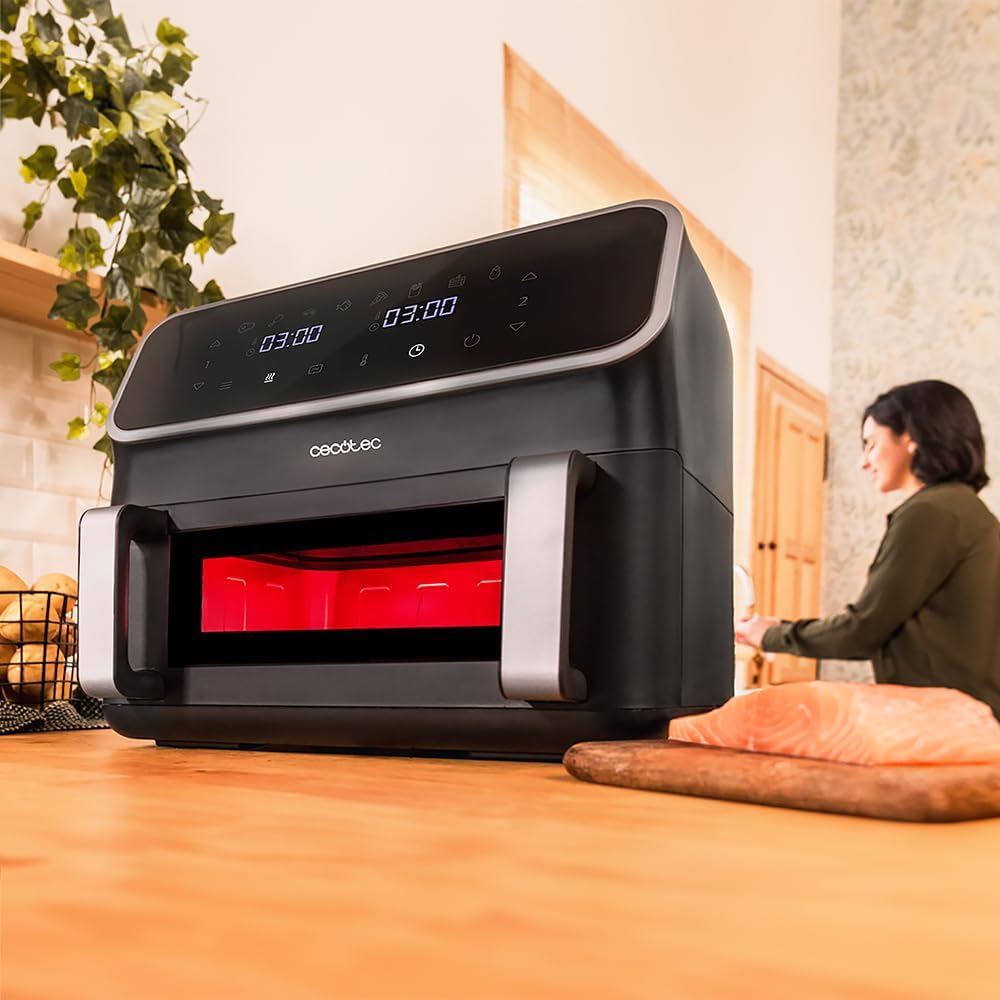
Image 2.2: Top-down view of the air fryer basket, illustrating the mobile divider in place, creating two distinct cooking zones.
3. Setup and First Use
3.1 Unpacking
- Carefully remove the air fryer and all accessories from the packaging.
- Remove any stickers or promotional materials from the appliance.
- Keep packaging materials out of reach of children.
3.2 Initial Cleaning
- Wipe the exterior of the appliance with a damp cloth.
- Wash the basket and the mobile divider with hot water, dish soap, and a non-abrasive sponge. Rinse thoroughly and dry completely.
- Ensure all parts are dry before assembly.
3.3 Placement
- Place the air fryer on a stable, heat-resistant, and level surface.
- Ensure there is adequate ventilation around the appliance (at least 10 cm clearance on all sides and above).
- Do not place the appliance near flammable materials or heat sources.
3.4 Power Connection
- Insert the power plug into a grounded wall outlet.
- The appliance is now ready for use.
4. Operating Instructions
4.1 Control Panel
The Cecofry Panoramic 9000 features a multifunction touch control panel. The display shows time, temperature, and selected modes. Buttons allow for power, mode selection, temperature adjustment, and time adjustment.

Image 4.1: A user interacting with the digital touch control panel to adjust cooking settings.
4.2 Basic Operation
- Power On: Press the power button to turn on the appliance.
- Select Mode: Choose one of the 8 pre-configured modes or manually set the time and temperature.
- Adjust Temperature: Use the temperature control buttons (usually up/down arrows) to set the desired temperature between 80 °C and 200 °C.
- Adjust Time: Use the time control buttons to set the cooking duration.
- Start Cooking: Press the start button to begin the cooking process.
4.3 Using the Mobile Divider (Dual-Zone Cooking)
The mobile divider allows you to cook two different foods simultaneously at potentially different temperatures and times.
- Insert Divider: Place the mobile divider securely into the basket to create two 4.5 L compartments.
- Add Food: Place different food items into each compartment.
- Set Settings: On the control panel, you can set independent temperatures and times for each zone (Zone 1 and Zone 2).
- Synchronization: Activate the synchronization function if you want both zones to finish cooking at the same time. The air fryer will automatically adjust the cooking times.
4.4 Preheating Function
For optimal cooking results, especially for items like fries or baked goods, it is recommended to use the preheating function.
- Select the preheat option or manually set the desired temperature and a short time (e.g., 3-5 minutes) before adding food.
- Once preheated, add your food and start the main cooking program.
4.5 Monitoring Cooking with the Viewing Window
The integrated viewing window allows you to check on your food without interrupting the cooking process, maintaining consistent internal temperatures.

Image 4.2: A user checking the cooking progress of food through the transparent viewing window.
5. Maintenance and Cleaning
Regular cleaning ensures the longevity and optimal performance of your air fryer.
5.1 Cleaning the Basket and Divider
- Always unplug the appliance and allow it to cool completely before cleaning.
- Remove the basket and the mobile divider.
- Wash them with hot water, dish soap, and a non-abrasive sponge. For stubborn residue, soak in hot soapy water for about 10 minutes.
- Important: The basket and divider are not dishwasher safe. Hand wash only.
- Rinse thoroughly and dry completely before reassembling or storing.
5.2 Cleaning the Interior and Exterior
- Wipe the interior cavity with a damp cloth. For stubborn grease, use a mild detergent.
- Clean the exterior of the appliance with a soft, damp cloth. Do not use abrasive cleaners or scouring pads.
- Ensure no water enters the appliance's electrical components.
5.3 Storage
- Store the air fryer in a cool, dry place, away from direct sunlight and moisture.
- Ensure the appliance is clean and dry before storing.
6. Troubleshooting
If you encounter any issues with your air fryer, please refer to the following common problems and solutions:
| Problem | Possible Cause | Solution |
|---|---|---|
| Appliance does not turn on. | Not plugged in; power outlet malfunction; appliance damage. | Check power plug connection; test outlet with another appliance; contact customer support if damaged. |
| Food is not cooked evenly. | Overfilling the basket; food not shaken/flipped; incorrect temperature/time. | Do not overfill; shake or flip food halfway through cooking; adjust temperature/time as needed. |
| White smoke coming from the appliance. | Grease residue from previous use; fatty food cooking. | Clean the basket and interior thoroughly; this is normal for very fatty foods, but ensure it's not excessive. |
| Food is not crispy. | Not enough oil (for some foods); temperature too low; cooking time too short. | Lightly brush food with oil; increase temperature or cooking time. |
7. Specifications
| Feature | Specification |
|---|---|
| Brand | Cecotec |
| Model Number | 03491 |
| Color | Black |
| Product Dimensions (L x W x H) | 37 x 39 x 31 cm |
| Capacity | 9 Liters |
| Power | 2700 Watts |
| Voltage | 220 Volts (AC) |
| Material | Metal |
| Special Features | Automatic shut-off, Temperature control, Dual zone functionality, Programmable |
| Item Weight | 7.4 Kilograms |
| Recommended Uses | Frying, Grilling, Baking, Roasting, Steaming |
| Spare Parts Availability | 10 Years |
8. Warranty and Support
Cecotec products are manufactured to high-quality standards. For information regarding the warranty period and terms, please refer to the warranty card included with your purchase or visit the official Cecotec website.
For technical assistance, troubleshooting beyond this manual, or spare parts inquiries, please contact Cecotec customer support. Contact details can typically be found on the official Cecotec website or in your product documentation.
Spare parts for this model are generally available for a period of 10 years from the date of purchase.


