1. Introduction
This manual provides essential information for the safe and efficient use of your Cecotec Conga 11090 Spin Revolution Home&Wash T robot vacuum cleaner. Please read this manual thoroughly before operating the device and retain it for future reference.
The Conga 11090 Spin Revolution Home&Wash T is a robot vacuum and mop equipped with laser technology and an automatic self-emptying and self-cleaning base. It is designed for comprehensive floor cleaning, including vacuuming dust and mopping with rotating pads.
2. Safety Instructions
To reduce the risk of injury or damage, observe the following safety precautions:
- Ensure the power supply voltage matches the rating label on the charging base.
- Do not operate the robot in wet environments or near flammable materials.
- Keep children and pets away from the robot during operation.
- Do not use the robot to pick up large debris, sharp objects, or liquids other than water for mopping.
- Regularly inspect the power cord and plug for damage.
- Only use original accessories and replacement parts.
- Avoid blocking the robot's sensors or charging contacts.
- Do not attempt to repair or modify the robot yourself. Contact authorized service personnel.
3. Package Contents
Verify that all items are present in the package:
- 1x Robot Vacuum Cleaner
- 1x Self-emptying and Self-cleaning Base with 2 tanks (clean water and dirty water)
- 1x Dust Bag (pre-installed in the base)
- 1x Side Brush
- 2x Rotating Mop Pads (pre-installed)
- 1x Power Cable
- 1x Self-cleaning Brush (for maintenance)
- 1x Multifunction Brush
- 1x Instruction Manual
4. Product Overview
The Cecotec Conga 11090 Spin Revolution Home&Wash T integrates advanced features for automated home cleaning.
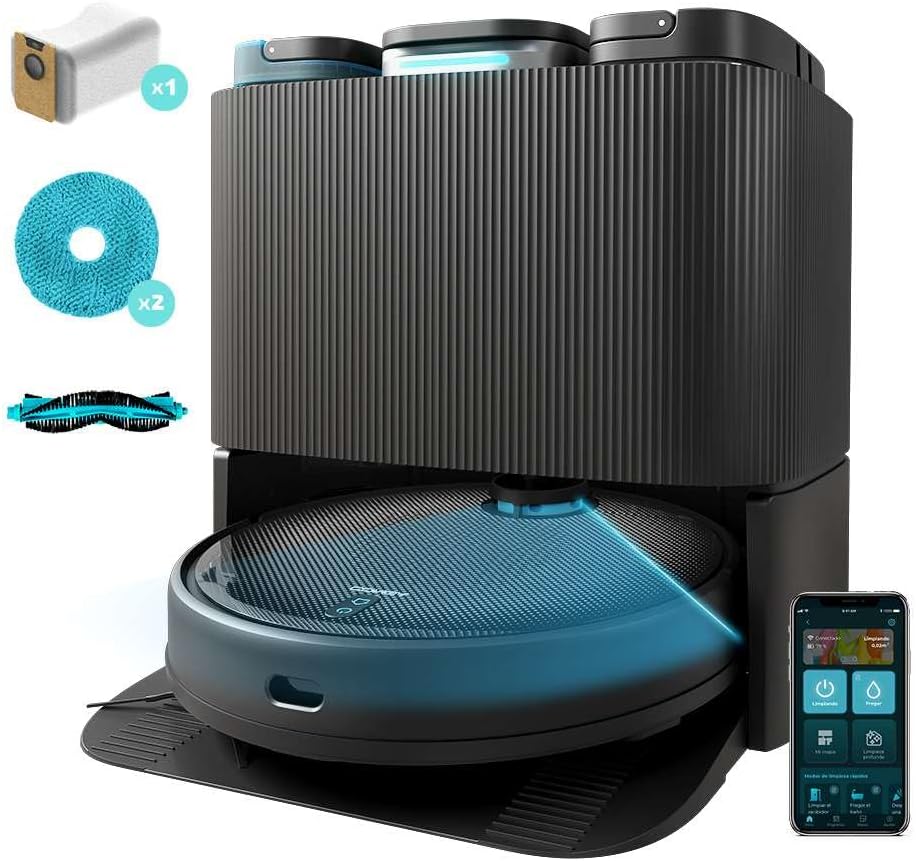
Figure 4.1: The Cecotec Conga 11090 robot vacuum cleaner docked in its self-emptying and self-cleaning base. The base features three compartments for dust, clean water, and dirty water.
4.1 Robot Components

Figure 4.2: Top view of the robot, showing the power/clean button and home button. The laser navigation system is visible on top.

Figure 4.3: Underside of the robot, illustrating the main brush, side brush, and two rotating mop pads for effective cleaning.
4.2 Self-Emptying and Self-Cleaning Base

Figure 4.4: Top view of the base, showing the three distinct tanks: a 2.5L dust tank, a 2.8L clean water tank, and a 2.4L dirty water tank.
The base automatically empties the robot's dustbin and cleans/dries the mop pads. It features automatic detection for a full dust bag or empty/full water tanks, providing alerts as needed.
5. Setup
5.1 Charging Base Placement
- Place the self-emptying and self-cleaning base against a wall in an open area.
- Ensure there is at least 0.5 meters of clear space on both sides of the base and 1.5 meters in front.
- Connect the power cable to the base and plug it into a power outlet.
- Ensure the clean water tank is filled and the dirty water tank is empty.
- Confirm a dust bag is correctly installed in the base.
5.2 Initial Charging
Place the robot onto the charging base. Ensure the charging contacts align. The robot will begin charging automatically. For first use, allow the robot to fully charge before operation.
5.3 App Installation and Connection
- Download the "CECOTEC" app (OS app System 3.0) from your mobile device's app store.
- Follow the in-app instructions to register an account and add your Conga 11090 robot.
- The app will guide you through connecting the robot to your home Wi-Fi network (2.4 GHz).

Figure 5.1: A user controlling the robot vacuum cleaner via the Cecotec mobile application, which offers various cleaning modes and settings.
6. Operation
6.1 Starting a Cleaning Cycle
- Via Robot Buttons: Press the power button on the robot to start a general cleaning cycle.
- Via Mobile App: Use the CECOTEC app to initiate cleaning. The app allows for more advanced control, including selecting specific rooms, setting cleaning modes, and adjusting suction/water levels.
6.2 Laser Navigation and Mapping
The robot uses laser technology for precise navigation and mapping of your home. During its first cleaning cycle, it will create a detailed map, which can be viewed and customized in the app.

Figure 6.1: The robot utilizing its laser navigation system to efficiently map and clean the environment, avoiding obstacles.
6.3 Automatic Features
- Total Surface Cleaning: If the battery runs low during a cleaning cycle, the robot returns to its base to recharge, then resumes cleaning from where it left off.
- Water Surface Cleaning: During mopping, if the mop pads become dry, the robot returns to its base to re-humidify them before continuing the mopping task.
- Customizable Mopping: Adjust the mop pad cleaning time (10, 15, or 20 minutes) and the frequency of automatic dust emptying (after one, two, or three cleaning cycles) via the app.

Figure 6.2: The robot actively mopping a floor, demonstrating its ability to clean various types of spills and dirt.
7. Maintenance
Regular maintenance ensures optimal performance and extends the lifespan of your robot vacuum cleaner.
7.1 Self-Emptying Base Maintenance
- Dust Bag Replacement: The base will alert you when the dust bag is full. Replace it with a new one to maintain optimal dust collection.
- Water Tank Management: Regularly empty the dirty water tank and refill the clean water tank. The base provides alerts for these actions.
- Mop Pad Cleaning: The base automatically cleans the mop pads. Ensure the clean water tank is filled for this process.

Figure 7.1: An internal view of the self-emptying and self-cleaning base, illustrating the water circulation for mop pad cleaning and the dust collection system.
7.2 Robot Component Cleaning
- Main Brush: Remove and clean the main brush regularly using the provided self-cleaning brush. Remove any tangled hair or debris.
- Side Brush: Check the side brush for wear and tear. Replace if damaged. Clean any hair or debris caught around it.
- Mop Pads: Although self-cleaned by the base, periodically remove and hand-wash the rotating mop pads for thorough cleaning.
- Sensors and Charging Contacts: Wipe the robot's sensors and charging contacts, as well as the base's charging contacts, with a dry cloth to ensure proper function.
8. Troubleshooting
If you encounter issues with your robot vacuum cleaner, refer to the following common problems and solutions.
| Problem | Possible Cause | Solution |
|---|---|---|
| Robot does not start or respond. | Low battery; power switch off; robot stuck. | Charge the robot; ensure power switch is on; clear any obstructions. |
| Poor suction performance. | Full dust bag; clogged main brush; dirty filter. | Replace dust bag; clean main brush; clean or replace filter. |
| Mop pads are not wet or cleaning effectively. | Empty clean water tank; clogged water nozzles; dry mop pads. | Refill clean water tank; clean water nozzles; allow robot to return to base for re-humidification. |
| Robot cannot return to charging base. | Base obstructed; robot too far from base; dirty charging contacts. | Clear area around base; manually place robot near base; clean charging contacts. |
| App connection issues. | Incorrect Wi-Fi password; 5GHz Wi-Fi network; robot too far from router. | Verify password; ensure 2.4GHz Wi-Fi is used; move robot closer to router. |
For further assistance, consult the CECOTEC app or contact customer support.
9. Specifications
| Feature | Detail |
|---|---|
| Brand | Cecotec |
| Model Number | 00263 |
| Product Name | Conga 11090 Spin Revolution Home&Wash T |
| Color | Black |
| Dimensions (L x W x H) | 34.5 x 34.3 x 10.8 cm |
| Item Weight | 10.25 kg |
| Suction Power | 5000 Pa |
| Battery Life (Autonomy) | Up to 140 minutes (2 hours 20 minutes) |
| Dust Tank Capacity (Base) | 2.5 Liters |
| Clean Water Tank Capacity (Base) | 2.8 Liters |
| Dirty Water Tank Capacity (Base) | 2.4 Liters |
| Filter Type | Fabric |
| Special Features | Laser Navigation, Automatic Self-Emptying Base, Automatic Mop Cleaning & Drying, App Control |
| Connectivity | Wi-Fi (2.4 GHz), Bluetooth, App Control |
| Surface Recommendation | Laminate and other hard floors |
10. Warranty and Support
Cecotec offers a commitment to spare parts availability for 10 years. For warranty claims, technical support, or to purchase replacement parts, please contact Cecotec customer service through their official website or the CECOTEC app.
Keep your purchase receipt as proof of purchase for warranty purposes.


